topbanner_forum
  *

avatar image

Welcome, Guest. Please login or register.
Did you miss your activation email?

Login with username, password and session length
  • Wednesday December 17, 2025, 2:41 pm
  • Proudly celebrating 15+ years online.
  • Donate now to become a lifetime supporting member of the site and get a non-expiring license key for all of our programs.
  • donate

Recent Posts

Pages: prev1 ... 445 446 447 448 449 [450] 451 452 453 454next
11226
Living Room / Re: Show us your (physical) desktop
« Last post by tomos on October 10, 2006, 06:22 PM »
It's interesting to see that some of you have very poor arm support! - ideally you should be able to rest your forearm on your table while typing, to avoid too much strain. I know it certainly matters to me, with all those hours I spend (or at least, used to spend) in front of the computer :-[
re typing
I read somewhere the best way is to hold the wrists higher than the keyboard (for which you'ld need the elbows at least as high or higher) so that the wrists arent bent much - especially not upwards. Dont know if thats the case ..
I dont type that much but am using the keyboard constantly for shortcuts and the mouse with other hand so I do end up leaning on edge of desk - from experience i can tell you that's not so good!
11227
Living Room / Re: Show us your (physical) desktop
« Last post by tomos on October 10, 2006, 06:21 PM »
going back in time a bit:
my chair is horrible, and i've been on the hunt for a proper chair for a while, but haven't found an acceptable one in my price range.
I was using a gymnastic ball there for a while
I'm going to go back to it when I get a floor ring for under it to stop it rolling  ;D

pros:
you sit really straight (its very good for your back)
cheap  :) (I was looking at @ chair/stool for €400 & it was talking about its advantages over a gymball which got me thinking - apart from preffering to have a holiday to a €400 stool)
you actually get to exercise while you sit - (it can almost be a bit of a strain at the beginning ..)

cons:
looks ?
you got to cover it with something or it can get kindof sweaty!
whatever you cover it with usually falls off when you stand up
cant think of any other ..

ps I can post a pic of gymball - wouldnt go to the bother for my computer equipment ...  :D
11228
Living Room / Re: Everyone's Photo Portfolio, Purlease!
« Last post by tomos on October 10, 2006, 03:13 PM »
Allen -
I really like the "BodySilk" image (is that a photo or a vector image?)
11229
General Software Discussion / Re: keeping/saving cloned files
« Last post by tomos on October 10, 2006, 03:05 PM »
Darwin-
did you ever have another go?
11230
General Software Discussion / Re: keeping/saving cloned files
« Last post by tomos on October 10, 2006, 03:04 PM »
That is incredibly weird, here it has worked for all the files...
tell me about it - but the linked files are there looking at me - one dated months ago, one dated yesterday ...

I'm trying at the moment to be a dedicated worker @ la GOE-xperiment  :)
so,
I'll try this again some evening later this week. (I want this to work)

It could be something to do with my machine ?? Its working (fairly) well otherwise.
11231
Living Room / Re: Everyone's Photo Portfolio, Purlease!
« Last post by tomos on October 10, 2006, 02:46 PM »
heres mine from the "Fotokreis" (click on "zur übersicht" if you want to see other member's photos)

They were all taken this year, but havent been taking many since the start of summer.

Liked your buildings Redhat - nice light (or lack of same :) ) in all the biuldings, in & out.

P.S. Nice rainbows and spiders Allen!
Yeah, and nice halloween pumpkins  :)

& loads of nice photos there Oshyan (make me miss the sea, I grew up about half hours drive from it - now about 7hrs drive, but I do live in beautiful countryside here so I usually dont miss it!)
11232
General Software Discussion / Re: keeping/saving cloned files
« Last post by tomos on October 09, 2006, 02:27 PM »
I uninstalled NTFS Links (because life is too short!) but maybe I should give it another go...
I just after reinstalling it & it seems to work okay -
 I mean
the first test hard link worked perfectly:
 
created a hard link of a .rtf file (right click-drag)
modified hard link - original modified
renamed h.link, modified it again - original kept same name but did follow suit re modification.
Perfect

Unfortunately,
I'm just after trying the same with .fh files (Freehand) -
it created the hard link, but nothing beyond that worked ... :(

repeated with diff .fh file, no joy.

PS
odd ...  :-\
its not working in this part of the world
-tom
funny, its still not working from my "part of the world"=on this computer with any browser.

maybe it's really just not meant to be, for me,
11233
General Software Discussion / Re: Is AVG really that bad?
« Last post by tomos on October 09, 2006, 12:21 PM »
I was thinking of getting Ewido,
& cause of that was thinking of getting the "AVG anti-malware".
Thats Ewido & AVG pro - innit? - or is it??
The last time I looked they were calling it Ewido still, but now its just Anti-spyware. I presume they just incorporated it ...

Together they come in at a very reasonable $45 or so,
with yearly updates of "approximately half that" (or so i was told)

I'm currently using the free version (AVG) & find it easier to update than AntiVir,
mind you with broadband now its no big deal.

AVG often seems to come a bit down the list in terms of virus detection in any tests I've seen
which is a bit worrying (again: innit?? :) )
mind you,
gizmo says here that the combination of AVG & Ewido detects more than NOD32 (in his tests) ...

11234
your welcome  :D   g'luck with it!

it'd be nice to hear how you get on:
if you make any variations or find it helpful - unhelpful - whatever,

I'm going to post again when I've been using it a while -
I'm throwing in a couple of ideas from Mark Forster & varying some of the details for myself.   
11235
Living Room / Re: Artwork wanted!
« Last post by tomos on October 06, 2006, 05:07 AM »
I'm not actually familiar with flash, but do use Macromedia FreeHand.
Its native file format saves very small, (FH.9 or 10 etc.).
I wonder could that be imported into Flash?

EPS would be I guess the most universal format but much bigger.

I guess its a good thing to think about at this stage,
rather than having something you cant convert to your needs at a later stage  :o  :)
11236
Living Room / Re: Artwork wanted!
« Last post by tomos on October 06, 2006, 04:54 AM »
what file-format would do - I mean for the vector image ?
11237
Added a summary to the first post to hopefully make it all a bit more accessible.

Would saythough, if you're interested, it's the details that hold it together so it worth reading the whole thing.

Attatched here is a PDF from the author (again, with permission) about the system - with better quality images which helps!
11238
[Originally posted by Martin Ternouth here. (Edited slightly here - and reproduced with permisson :) )]

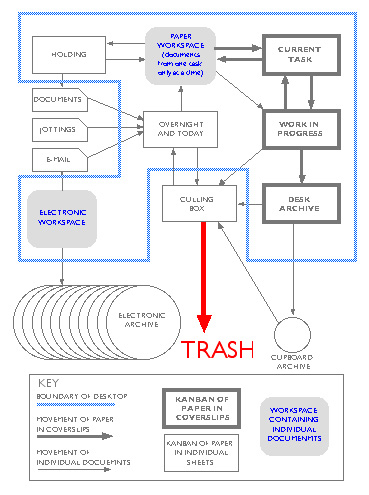
Paper is kept in the system in two forms:
loose, when it is being worked on, and in coverslips when it isn't.

All current documents relating to a task are kept in a transparent coverslip. The type of coverslip used is closed on two sides only so that the contents can be extracted as easily as possible.
The coverslip contains a title sheet at the top of the pile that has the name of the task written at the top (TASK 1) and the bottom. This first sheet also has a space for handwritten notes.
If the documents form too bulky a pile then the task is split into two coverslips (TASK 3 Sales and TASK 3 HR) with a reference to each on the front sheet of each.
Operational files may also be needed that cover several tasks (Issues in France). These also are each contained within a coverslip. All these coverslips are stored in a tray, or trays, called WORK IN PROGRESS (WIP).
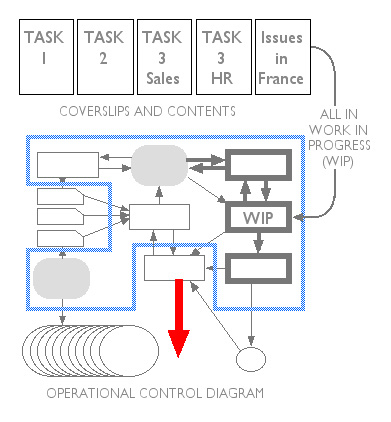
01.jpg

There is no specific order to the paper within the coverslips.
It is a principle of the system that every piece of paper is looked at once a week.
In practice, the most recently-referred to pieces of paper are near the top: this facilitates culling in due course. This weekly review is the key to the system's success. It means that dependencies and inter-relations are continually being exposed and examined and held in human short-term memory whilst the review is being carried out. Flicking through paper does not involve any mental effort: certainly far less than logging in and out of documents on a screen.


The system is initiated by a very simple series of processes.
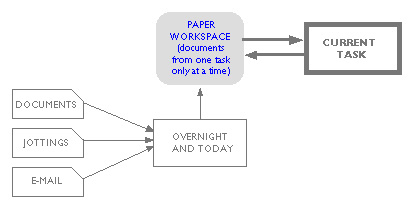
02.jpg

Work comes in. It can be formal on paper, jottings on a telephone call just received, or a printout of an email with information that will need to be referred to frequently. All this paper is put loose into a filing tray marked OVERNIGHT AND TODAY. There is one rule for this tray.

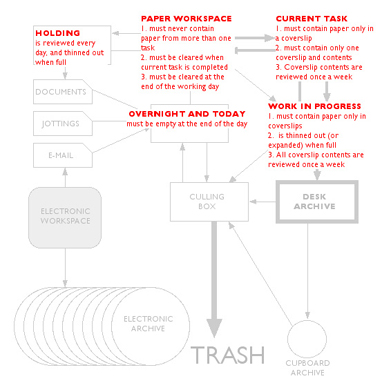
OVERNIGHT AND TODAY must be empty at the end of the day.

The PAPER WORKSPACE, is normally the square yard or so of the desk beside the computer. This can contain any amount of paper in any order or piles or scatterings. There are three rules that govern the use of the paper workspace.

PAPER WORKSPACE must never contain paper from more than one task
PAPER WORKSPACE must be cleared when current task is completed
PAPER WORKSPACE must be cleared at the end of the working day

You put the paper from overnight and today into the workspace, works on it until whatever you are doing is finished for the moment (or until you are permanently interrupted) at which point it goes into a coverslip in a filing tray labelled CURRENT TASK. When you are ready to resume work on it the contents are taken out and scattered in workspace as before. There are two rules for current task.

CURRENT TASK must contain paper only in a coverslip
CURRENT TASK must contain only one coverslip and contents


IMMEDIATE ADVANTAGES

The first advantage of this system is that it grows organically. Task files are not set up until they are needed. The second advantage is that the system recognises that people work best when they have paper to shuffle around, make notes on, place side by side, clip to or unclip from. The third advantage is that paper never goes missing because the chaos of paper on the desk is all from one task.

MULTIPLE TASKS AND "TOO PRESSURED TODAY"

It is a fortunate (or very bored) executive who only has one task to control. New tasks are dealt with in exactly the same way as the first. However, because there can only ever be one current task, the new coverslips are stored in the filing tray called WORK IN PROGRESS. From time to time they will become the current task.
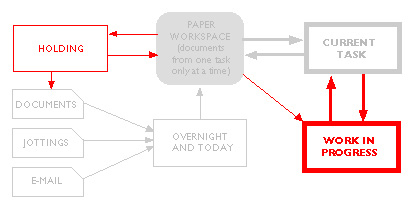
03.jpg

Loose paper is never passed between these trays, only in coverslips. New documents (or documents that may have become misfiled) can of course be transferred into coverslips.

Pressure of work will often prevent you from giving thought to everything in OVERNIGHT AND TODAY. Anything unattended during the day or at the end of the day to is dropped into a tray or box on the desktop called HOLDING.

More rules:

WORK IN PROGRESS is thinned out (or expanded) when full

HOLDING is reviewed every day, and thinned out when full

Documents from holding may be passed back into overnight and today. The purpose of the system is not to dispose of documents but to ensure that they are regularly reviewed.

REVIEW OF TASKS

All tasks in WORK IN PROGRESS and CURRENT TASK are reviewed once a week. Every document (say 1-3,000) in work in progress and current task is scanned through. It will normally take less than half-an-hour,

THE REMAINING ELEMENTS AND PROCESSES
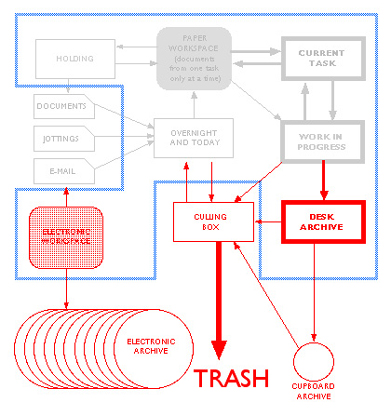
04.jpg

As a general rule, all documents are filed electronically (ELECTRONIC ARCHIVE).
A seperate archive of bound documents may be kept on the desk (DASK ARCHIVE)
Some formal project documents may need to be kept on paper. These are not part of operational work control and should be kept in a CUPBOARD ARCHIVE or filing cabinet.

The frequent review process will lead to a continual winnowing of paper. This is dumped into a CULLING BOX (an empty box of photocopier reams is ideal) and this is reviewed when it becomes full. This is a last backstop to prevent anything valuable being thrown out. Anything having lain undisturbed in the bottom of the culling box for a month or so can safely be placed in the TRASH.

MINOR NOTES

The system operates perfectly as described in the foregoing pages.
The system is designed to keep paper mobile and instantly accessible.
Files live in cabinets and cupboards, preferably virtual. A list of work in progress (including current task) can be useful, pinned up on a cubicle partition. Written by hand on a sheet of A3 it can contain notes for instant reference in response to a phone call.
The trays can usefully have a sheet of coloured paper placed on top of them after review (with the time of last review) so that new work is separated from sheets that have previously been looked at.
05.jpg

The full system takes less than a day to set up.
There is no maintenance time separate from the review of the documentation, other than a few seconds occasionally sweeping a deskful of documents into a coverslip, and further set-up tasks such as expanding kanbans.

There is considerable time saved from the following:

Being able to find any document within seconds

Never losing any documents

Not having to sort filing into alphabetical or any other order

Arriving at a clear desk in the morning


The system does not tie you to your desk — quite the opposite. Nearly all the archive filing and the project chart and other documents are electronic. Task files can be pulled out and will have the advantage over punch-hole files that only current information is included. Also, all the documents are available to any other member of the team or the office who can operate the system in your (frequent) absences with virtually no training. The system holds information in piles, but the piles are labelled.
06.jpg

The following is a summary of the rules.

OVERNIGHT AND TODAY must be empty at the end of the day.

PAPER WORKSPACE must never contain paper from more than one task
PAPERWORKSPACE  must be cleared when current task is completed
PAPER WORKSPACE must be cleared at the end of the working day

CURRENT TASK must contain paper only in a coverslip
CURRENT TASK must contain only one coverslip and contents

WORK IN PROGRESS must contain paper only in a coverslips. WIP must be thinned out (or expanded) when full

HOLDING is reviewed every day, and thinned out when full


Daily (by the end of the day)

OVERNIGHT AND TODAY must be empty.

HOLDING is reviewed daily.

PAPERWORKSPACE must be cleared.


Weekly:

All tasks in WORK IN PROGRESS are reviewed once a week.

All tasks in CURRENT TASK are reviewed once a week. 
 

 -- Martin Ternouth, December 15, 2003
11239
I've been trying to implement time-management without great success. I have realised that first I needed to implement some sort of a system for organising my workspace.

The following post is a (slightly edited) copy of a post made here by Martin Ternouth describing his management system.
(It's about a quarter ways down the page, dated December 15, 2003. I came across it referred to here at 43folders.com)

It the first thing I came across that seemed to offer a complete system for coping with day to day work/paper/projects.

This might not be relevant to people who dont generate lots of paper, or to people who already have functioning systems in place, but for me, it's a dream.

These benefits alone help me breathe a sigh of relief
Being able to find any document within seconds

Never losing any documents

Not having to sort filing into alphabetical or any other order

Arriving at a clear desk in the morning

************************************
************************************
Its a long post the next one :)
so maybe I should give a brief summary here:

To start there's your WORKSPACE:
You can only have one project at a time on it. Clear space end of day!
Where to?
to CURRENT TASK tray which holds, well, your current task  :)
WORK IN PROGRESS tray holds other current projects.

Then you have your InBox -
OVERNIGHT & TODAY which must be cleared by end of the day.
also
HOLDING tray - stuff from inbox can go in here - in practice I find its mostly things that need to be filed away or scanned - to be checked daily.

 :two: It might not seem like anything new but where it works well i find is in working on only one task at a time - and having a home for that task & that task only.
Also he uses these see through plastic folders (coverslips) that are open on 2 sides only (I've read they're not so common in the States?) & says you must keep all documents/groups of documents in these (apart from InBox mainly) which keeps things much more under control I find.
There are other details that are very important to system & of course regular (planned) checks/reviews :)


Also, if you want to get a quick "view", have a look at the last couple of pictures & the summary of the rules end of next post.

[Edit: see post#3 for attatched PDF about the system from Martin Ternouth]
11240
anti-procrastination group!!
that sounds interesting ?
11241
Site/Forum Features / Re: RSS Feeds for DonationCoder.com and this Forum
« Last post by tomos on October 04, 2006, 01:58 AM »
anyone know what to use for "all unread posts" ?
11242
I've just read the bit in Do it Tomorrow about filing. (Chapter 15 -Sorting Out Systems - under the headings "Working from Home" then "Filing")

Mark recommends using Lever-arch folders instead of suspension files.

It makes sense to me (what he says), in that with suspension/alphabetically filed things I'm often not sure where things are - is it filed under Software, Computer OR Programmes for example.

He just stacks his folders on a shelf, with the most recently used one always on the left.

Has anyone tried this out ?
I'm wondering as well how to group the stuff that's to be filed ... e.g. Finances is an obvious one & depending what line you're in you could break that down - I'm going for "Current Year" & "Finances General"
But with other stuff - especially scrappy bits n pieces I'm not sure how to go about it.

I guess whatever I try, as I work with it, it will evolve .. :)
11243
good luck then, tomos.
cheers!
tom
11244
I'm a late starter on this one & there was too much choice (this, no that, no ..)

I also finally somehow realised that I had to not only tidy up my workspace,
but make a place for everything
- even if its as Mark Forster says a "Backlog" tray/box whatever. (I'm coming from a dark & very disorganised place ..)

Anyways,
I've just read he highly recommends using the "current initiative" idea for clearing a backlog (of anything - even debt ! :) ),
so I have a box of stuff to be filed/sorted,
which I now officially declare "Backlog" and also "Closed" (nothing can be added).

Now I start on that first thing tomorrow morning  :up:
11245
Backup Guide / Re: Acronis now does backup of individual files/folders
« Last post by tomos on September 29, 2006, 02:55 AM »
I have just discovered "Iomega Automatic Backup Pro"  ...
 ... The only things lacking are compression and the ability to backup files locked by other processes - but for normal 'My Documents' type data files it works really well and worth giving a whirl.

been trying this out (Iomega Automatic Backup pro):
it does actually give an option to compress (Edit>Advanced Tab:)
I just tried a test backup of 41MB of files & backup is listed as 20MB

It does crash on my computer when i restart after being in hibernation
11246
Living Room / Re: Xara X1 Massive discount (expires 28th September)
« Last post by tomos on September 26, 2006, 03:01 AM »
I was going to just download it but went for the posted version -
as you say Carol its nice to have a decent CD packaging & a shortcuts-card

- only cost me 6 dollars postage (maybe cause its just within Europe) but then got charged VAT tax -
still, wont break the bank @ under $30  :)
11247
Mini-Reviews by Members / Re: XYplorer File Manager
« Last post by tomos on September 23, 2006, 04:27 PM »
One question: if the list is currently sorted by Size, how does DO achieve the correct sort order before it knows the folder sizes?
it loads them alphabetically first & then sorts them acording to size - this can take a while if the folders are very large
11248
I cannot predict how many ideas I'm going to have in a day. Nor how long it'll take to action those ideas. This is, I think , not exclusive of academics: can a programmer estimate how many bugs he can find in a day? And how long a bug will need to get fixed? Tough call sometimes.
-urlwolf
You're probably aware of this aspect:

I'm just reading in Forster (DIT Chapter 13 I think - I can check if you want) about projects/ideas that you want to do as opposed to projects you need to do.

He also describes them as projects that dont have a deadline & recommends picking one & concentrating on that till its done then going on to the next.

I realise that may not be appropriate to a lot of situations, but it could possibly reduce the idea of certain things (ideas/projects) as a backlog?
Which I reckon must be helpful - "backlog" seems like a weight on the shoulders to me!

I'm concentrating on getting a organisation/time-managemnet/system of sorts going here, (apart from the work I have to do) and then I'm going to settle down to next "project" ... actually writing this makes me realise a lot of things I want to do can go on this list - could call it the wish-do-list maybe :)
11249
Post New Requests Here / Re: IDEA: Very simple timeclock utility
« Last post by tomos on September 19, 2006, 09:48 AM »
I love the way it asks what I was doing while I was away from the computer
actually I think theres a bug with that:

When desktop is idle for designated time I get a query asking what I've been doing.
When saved though, the text doesnt show up on the list.

If I choose "Add comment to log" - that works.
11250
The Getting Organized Experiment of 2006 / Re: i'd like to buy some discipline please.
« Last post by tomos on September 19, 2006, 05:47 AM »
I'm spending way too much time comparing systems and reading around.
I think it'd be easier to do a 'shareware trial'...
For 30 days, just do 'to the letter' what the system says.
Do not try to add new stuff
Do not compare it with others
Believe it as if it was DOGMA

That a big one for me as well - last week was a real struggle trying to work AND take in all this new stuff & reading different responses/variations from people in internet.
(This week is a struggle too for that matter)

But, I guess even if you pick ONE, you will probably have to adjust it to your needs ...
Pages: prev1 ... 445 446 447 448 449 [450] 451 452 453 454next