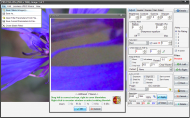
topbanner_forum
  *

avatar image

Welcome, Guest. Please login or register.
Did you miss your activation email?

Login with username, password and session length
  • Wednesday March 25, 2026, 3:15 am
  • Proudly celebrating 15+ years online.
  • Donate now to become a lifetime supporting member of the site and get a non-expiring license key for all of our programs.
  • donate

Recent Posts

Pages: prev1 ... 415 416 417 418 419 [420] 421 422 423 424 425 ... 454next
10476
Qimage
basically helps you print your photos,
but, it has to be said: it helps a lot,
which it would want to for its price(s)...  ;)

http://www.ddisoftware.com/qimage/
Qimage is our world renowned batch printing and processing software.

    * Optimal print quality regardless of size [see first image below]
    * Optimal arrangement of prints on page
    * Mix and match different size prints on each page
    * Print cropping tool remembers all your crops
    * User controllable final print "smart sharpening"
    * Fully ICC aware color management
    * View slide shows, send photos via e-mail
    * Batch convert, create files for photo labs, etc.
    * Automated job log, save and recall jobs/settings!
    * 30 day trial available: see demo link on left
    * Free lifetime upgrades!
    * More...

Qimage is now available in Lite, Professional, and Studio Editions.
Only pay for the features you need!  Click for feature comparison.

    * Lite Edition: $34.95
    * Professional Edition: $49.95
    * Studio Edition: $89.95
You can upgrade from one version to next for the cost difference
Compare Features Link

Support Forum
Qimage Support Forum (@ Steves-digicams.com Forums)

Animated gif from Qimage website:

qimage06.png
I just downloaded the trial today -
I have tried it before but was too busy last trial around to get to know it well -
I still dont know it atall well but was taking some screenshots & wanted to propose it
for a discount attempt so thought I'd make a post about it.

Trial is valid for 30 days -
same as Pro version but second and further images have a grid superimposed -
if you print one image & restart, you're okay - but if you want to print more than one image on a page, you're not!


Main Window:

print-anim.gif


Context Menu from Layout Page on the right in main window
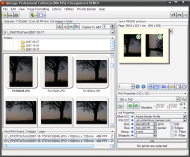
qimage01.png


Here you can place & crop very exactly:
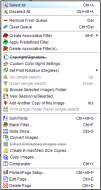
qimage02.png


This is the batch filter from context menu above.
You can reduce noise - preview window in centre has noise reduction applied on right hand side only
Also adjust colours/levels/etc quite comprehensively.
You can save all settings to new file or as a filter file with gets saved with the original -
Qimage will pick up on when you revisit folder
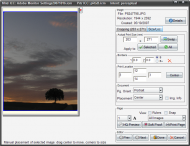

qimage03.png

I chose this foto cause it's iso400 which is fairly noisy in this camera.
I haven't used noise reduction software much so cant say how this compares -
noise reduction looks good but does make image "softer" which is the norm I think.
There's an iso noise reduction filter & a shadow noise reduction filter.
Calls it's sharpening smart


this doesnt show much but I liked the look of it :P
qimage04.png
again right hand side has noise reduction


It does make really nice prints, easily!
Probably super if you want to print lots of images - me, I'm so fussy I print one image ten times instead of ten once  :)
You can add profiles - printer, monitor.. I'm getting out of my depth here already ...check your printers ppi resolution (not ink dpi) which helps Qimage to resize/interpolate the image in better way http://www.ddisoftwa...age/quality/#quality.
I think I'm only getting to know this programme but in spite of gui struggles (see below) it really works quite simply, cleanly, & well out of the box

With enlargements it is very impressive

Layout is very flexible too but every time I go back to it I struggle with finding an easy way to fit more than one image to a page
Lets just say theres a steep learning curve in spots & it's probably worth printing the manual & taking it off to bed with you...

Really to do a proper "review" of this you'd have to compare prints from this & other apps -
previously I've used Canon's Easy-PhotoPrint which comes with their printers but can also
be downloaded (free) from their website (I found it under printers[you have to follow up a particular printer -
try one of the pixma ones]/downloads but I dont have link anymore...)
It makes a lovely print (well on my canon printer at any rate) but isn't very flexible layoutwise nor for editing


Keeping in mind that I really want this software, I'm going to get my gripes out of the way too.

I find charging almost double price for Studio edition,
whose main advantage is it can read RAW files a bit, well, rich :-\ especially
in this day an age where everyone & their mother can use raw images

The gui I'm finding very difficult to get to know - stuff seems to be all over the place,
often in very unexpected places. Stuff one would expect a button for hidden in context menus.
In fairness there's many different aspects covered but GUI could still be a lot more intuitive.
Also, space is wasted, unnecessary toolbars cant be turned off, preview of layout doesnt fill available space..

And I'm sorry to have to say it:
out of the box it is ugly :P -
I had to change a few settings & skin (new since last trial, thank you!) to get it more usable
(they have this autosetting for "closed panels" enabled by default which makes them twitch nervously &
disappear unexpectedly..), and so that I could bear looking at it - (am I really superficial  :-\ )
10477
General Software Discussion / Re: What's your preferred File Manager
« Last post by tomos on October 17, 2007, 04:17 PM »
I've been using Total Commander for (and its predecessor Windows Commander) for about 5 years; took me less than a day to be won over to its clean, powerful interface, which just keeps getting better every year.

There's one desirable feature which it's still missing, though, and I'm wondering which of the the other FMs support it -- namely, virtual folders, i.e. the ability to create a persistent folder "containing" arbitrary files which actually are located anywhere, and to operate on them just as if one had opened each one's home folders (view, edit, rename, copy, change properties...)

DOpus does support virtual folders
10478
Living Room / Re: How much RAM do you have on your PC?
« Last post by tomos on October 17, 2007, 10:27 AM »
Treated myself to a nice 19" LCD monitor as a consolation price. :-*

thats good nosh,
we dont have to feel sorry for you!
10479
hi TeaTime
welcome   :)
bienvenue, or whatever it is you say over there !
10480
General Software Discussion / Re: Fixed Drive Letters for Removable Drives
« Last post by tomos on October 17, 2007, 02:59 AM »
Just remove the drive spec, windows will interpret it as "from the root of the drive this program is running off". Why didn't you just try it?

hi Ehtyar,
I wasnt trying to be smart (well maybe I was but I didnt mean to offend) -
in fact the opposite is the root problem :) (being completely ignorant of how to proceed)

I do want to make my usb stick a fixed drive
But while I have no idea what to do iwith "G:\myfavapp\app.exe = \myfavapp\app.exe" -
is it intended for PowerPro as well? I do have PP running... do I make a script with it as edbro suggested?
it probably doesnt suit me cause I use the USB stick for backup -
I dont think I have any programmes on it anymore


[On the other hand if it's as easy as you say I could put a programme on it simply to implement this]
10481
General Software Discussion / Re: What's your preferred File Manager
« Last post by tomos on October 16, 2007, 03:55 PM »
hey Kalos,
I replaced Explorer, but not actually for any of the reasons you list
so I guess you could say each of us can do whatever we want to do...

10482
Dirhael,
thanks for all this help.
Unfortunately, everything in DOpus is as it should be...
well, I should say the utility had changed back image associations to ms PHOTOED,
but when I change them (well, jpeg) back to anything else I


You got me going in the right direction!!!
SORTED  :up:

Problem was actually in "FileType Groups/Images", which consisted of three different jpeg extensions
Under Events/doubleclick was {dlgopen}
whatever that is - when I got rid of it things seem to work okay (so far anyway :) )

Thanks again  :Thmbsup:

EDIT: not sure about problems with WinExplorer - but dont care that much about them especially at the moment :D
will check later tomorrow...
10483
I did some searching around on Google, and found this little utility which may be able to help you.

thanks Dirhael, will try that out
unfortunately
no joy there - it said it worked (+ no error messages) & might need a restart -
which i did but still getting the open box when trying to open jpegs..
10484
I did some searching around on Google, and found this little utility which may be able to help you.

thanks Dirhael, will try that out

Seeing as Directory Opus doesn't even touch the Windows settings for opening images (the Open verb etc.), it's impossible that it is causing the problems you are having with Windows Explorer. If I were to guess, the registry entries for certain image types have been corrupted.

but it is odd that it's only in DOpus that the open dialogue box appears...

10485
Just a heads up that a new build of exifpro is available for download.
nother new version Oct 5th

any users of DOpus & ExifPro, esp if you've ever made ExifPro default viewer..
 could you please look at this thread:
default image open assoc. screwed up - DOpus/ExifPro dont mix?

EDIT: dont worry
(unless you were having problems too in which case go see), that Dopus/ExifPro thing is sorted.
10486
I am going to contact the ExifPro people,
re DOpus, I'm not sure how much help I'll get these days with Opus 8 instead of 9 - might just get told to upgrade.

As I say,
1) wondering if anyone having similar problems
2) any ideas for a cure (whether or not having similar problems!) - I know there's a bunch of threads about file associations, I will look them up but thought I'd make new thread here cause this fairly specific situation
10487
I'm wondering has anyone else had similar problems
in particular with Directory Opus [8] & ExifPro or other viewers ?
If it's not your default viewer - dont try it just to see, this is the second computer I've had this problem on! *


Summary:
I made ExifPro default viewer for images - it didnt work very well:
now, even though I've changed back associations all I get (still) when trying to open a jpeg image in DOpus is
an open-dialogue-box for the ExifPro installation folder


A bit more detail:
Okay, with DOpus the Opus viewer is set as default - I turned this off in
1) Preferences/DoubleClick/Files...
2) Then in Settings/Filetypes I made ExifPro my default viewer for jpegs, pngs & tiffs

It worked once or twice, I changed some settings in ExifPro to suit use more
(afraid I'm not sure *exactly* which I changed at this stage - dont know if relevant either..)
Then when I tried to open jpegs I got an open dialogue box for the ExifPro installation folder.
pngs & TIFFs continued to work - the problem seems to be mainly with jpegs

At this stage in Win Explorer things *seemed* to be okay but not sure how closely I checked...

I tried to change things back but it unfortunately it didnt work -
still got the ExifPro open-dialog box instead of file opening in DOpus viewer.

Then tried making "Windows Pic & Fax Viewer" default viewer for all images
but what happened was files would open okay but I cant move on to the next image...


Now situation is DOpus viewer is deselected (as in see (1) above),
I've made ExifPro default viewer again - it works well in Win Explorer but doesnt open jpegs in DOpus.. same ol dialog box

Just to double check,
(quickly changing associations yet again..)
with default Windows viewer associated with images,
in DOpus: jpegs dont open - get open-dialog box instead
             other images will open but wont move on to next image when prompted
in Win Explorer:everything opens, but wont move on to next image when prompted


* I did have this problem on my last days with my previous computer -
it was full up harddrive, low memory, just thought it was yet another "I'm struggling - you're overworking me" symptom...
10488
Living Room / Re: The Ugliest Products in Tech History
« Last post by tomos on October 16, 2007, 11:32 AM »
interesting, I felt fairly neutral about most of the stuff there -
well, I wouldnt buy a zunes thingy...

Maybe its strange but I quite like the Osborne 1 portable computer -
wonder when they going to start producing retro computers like the way you can get 50's style radios...
(you could probably fit a very powerful computer into that Osborne box & a nice wide screen, discreetly change the colours & you're off :))

While Microsoft Windows 1.0 is not a pretty sight -
I think XP's default theme should have beaten it onto the list...

& first prize of the bunch should definitely have gone to that iMac :) (& that's nothing personal against Apple)
10489
thanks from here too,
to Darwin & his Lumberjack crew  :up:


Newsletter for October 14th, 2007
Codename "I'm a lumberjack and I'm OK"
so,
ye work all night & sleep all day then !?!
  :D

10490
General Software Discussion / Re: Nothing to see here :/
« Last post by tomos on October 16, 2007, 06:37 AM »
10491
Post New Requests Here / Re: IDEA: fixing tray icons
« Last post by tomos on October 16, 2007, 03:52 AM »
from "Shareware that don't have freeware replacements"

Well, I gave up on Tray Wizard. It kept on forgetting that I hid some icons and also didn't allow some of them to display. So, now I'm using TraySaver which is better at managing the system tray. You can get it from http://www.mlin.net/...les/TraySaverB10.exe. The source for it can be found at http://www.mlin.net/.../TraySaverSource.zip.

just happened to remember it - dont use tray management myself!

PS does Target = Tom C.?? (same avatar at any rate..)
10492
Post New Requests Here / Re: IDEA: Timer based on real time
« Last post by tomos on October 16, 2007, 03:33 AM »
On App Restart I didnt allow to Activate Directly ( without apply changes) because the activation time still reflects the last configured time, which might not be applicable. So, I prefer to click on apply with a new start time or, incase if i like to use the same then apply the old setting and activate !

that makes sense
10493
General Software Discussion / Re: Fixed Drive Letters for Removable Drives
« Last post by tomos on October 16, 2007, 03:23 AM »
Very simple way to handle this: G:\myfavapp\app.exe = \myfavapp\app.exe. Problem solved :)

 :tellme: ????? (or was it a joke that went over my head ?? :P )
10494
Upgrade to FileHamster +plus only $19.95!
New Features Include:

    * WatchTree filters
    * WatchTree enhancements
    * Enhanced network and removable drive support
    * Offline libraries
    * Customized OpenWith menu
    * Full UNC support
    * Adjust SubFolder properties within a watch
    * And ALL future features and enhancements...
-http://www.mogware.com/filehamster/upgrade/index.html

I'm sure they wont mind me quoting their response to my query about what direction they taking:
We have always planned on a continuous rollout of new features and enhancements to FileHamster in the form of paid plugins.  In addition to those plugins we are also planning on continued addition to the plus version of FileHamster.  As for the free version, minus bug fixes, we hope to suspend any further changes.


      Currently we have the following plugins in testing:

            TeamPlugin – Gives FH the ability to work with a shared library across a network.

            ScriptPlugin – Gives FH the ability to add scripted events to each completed revision.

            ReplicationPlugin – Gives FH the ability to replicate revisions to secondary locations each time a revision occurs.

            AdvancedZip – Gives FH the ability to delta or patch zip revisions.
sounds okay to me* -
they interested in the idea of being able to make an exportable report as well
so i happy

*EDIT: I mean it sounds fair enough to me -
"As for the free version, minus bug fixes, we hope to suspend any further changes."
cause it works very well as is, I dont know if I even need any of the capability of paid version
Presumably new plugins (paid or free) will work with the free version
10495
Post New Requests Here / Re: IDEA: Timer based on real time
« Last post by tomos on October 15, 2007, 09:58 AM »
TimerAssist.png
does the Set Loop mean that it will only (in this case) run 5 times 5mins & then stop ?

I cant make the number any higher than 5 ?!
10496
Post New Requests Here / Re: IDEA: Timer based on real time
« Last post by tomos on October 15, 2007, 09:27 AM »
can someone test my application ? I want to be assured it works the way I want on other systems too.

xp home / up-to-date

it's working nicely here, unfortunately my sound card isn't working (brand new pc but havent had time to get to that yet)
but
popups are coming up nicely on time -
I'm finding it a helpful reminder of time passing by which makes me think "what am i doing right now" each time it pops up  :)

Would be nice:
1) if it closed to systray
2) if you could right click on systray icon for to close it or whatever -
nothing happens here anyways when I do - have to double click it to open it & then close it
3) if on (re)starting one just had to click "activate" instead of "apply changes" & then "activate" - but thats a minor one  :)
10497
General Software Discussion / Re: Less Than Worthless Reply From Take 2 Interactive
« Last post by tomos on October 15, 2007, 09:14 AM »
I've had that experience with apps that actually have very good support -
except I didnt have to wait 10 days of course  :)

They look at the first line of your mail & presume you havent a clue, dont read any further & send a reply requesting for more info.

Next time I contact any support I'm going to start off by saying
Attatched is x, y, & z logfile or whatever,
I KNOW that § is an option BUT ß didnt work for me - whats the problem -

I guess most of them are under pressure be it cause they small operations, or
big operations with stupid management & underpaid/unhappy(probably) staff who
dont give a toss more often than not cause their management doesnt either...
10498
General Software Discussion / Re: What's your preferred File Manager
« Last post by tomos on October 14, 2007, 05:19 PM »
Sure :)

was actually being silly there but interesting read  :)
10499
Upgrade to FileHamster +plus only $19.95!
New Features Include:

    * WatchTree filters
    * WatchTree enhancements
    * Enhanced network and removable drive support
    * Offline libraries
    * Customized OpenWith menu
    * Full UNC support
    * Adjust SubFolder properties within a watch
    * And ALL future features and enhancements...
-http://www.mogware.com/filehamster/upgrade/index.html

Unfortunately there's no more details at the mo

Actually,
I'm a bit pissed off - I'm just after buying the "Report Window Plugin" which I thought would create an exportable report, unfortunately it doesnt [seem to].
I mean, I think this is an absolutely wonderful programme -
I'd recommend it to anyone, paid or free  :)
but,
I have this niggling..
"okay 10$ for plugin, 20$ for plus version, if I request x or y capability is it going to be another 10$ plugin & another &... "

sorry for being so negative but there you go...
10500
General Software Discussion / Re: What's your preferred File Manager
« Last post by tomos on October 14, 2007, 03:14 PM »
You're being too optimistic ;D

could you give us a link for that Lashiec...
Pages: prev1 ... 415 416 417 418 419 [420] 421 422 423 424 425 ... 454next