

Occasionally a friend of DC without a web site will release a program and ask us to host it. We've create the Miscelaneous Member Software Archive for this purpose.
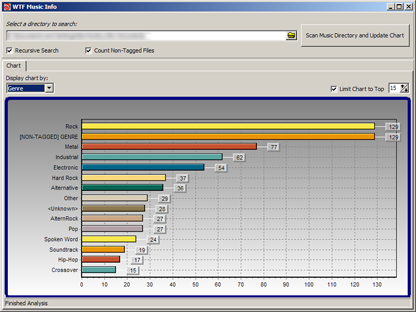
There you will find some programs by DC member seedling, including: Random MixTape Maker, which takes a large collection of your mp3 files and creates playlists with a specified target duration; WTF Music Info, which will scan your music directories and give you a nice, graphical view of your music library.
- Number of programs available: 3
- Last updated: 2008
- Visit the miscelaneous DC member archive page to browse apps and download them here: http://www.dcmembers.com/archive.
The 2007 Getting Organized Experiment (GOE) Freeware Programming Challenge
This page lists the freeware programs created during our 2007 Getting Organized Experiment Programming Challenge. The programs are inspired by our Getting Organized Experiment series where we explore systems and tools for becoming more organized and maximizing our productivity. Coders are instructed simply to creae a small free utility that, loosely defined, relates in some way to heling people work more efficiently.
You are viewing a specific blog item. Click here to return to the main blog page.
CFDButtonI've seen other apps that do some of the same things, but have some limitations that I think I have addressed. It mainly adds some functionality to the windows common file dialog, like favorites, history, and custom file filters. I found other solutions didn't get the file filtering quite right so I wrote my own.. Small app, coded in C++, portable, so it runs on a usb thumb drive.. Comments and suggestions welcomed
http://dreamcycle.net/cfdbutton/ |
||


