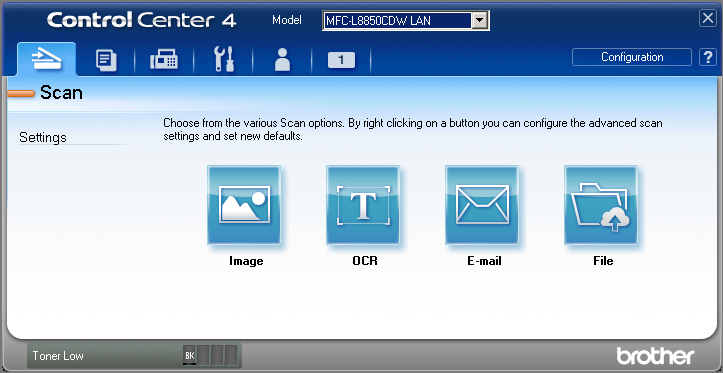
Do you have "Start ControlCenter on computer startup" enabled in preferences? How about "Open the main window on CC startup"?
In my current version below, both options can be left unchecked. If the CC4 tray app isn't running, it will be started.
If you actually open CC4 and click on the Configuration button, which Mode are you using: Home or Advanced?
The program below is designed to work with either mode.
Soooo...more testing revealed some really, really, really inconsistent behaviour so I've tried another tack. Please redownload:
http://www.dcmembers.com/skwire/wp-content/uploads/sites/5/apps/snacks/CC4_Tool.zip
- Unzip that to its own folder. There are now three files: CC4_Tool.ahk (source file), CC4_Tool.exe (program), and config.ini (settings file)
- Launch the Brother Utilities application. Make note of the printer name in the dropdown list. On my test VM, it's: MFC-L8850CDW LAN
- Open up the config.ini file in a text editor (Notepad, etc., not Word). Change the Model=MFC-L8850CDW LAN line to match your printer name and save the config.ini file.
- Run the CC4_Tool.exe application. Let me know if it works now.
Source:
#NoEnv
#NoTrayIcon
DetectHiddenWindows, On

IniRead, myModel, % A_ScriptDir . "\config.ini", Settings, Model

GroupAdd, myCc4WindowsGroup, ahk_class ControlCenter4_AdvMainWndCls
GroupAdd, myCc4WindowsGroup, ahk_class ControlCenter4_HomeMainWndCls

Process, Exist, BrCtrlCntr.exe ; Check to see if the process exists.
If ! ( ErrorLevel ) ; Process does not exist, start the process and activate window.
{
    Run, "C:\Program Files (x86)\ControlCenter4\BrCcBoot.exe" /model="%myModel%", "C:\Program Files (x86)\ControlCenter4"
    WinWait    , ahk_group myCc4WindowsGroup, , 5
    WinActivate, ahk_group myCc4WindowsGroup
}
Else ; Process is already running so show the window.
{
    WinShow    , ahk_group myCc4WindowsGroup
    WinActivate, ahk_group myCc4WindowsGroup
}

ExitApp