DonationCoder.com forum
 
Read-only archive. This is a static copy of the DonationCoder.com forum. Reading and searching work as before; logging in, posting and private messages do not.
Archive of 2026-10-21 · About this archive · Main site

Author Topic: How to automatically move specific files from c:\users\username\documents  (Read 20,482 times)

dcwul62

  • Supporting Member
  • Joined in 2013
  • **
  • Posts: 336
The output of a tool that I use, always being .png files, is defaulted to c:\..\..\documents.
I know that I can entirely move the folder, e.g. from c: to some other partition, like d:

In my case, that is not really a good option: I only want the .png files be moved to a different drive
and it should be done automatically.

I have really no idea if that's possible, or whether I should run some tool in the background or what.

Any suggestions?

Thanks.

(p.s. I am not sure if this is the right place to ask)


tomos

  • Charter Member
  • Joined in 2006
  • ***
  • Posts: 11,970
    • Gathering Badge
    • Participated in NANY Challenge Once
Use a backup programme that can monitor the folder & move the files. I use Syncovery for backup (not able to check right now, but 99.9% sure it can do that).
Tom

dcwul62

  • Supporting Member
  • Joined in 2013
  • **
  • Posts: 336
Just also found a tool named DropIt.
Got it working, partly only: when configured to monitor a folder, it copies the files in there alright.
However, regretfully I could not find a setting that it will only monitor that folder and nót process any subfolders in there.

Probably there are a few other tools around, but they are payware.
Though the price may be justified (because those tools can do a -lot- of other things as well), for this one and only task, well, I tend to first look for 'free solutions' that are also lightweight.

I have SyncBackPro, the installation-file is close to 27MB and it typically is something to run as a separate session, backing up your entire system.


-

tomos

  • Charter Member
  • Joined in 2006
  • ***
  • Posts: 11,970
    • Gathering Badge
    • Participated in NANY Challenge Once
I have SyncBackPro, the installation-file is close to 27MB and it typically is something to run as a separate session, backing up your entire system.

from the Syncback comparison page, for the pro version:
Quote
Real time Backup/Sync when files/folders change
https://www.2brightsparks.com/syncback/compare.html

I presume they would have a 'move' option -- I just checked and Syncovery does do this:
I use it for monitoring important files/folders, but for backup with versioning. FWIW: currently using 11mb in the tray, cant say I ever been bothered by it doing its job.
Tom

antekgla

  • Participant
  • Joined in 2011
  • *
  • Posts: 75
    • Participated in NANY Challenge Once
Just also found a tool named DropIt.
Got it working, partly only: when configured to monitor a folder, it copies the files in there alright.
However, regretfully I could not find a setting that it will only monitor that folder and nót process any subfolders in there.

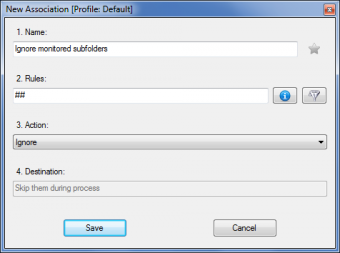
If you want to ignore subfolders of monitored folders, you can select “Always process folders and not scan them” from Options (“Main” tab) and add the following association as the only one for folders

fetch.png

Source: Dropit Website
SRTFilter Automatic Subtitle Editor & Renamer
Dualcopy If you use Teracopy or Fastcopy this can be interesting   - My N.A.N.Y 2018 Entry

tomos

  • Charter Member
  • Joined in 2006
  • ***
  • Posts: 11,970
    • Gathering Badge
    • Participated in NANY Challenge Once
With SyncBackPro, you'd have to check if excluding sub-folders is an option. (In Syncovery I can select what subfolders to in/ex-clude.)

Re the memory usage:
in this day and age, memory usage at that level (~30mb) doesnt seem significant (to me at any rate).

FWIW:
I may be completely wrong, but you give the impression that you dont have an effective backup strategy, re local backup at any rate. If you have files of any importance that you modify, it's worth considering and looking at the monitoring possibilities of your backup software.
Tom

mouser

  • First Author
  • Administrator
  • Joined in 2005
  • *****
  • Posts: 40,931
    • Gathering Badge
    • Plugin Coding Medal
    • Participated in NANY Challenge Seventeen Times
    • Cody Award
    • Coding Snacks
    • Volunteers/Staff
A full fledged backup tool seems excessive for this task.  One of skrommels or skwires AHK wonders seems like it would fit the bill.

wraith808

  • Supporting Member
  • Joined in 2006
  • **
  • Posts: 11,205
    • Participated in NANY Challenge Fourteen Times
    • Coding Snacks
    • Writer
    • Hardware Hacker
theres a program called belvedere thats made for this very purpose

https://lifehacker.com/341950/belvedere-automates-your-self-cleaning-pc

they list it as unsupported on alternative.to even though its OSS, but ive not had problems with it. but they list others there

https://alternativeto.net/software/belvedere/

nogojoe

  • Charter Member
  • Joined in 2006
  • ***
  • Posts: 174
Hi. Just came across this program. It may help you

http://www.softpedia.com/get/System/Boot-Manager-Disk/MoveOnBoot.shtml
Often the most convincing people are those who have lost the plot so much they don't recognize the difference between fact and fantasy

dcwul62

  • Supporting Member
  • Joined in 2013
  • **
  • Posts: 336
Thank you all!
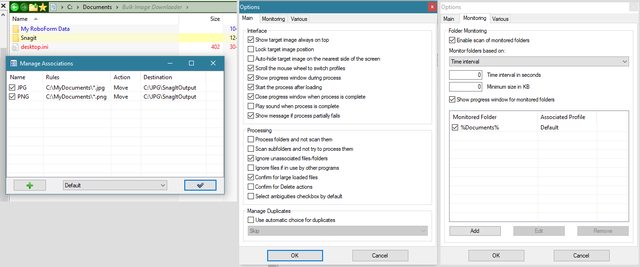
As for DropIt I tried following, without success.

-

-

Mouser: I checked his site, likely I am overlooking it, but eh .. which AHK ?
wraith808: I came accross Belvedere, but one way or the other I could not download it and I assumed, considering the age of the program that it wasn't supported anymore, i.e. I went on.
There are many, many tools around,
see http://www.softpedia.com/downloadTag/Monitor%20Folder

After spending quite some time on checking them out, I also find a relatively simple solution with Powershell.

Seems to work fine.

created a powerscript file (.ps1)

e.g. MoveImages.ps1

Code
for (;;) {
    start-sleep -s 10
    move-item C:\Users\Username\Documents\*.png N:\JPG\Catalog
    move-item C:\Users\Username\Documents\*.jpg N:\JPG\Catalog
}


then run with powershell.

It may not be as fancy as some tools around, but effective just for this task.

I have NO knowledge of Powershell and scripting, I picked this up from Stackoverflow.
Add the .ps1 file to Windows startmenu, right-click "Run with Powershell", or better
associate .ps1 with Powershell.exe (often ps1 is associated with Notepad)

-


« Last Edit: November 13, 2017, 10:31 AM by dcwul62 »

wraith808

  • Supporting Member
  • Joined in 2006
  • **
  • Posts: 11,205
    • Participated in NANY Challenge Fourteen Times
    • Coding Snacks
    • Writer
    • Hardware Hacker
wraith808: I came accross Belvedere, but one way or the other I could not download it and I assumed, considering the age of the program that it wasn't supported anymore, i.e. I went on.

Just check at the github repository: https://github.com/mshorts/belvedere

It's also AHK, so should be pretty easy to alter if needed.

Original address: https://www.donationcoder.com/forum/index.php?topic=44584.0