DonationCoder.com forum
 
Read-only archive. This is a static copy of the DonationCoder.com forum. Reading and searching work as before; logging in, posting and private messages do not.
Archive of 2026-10-21 · About this archive · Main site

Author Topic: Popup window: "To clipboard" does not work  (Read 5,160 times)

Zom

  • Participant
  • Joined in 2009
  • *
  • Posts: 2
Popup window: "To clipboard" does not work
« on: July 31, 2017, 09:15 AM »
Hi,

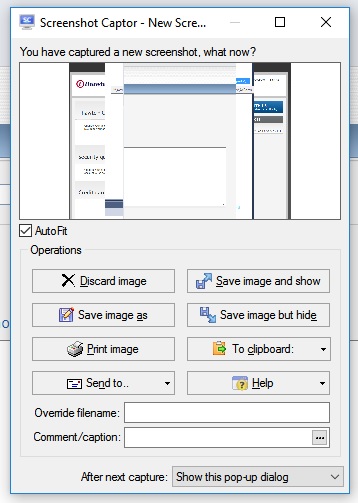
I installed latest Screenshot Captor build on top of the previous one and got the following problem: the "To clipboard" button does not work. No dropdown shown, just nothing happens.
CopyToClipboard.jpg

Is this a known issue?
How to fix this?

Tried to uninstall/install again - still the same problem.

mouser

  • First Author
  • Administrator
  • Joined in 2005
  • *****
  • Posts: 40,931
    • Gathering Badge
    • Plugin Coding Medal
    • Participated in NANY Challenge Seventeen Times
    • Cody Award
    • Coding Snacks
    • Volunteers/Staff
Re: Popup window: "To clipboard" does not work
« Reply #1 on: July 31, 2017, 09:24 AM »
Works here.. What operating system are you using?
If you exit SC and restart it -- same problem?

ps.
Installing latest build on top of previous one is completely fine -- that's the way you are supposed to do it.

mouser

  • First Author
  • Administrator
  • Joined in 2005
  • *****
  • Posts: 40,931
    • Gathering Badge
    • Plugin Coding Medal
    • Participated in NANY Challenge Seventeen Times
    • Cody Award
    • Coding Snacks
    • Volunteers/Staff
Re: Popup window: "To clipboard" does not work
« Reply #2 on: July 31, 2017, 09:26 AM »
Also, can you check the option in "Quick Bar and Post Cap" under "Copy button:" and see what you have set?  It may be that one of the non-default options for that is not working right..

Zom

  • Participant
  • Joined in 2009
  • *
  • Posts: 2
Re: Popup window: "To clipboard" does not work
« Reply #3 on: July 31, 2017, 09:40 AM »
Also, can you check the option in "Quick Bar and Post Cap" under "Copy button:" and see what you have set?  It may be that one of the non-default options for that is not working right..

Thanks, that helped! The option you've mentions was cleaned up for some reason.

mouser

  • First Author
  • Administrator
  • Joined in 2005
  • *****
  • Posts: 40,931
    • Gathering Badge
    • Plugin Coding Medal
    • Participated in NANY Challenge Seventeen Times
    • Cody Award
    • Coding Snacks
    • Volunteers/Staff
Re: Popup window: "To clipboard" does not work
« Reply #4 on: July 31, 2017, 10:28 AM »
When you say it was "cleaned up" -- can you elaborate -- it still sounds like there was a bug in the program I need to fix.
And if you are saying this option was empty -- please make sure that all your options haven't been cleared, which would indicate your settings file is corrupt.

Original address: https://www.donationcoder.com/forum/index.php?topic=44153.0