DonationCoder.com forum
 
Read-only archive. This is a static copy of the DonationCoder.com forum. Reading and searching work as before; logging in, posting and private messages do not.
Archive of 2026-10-21 · About this archive · Main site

Author Topic: N.A.N.Y. 2013- PDF Batch Saver  (Read 28,817 times)

TaoPhoenix

  • 0 - 60 ... then back to 0 again!
  • Supporting Member
  • Joined in 2011
  • **
  • Posts: 4,642
    • Participated in NANY Challenge Three Times
N.A.N.Y. 2013- PDF Batch Saver
« on: December 19, 2012, 09:12 PM »

Another of my Commissions, just in time for NANY.

Alpha1:

http://www.freevoteusa.com/PDF%20Batch%20Saver%20Alpha1%2012-19.zip

What it is supposed to do:
Take a list of URLs and save them to PDFs with a couple of different numbering methods.

I'm sure there are still edge cases but this is the first usable copy I have.
Use attachthumb=# to show an attached image as an expandable thumbnail, or attach=# to show full size. (With Brackets)

kunkel321

  • Supporting Member
  • Joined in 2009
  • **
  • Posts: 626
    • Participated in NANY Challenge Once
Re: N.A.N.Y. 2013- PDF Batch Saver
« Reply #1 on: December 20, 2012, 01:37 AM »
Do you mean it makes a PDF that is a list of links, or does it get the webpages that the URLs point to and convert those?
If the latter, I image this would work well with the Docear mindmap project.  http://www.docear.org/

TaoPhoenix

  • 0 - 60 ... then back to 0 again!
  • Supporting Member
  • Joined in 2011
  • **
  • Posts: 4,642
    • Participated in NANY Challenge Three Times
Re: N.A.N.Y. 2013- PDF Batch Saver
« Reply #2 on: December 20, 2012, 04:24 AM »
Do you mean it makes a PDF that is a list of links, or does it get the webpages that the URLs point to and convert those?
If the latter, I image this would work well with the Docear mindmap project.  http://www.docear.org/

Hi Kunkel,
I wasn't clear. It takes a text file list of URLs and then runs them through some open source web converter modules to create PDFs of the remote web pages.

It was inspired as a spin off from a discussion I had with Miles Ahead over at BBSS.
http://www.donationcoder.com/forum/index.php?topic=30913.msg308093#msg308093

Both the widget from MilesAhead and this were spawned by my job hunts online especially Monster.  It became a data management problem - how do you know what pages you looked at and what were the results? (Assume Firefox for all of this.) So in my favorite Rube Goldeberg fashion, I cooked up an answer:

1. Find lots of potential pages and then use the Session Manager plugin to save the session so that they can be reopened as a batch as desired.
2. Miles' BBSS flips through the tabs and creates paired lists of page titles and URL links. These are saved in simple text files.
3. I/you can import those as two columns into a spreadsheet whereupon of course you can add more info to your heart's content.
4. This is the last piece, where then you then have matching PDF copies because Monster/others take down the page after the hiring employer takes down the job posting. I got tired of hand-saving each tab and fiddling with numbering of the files to match item numbers on the spreadsheet.


Use attachthumb=# to show an attached image as an expandable thumbnail, or attach=# to show full size. (With Brackets)

TaoPhoenix

  • 0 - 60 ... then back to 0 again!
  • Supporting Member
  • Joined in 2011
  • **
  • Posts: 4,642
    • Participated in NANY Challenge Three Times
Re: N.A.N.Y. 2013- PDF Batch Saver
« Reply #3 on: December 30, 2012, 04:44 AM »
Hmm, with holidays and Fiscal Cliffs and general federal silliness I might not be able to fun the bug fixes on my app, so it might just have to live as a proof of concept alpha, maybe not go into the official writeups. :  (

I want a jerrrrb now!  :'(
Use attachthumb=# to show an attached image as an expandable thumbnail, or attach=# to show full size. (With Brackets)

TaoPhoenix

  • 0 - 60 ... then back to 0 again!
  • Supporting Member
  • Joined in 2011
  • **
  • Posts: 4,642
    • Participated in NANY Challenge Three Times
Re: N.A.N.Y. 2013- PDF Batch Saver
« Reply #4 on: December 30, 2012, 04:26 PM »
I am trying to get an updated copy of a simpler version of this app with only one processing mode and a little bit of finish polish on it. I should have it later today so that will be nice.
Use attachthumb=# to show an attached image as an expandable thumbnail, or attach=# to show full size. (With Brackets)

TaoPhoenix

  • 0 - 60 ... then back to 0 again!
  • Supporting Member
  • Joined in 2011
  • **
  • Posts: 4,642
    • Participated in NANY Challenge Three Times
Re: N.A.N.Y. 2013- PDF Batch Saver
« Reply #5 on: December 31, 2012, 02:12 AM »
Beta 2 - Final Release

This copy has been cleaned up with a single processing method, a small bit of help text, and some bug fixes. It is recommended that you check your starting folder not to have PDFs left over from prior runs because otherwise the numbering method could disturb related tracking documents you might have such as an itemized spreadsheet.

(Edit1: "Maximum attachment size allowed: 8000 KB". So it will have to go on my external page.)

http://www.freevoteusa.com/PDF-Batch%20Saver-Beta1.zip
Use attachthumb=# to show an attached image as an expandable thumbnail, or attach=# to show full size. (With Brackets)
« Last Edit: December 31, 2012, 02:28 AM by TaoPhoenix »

mouser

  • First Author
  • Administrator
  • Joined in 2005
  • *****
  • Posts: 40,931
    • Gathering Badge
    • Plugin Coding Medal
    • Participated in NANY Challenge Seventeen Times
    • Cody Award
    • Coding Snacks
    • Volunteers/Staff
Re: N.A.N.Y. 2013- PDF Batch Saver
« Reply #6 on: December 31, 2012, 03:00 AM »
How about some screenshots?

TaoPhoenix

  • 0 - 60 ... then back to 0 again!
  • Supporting Member
  • Joined in 2011
  • **
  • Posts: 4,642
    • Participated in NANY Challenge Three Times
Re: N.A.N.Y. 2013- PDF Batch Saver
« Reply #7 on: December 31, 2012, 03:06 AM »
How about some screenshots?

Sure, lemme use ScreenShot Captor (TM)!  8)
Use attachthumb=# to show an attached image as an expandable thumbnail, or attach=# to show full size. (With Brackets)

TaoPhoenix

  • 0 - 60 ... then back to 0 again!
  • Supporting Member
  • Joined in 2011
  • **
  • Posts: 4,642
    • Participated in NANY Challenge Three Times
Re: N.A.N.Y. 2013- PDF Batch Saver
« Reply #8 on: December 31, 2012, 03:14 AM »
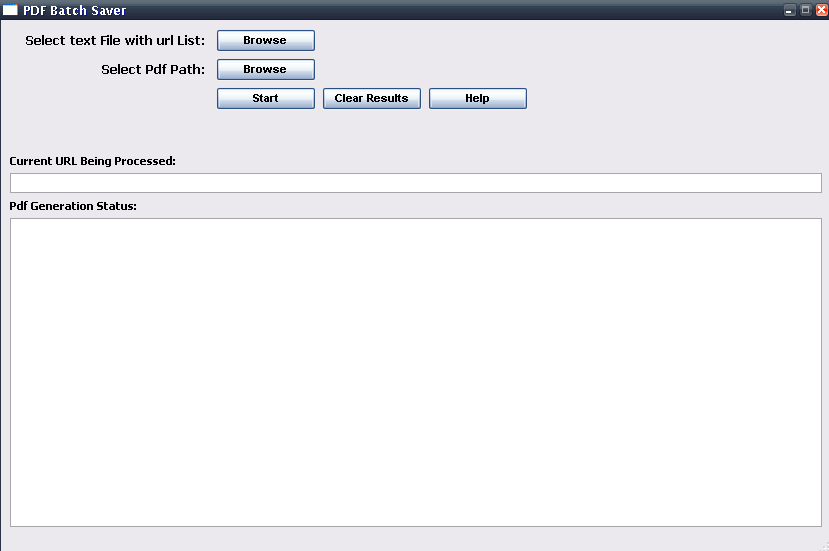
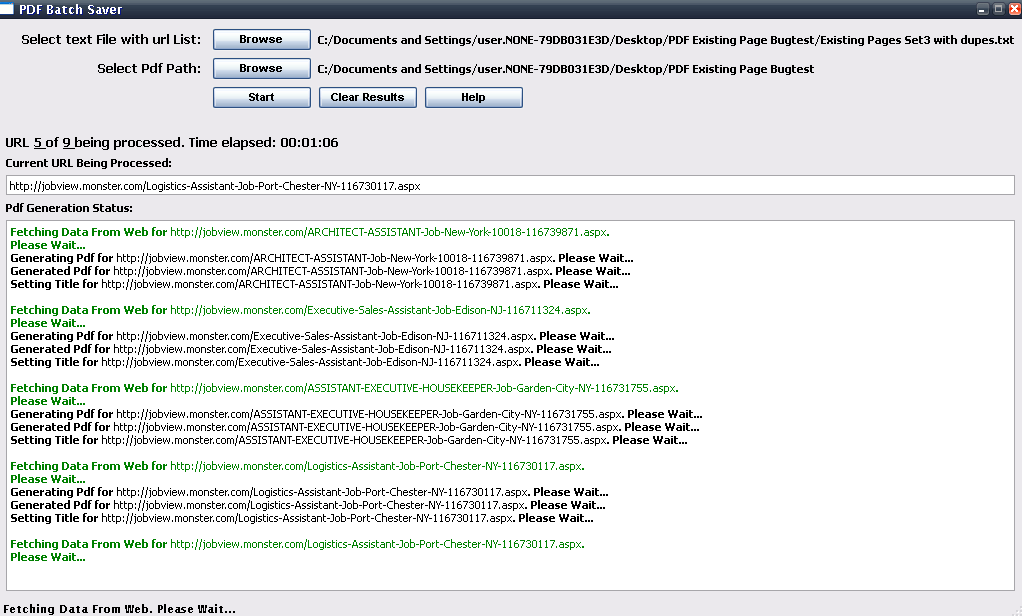
The shots are different sizes because you have limited ability to change the app window size.

Here is the basic app before it starts:
[attach=#]

Here it is running:
[attach=#]


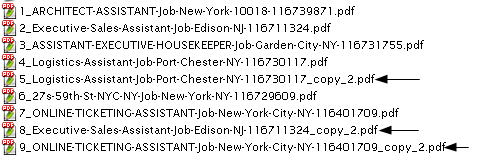
Here is a shot of the output files. Crucial is the function to automatically handle duplicates in the list, because the entire concept came about when doing ordinary saving, having to constantly answer "do you want to replace the existing duplicate". However the numbering method does update the number sequence so that if you have an itemized list, #8 is still #8, even if it's in fact the same page as #2.


[attach=#]

It is intended to be "Run and Forget". I haven't powertested it for colossal data sets, it's prob. not industrial-enterprise grade, but a big test set I had was 215 items. I am a real fan of Trandesk from here, and it runs in the background under Trandesk, and it doesn't use a browser instance like I first envisioned, so I think you can often "park it" to run a batch and then come back to it later. It was crucial for it not to halt mid way and ask about what to do with something, so there are a couple small quirks left over with that.


Use attachthumb=# to show an attached image as an expandable thumbnail, or attach=# to show full size. (With Brackets)
« Last Edit: December 31, 2012, 03:23 AM by TaoPhoenix »

TaoPhoenix

  • 0 - 60 ... then back to 0 again!
  • Supporting Member
  • Joined in 2011
  • **
  • Posts: 4,642
    • Participated in NANY Challenge Three Times
Re: N.A.N.Y. 2013- PDF Batch Saver
« Reply #9 on: December 31, 2012, 03:35 AM »
I'm out of funding but I do have the source code if for some ______ reason someone wants to fiddle with it to make it a joint-NANYesque thing, he/she/it can reply here and we can go to town.  :)  I think it's in Python.
Use attachthumb=# to show an attached image as an expandable thumbnail, or attach=# to show full size. (With Brackets)

mouser

  • First Author
  • Administrator
  • Joined in 2005
  • *****
  • Posts: 40,931
    • Gathering Badge
    • Plugin Coding Medal
    • Participated in NANY Challenge Seventeen Times
    • Cody Award
    • Coding Snacks
    • Volunteers/Staff
Re: N.A.N.Y. 2013- PDF Batch Saver
« Reply #10 on: December 31, 2012, 04:19 AM »
Nice, that could be useful  :up:

TaoPhoenix

  • 0 - 60 ... then back to 0 again!
  • Supporting Member
  • Joined in 2011
  • **
  • Posts: 4,642
    • Participated in NANY Challenge Three Times
Re: N.A.N.Y. 2013- PDF Batch Saver
« Reply #11 on: December 31, 2012, 04:24 AM »
Nice, that could be useful  :up:

Heh all my commissions ARE useful. The question is whether anyone but me uses them. This came from Top Of Keyboard swearing at Monster.com
"!@#$%^(%$&%$ I have 215 results, 37 of them are the same because "Sort by Relevance moves them around every day and Date shifts them all by a day, and it will take me 7 hours to save them by hand?! REALLY?!"

>:(  :D
Use attachthumb=# to show an attached image as an expandable thumbnail, or attach=# to show full size. (With Brackets)
« Last Edit: December 31, 2012, 04:29 AM by TaoPhoenix »

TaoPhoenix

  • 0 - 60 ... then back to 0 again!
  • Supporting Member
  • Joined in 2011
  • **
  • Posts: 4,642
    • Participated in NANY Challenge Three Times
Re: N.A.N.Y. 2013- PDF Batch Saver
« Reply #12 on: December 31, 2012, 11:31 AM »
Share Credit gang, I have no delusons of authorship, not this time at least!

Any Python Hackers out there>
Use attachthumb=# to show an attached image as an expandable thumbnail, or attach=# to show full size. (With Brackets)

Original address: https://www.donationcoder.com/forum/index.php?topic=33349.0