DonationCoder.com forum
 
Read-only archive. This is a static copy of the DonationCoder.com forum. Reading and searching work as before; logging in, posting and private messages do not.
Archive of 2026-10-21 · About this archive · Main site

Author Topic: Toolbar Cleaner + BHO Remover  (Read 5,685 times)

cmpm

  • Charter Member
  • Joined in 2006
  • ***
  • Posts: 2,026
Toolbar Cleaner + BHO Remover
« on: July 04, 2011, 01:57 PM »
This program was able to remove some disabled plug-ins with no way to remove them that I knew of.
Maybe it will be of some help to others here.

http://www.ghacks.net/2011/07/04/toolbar-cleaner-remove-unwanted-toolbars-from-chrome-firefox-internet-explorer/

http://toolbarcleaner.com/

y0himba

  • Yar.
  • Charter Member
  • Joined in 2005
  • ***
  • Posts: 448
    • Military Service Badge - US Army
    • Military Service Badge - US Navy
Re: Toolbar Cleaner + BHO Remover
« Reply #1 on: July 04, 2011, 05:02 PM »
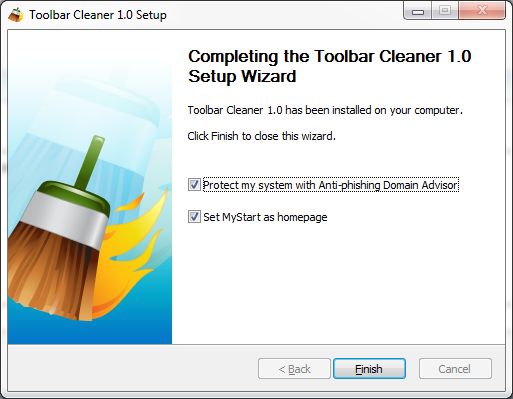
I find it ironic that a toolbar cleaner wants me to "Protect my system with Domain Advisor" and "Set MyStart as my homepage".  Also, when clicking the like button it asks you to enter your Facebook user/paa and the same with Twitter, although I am already logged in.

It didn't find any of the things I want to get rid of in Firefox, and it listed things that are not installed in Chrome.

Good idea, but I am a bit leery of this one.  Uninstalled it.

[attach=#]

cmpm

  • Charter Member
  • Joined in 2006
  • ***
  • Posts: 2,026
Re: Toolbar Cleaner + BHO Remover
« Reply #2 on: July 04, 2011, 05:59 PM »
As gHacks points out, this is not a problem.
Just uncheck those two boxes.

If you do not want that make sure you disable the options on the completing the toolbar cleaner 1.0 setup wizard.

I didn't want either.
And I don't recall having to do anything with facebook or twitter.
The download is on the page I posted as well as a link to it's facebook page, that I didn't need to go to.

Original address: https://www.donationcoder.com/forum/index.php?topic=27215.0