topbanner_forum
  *

avatar image

Welcome, Guest. Please login or register.
Did you miss your activation email?

Login with username, password and session length
  • Wednesday December 3, 2025, 9:00 am
  • Proudly celebrating 15+ years online.
  • Donate now to become a lifetime supporting member of the site and get a non-expiring license key for all of our programs.
  • donate

Recent Posts

Pages: prev1 ... 33 34 35 36 37 [38] 39 40 41 42 43 ... 1514next
926
Living Room / Re: Looking for audio merger Y-cable
« Last post by mouser on March 13, 2020, 03:37 AM »
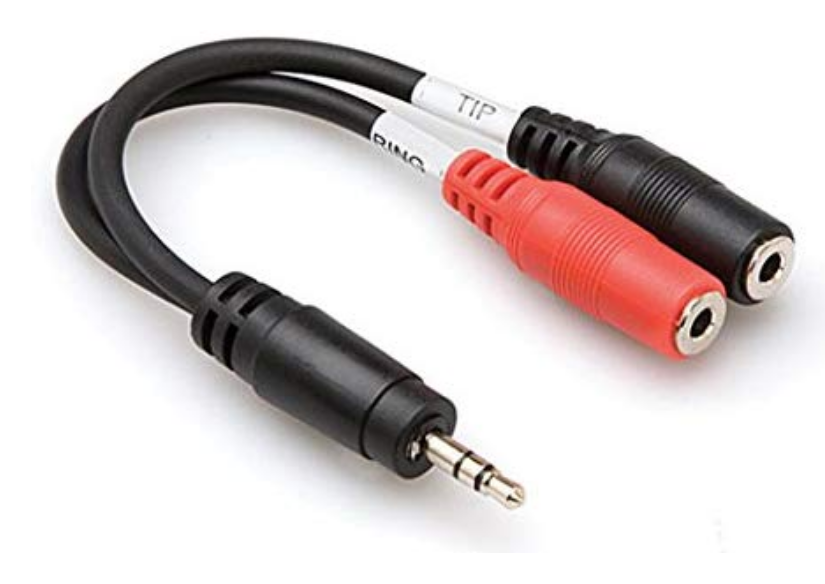
This will do what you want as I was describing, as long as you are ok with each source being in a different ear:
https://www.amazon.c...-Cable/dp/B000068O5H
Screenshot - 3_13_2020 , 3_35_50 AM.png

As different reviewers states:
"With the great help of splitting the two mics in the two different audio side (left and right) you are able to record two mics and have their sound separated"

So you would plug your two different audio SOURCES into the two female jacks, and they will be merged into a stereo signal where one source is your left ear, and another is in your right ear.


There is a caveat though, it is only going to pass through one channel of each input.  So for music, this could be a problem, where the left+right channels might have different content, and one of those channels will be ignored.

I believe in that case your solution would be to add an adapter that would first convert the stereo input source to a combined mono source, e.g.:
https://www.amazon.c...apter/dp/B0002EOHX0/

Screenshot - 3_13_2020 , 3_42_30 AM.png
927
Living Room / Re: Looking for audio merger Y-cable
« Last post by mouser on March 12, 2020, 11:16 PM »
It *might* be possible to just use a normal (1 stereo in to 2 stereo out) splitter in reverse -- im not sure about that.  The internet will be able to answer that.

But for sure you could always get an adapter (splitter) that splits a stereo signal into left+right signals, and then use THAT in reverse.  That will definitely work, feeding one input to the left ear and another input to the right ear.
928
You are using a version somewhat older.. Try installing the latest.
929
Were you doing anything when the error occurred?
Can you check what version you are running that gave that error, and see if there is anything about the error at the bottom of the Troubleshooting Log page in the options?
930
Clipboard Help+Spell / Remind me of feature requests please
« Last post by mouser on March 12, 2020, 01:07 AM »
I've been working like mad on the new extended clipboard format features for CHS; now would be a good time to remind me of older feature requests I've overlooked.
931
Clipboard Help+Spell / Re: Feature request: emoji support
« Last post by mouser on March 11, 2020, 10:23 PM »
CHS now has support for copying all sorts of formats and extended character sets, unicode, etc.
See the alpha download here: https://www.donation...ex.php?topic=49490.0
932
Updated so that even folks who have CHS set to only save plaintext, will still use the new url-grabbing feature to record the source url from web page text captures.
933
But please do let me know if you have any weird behavior.. I need to make sure I didn't break anything before I can put this into wider testing..
934
Great  :Thmbsup:

Let me know any bugs or feature requests..

The thing I'm dreading the most is adding some advanced rule system to let people control what formats get ignored..
935
And updated again with a bugfix for image capture.
936
Uploaded new version which knows how to get image data from the clipboard in more formats.  Try it with your inkscape and see how it does.
You should now see image thumbnails in your quick paste pop up menu and from within the clip grid, etc.
937
No, that solves that issue.  I think for the most part its no big deal if you get duplicates.
Ideally it would be nice to be able to give CHS a rule like: ignore the hash of a specific format from a specific app.
938
Also, the reason the new CHS was slower for me was that I have the options to backup and optimize the database when the program starts, and with all the large clips this process was taking longer, hence the slower startup times.  I added a tray message to announce when backing up was occurring, and if you have a slow backup you might want to consider disabling the backup on startup function.
939
Just uploaded a minor update with new feature in the Clipboard Blob Interrogator: You can now right click on a format and save that one format to a file.  Useful for debugging formats and comparing formats, etc.

I think you'll find when you do that, that the two "seemingly" identical clips actually have some (inconsequential) differences.
940
Copying the same vector clip twice is *not* recognised as duplicated clip.

My *guess* is that this is because there is some data in one of the formats that is changing -- probably because of a time stamp.
The solution in that case will be some advanced rule to ignore a certain format (or just ignore its hash value).

The trick will be to look at the hash values of the formats in those two vector clips that look identical.  Let me know what you find.
941
Updated with various improvements; support for proper handling of special Metafile data formats. The clipboard format interrogator also now lets you copy single formats to the clipboard -- useful for testing.
942
Find And Run Robot / Re: Sending the selected text to a program via FARR
« Last post by mouser on March 08, 2020, 07:30 PM »
try using $$c instead of %cliptext%
943
Find And Run Robot / Re: Best way to Upgrade FARR and Preserve Customizations
« Last post by mouser on March 08, 2020, 10:54 AM »
You can edit FindAndRunRobot.ini, but as Nod5 said, you have to make sure you exit FARR first, since it keeps it in memory and writes it on exit.
944
Living Room / Re: What books are you reading?
« Last post by mouser on March 08, 2020, 10:33 AM »
945
Find And Run Robot / Re: Best way to Upgrade FARR and Preserve Customizations
« Last post by mouser on March 08, 2020, 10:29 AM »
If you are going to manually modify the .alias files, make sure you are not trying to manually edit one of the built-in read only alias files -- they will be overwritten on update.
If you want to modify or replace a built-in alias file, the way to do that is make a COPY of that alias file into your own alias directory and tell FARR to disable the built-in one.  That way your custom one won't be overwritten.
946
Find And Run Robot / Re: Sending the selected text to a program via FARR
« Last post by mouser on March 08, 2020, 10:26 AM »
Adding a tip to what Nod5 says :)

To see what you are going to launch you can change that result from
Selection to Velocity | C:\folder path\velocityprogram.exe "$$c"

To:
Velocity $$c | C:\folder path\velocityprogram.exe "$$c"
947
Find And Run Robot / Re: Sending the selected text to a program via FARR
« Last post by mouser on March 07, 2020, 07:35 PM »
You can easily set up a custom hotkey for FARR that will copy the text you have selected in any program, and then bring up farr with a menu of choices that you can select from (and filter by typing).
I use this feature to do exactly the kind of thing you are talking about.
Here's a recent example of how to do this to translate words: https://www.donation...ic=49637.0;topicseen
But you can use this to bring up a custom alias result with multiple entries for each kind of thing you might want to do with the selected text.
948
Find And Run Robot / Re: Sending the selected text to a program via FARR
« Last post by mouser on March 07, 2020, 06:29 PM »
Interesting question.

I'll add a new field (%search%) that you can specify in toolbar launch parameters to pass the search text.
949
Find And Run Robot / Re: Installable vs Portable?
« Last post by mouser on March 07, 2020, 04:25 PM »
When you uninstall FARR, it doesn't automatically delete your installed settings.
If you want to delete them you can delete them by deleting the folder "C:\Users\USERNAME\Documents\DonationCoder\FindAndRunRobot"
950
Find And Run Robot / Re: Best way to Upgrade FARR and Preserve Customizations
« Last post by mouser on March 07, 2020, 04:20 PM »
The portable version you download is packaged in a way that you can always just unzip it on top of your existing portable version to upgrade.

The only time you have to be a little careful is if you are going from a portable to install version, or vice versa, and want to preserve your settings.
In this case, the trick is simply to make sure FARR looks in the right place for your settings and customizations.  The ConfigDir*.ini files are what tell FARR where to look for its settings and where to save data.
Pages: prev1 ... 33 34 35 36 37 [38] 39 40 41 42 43 ... 1514next