topbanner_forum
  *

avatar image

Welcome, Guest. Please login or register.
Did you miss your activation email?

Login with username, password and session length
  • Friday December 5, 2025, 12:05 am
  • Proudly celebrating 15+ years online.
  • Donate now to become a lifetime supporting member of the site and get a non-expiring license key for all of our programs.
  • donate

Recent Posts

Pages: prev1 ... 360 361 362 363 364 [365] 366 367 368 369 370 ... 1514next
9101
Living Room / Re: My Gadget Idea: "Timestamper Disc"
« Last post by mouser on August 19, 2013, 03:22 AM »
Good ideas.

I definitely think a physical little disc that you could keep in the places you would use it would be most convenient, and that getting out a phone in each place you would want to use it would be inconvient, but a mobile app has some advantages, like a central location for all items, and no manufacturing issues.  So a simple mobile app would make sense too.
9102
Living Room / My Gadget Idea: "Timestamper Disc"
« Last post by mouser on August 19, 2013, 12:40 AM »
So I have had this very simple little gadget idea for years: A "Timestamper Disc"

And i cannot for the life of me understand why it doesn't exist yet.  It seems like it would make a perfect kickstarter project.


The Timestamper Disc:

The device would basically be like the watch face of a digital watch -- small, round, thin, powered by watch cell battery.

In its simplest form it would have a single "NOW" button on the front, and would simply display the date and a time that the button was last pressed.
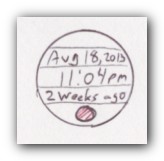
Scan - 8 19 2013 , 12 40 37 AM.jpg

If you had room you might display an additional line showing an natural approximation of the time since the last button push, like "13 days ago" or "6 months ago." If space was tight, you could have the button that cycled through the display of last pushed date, time, approximation, and hold button to trigger the NOW timestamp.


So, what would this device be used for?

You'd want to have several of these around the house -- you could use them to keep track of the last time you changed your water filter, the last time you took your medications, the last time the dog was walked, the last time you called your mother, the last time you used the exercise machine, the last time you cleaned your room, the last time the smoke detector batteries were changed, the last time you ate a snack, the time you woke up, the time you went to sleep, how long ago you put on the last coat of paint, when the lassagne was baked, etc.

You'd just place one of these Timestamping discs on or near the object you want to keep track of (velcro, magnet, band, etc.), and just hit the button when you use the object or perform the task.  Now whenever you come back to it, you can see how long it's been since you last performed the event.

They'd be cheap enough that people would buy them in packs of 5 or 10.  With watch cell batteries they would last decades.  You could probably use watch parts and manufacturing machinery.  It's basically a glorified simplified, half-watch.


Additional features:

If you wanted to get fancier, you could put a micro-usb port on it and let users connect to pc/mobile and get historical timestamps of every button press.. And i'm sure you could come up with additional ideas, like being able to set alarms to trigger automatically after the elapse of X amount of time since last press.

Thoughts?
9103
Any reports with the beta or feature requests?
9104
Welcome back Jammo  :up:
9105
Living Room / Re: Why you should record video of the everyday people in your life
« Last post by mouser on August 17, 2013, 07:59 PM »
Awesome post, fredemeister:up:
9106
Living Room / Re: Animal Friends thread
« Last post by mouser on August 17, 2013, 07:57 PM »
Mother panda reunited with baby:
9107
I'd love to get some help testing the latest beta to make sure i didn't break anything with the docking code:


v1.136.01 - Aug 17, 2013 Beta
  • [Feature] LBC was sometimes not properly docking hiding/sliding docks -- they would reserve desktop space even though they shouldn't.
  • [Feature] Option to check for updates at startup.
  • [Feature] When using keyboard keys to resize dock, you can now use ctrl and alt + arrows to move and resize docks (works well when you have the don't stretch option checked for a dock).  Fixed bugs related to resizing with keyboard.
  • [Feature] New license options that make it possible to use LBC as a launcher for a read-only file that you distribute to others.
  • [Improvement] Uses captions as hints when icons are set to not display captions and hints are enabled.
  • [Improvement] When specifying custom x,y popup location of dock menus, you can use negative values to offset from right and bottom of screen.
  • [Improvement] Installer now offers to run the program after installation.
  • [Improvement] Program no longer advises you to backup your file until you have a non-trivial number of nodes in it.
  • [Improvement] You can now drag+resize even borderless docks (usually!).


I'm trying to fix weird bugs that were showing up on Windows 7 especially, with docks failing to hide/resize.

So basically i'd just like to know that your docks are not suddendy failing to dock or hide or resize the way they have in the past.
9108
thank you so much for the steps jp, unfortunately, following those instructions does *not* reproduce the problem here.
maybe it's some  other combination of settings or some other mystery??

I so badly want to fix this but i cannot for the life of me get this problem to occur -- trying on windows xp, windows 7, with microsoft office apps (excel).

I need help figuring out a way to reproduce this and get it to happen.

Maybe it's some other combination of settings..

Can you download the latest debug version of LBC:
https://www.donation...ommanderPortable.zip

And confirm that the problem still happens, and see if you can't experiment a little more and help me identify how to reproduce this.  Maybe try this portable version with a brand new settings and make the minimal changes, and let me know exactly how to reproduce.  if the problem occurs even with notpad, let me know -- or does it only happen with ms word?

does it happen right from program start, or only after triggering some buttons.. what operating system?

anything to give me a clue about what combination of settings causes this, but mainly -- enough information to be able to reproduce it here.  if i can reproduce it i can fix it.
9109
LaunchBar Commander / Re: Launchbar Commander still "Stealing Focus"
« Last post by mouser on August 17, 2013, 08:46 AM »
I so badly want to fix this but i cannot for the life of me get this problem to occur -- trying on windows xp, windows 7, with microsoft office apps (excel).

I need help figuring out a way to reproduce this and get it to happen.

Maybe it's some other combination of settings..

Can you download the latest debug version of LBC:
https://www.donation...ommanderPortable.zip

And confirm that the problem still happens, and see if you can't experiment a little more and help me identify how to reproduce this.  Maybe try this portable version with a brand new settings and make the minimal changes, and let me know exactly how to reproduce.  if the problem occurs even with notpad, let me know -- or does it only happen with ms word?

does it happen right from program start, or only after triggering some buttons.. what operating system?

anything to give me a clue about what combination of settings causes this, but mainly -- enough information to be able to reproduce it here.  if i can reproduce it i can fix it.
9110
CHS always remembers the formatting from the last clip. The only way I know of to strip the formatting, is to copy more text (i.e. after you've copied the text you want) - the text you want to paste will now be in second place in the list - when you paste this it will not be formatted.

is this true?

i thought the way it worked was that if you use Ctrl+V you will get the normal formatting since you are using the windows clipboard, but if you use the quick-paste menu, EVEN IF ITS THE FIRST ITEM, it would strip formatting.  no?
9111
LaunchBar Commander / Re: Importing and Exporting Configs for Manipulation
« Last post by mouser on August 17, 2013, 01:16 AM »
And I've just realised, when I edit a node that only has a local reference to an icon (because it's a menu, say) changing the drive reference to %APPDRIVE% doesn't result in the "save changes" button becoming available unless some other change (to the comment, say) is made.

this part will be fixed in next release.
9112
LaunchBar Commander / Re: Idea: popup at corners
« Last post by mouser on August 17, 2013, 01:11 AM »
New version you can specify negative values to offset from bottom right.
9113
LaunchBar Commander / Re: Icon problems with FileContents nodes
« Last post by mouser on August 17, 2013, 12:54 AM »
It doesn't affect image files selected for a regular node (like a command or menu for example). Does that use the same code or does that use something else that's not compatible with FileContents nodes for whatever reason?

yeah, the normal button icons are actually extracted from files once at time of adding them, and then stored as data.  this has some real pros and cons, but it's not dependent on the file system icon rendering.  when showing the contents of directories, however, i use this other method that shares file explorer icons (FARR uses this too by the way) -- the benefit is that the OS does the heavy lifting of finding the icons, the downside is you are at the whim of the OS for some of these issues.
9114
LaunchBar Commander / Re: Icon problems with FileContents nodes
« Last post by mouser on August 17, 2013, 12:27 AM »
I may not be able to fix this -- for file contents nodes, LBC relies on the system behavior for showing files, via a function called SHGetFileInfo, and it seems your system (all systems?) are set up so that if you set a custom handler for .ICO files, the result is that all .ICO files show up in standard file managers/explorers as generic icons.
9115
LaunchBar Commander / Re: Icon problems with FileContents nodes
« Last post by mouser on August 16, 2013, 11:41 PM »
Ok so i have a question -- if in the /ICON field you specify the path to an exe -- does it get the proper icon from the exe?

so its only doing this when you do /ICON and specify the path to a file that ends in .ICO extension?
9116
LaunchBar Commander / Re: Icon problems with FileContents nodes
« Last post by mouser on August 16, 2013, 04:32 PM »
messaged you with test version.
9117
LaunchBar Commander / Re: Icon problems with FileContents nodes
« Last post by mouser on August 16, 2013, 12:56 PM »
set using the /icon argument.


i was just about to tell you that you were imagining some feature in LBC regarding this mystery /ICON switch.. but then it occurred to me to read the help file for my application and it turns out there is such a thing after all.

i will see if i can find the issue, it sounds like it should be pretty simple -- it sounds like it's using the file extension only to look up the icon.

9118
LaunchBar Commander / Re: stopping window from turning into a dock
« Last post by mouser on August 16, 2013, 12:51 PM »
I have sent you a version to test.
9119
LaunchBar Commander / Re: Launchbar Commander still "Stealing Focus"
« Last post by mouser on August 16, 2013, 12:38 PM »
Im working on a new release now, to upload before end of this weekend -- time to fix this!
9120
Living Room / Re: Gadget WEEKENDS
« Last post by mouser on August 16, 2013, 05:33 AM »
Got a KVM switch so I could switch between an old and new machine while using same monitor, keyboard, speakers:

http://www.amazon.co...S932UB/dp/B002TQYSN8

Screenshot - 8_16_2013 , 5_32_13 AM -.png

The darn thing actually works (surprised me)!
9121
Hi utilfreak, and thank you for such a clear statement of the problem.

Shades comments are right in the sense that, the easier solution is to just turn off the automatic check for updates at startup in Screeenshot Captor (you'll see the option on the first tab of options).  You can always ask SC to check for updates manually whenever you want.

However, i will check the update-check code and see if i can't decrease the timeout time, as 90 seconds seems way too long, and i can see this issue biting other people who don't have internet connection enabled.  I'll see if it's something that's easy for me to adjust and report back.
9122
DC Gamer Club / Re: Worms Clan Wars 4 Pack
« Last post by mouser on August 14, 2013, 04:22 AM »
I'm in.
9123
Screenshot Captor / Re: Startup error due to Decimal symbol
« Last post by mouser on August 13, 2013, 09:16 PM »
I really need to fix this -- it only affects people moving their settings between different locales, but you're not the only one.
9124
Living Room / Re: Bitcoins Can Be Regulated
« Last post by mouser on August 13, 2013, 08:41 PM »
i've merged several recent bitcoin threads as i think they were starting to clutter up the living room.
i think we would be better off keeping all bitcoin discussion on one or two threads.
9125
Living Room / Re: Interview with Ladar Levinson of LAVABIT (Must see)
« Last post by mouser on August 13, 2013, 07:14 PM »
Well worth watching.

Actually for me the most interesting point of all was made not by the subject of the interview, but in the comments shown of Edward Snowden, in praising his actions.  Snowden points out that if the large companies had the guts to do what this guy did, and shutdown their services for even a day in protest to the government trying to bully them into doing these things (that they say the object to), it would cause enough backlash that the government would have to back down.

For me, truly the shocking and outrageous part of all this is the fact that these new security laws prevent people from even talking about the broad outlines of what they are being charged with, or being forced to do.

We can't discuss the propriety and wisdom of the underlying requests being made of them when people like this can't even tell you what the government was trying to make them do.
Pages: prev1 ... 360 361 362 363 364 [365] 366 367 368 369 370 ... 1514next