topbanner_forum
  *

avatar image

Welcome, Guest. Please login or register.
Did you miss your activation email?

Login with username, password and session length
  • Thursday December 4, 2025, 6:54 pm
  • Proudly celebrating 15+ years online.
  • Donate now to become a lifetime supporting member of the site and get a non-expiring license key for all of our programs.
  • donate

Recent Posts

Pages: prev1 ... 321 322 323 324 325 [326] 327 328 329 330 331 ... 1514next
8126
I have some (internal) sata drive racks installed in my computer, they look like this:
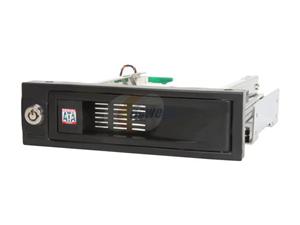
drivebay.jpg

I'm a huge fan of such drive racks -- both internal if you have the space, or external in a usb enclosure if not.

My ASUS motherboard bios has some great options that let me mark these sata ports as hotswappable, which makes them normally show up in the normal windows tray icon where they can be "ejected" (hot-swapped) safely.

However, recently I made the "mistake" of installing updated Intel chipset sata drivers (because i thought i might want to try a raid setup), and it seems one of the known side effects/bugs of these drivers is that it hides the fact that certain ports were designated as hotswappable in bios.

In short -- the new drivers killed my ability to hotswap from my drive bays.

I was getting ready to rollback the new drivers when I came across this very excellent free tool called "HotSwap!", which basically sits in the system tray and restores the ability to hotswap sata drives:
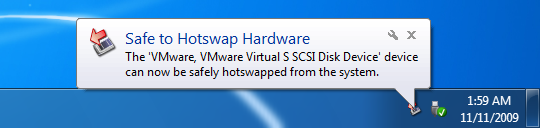
hotswapscreenshot.png

The vast majority of you will have no use for this, but I thought it was worth a post in case someone else stumbles into the same scenario that I did.  One of those great little free utilities that can save your bacon if you ever need it.

HotSwap! website: http://mt-naka.com/hotswap/index_enu.htm

One tip: If you have multiple non-system hard drives, The default HotSwap! menu will show them *all* as hotswappable, but you can manually configure which drives are fixed so that they are not listed.
8127
General Software Discussion / Re: ScreenShot Captor is a Mess
« Last post by mouser on February 13, 2014, 05:09 PM »
everyone cool your jets.

as i've said before, i'm prone to fly into fits of rage at other software that frustrates me, so it's impossible for me to get mad at others for venting their software rage if they experience it using one of my apps.
8128
General Software Discussion / Re: ScreenShot Captor is a Mess
« Last post by mouser on February 13, 2014, 02:38 PM »
i should say i had the same reaction that tomos did -- it doesn't sound like you are going to be happy with Screenshot Captor -- there are so many alternatives -- try one until you find one that works like you want.
8129
General Software Discussion / Re: ScreenShot Captor is a Mess
« Last post by mouser on February 13, 2014, 02:24 PM »
Screenshot Captor does have a ton of options and can be overwhelming if you dive into them.

However, you should be able to install it, run it, and just hit the PrtScreen to capture the screen.  At that point you should be shown a preview and given some options about what you want to do with the captured image.

If you want to capture a window with transparent corners, select it and hit Alt+PrtScr.

Everything should work nicely by default and not present you with too much complication.

Does that part at least work for you?  Can you be a little clearer about where exactly you started having trouble?

8130
General Software Discussion / Re: The Best Security Suites (2013/2014)
« Last post by mouser on February 13, 2014, 01:38 PM »
Yep.

In general, I would not put too much weight on the actual numerical ratings and editor's choice in this roundup.  Neil's priorities are different than ours.  In addition to focusing on removal of infections, he also seems biased towards suites that have everything including the kitchen sink, while many of us, myself include, do not want all this bloatware and are just interested in antivirus+firewall.

Having said that -- this massive comparative review (and the charts the accompany it) are full of very useful information -- and the overall impressions, coming from someone who has tried so many, are likewise useful.
8131
General Software Discussion / Re: The Best Security Suites (2013/2014)
« Last post by mouser on February 13, 2014, 11:31 AM »
The one area I think Neil gave himself (and the tech support of these companies) huge amounts of completely unnecessary pain, and colored his results as well, is how determined he was that these tools should be able to do their initial install on an already virused system.

That's asking too much, and no one should turn to an antivirus/security app after an infection to rescue them from it.  If you are trying to recover from an infection you should use a dedicated self-booting repair tool, or something similar.
8132
General Software Discussion / Re: Photos that spontaneously change
« Last post by mouser on February 13, 2014, 10:17 AM »
no one is sneaking into your pc and adjusting the contrast of your photos  :P

try some steps to figure out the problem:

Make your changes, then close the files, then reopen them.  were the changes saved? ok then rmake copies and ename them and zip them and file them away somewhere.
Next time you find they look different, go check out your zipped archive and compare -- have the files changed or not?
8133
General Software Discussion / Re: The Best Security Suites (2013/2014)
« Last post by mouser on February 13, 2014, 10:08 AM »
While I don't agree with all of the conclusions, there are lots of interesting charts in the roundup, this one I found particularly useful:

http://www.pcmag.com...71,iid=392519,00.asp

Screenshot - 2_13_2014 , 10_06_09 AM.png

It shows the impact on performance when running the different tools (explanation here).
8134
General Software Discussion / Re: The Best Security Suites (2013/2014)
« Last post by mouser on February 13, 2014, 09:45 AM »
Neil actually did go review Outpost after this initial roundup, here: http://www.pcmag.com...,2817,2430088,00.asp
And a couple more here: http://www.pcmag.com...,2806,1639159,00.asp
8135
N.A.N.Y. 2014 / Re: NANY 2014 Release: Process Piglet
« Last post by mouser on February 13, 2014, 08:51 AM »
Mike Williams at betanews wrote an intelligent review of Process Piglet:

http://betanews.com/...-with-process-piglet

There are plenty of more sophisticated ways of monitoring RAM use, but Process Piglet is still a likeable tool, easy to use and very configurable. If you're having system resource issues and want to track what applications are doing over time, then we'd give it a try.
8136
General Software Discussion / Re: It's not a valid windows 32bit application
« Last post by mouser on February 13, 2014, 06:58 AM »
Best thing to do if you get infected by a bad virus (one not known to be easily and reliably cleanable) is restore a system backup that you know is clean, or reinstall windows -- rather than try to "clean it"
8137
General Software Discussion / The Best Security Suites (2013/2014)
« Last post by mouser on February 13, 2014, 05:43 AM »
PC Magazine writer Neil Rubenking wrote a massive and very useful review of security suites (antivirus + firewall) for PC Magazine recently, with ratings and detailed observations.

The chart below summarizes our findings for three dozen current security suites, highlighting overall scores and category scores of 4.0 stars or better. It's easy to see that some products earned high scores in all or nearly all the categories, while others got just a few high scores.


I may not agree with everything written but it's darn useful.  See also some newer PC mag security reviews that came out after the roundup here.
See also: http://securitywatch...ce-need-not-conflict
8138
Coding Snacks / Re: Binary Search Tree help
« Last post by mouser on February 13, 2014, 04:30 AM »
What mwb suggested is what I would do (except that i would use a better name for the variable!).
8139
Living Room / Re: Funny Animal Videos
« Last post by mouser on February 13, 2014, 04:03 AM »
More crow intelligence -- these guys are amazing:
8140
Living Room / Re: Glenn Grenwald's "The Intercept" is now online
« Last post by mouser on February 13, 2014, 03:40 AM »
Thanks for the heads up  :up:
8141
Drag&Drop Robot / Re: Drag+Drop Robot config for 7zip
« Last post by mouser on February 12, 2014, 03:26 PM »
Quite right, fixed  :up:
8142
Drag&Drop Robot / Drag+Drop Robot config for 7zip
« Last post by mouser on February 12, 2014, 08:22 AM »
Just thought i'd share this since i had use for it today.

If you want to use 7-zip to compress a bunch of FOLDERS, each to their own compressed archive, use the following as your commandline:

C:\Program Files\7-Zip\7z.exe a -r "%2.7z" "%2"
or for zip format: C:\Program Files\7-Zip\7z.exe a -r "%2.zip" "%2"

And set your options to "Allow dropped folders" in top right if not already set.


8143
N.A.N.Y. 2014 / NANY 2014 mentioned at freewaregenius.com
« Last post by mouser on February 10, 2014, 04:05 PM »
Nice writeup of NANY 2014 from Samer at the great freewaregenius.com today:

Screenshot - 2_10_2014 , 4_02_48 PM_thumb002.png
http://www.freewareg...are-check-nany-2014/
8144
LaunchBar Commander / Re: Removing Exit button - possible?
« Last post by mouser on February 10, 2014, 08:35 AM »
Yes -- i've found some things that need tweaking.  But I already added the exit button option, right?  Did you have other features you need added?
8145
Screenshot Captor / Re: imm.io no longer available
« Last post by mouser on February 10, 2014, 03:53 AM »
i will have to add support for some other image hosting sites to sc.  if people post their favorites i will try to add them.
8146
Screenshot Captor / Re: Assistance needed with the MiniCap command line
« Last post by mouser on February 08, 2014, 08:11 PM »
try using spaces instead of comas:

Run, C:\Program Files (x86)\MiniCap\MiniCap.exe -captureregion 200 200 500 500
8147
Living Room / Re: Programmers: What size monitors do you guys prefer?
« Last post by mouser on February 08, 2014, 04:39 PM »
I can report that a widescreen 27" monitor in portrait mode is a wild experience -- but unfortunately just too tall to be usable -- the vertical neck strain would put you in the hospital after a day.

It's *REALLY* a shame that widescreen monitors seem to be the only format being made these days -- I find it distinctly unhelpful.  27" widescreen is just too wide.  a square shaped 27" diagonal monitor would be great.
8148
Check out also FileMenuTools: http://www.lopesoft.com/en/filemenutools

8149
DC Gamer Club / Re: [ENDED] HUNTERCOIN GIVEAWAY~! =D
« Last post by mouser on February 06, 2014, 11:41 PM »
Locked.
8150
x16, your image shows the double height normal size win7 taskbar.  i'm talking about the half-height option.

oh -- is that TClock you have showing that info?  Didn't know it could display two-lines. nice.
Pages: prev1 ... 321 322 323 324 325 [326] 327 328 329 330 331 ... 1514next