


 Recent Posts
801
Mini-Reviews by Members / Mini-Review: GIFExplainer
« Last post by wraith808 on March 25, 2020, 10:20 PM »GIF Explainer Review
DISCLAIMER: Note that I was given a review copy of GIF Explainer in exchange for an unbiased, honest review.
Basic Info
Introduction
I must admit starting off, I went into GIF explainer with certain preconceived notions. When I see GIF Explainer, I think that it's going to record video and turn it into a GIF for sharing. That brings to mind certain questions- how about audio? How large are these things going to be? We've all seen the huge many megabyte GIF files that struggle to load in the browser as they download the image.
I'm happy to say that this isn't that.
If you've seen programs like ScreenSteps or Clarify, this is a similar concept- it documents processes in steps. Once these processes are documented, it saves them to a GIF image instead of a PDF.
Who is this app designed for
I could see this being useful to explain a series of steps to someone remotely instead of a screenshare or a screen recording.
The Review
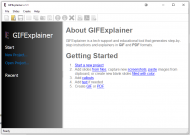
The first screen you're treated to after you install the program is this one. It immediately made me question what I'd thought, and open my mind to what it is.
I'll take the documentation for one of my own programs, and recreate it in GIF Explainer to see how straightforward it is.
The first step is to Start a new project, so I clicked the link, and the following dialog appeared.
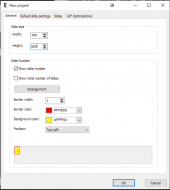
So it looks like the project will start with a tabbed dialog wizard- the first thing I did was set the width and height to a size that I thought would encompass the pages. I left everything else at their defaults, and moved to the next tab.
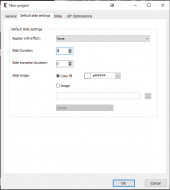
Some basic information about the settings of the slides- appears pretty straightforward, and without other notice, I assume that the time scale is in seconds (at least I hope so).
There are several options for effects in the drop down.
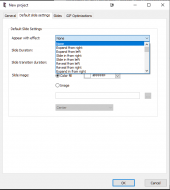
I choose slide in from left. What I didn't notice until later that the default for the transition duration is 0, and so it won't show up. It would be nice if you selected an effect, it changed that, as it is easy to miss.
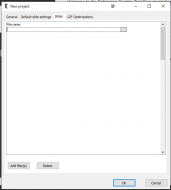
I didn't realize you'd actually be adding the slides in the wizard. The button on the highlighted line allows you to select a single file, or the Add files button allows you to select more than one at a time. I choose that way and end up with this.
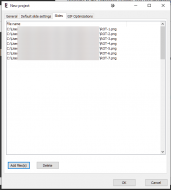
It seems as if there would be some interface here to rearrange other than deleting and adding, but trying to drag and drop only opens the file selection dialog. I hope that it's there later...
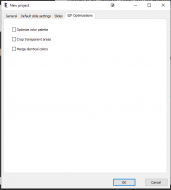
Some standard GIF optimizations- I choose none of them and click OK.
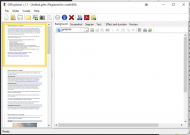
The slides appear, but there's no way to drag and drop them. I see that there is a button to allow arrangement of a single slide at a time. A bit clunky, but it works.
You can also add files, but only one at a time in this view, and add blank slides or screen shots.
The large area below is just to show you what your main background will look like.
I'm actually not sure what the Screenshot tab is for. I do know that when I try to do anything with the interface at this point, it is non responsive- Seems to be a problem with the rect clipping? But I can click the tabs so go quickly to the next one.
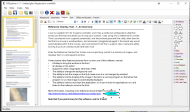
This tab allows you to edit your image and add callouts or other images or other graphical enhancements to the image. I add a callout arrow, and click on it which allows me to add text to it. There's quite the variety of different graphical artifacts to add to the image.
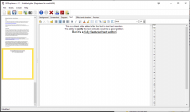
The next tab is a text tab which is a full featured text processing implementation, complete with tables and equation editing and the ability to insert more images. However, the one thing that it's missing that would be nice for a text based slide is the ability to vertically justify the text. Maybe the text is automatically justified to the center of the slide? I guess we'll see.
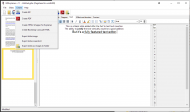
There are several options as to what you can do- create a GIF of course, but you can also export your images from the project, create a PDF, and create several a couple of different wrappers for your GIF. You can also export the slide's image or screenshot. Not sure what each if these is... I export the image and it seems to allow me to save it to a file, but doesn't enforce a type, so I'd guess it was the same format as the image itself? But the size of it is a lot larger than the image; the image was 35k and the exported slide is 1.6MB(!)
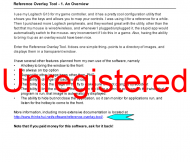
When I export it, even though the program is registered, it has a watermark that says Unregistered.
Exporting a screenshot throws an error. I suppose that those functions need a bit of clarification.
I created the final GIF, and it weighs in at 524KB- reasonable. The PDF of the same process was 1.15MB originally.. the exported PDF comes in at 1.14MB- so right about the same as the original!
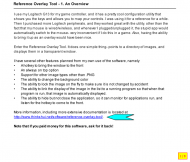
Taking a look at the GIF, I notice that the swipe transitions that I put in aren't there- and it's because of the transition duration above. I ended up making the images differing sizes beceause I had to chop up a page- and those images are centered vertically. The text I put on the new slide is not centered vertically.
How does it compare to similar apps
I'm not sure that there really is a similar app. In concept, it's quite similar to ScreenSteps or Clarify, but the implementation is quite different as it is an autoadvancing presentation. It's also a lot smaller (at least on my limited sample) than a comparable PDF.
Conclusions
It is a simple application with a simple purpose- but it packs quite a punch into the implementation of that purpose. It could use a bit of polishing in the user experience area, but it gets the job done ably. I've gone through the trouble of documenting steps for clients for a simple task- and the overhead in doing this seems quite smaller. I can also host this in a web page or just send a link to a gif that opens in a browser rather than being concerned about their capabilities to view it. If you have a need for something like this, it will prove useful. However, the use case that I put it to is not the best use case for it- it won't replace documentation, and though one of the stated uses was for guides, I don't think it would be meant for that with the static transition times. The target audience will either be waiting for the next slide, or won't have enough time to digest it. I'm also a bit confused on the licensing option- it appears that the $29.95 license is for a perpetual license with expiring updates, and the $149.00 license is a lifetime license with lifetime upgrades. But the mentions of subscriptions is a bit offputting. If it is true that the license key is perpetual, I think that it could be stated more plainly, as subscription has certain negative connotations. At $29.95 for a license with 1 year of upgrades, I think it's a fair price. However, if that's a subscription, I'm a bit more skeptical.
DISCLAIMER: Note that I was given a review copy of GIF Explainer in exchange for an unbiased, honest review.
Basic Info
| App Name | GIFExplainer |
| App URL | https://www.gifexplainer.com/ |
| App Version Reviewed | v1.1 |
| Test System Specs | Windows 10 64-bit |
| Supported OSes | Windows 7/10 |
| Support Methods | Registered users: http://www.majormind.com/helpdesk. Sales support: [email protected] |
| Upgrade Policy | https://www.gifexpla...om/order.html#hprlic |
| Trial Version Available? | Yes, adds watermarks. You have to give your e-mail address to get trial link. |
| Pricing Scheme | Lifetime license: $149.00. Subscription Price: 29.95USD |
| Author Donation Link | wraith808 |
Introduction
I must admit starting off, I went into GIF explainer with certain preconceived notions. When I see GIF Explainer, I think that it's going to record video and turn it into a GIF for sharing. That brings to mind certain questions- how about audio? How large are these things going to be? We've all seen the huge many megabyte GIF files that struggle to load in the browser as they download the image.
I'm happy to say that this isn't that.
If you've seen programs like ScreenSteps or Clarify, this is a similar concept- it documents processes in steps. Once these processes are documented, it saves them to a GIF image instead of a PDF.
Who is this app designed for
I could see this being useful to explain a series of steps to someone remotely instead of a screenshare or a screen recording.
The Review
The first screen you're treated to after you install the program is this one. It immediately made me question what I'd thought, and open my mind to what it is.
I'll take the documentation for one of my own programs, and recreate it in GIF Explainer to see how straightforward it is.
The first step is to Start a new project, so I clicked the link, and the following dialog appeared.
So it looks like the project will start with a tabbed dialog wizard- the first thing I did was set the width and height to a size that I thought would encompass the pages. I left everything else at their defaults, and moved to the next tab.
Some basic information about the settings of the slides- appears pretty straightforward, and without other notice, I assume that the time scale is in seconds (at least I hope so).
There are several options for effects in the drop down.
I choose slide in from left. What I didn't notice until later that the default for the transition duration is 0, and so it won't show up. It would be nice if you selected an effect, it changed that, as it is easy to miss.
I didn't realize you'd actually be adding the slides in the wizard. The button on the highlighted line allows you to select a single file, or the Add files button allows you to select more than one at a time. I choose that way and end up with this.
It seems as if there would be some interface here to rearrange other than deleting and adding, but trying to drag and drop only opens the file selection dialog. I hope that it's there later...
Some standard GIF optimizations- I choose none of them and click OK.
The slides appear, but there's no way to drag and drop them. I see that there is a button to allow arrangement of a single slide at a time. A bit clunky, but it works.
You can also add files, but only one at a time in this view, and add blank slides or screen shots.
The large area below is just to show you what your main background will look like.
I'm actually not sure what the Screenshot tab is for. I do know that when I try to do anything with the interface at this point, it is non responsive- Seems to be a problem with the rect clipping? But I can click the tabs so go quickly to the next one.
This tab allows you to edit your image and add callouts or other images or other graphical enhancements to the image. I add a callout arrow, and click on it which allows me to add text to it. There's quite the variety of different graphical artifacts to add to the image.
The next tab is a text tab which is a full featured text processing implementation, complete with tables and equation editing and the ability to insert more images. However, the one thing that it's missing that would be nice for a text based slide is the ability to vertically justify the text. Maybe the text is automatically justified to the center of the slide? I guess we'll see.
There are several options as to what you can do- create a GIF of course, but you can also export your images from the project, create a PDF, and create several a couple of different wrappers for your GIF. You can also export the slide's image or screenshot. Not sure what each if these is... I export the image and it seems to allow me to save it to a file, but doesn't enforce a type, so I'd guess it was the same format as the image itself? But the size of it is a lot larger than the image; the image was 35k and the exported slide is 1.6MB(!)
When I export it, even though the program is registered, it has a watermark that says Unregistered.
Exporting a screenshot throws an error. I suppose that those functions need a bit of clarification.
I created the final GIF, and it weighs in at 524KB- reasonable. The PDF of the same process was 1.15MB originally.. the exported PDF comes in at 1.14MB- so right about the same as the original!
Taking a look at the GIF, I notice that the swipe transitions that I put in aren't there- and it's because of the transition duration above. I ended up making the images differing sizes beceause I had to chop up a page- and those images are centered vertically. The text I put on the new slide is not centered vertically.
How does it compare to similar apps
I'm not sure that there really is a similar app. In concept, it's quite similar to ScreenSteps or Clarify, but the implementation is quite different as it is an autoadvancing presentation. It's also a lot smaller (at least on my limited sample) than a comparable PDF.
Conclusions
It is a simple application with a simple purpose- but it packs quite a punch into the implementation of that purpose. It could use a bit of polishing in the user experience area, but it gets the job done ably. I've gone through the trouble of documenting steps for clients for a simple task- and the overhead in doing this seems quite smaller. I can also host this in a web page or just send a link to a gif that opens in a browser rather than being concerned about their capabilities to view it. If you have a need for something like this, it will prove useful. However, the use case that I put it to is not the best use case for it- it won't replace documentation, and though one of the stated uses was for guides, I don't think it would be meant for that with the static transition times. The target audience will either be waiting for the next slide, or won't have enough time to digest it. I'm also a bit confused on the licensing option- it appears that the $29.95 license is for a perpetual license with expiring updates, and the $149.00 license is a lifetime license with lifetime upgrades. But the mentions of subscriptions is a bit offputting. If it is true that the license key is perpetual, I think that it could be stated more plainly, as subscription has certain negative connotations. At $29.95 for a license with 1 year of upgrades, I think it's a fair price. However, if that's a subscription, I'm a bit more skeptical.


