topbanner_forum
  *

avatar image

Welcome, Guest. Please login or register.
Did you miss your activation email?

Login with username, password and session length
  • Monday December 22, 2025, 7:19 am
  • Proudly celebrating 15+ years online.
  • Donate now to become a lifetime supporting member of the site and get a non-expiring license key for all of our programs.
  • donate

Recent Posts

Pages: prev1 ... 309 310 311 312 313 [314] 315 316 317 318 319 ... 454next
7826
General Software Discussion / Re: Helicon Filter won't work on my computer!
« Last post by tomos on April 12, 2010, 09:52 AM »
btw, the BDJ offer is for a lifetime license (so it's still tempting aaaaghh!):

You're an evil little man, Tom! I'd managed to walk away from the BDJ offer and you've got me scurrying back over to review it (yet) again  >:(

You calling me 'little' ?? >:( 
lol :)
7827
General Software Discussion / Re: Helicon Filter won't work on my computer!
« Last post by tomos on April 12, 2010, 07:23 AM »
@ CyberDiva -
maybe I over reacted when saying I wouldnt re-install after uninstalling. But then the fact this has happened to others makes it sound like it will happen again if you reinstall... (although it might be okay if you just install the beta? - Skwire had the problem with the free version too)

I know I recommended Helicon Filter in the Sagelight thread, but I'm unsure whether to go for the BDJ offer myself. It sounds like Sagelight has much more active development, I've joined the forum there and am going to make a few requests & hope for the best. If it was the ease of use that tempted you (with HF) I suspect you'd get used to Sagelight relatively quickly. At this stage (for me) I think the only big advantage of HF is that you can browse a folder within the app itself.

btw, the BDJ offer is for a lifetime license (so it's still tempting aaaaghh!):
Danylo Kozub (Helicon Soft Ltd. Developer) Says:

Helicon Filter is sold only with life time license, so this is mistake in BdJ which will be corrected.
7828
My favorite is MHSoftware's InfoStore...

It's paradigm is an hierarchical tree of folders, notes, and data tables.  Not the most full featured of tools, but fantastic at quick and dirty which, honestly, is what I need mostly.

As a programmer/developer, I can honestly say that InfoStore's keyboard interface is the best I have ever encountered.  In the beginning I was put off by it for reasons you will understand if you try the software, but after a while I acquired a taste for it.  The design is minimal-key-strokes-necessary... most of you understand how hard that is to architect.

Highly recommended

that sounded interesting, so I went to have a look & clicked on buy to see the price - but link was dead - so I emailed site. Answer was:
I regret that InfoStore is not currently being sold; but expressions of interests are recorded, and we will contact you again if we decide to release an upgraded version.


PS I dont understand your InfoQube comment either...
7829
General Software Discussion / Re: Helicon Filter won't work on my computer!
« Last post by tomos on April 11, 2010, 04:03 PM »
I didnt have any problems with the last free version myself (XP Home SP2)
maybe you should report this to Helicon Filter ?

If they acting up that much I certainly wouldnt reinstall (if I were to uninstall)
Do you use system restore or an imaging programme? you could try going back pre the install
If uninstalling, I would use Revo-uninstaller (there's a portable version - free) it should clean up any mess fairly well :)
7830
just edited my post above

[...]   I just found a 'Smooth Skin/Image' edit which = Noise Reduction, preview of effect doesnt allow you to zoom in though, so you cant really see effect unless you apply it... - a confusing interface here with changes shown 'live', and also a 'Preview Selection' setting which has the limitation as described in strikethrough text combined with: I not sure what exactly it's previewing ]

[...]

[edit] corrected SL noise reduction info [/edit]


Discussion of Noise Reduction in Sagelight

And another

Even more discussion on 26th March in the BLOG

the blog link recommends a good noise-removal plugin (awaiting improvements in Sagelight itself) :Thmbsup:
7831
Backup Guide / Re: Well I'd like to have shared some ....
« Last post by tomos on April 11, 2010, 06:49 AM »
sounds interesting

ReverseDelta™ to Save Space

Using its ReverseDelta™ incremental technology, Oops!Backup will only back up the actual changes you make to a file – without needing to back up the whole file again every time you make a change. What distinguishes this technology from other products is that our innovative ReverseDelta ensures that the latest version of a file is always available in its entirety and not as a delta file.
7832
Helicon can be trialed without any limitations for 30 days. The version from BdJ is 5.0 beta.

ahh, that probably (again: hopefully) means free upgrades till version #6 ...

Curt, what do you like about Helicon Filter 5 that you really want but can't get with Sagelight?

@ Cyberdiva
I know I'm not Curt  :)
but I would be tempted by the BDJ offer because Helicon Filter is:
much easier to use when you want to modify more than one image
has noise reduction
it's also probably much easier to use if you're a more basic user (but dont let that put you off if you're a more advanced user)

If I wanted to modify just a couple of images, especially if I really wanted to modify them as opposed to 'just' correcting the image, Sagelight would be my choice

hth, Tom
7833
Interesting range of licenses.
On the HF website, they have a 12 month license for $20 and an unlimited lifetime license for $75.
The 50% off BdJ offer ($37.50) gives you free upgrades until the next major version. That might, of course, mean a lifetime ;D

The 12 month license reverts to 'demo mode' after your time is up (what exactly demo mode is, I dont know)
I presume (hope) "free upgrades until the next major version" does NOT revert to demo mode at any stage

Also, (probably more importantly) there's a beta of version 5 out, so the next major upgrade is presumably going to be very soon... (current version being 4.9.something I believe [can anyone confirm that current Helicon Filter is not yet at version 5?]
7834
Living Room / Re: First iPad Reviews Are In
« Last post by tomos on April 08, 2010, 09:47 AM »
Well, just to play devil's advocate here, I'm going to post an article by the great Stephen Fry about the ipad:
http://www.stephenfr...10/01/28/ipad-about/

A very entertaining read :)

I'm confused again though - I know nothing about this sector of the market apart from reading some reports & reviews of iPad & the related threads here. I thought there was nothing particularly new about the iPad - Stephen Fry seems to think it's revolutionary but doesnt really say why.
Maybe it's simply the quality & build of it - he does go on about that.
and the quote in mouser's post (OP) complements that
For most people, manipulating these digital materials directly by touching them is a completely new experience - and a deeply satisfying one.

I know it's supposed to have a good quality screen (with very good viewing angles)

Have I missed something else (novel/new/different) though ?
7835
Well, I had a little go at it last night - it's a very nice progamme, it reminds me of Helicon Filter, which (free version) I also tried out for the first time within the last week.
I think I'd prefer this to Helicon Filter if just working on a very small number of images,

Some comparisions: Sagelight (SL) with Helicon Filter (HF) - Disclaimer: remember these are first impressions (please correct me if I wrong anywhere!)

~ Both are easy to use - just mess around and see what happens!
~ Both have a split pane view - original & current modification; in SL one-click shows you the original image at any time no matter the view
~ SL has the better rotate image - simply cause there is a grid overlaid - no guides in HF
~ SL has the 'Undo Brush' so you can selectively undo any of the effects
~ HF has noise reduction - cant find any in SL [I just found a 'Smooth Skin/Image' edit which = Noise Reduction, preview of effect doesnt allow you to zoom in though, so you cant really see effect unless you apply it... - a confusing interface here with changes shown 'live', and also a 'Preview Selection' setting which has the limitation as described in strikethrough text combined with: I not sure what exactly it's previewing ]
~ HF will correct chromatic abberation (have not tried) and you can adjust for a certain amount of lens distortion or from incorrect angle of image (skew etc)
~ SL - there doesnt seem to be a way of having a folder of images visible as thumbnails | with HF you can open a folder & select images, or even batch process (for what that's worth)
~ oddly, Sagelight does not have one shortcut key - not even Ctrl+O or Ctrl+S - that would drive me crazy if I wanted to work on a lot of pics (also have to use window open dialogue to find your pics)


[edit] added SL noise reduction [/edit]
[edit] corrected SL noise reduction info [/edit]
7836
I love the idea of exifPro, and bought a license. However, as I've noted elsewhere, it generates HUGE index files (almost 2GB) and two deal breakers for me:

:) just in case you missed my response on last page :)

Re Exif-pro:
AFAICT it's cataloging [indexing] features are really intended for keeping track of stuff on external drives/discs
- there's no other advantage to cataloging that I can see
of course,
this may well be what you were using it for . . . (I've never used that feature after the first attempt; but I did use the programme just last week to sort a batch of 400 photos of a wedding & it worked very well for that.)
7837
thanks Dormouse, things are getting slowly clearer ;)


PM allows you to add tags to the photo itself as well as to a sidecar
Is one of these preferable?
IPTC is stored as part of the file AFAIK - isnt that (IPTC) pretty much a 'standard' ? (I suspect if I reread this thread that's covered somewhere :-[)


A browser, sorter, tagger is like a file explorer taking in details of all the files, allowing you to browse them and add tags, ratings etc.
that's a good description of Exif Pro then
(but I'm not sure of it's RAW capabilities)
7838
I think what surprises me here is the distribution of prices.

I guess they charge high prices mainly cause they can - photography has been accepted as an expensive hobby where everyone wants to get 'the best'

But maybe also because workflow is very important in these apps: hence there needs to be a lot of work done on the GUI - coders hate working on GUI's & charge triple rate for that kind of work (:p and maybe it's more labour intensive too?)

I guess I should have added a smiley at the end of all that :)
7839
I think what surprises me here is the distribution of prices.

I guess they charge high prices mainly cause they can - photography has been accepted as an expensive hobby where everyone wants to get 'the best'

But maybe also because workflow is very important in these apps: hence there needs to be a lot of work done on the GUI - coders hate working on GUI's & charge triple rate for that kind of work (:p and maybe it's more labour intensive too?)
7840
Thanks for the tip :Thmbsup:


The business edition of a popular Symantec utility being offered free for registration.

Unless I'm missing something, it doesnt seem to be a Symantec utility - it's from "MT Solution Ltd."
7841
Backup Guide / Re: Don't forget a regular mydocuments backup
« Last post by tomos on April 05, 2010, 02:10 PM »
thanks MohKraats :)

this one sounds interesting,
   Areca    http://www.areca-backup.org   Freeware, opensource GPL
Does do delta and incremental backups, you can search within a backup, restore only 1 file from a backup, and and and . . . .

here's a good review (from user giessen) from cnet
Pros: This can make a backup and keep it up-to-date by just changing the parts that need to be updated. It can cut large files into pieces and encrypt the backup (including the filenames) so it is completely safe. The backup process is reasonably fast.

Cons: It's not very effective for making a backup to a (mapped) network drive, because the backup process involves many write and read operations (more than just creating the backup files and saving them). No WebDAV compatibility.
Summary: I use this to make a local backup, which I then transfer to a web drive with a WebDAV synchronizer (in this case, Gladinet). Areca offers to save the backup to an FTP server, but they are not easily available anymore and have been superseded by WebDAV, whcih Areca can't handle.

The backup process is fast and seems to be accurate. With a strong password (or a pass-key -- but you need to make a backup of that somewhere else) the files are probably very safe.

with a programme like this (that does delta backup) I'd like to see it tested before I'd depend on it (some people here would be fairly negative when it comes to partial file backups...)
7842
Re Exif-pro:
AFAICT it's cataloging features are really intended for keeping track of stuff on external drives/discs
- there's no other advantage to cataloging that I can see

Tagging is limited (I think you can create tags via a text file but without any hierarchy)
It's a great programme for sorting a batch of photos using the default tabs 1(good) to 4(print)
Great viewer
7843
This is all just bringing back bad memories and reminds me about WHY I dumped the whole "organization" idea in the first place and just use DOpus 9...

Nothing wrong with using DOpus. The main reason I originally chose it against the competition was that I thought its use in working with images was much better. And I still use it for lots of (simple) image management processes.

I've requested some minor improvements re working with images in DOpus - e.g.
ability to open file currently showing in (standalone) viewer in an external editor;
ability to copy path of file currently showing in viewer;
better zoom-in capability in viewer


I'm amazed how little file managers cater towards working with images - if you move to pretty much any app designed specifically for working with images, you're going to miss lots of goodies you usually have in your file manager.  And vice-versa  :-(
These day pretty much everybody has photos so it would be nice if the file-managers catered a bit more to that.
Also if you work with images (but not photos) you're very much neglected


But I guess by image 'organiser' tagging is pretty much a must - otherwise I think I'd stick with DOpus too - as I have it  ;-)
Like Superboyac, I'm watching this space for tips :up:
7844

not to give anyone a hard time - but just in case people haven't seen it:
The amount you choose to pay is entirely up to you but because of Paypal's fees, it is suggested that you make a payment of $2.00 or more otherwise the developer will be out of pocket which would be unfair

from Gizmo's site (link in first post)
7845
Re the idea of storing notes seperately:

InfoQube's (IQ) notes are html and are stored seperately from the database file by default
The HTML pane displays content (web &/or notes) related to items
The HTML content can also be stored/saved as MHT (as html it cannot yet store images locally AFAIK)
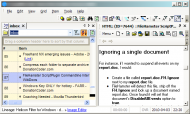
IQ_066.png

Reading your first post Josh: I think IQ could fit the bill
e.g. I can create links to files (or to other items, or to urls) in the Grid (left side in screenshot) & in the html pane
or
I can simply open e.g. a PDF file in the html pane and next time I click on the related item in the grid the pdf file show again - I believe the files shown in the html pane can also be saved in a folder in same directory as the database file. (I work mostly with files linked to items in the grid myself)
I have Softmaker/Textmaker and I find the html pane opens doc files externally - I believe with Word installed it shows doc files within the programme

This would not be covered:
Ideally, each page would allow for thumbnail generation to get a quick glimpse of the pages in each "book" without opening them all them completely. Of similar function, or perhaps a substitute, is just displaying the associated icon of the program used to open each document so you know it's type.
and
I'm not sure what you mean by a "CHM file creation tool"

IQ is still in Beta:
Pros - very responsive developer
Cons being it has a learning curve cause the interface at times not yet so user-friendly, and also cause it's so flexible (- but having a fair idea what you want to do with it helps - you'd get a lot of help at it's forums too)
7846
Found Deals and Discounts / Re: Greenbox LogoMaker: Free
« Last post by tomos on March 24, 2010, 04:39 AM »
thanks App & Curt for the description & screenshot :Thmbsup:
7847
Found Deals and Discounts / Re: Greenbox LogoMaker: Free
« Last post by tomos on March 23, 2010, 11:45 AM »

How does a 'Logomaker' work ?

  Does it give you design tips ?
  Does it say - no, dont do that, do this ?
  does it have a bunch of clipart included ?

(just trying to get my head around this, thanks!)
7848
woo hooo ;D
muggy mug mug :D

thanks!!
7849
Post New Requests Here / Re: IDEA: usb drive backup program
« Last post by tomos on March 20, 2010, 06:12 PM »
It needs to compress it

Aren't syncing & compressing incompatible as such - I mean it becomes a backup then doesnt it - I'm not sure how much the terminology matters, but if compression is important there are probably free backup apps that will do (some of) what you want..
7850
Found Deals and Discounts / FileHamster discount link
« Last post by tomos on March 20, 2010, 03:54 PM »
FileHamster discount link from here on dc:

[...]
Link
-Mogware Support (March 20, 2010, 12:25 PM)

it's 50% off the Basic & Enterprise versions (which are otherwise full-price at the moment - so that's an especially good deal on the Enterprise version)
and
50% off the Advanced version (otherwise 60% off at the moment)(i.e. it's just shy of $40 with this discount)

AFAIK plugins dont work with the Basic version (so e.g. no zipped backup).
I'm not sure if you're able to upgrade from one version to another (e.g. Basic to Advanced)
Pages: prev1 ... 309 310 311 312 313 [314] 315 316 317 318 319 ... 454next