topbanner_forum
  *

avatar image

Welcome, Guest. Please login or register.
Did you miss your activation email?

Login with username, password and session length
  • Sunday December 21, 2025, 4:43 am
  • Proudly celebrating 15+ years online.
  • Donate now to become a lifetime supporting member of the site and get a non-expiring license key for all of our programs.
  • donate

Recent Posts

Pages: prev1 ... 295 296 297 298 299 [300] 301 302 303 304 305 ... 470next
7476
General Software Discussion / Re: WorkTimer: A free web app for freelancers
« Last post by 40hz on June 13, 2011, 07:17 PM »
UPDATE2:

Just heard from Sirbastian Manning, developer of WorkTimer. He clarified a few questions I had and pointed me to some things I was afraid I might have missed or misunderstood.

I'll be doing the review for real as soon as I get a chance. Probably towards the end of this week.

I also invited Sirbastian to drop by and get to know us. Hopefully he'll be able to find the time to join in the discussion.

So...stay posted. Review is on the way. :Thmbsup:

7477
Developer's Corner / NetRexx is now free and open source courtesy of IBM
« Last post by 40hz on June 13, 2011, 02:07 PM »
Good news for Rexx fans. It's been open sourced and released under IBM's ICU License.


NEWS: NetRexx Open Source

I am very happy to be able to announce that today, the 8th of June 2011 (World IPv6 Day) IBM has sent RexxLA the source code of the reference implementation of the NetRexx translator for administration and release under the ICU open source license. I would like to thank IBM, and everyone at IBM and RexxLA who has put in hard work to make this possible. This has secured the future of NetRexx, our favourite computer language, and enables us to do work on it to keep it up to date whenever this seems necessary. A special thanks to Mike Cowlishaw is in order, who not only invented and produced the language, but also was of invaluable assistance during the open source process.

This brings an end to a long period in which some have expressed doubts regarding the perspective of the language and the intentions of the parties involved. Now that we have this behind us, the real work can start. The language board will convene and draw up plans for the future. Because a lot of the work of readying the source code for publication has been done over the years past, there will be no long delay in having it available in a source code repository on the net. The www.netrexx.org site will be on the air shortly.

The IBM NetRexx web site will be changed to reflect this new status of NetRexx, and will cease to function later this year. The binary distribution will be available from www.netrexx.org initially and will reflect NetRexx 3.00, which is an almost unchanged release that contains the required source code modifications of the translator and has some small fragments of code adapted to be able to build on more recent Java versions. It is expected that 3.01 will be available from the code repository and will be the first official RexxLA release.

best regards,

René Vincent Jansen
President, Rexx Language Association.

Link to announcement here.

Not familiar with Rexx? You can read about it here.

Rexx for everyone

Scripting with Free Software Rexx implementations

David Mertz ([email protected]), Developer, Gnosis Software, Inc.

David Mertz is owner and chief consultant for Gnosis Software, Inc. whose corporate slogan is "We Know Stuff!" (and we do). His fondness for IBM dates back embarrassingly many decades. You can reach David at [email protected]; you can investigate all aspects of his life at his personal Web page. Suggestions and recommendations on past or future articles are welcome. Check out his book, Text Processing in Python.

Summary:  It's easy to get lost in the world of "little languages" -- quite a few have been written to scratch some itch of a company, individual, or project. Rexx is one of these languages, with a long history of use on IBM operating systems, and good current implementations for Linux and other Free Software operating systems. Rexx occupies a useful ecological niche between the relative crudeness of shell scripting and the cumbersome formality of full systems languages. Many Linux programmers and systems administrators would benefit from adding a Rexx implementation to their collection of go-to tools.


7478
Living Room / Re: Force USB Drives to use Drive Letter X
« Last post by 40hz on June 13, 2011, 12:56 PM »
So from what you're saying it should pick T: next, yes?

Nope. It should have picked E: The next available drive letter - not the next letter available after the last drive letter you assigned.

Just checked it on our test server duplicating your setup above to be sure I didn't have my head someplace it shouldn't be.

C: - Physical
D: - CD-ROM
E: - Available (not assigned)
F: - Mapped Drive
G: - Available (not assigned)
S: - Physical

It assigns the external HD I plugged in the letter E. Installed a USB key and allowed it to be assigned a letter. The server chose G which is the next available letter since F has already been assigned as a mapped drive. Removed the drive in E, waited a minute and plugged it back in. It got assigned E again.  :)

C: - Physical
D: - CD-ROM
E: - USB External Drive for backup
F: - Mapped Drive
G: - Flash key (used to test since mapped F has already provided the gap between D and F)
S: - Physical

The reason why you want to have a gap is to have a predictable drive letter for auto assignment. If you have an available letter down low in the alphabet, that will be what gets picked first whenever you plug/unplug your backup drive. Stuff that gets installed afterwards will land above that. Which is no problem because you usually don't need to worry too much about what drive letter gets assigned. Or if you do, you assign it yourself (I always do BTW) in disk manager. As long as the device stays connected, an assigned letter won't change. And t it should be persistent after a reboot.

About the only time it might be a problem is if you have a bunch of USB storage devices that have been auto assigned a letter by a server which gets rebooted unexpectedly. In that case there is a definite chance those drive letters may get switched around if something goes awry with the USB discovery polling. But you should always check your system after a reboot anyway so...

:Thmbsup:

P.S. Moving the CD over to M (funny, I always use R ;D) makes the next available letter D - which will always get assigned to your backup drive as long as no other USB drive else gets plugged in first.  Works the same as my suggestion. 8)
7479
Living Room / Re: Why ebooks are bad for you
« Last post by 40hz on June 13, 2011, 12:44 PM »
I think the recording industry has realized they've lost the battle, hence the new emphasis on network filtering, voluntary censorship, and policing the internet we're hearing so much about these days.

What makes this interesting is that along with all the justifications for expanded powers and "cooperation" (in order to prevent terrorist activity, cyberattacks, and that perennial favorite demon - child pornography) is what's found hidden in the fine print and subtext. Most notably protection for "intellectual properties" which on further reading seems to be largely confined to pop music recordings and big-budget motion pictures.

Also interesting is how individual privacy, consumer protection and compensation for corporate negligence when it involves breaches of their own IT security, and restrictions on the gathering and sharing of personal information between companies is never mentioned - or is given token mention. If it even gets that much.

Brave new world indeed.  :tellme:


7480
Living Room / Re: Force USB Drives to use Drive Letter X
« Last post by 40hz on June 13, 2011, 07:29 AM »
I had a similar problem. But I didn't have a brilliant solution at the time so I used this workaround.

Instead of insisting on a specific drive letter, take advantage of the fact drive letters get assigned in next available letter sequence when a USB drive gets plugged in.

I just looked at the last fixed harddrive letter (in this case CDEFG were all being used), plugged in a USB key and assigned it one more than the next available letter which in this case is the letter is I. (I set the key to hold a backup of the system state data since I didn't want it to just sit there doing nothing BTW.)

We then set set the backup software to look for the H drive. Because with drive I now 'permanently' occupied by the USB key, it leaves a gap in the sequence, with the next available letter being H. If you remove and then immediately add (as in swap) an external drive, it will always assign it the same letter (H) since it's the next available in sequence (i.e. CDEFG_I).

So why create a gap in the letter sequence? Here's why: Anything that gets plugged in after that will get letter J or higher.

So as long as you're swapping H properly using the remove USB applet - and you immediately replace it with another drive - the drive letter shouldn't change. The backup drive will always get the letter that falls into the gap. And any additional USB drives will grab letter J or higher so it won't affect your designated backup drive letter assignment. No more having the backup drive's letter jumping around.

 :)
7481
Living Room / Re: Why ebooks are bad for you
« Last post by 40hz on June 13, 2011, 06:58 AM »
I think it comes down to an attempt by the publishing industry to reposition their product and change the definition of what a book is.

Under the old paper system, books are 'objects,' or 'artifacts' or 'products.' In most societies, once an object is purchased, ownership passes to the purchaser.

Under the new electronic format, books are now considered just another form of intellectual property, and are therefor licensed for use rather than sold.

It's a subtle distinction but a very real one. And since the desire to redefine a book is primarily driven by profit motives, it's a debate that's unlikely to get resolved amicably.

In some respects the e-book publishers are smart in tying their product to an access device. The thing that is killing the recording industry is their inability to restrict the use of their product because the playback devices and technologies are widely distributed and non-proprietary. The large publishers that are selling digital editions seem determined not to let that happen to them.

Unfortunately, attempting to restrict access by requiring a proprietary device has been tried in the past. And it failed miserably. Early record players all used their own format. A Victorola 78 record would not work on a different brand player. And this was done mostly in an attempt to lock in the customer's downstream purchases to a specific brand of player.

But while this did provide certain short-term benefits to the companies making the players, it also hurt the industry as a whole since it made people reluctant to buy an expensive record player without some assurance it would be able to play any recording they wanted to purchase. It also hurt the artists since they were locked into a specific manufacturer's device. And those same manufacturers took advantage of the situation by offering lower payments to artists if theirs was the most popular player.

It wasn't until "open" formats like the standard 33 and 45 vinyl records came out that the entire industry really took off and everybody came out ahead. It was a win for the artists, the recording companies, the equipment manufacturers - and the customers. And all because they dropped their proprietary and restrictive formats.

7482
^Wouldn't know. Never got that approval.  ;D

7483
Actually, the Knights "Nih!!!" isn't too far from what it means in this sense.  ;D

Not Invented Here (NIH) is a term used to describe persistent social, corporate or institutional culture that avoids using or buying already existing products, research or knowledge because of their external origins. It is normally used in a pejorative sense, and may be considered an antipattern. The reasons for not wanting to use the work of others are varied but can include fear through lack of understanding, an unwillingness to value the work of others, or forming part of a wider "turf war".[1]


7484
They disable right click by default .... WTF !!!

One of my pet hates with Macs is the mouse/mousepad. I particularly hate that you can't tap the mousepad to click ..
-Carol Haynes (June 12, 2011, 05:22 AM)
.

Guess they don't want to license the drivers from Synaptic like everybody else does. One more example of N.I.H. :-\

7485
@40hz:
Rite of passage would describe it better, I think.  :Thmbsup:

Hmmm...

turning point
(turning points plural ) A turning point is a time at which an important change takes place which affects the future of a person or thing.

rite of passage
a ritual event that marks an individual's progress from one status to another

Maybe...but I think I'm going to stick with turning point. :P

It wasn't so much an acknowledgment of my attainment of any sort of social status or maturity. ;D  It was more a realization that I now had resources of my own and therefor could be expected to grant a favor as well as request one. Which is typical of my family. Real old-school New England. There's not much patience with ritual, so there's nothing like a "coming of age" process or ceremony. "Growing up" or "becoming an adult" (in my family) simply means taking on more responsibilities and being held more strictly accountable for your actions and words. Which makes for a rather austere outlook on life. But I guess that's us...   ;)


7486

I believe I have what I need sitting out in the garage already, but I might go out and buy a kit just for techy stuff. It's really annoying having to scrub down tools before you use them on computers because the last place you used the tool you need was in the messiest environment possible :P
-wreckedcarzz (June 12, 2011, 12:31 AM)

Very true. Don't know how much of this you plan on doing, but it's always nice to have a set of tools for a specific purpose. And you don't need to spend gobs of money assembling a kit as long as you don't get sucked into the marketing hype. Good hand tools tools are still relatively cheap, and they don't wear out servicing computers like they do when you're working on car engines or big appliances. I just keep mine in a zip pouch all ready to go.

That, and my dad would stop blaming me for losing his screwdrivers. He just lays them down and then asks for them days later, oblivious to where they may have gone.

There is a certain satisfaction to cutting that umbilical cord. I used to have a similar problem with my Dad. It was a major turning point in my life (age 16) when he one day asked me if he could borrow some of my tools with a promise he would take good care of them and return them promptly.

I think that was the first time he started to look at me as another adult rather than just "his kid." (Revenge is sweet!) ;D


7487
Actually you are probably stuffed if you want to do much with faulty memory or hard disk as Apple laptops are notoriously difficult to take apart and probably require specialist tools.
-Carol Haynes (June 11, 2011, 04:00 PM)

For a Mac Powerbook, you'll need a T6 and T8 Torx screwdriver plus an (I forget which size) mini-Phillips. Keep track of which holes you take each screw out of too. They're not interchangeable. There's something like 6 different screws used in the Powerbook case assembly if my memory serves. Talk about smart industrial engineering practices. Is it any wonder they cost what they do?  :-\

*Googles for images and bookmarks them* Good to know :) thanks
-wreckedcarzz (June 11, 2011, 11:13 PM)

You can blow serious money on this stuff buying "pro" tools made by people like Xcelite and Jensen. But the simple truth is any decent quality screwdriver set will work equally well.

I keep one each of these two sets made by Husky. They're available at any HomeDepot store. One is a mini slot/Phillips, the other is the Torx set. They're small, fit comfortably in the hand, and all the bits get stored in the handle so they're completely self-contained. I probably do 95% of all my laptop tinkering with these two combo screwdrivers. (A small roll of Scotch Tape, a paperclip, a wooden or plastic toothpick, a small pair of non-conductive tweezers, and a hemostat takes care of the remaining 5% in case you're interested.)

HuskyRegular.jpg     HuskyTorx.jpg

They used to run about $8 USD each although somebody told me they just went up significantly in price. I wouldn't willingly pay more than $10 for either. Right now they're $7.00 and $8.49 at my local store.

Sears also has a nice selection of precision screwdrivers available either in sets or as singles. Singles run between $3 and $4 per. Nice because you only have to buy what you need. (IMO only amateurs show up with a tech case brimming with every screwdriver and pair of pliers known to mankind. A real pro packs only what she/he needs to get the job done.)

craftsman.jpg

There's also a nice 3-piece pen-style combo precision screwdriver made by AmPro that Sears carries for about $22. Comes in three colors and oozes 'Tech-Ninja' vibe with those knurled aluminum handles. This little set has more than you'll ever use. And it should last forever unless you lose one - or it gets stolen. Which happens far more often than we'd like in places (like corporate offices) where you'd normally least expect it.

AmPro.jpg

The only problem with the AmPro (or any combo tip screwdriver) is the shaft length and diameter. If there is a screw in a deep well in the case, the diameter or length of the shaft may not allow you to reach the screw that's lurking down there. Which is why I prefer screwdrivers like the above Husky 'multis' or the Sears precision singletons which have narrower and longer shafts.

That's my 2¢ anyway.

P.S. If your bits aren't already magnetized - magnetize them. It won't damage anything in the laptop since the magnetic field will be very weak. But it will save you time by allowing you to pull a tiny screw out of a hole without needing to turn the laptop over to do so.

Not having to flip the laptop will also save your sanity by eliminating the need to go searching for that same tiny screw when it bounces off the tabletop and disappears into the rug or gets lost in all the dust and debris found on most office floors. :Thmbsup:

7488
Living Room / Re: When you make your 100'th Post
« Last post by 40hz on June 11, 2011, 05:24 PM »
Go Stephen! :Thmbsup:

You too Ath - you little devi ! ;D

7489
[Desperately scrambling for a "bright side"]

If the entire experience is documented throughly, it should make for an excellent cautionary tail.

 ;D. Evil. But still  ;D.
 :Thmbsup:
7490
Actually you are probably stuffed if you want to do much with faulty memory or hard disk as Apple laptops are notoriously difficult to take apart and probably require specialist tools.
-Carol Haynes (June 11, 2011, 04:00 PM)

For a Mac Powerbook, you'll need a T6 and T8 Torx screwdriver plus an (I forget which size) mini-Phillips. Keep track of which holes you take each screw out of too. They're not interchangeable. There's something like 6 different screws used in the Powerbook case assembly if my memory serves. Talk about smart industrial engineering practices. Is it any wonder they cost what they do?  :-\


7491
General Software Discussion / Re: Not bad article on The Sins of Ubuntu
« Last post by 40hz on June 11, 2011, 03:16 PM »
O_o Uh, Okay... With a name like CrunchBang I just gotta try it!

I think you're gonna like it... :Thmbsup:

7492
General Software Discussion / Re: Not bad article on The Sins of Ubuntu
« Last post by 40hz on June 11, 2011, 12:39 PM »
I prefer Mint (in any incarnation) over Ubuntu these days. It's also refreshing to see the latest main release as their attempt to provide users with the absolute best Gnome 2 experience possible before Gnome forces us all to walk away from it and down the path of the, in many ways misguided (IMO), "new direction" Gnome 3 wants to take.

That being said, I still prefer Xfce to Gnome as my main desktop. Just hope #! (aka CrunchBang) continues to crank out their excellent distro.  Because that's my current "go to" Linux for day-to-day use.   :Thmbsup:

7493
Living Room / Re: What's Your Internet Speed/Reliability SATISFACTION?
« Last post by 40hz on June 11, 2011, 11:15 AM »
^I sometimes think the main reason why Apple prices it's products they way they do is to make you think twice before tossing them through a second story bedroom window onto your driveway.

Which is more than I can say for my nephew's Asus EeePC when it started giving him "big stones" one otherwise quiet Sunday afternoon.  ;D

7494
Hey, for $140, you're set! Do what you can with it. Play with it. Make some money with it then splurge on the newest one~! :D

That is one of the best pieces of advice I've ever seen given here.  :Thmbsup:

 8)

7495
Apple makes a fine machine. Yesterday's technology at tomorrow's prices AFAIC - but it presents itself nicely.

Truth be told, it does get the job done. At a cost. And if you want to run FinalCut Pro, GarageBand, or Logic Studio Pro, it's the only game in town.

For artsy or exotic apps, the Mac often shines. It's only when you try mainstream applications like browsers or office productivity programs that the blush comes off the rose and you realize how clunky OSX can be.

But that's the price you pay for "vision" and "insanely great."

However, if I had a spare $500 to play with I'd be more inclined to go for a B3 server from Excito. It's a truly cool and useful device. Does just about anything you'd want a home/media or small office server to do. And it's from Sweden - so it's automatically uber-cool.  ;D


7496
Speaking as a former Apple service provider, strongly consider investing in an AppleCare Protection Plan contract. If anything breaks you'll be glad you have it. For many things, the only source for replacement parts is Apple itself. And they don't sell raw parts so you'll often need to go through one of their service centers to get something fixed. Without AppleCare, that's can be an expensive proposition.  :tellme:

7497
Living Room / Re: What's Your Internet Speed/Reliability SATISFACTION?
« Last post by 40hz on June 10, 2011, 11:31 AM »
Most ADSL connections in my area need about 1 hour and twenty minutes to grab a 650mb CD image. Optimum Online cable does it in about 15-20 minutes. And a client T1 in a lightly trafficked office can do it in about 5.

Um... 5? ...minutes? On a T1, which is only 1.5Mb. We've got a pair of T1's for a total of 3.0Mb both ways which works great ... but it ain't gonna pull a full CD in 5min. ...Unless it's a zipped copy of a blank one... :)

Yoiks! My bloody iPhone dropped the 6 in front of 65 minutes for the T1! Fixing it now. Thanks.  (Gotta stop posting to the forum off my phone. God do I hate touchscreens. Bad medicine. Give me a chicklet keyboard any time. ) :-[

7498
Living Room / Re: What's Your Internet Speed/Reliability SATISFACTION?
« Last post by 40hz on June 10, 2011, 08:00 AM »
I have ADSL from SNET... which became SBCGlobal... which became AT&T.

I'm generally happy with it since outages are few and far between, and what throttling they may or may not do is pretty subtle.

ADSL Runs about $20/mo for standard speeds. Higher "business" speeds are available for a higher monthly rate.  Cable is about $40, and a T1 goes between $300-$500 depending on where you are; who you get it from; and what additional features (managed router, boundary security, VoIP, etc) come bundled with the package.  Sprint's T1 has traditionally been the cheapest offering for us when it's locally available.

Rather than use artificial tests I use the download time for a CD ISO as a rough 'utility' for testing line speeds. Most ADSL connections in my area need about 1 hour and twenty minutes to grab a 650mb CD image. Optimum Online cable does it in about 15-20 minutes. And a client T1 in a lightly trafficked office can do it in about 65.

None of these are scientific tests, but I think they're fair representations of what people in my area can reasonably expect performance-wise in 'real world' terms.

As you can see the performance isn't stellar. But it's not bad for most purposes.

I'll give it a 3 out of 5 rating for my area.  8)

Addenda:

Just for completeness, here's my speed per speedtest.net

speed02.jpg

And the related quality test from the cousin ping.net site:

speed03.jpg

Note: I generally prefer using the MySpeed tests available here.

They're more detailed and possibly more accurate. At least according to the techs from the various ISPs and VoIP providers I've asked. At any rate, this is what they all seem to use when they're on a client site. See results for my home connection below:

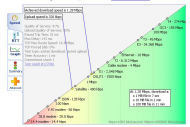
speed04.jpg     speed05.jpg

According to this, a 650Mb ISO file should take approximately 71.5 minutes on this connection - which is pretty close to my previously mentioned ballpark average of 80 minutes for most people on a similar connection in my area.

 8)

7499
General Software Discussion / Re: Not bad article on The Sins of Ubuntu
« Last post by 40hz on June 10, 2011, 06:43 AM »
I personally think Canonical's current focus is on partnering with someone to produce a tablet with Ubuntu's name one it. That's their single biggest chance to make some serous money, hence their new online store and blind infatuation with the Unity front end they're trying to shove down the Ubuntu community's throat. (I don't consider Unity a true desktop widows manager.)

People who don't learn from Apple's mistaken vision are doomed to copy it.  :P

7500
^I prefer an ePub (or PDF) whenever possible. Virtually anything can read them. And ePub is an open standard, which is important to me.

Pages: prev1 ... 295 296 297 298 299 [300] 301 302 303 304 305 ... 470next