Recent Posts
5651
Post New Requests Here / Re: IDEA: Email Attachments Browser
« Last post by Carol Haynes on June 30, 2006, 03:26 AM »For outlook and outlook express you can use X1 (free Enterprise Desktop Edition now at www.X1.com). You can use wildcards with extensions, eg. *.mov to list all email attachments which are QuickTime movies, or leave the search field blank to list all attachments by name. You can even preview the contents . I'm not sure which formats are supported - but certainly WM formats for audio are supported - so probably WM video too at least.
One of the nice things with X1 if you use Outlook is that if you keep archives of email over years you cand add those archive PST files to the X1 Outlook profile - so you can find stuff in all your email - not just the stuff currently loaded into Outlook - which is great because it can really encourage you to keep a minimum size active PST file.
The only drawback I have found with X1 is that Outllok seems to be less responsive - whether that is because X1 is trying to access the files at the same time as Outlook for indexing I don't know.
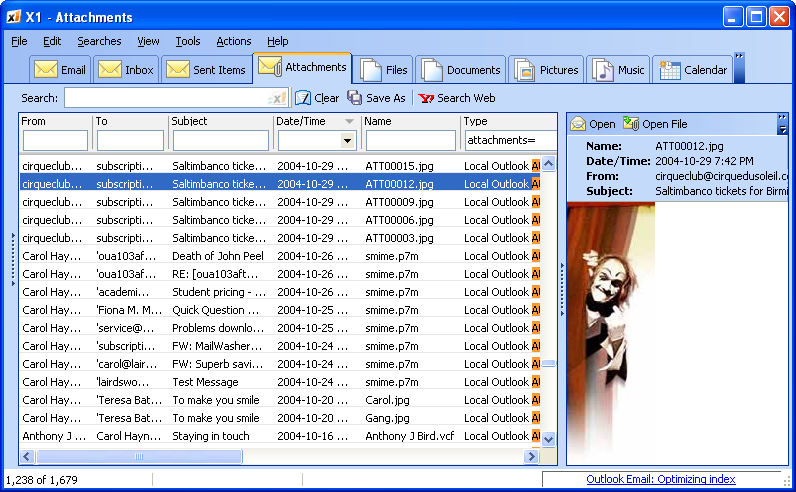
Here is a screenshot (using a JPG file in an archived Outlook email) :
One of the nice things with X1 if you use Outlook is that if you keep archives of email over years you cand add those archive PST files to the X1 Outlook profile - so you can find stuff in all your email - not just the stuff currently loaded into Outlook - which is great because it can really encourage you to keep a minimum size active PST file.
The only drawback I have found with X1 is that Outllok seems to be less responsive - whether that is because X1 is trying to access the files at the same time as Outlook for indexing I don't know.
Here is a screenshot (using a JPG file in an archived Outlook email) :