topbanner_forum
  *

avatar image

Welcome, Guest. Please login or register.
Did you miss your activation email?

Login with username, password and session length
  • Sunday November 30, 2025, 7:46 pm
  • Proudly celebrating 15+ years online.
  • Donate now to become a lifetime supporting member of the site and get a non-expiring license key for all of our programs.
  • donate

Recent Posts

Pages: prev1 ... 217 218 219 220 221 [222] 223 224 225 226 227 ... 251next
5526
Living Room / a 3D game that is only 97kb!
« Last post by lanux128 on January 14, 2007, 10:27 PM »
introducing .kkrieger, a free 3D game that is only 97kb!
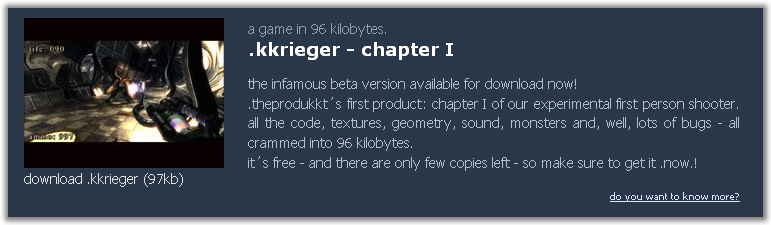
the infamous beta version available for download now!
.theprodukkt´s first product: chapter I of our experimental first person shooter. all the code, textures, geometry, sound, monsters and, well, lots of bugs - all crammed into 96 kilobytes.
it´s free - and there are only few copies left - so make sure to get it .now.!
-website

krieger.png
5527
Find And Run Robot / Re: Request for new FARR aliases
« Last post by lanux128 on January 14, 2007, 07:38 PM »
there are some in this thread -> Alias sharing..
5528
mouser, there's an anomaly with this script when using firefox as the default browser.. when i first highlight & press the hotkey, a new tab/window is opened but with the previous clipboard contents. only the 2nd time, the search is conducted with the selected text..

also, found another one of them highlight & run scripts.. :)

winSsearch - web-search highlighted text
WinSsearch-1.png
5529
Post New Requests Here / Re: IDEA: an indication that "start-up" is finished
« Last post by lanux128 on January 10, 2007, 08:19 PM »
What is an AHK script & where do I find it. Is it in there under the hood somewhere?
for a moment, i thought you were being sarcastic.. :)
AHK script contains instructions that translates into action when it is executed. for portability, the script is compiled into an exe. that's why, if you noticed, there are two download images at Skrommel's page - one for ahk script, the other for the exe..

more info here: http://www.autohotke...com/docs/Scripts.htm

5530
General Software Discussion / Re: Automation Program
« Last post by lanux128 on January 09, 2007, 08:43 PM »
I don't mean to be a smart ass, but why not just get a faxing application that works?
most probably the company that belkira works for, had signed a contract with a certain vendor who insist that only such and such programs may be used. so they're stuck with all this programs flaws & lack of updates.. my personal experience. :)
5531
General Software Discussion / Re: Automation Program
« Last post by lanux128 on January 09, 2007, 07:23 PM »
if you're into scripts, give Autohotkey a try. :)
5532
cool script, mouser! :Thmbsup:
i've been using something similar to this from the AHK forum: Google Search on Highlighted Text. but anyway, going to d/l your script & try it out.. :)

5533
General Software Discussion / Re: Motion Jpeg (.mjpeg) player or convert to mpg?
« Last post by lanux128 on January 08, 2007, 08:22 PM »
I can view them on the camera and they are fine but when I bring them to the computer, even when I've converted the video they are about three times the speed with no audio
that is because the codecs do not match.. use GSpot to view the details of video file, then you'll have a better idea of which codec to use.. basically, you have uninstall the codecs that you have then install something like K-lite codecs package..
5534
General Software Discussion / Re: Motion Jpeg (.mjpeg) player or convert to mpg?
« Last post by lanux128 on January 08, 2007, 07:53 PM »
i4get75, try installing QuickTime or QuickTime Alternate.. movies from my sony-ericsson play fine with them.

also, maximum time for movies can be changed provided you have an add-on memory card. but user forums for this phone will have a better idea on how to do it, try googling for them..

5535
try Free LaunchBar or its beefed-up cousin, True LaunchBar..
5536
Post New Requests Here / Re: IDEA: First Draft Maker
« Last post by lanux128 on January 08, 2007, 07:38 PM »
Well, I'm going to need .Net sooner or later.
yeah, i think it's built-in from WinXp SP2 onwards..

also, why don't you try Skrommel's SingleApp?
singleapp.png

5537
some sort of sorting options (by date/author/etc..) would be a nice complement for this fantastic feature.. :)
5538
General Software Discussion / Re: Hide icons from desktop
« Last post by lanux128 on January 07, 2007, 10:06 PM »
Curt, if you're still interested.. this stand-alone tool would do the job.
Toggle icons (1.96k, FREE) - Toggles icons on or off then quits, leaves desktop fully enabled.
5539
Post New Requests Here / Re: IDEA: First Draft Maker
« Last post by lanux128 on January 07, 2007, 09:00 PM »
i'm not a writer but i've read somewhere about Blockwriter & WriteRoom for a distraction-free writing environment but both are for MacOS..
5540
the same reason i had been requesting for Visual indicators whenever i right-click on SC's tray icon to "disable all hotkeys".. :)
5541
justinpetro1, check out this post & see if it is of use to you..
5542
Find And Run Robot / Re: "Custom File Explorer" option...
« Last post by lanux128 on December 28, 2006, 12:39 AM »
Hey, could I get a link to the latest version for testing?

you can PM mouser for the link.. more info here - Latest FARR v2.00.07 ALPHA PREVIEW Release.

5543
Post New Requests Here / Re: DONE: Proxy ON/OFF
« Last post by lanux128 on December 28, 2006, 12:27 AM »
some updates: ProxySwitcher Lite no longer available. there are only Std & Pro version and when i tried the Std version, this msg came up.. :huh:
ProxySwitcher.png

while at snapfiles.com, Proxy Changer's link has been removed. this is the direct link to the website: http://www.proxychanger.com/

5544
Find And Run Robot / Re: Windows Logo key shortcut keys in FARR?`
« Last post by lanux128 on December 27, 2006, 10:24 PM »
Actually, i can't find that script... And i can't remember doing it either :P

yeah, i got confused with this thread..
https://www.donation...dex.php?topic=2812.0

5545
Post New Requests Here / Re: IDEA: Create shortcuts from a list
« Last post by lanux128 on December 27, 2006, 09:14 PM »
yes, now it's a tip-top functional script.. good job, Skrommel & thanks. :Thmbsup:
p.s. some credit's on the way.. :-*
5546
Living Room / Communications break-down!
« Last post by lanux128 on December 27, 2006, 08:53 PM »
a Richter 7.1 earthquake in Taiwan has caused severe damage to cables linking Asia to Japan & the whole of Americas. therefore there is no direct connectivity, only via proxy servers limited by time & bandwidth - that means strictly no downloads. so anyone trying to get in touch with me have wait until my isp have made available an alternate route, hopefully via Europe or some other places. just letting everyone know about this..

More news: http://news.bbc.co.u...-pacific/6211451.stm
bbc-news1.png
5547
lanux128, could you tell me what skin you're using?
actually that is a WinXP theme - Royale - a new theme by Microsoft.. :)

5548
I can't tell you all how helpfull it is to have your bug reports and suggestions.. Really makes it fun.
glad to hear that, mouser..

btw, my rationale behind the copy path action is mentioned here in this thread.
farr2-005.png
but please disregard it because i feel that the Ctrl+C shortcut is sufficient enough.. :)
5549
Find And Run Robot / Re: Rightclick contextmenu: Copy URL to clipboard
« Last post by lanux128 on December 26, 2006, 02:46 AM »
this old bug is still around, only the path is copied instead of the url..

farr2-004-url-copy_ver001.png
5550
Find And Run Robot / Re: "Custom File Explorer" option...
« Last post by lanux128 on December 26, 2006, 12:13 AM »
just got an idea after reading jdmarch's post here..
for salamander users, there's a cmd-line option for pre-selecting left-right panels.

Command line parameters of Salamand.exe
You can specify current directories in panels after execution of Servant Salamander. These directories can be passed to Salamand.exe as first and second command line parameter. So 'Salamand.exe "C:\Program Files" D:\' will execute Servant Salamander with "C:\Program Files" in the left panel and "D:\" in the right panel.
-help-file

here is the option when applied in farr, use an empty quotation marks for the left-panel then put the folder parameter in the 2nd set of quotation marks for the right-panel..
farr2-custom-file-xplorer.png
Pages: prev1 ... 217 218 219 220 221 [222] 223 224 225 226 227 ... 251next