topbanner_forum
  *

avatar image

Welcome, Guest. Please login or register.
Did you miss your activation email?

Login with username, password and session length
  • Friday April 17, 2026, 11:21 pm
  • Proudly celebrating 15+ years online.
  • Donate now to become a lifetime supporting member of the site and get a non-expiring license key for all of our programs.
  • donate

Recent Posts

Pages: prev1 ... 207 208 209 210 211 [212] 213 214 215 216 217 ... 251next
5276
General Software Discussion / DipStych - Open Source "Stitch" program
« Last post by lanux128 on April 19, 2007, 01:45 AM »
introducing DipStych, a simple program to create "N-tychs"..

DipStych is a simple Windows application that makes creating 'tychs (diptych, triptych...n-tych) really simple.  It also is a simple way to add a border or frame to a single image. DipStych is free software and is released under the GNU Public License.
-website

My Take: This is a very useful program with the "stitching" feature that has been frequently requested and has generated much discussion here at DC. DipStych has a very simple interface with all the options available in the main screen. Btw, if you still don't have .NET framework runtimes, then this app alone is worth the download. :)

Features:
• Arrange images vertically or horizontally
• Able to resize images to fit the frame
• Preview before creating new images
• Saves to JPG, PNG, GIF and BMP
• Option to put a border or frame around the images
• Requires version 2.0 of the .NET framework

Main Window
ws-dipstych-1.png

Preview - Vertical
ws-dipstych-1-vert.png

Preview - Horizontal
ws-dipstych-1-horiz.png

Resize Options
ws-dipstych-1-resize.png

P.S. Definition of diptych.

5277
General Software Discussion / Re: Fast Explorer: Tweak Your Context Menu
« Last post by lanux128 on April 18, 2007, 11:11 PM »
this is quite a good program.. was suggested as part of the features to be included in the ContextMenu Commander some time ago..
5278
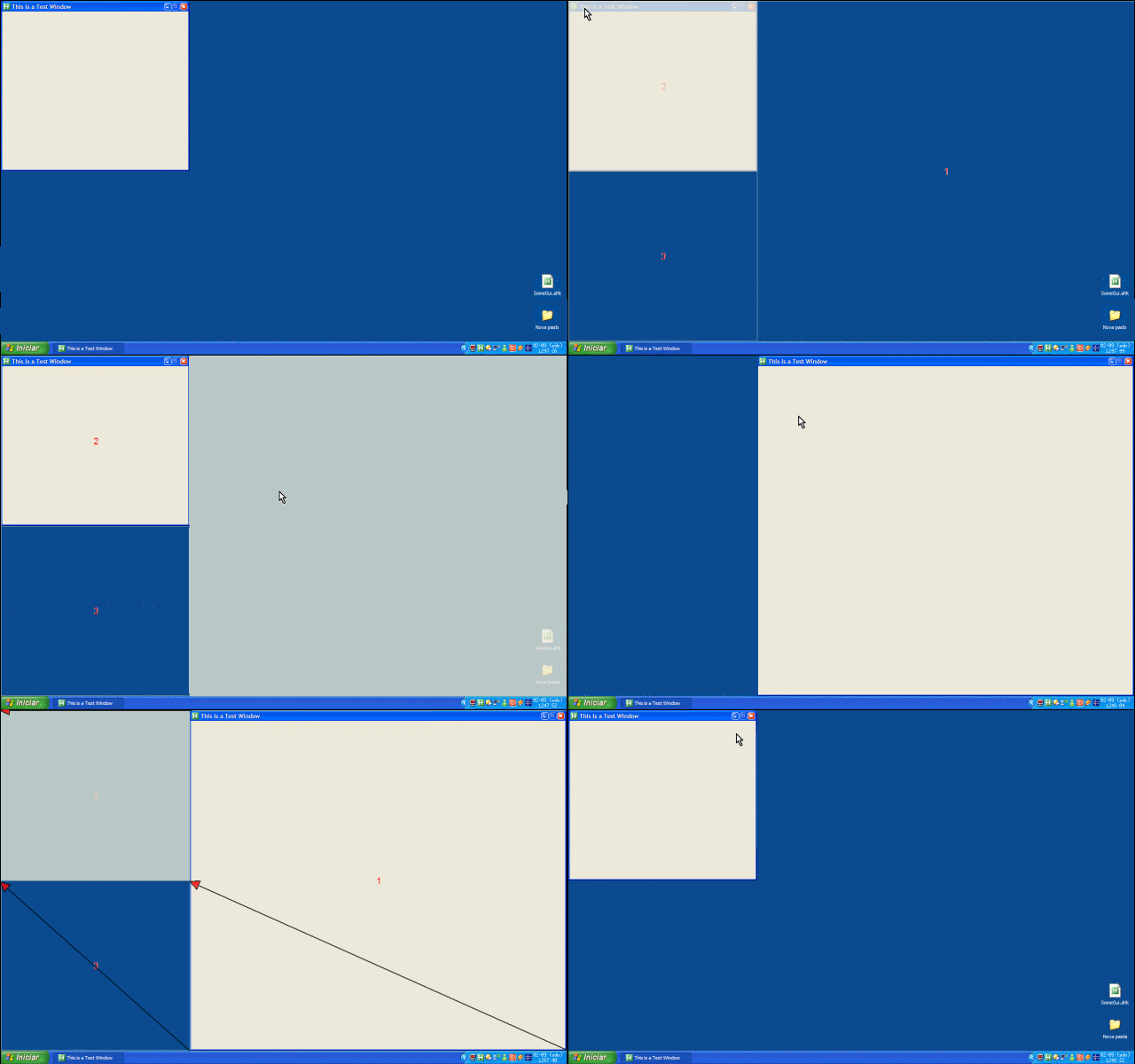
hmm.. just noticed this post.. CWuestefeld, i think you need a solution that encompasses the whole desktop instead of a windows-specific program like WinWarden.

so i'd like to suggest jgpaiva's GridMove. btw, it also support multi-monitor.. :)

GridMove in action

5279
General Software Discussion / Re: Program to move/size windows
« Last post by lanux128 on April 18, 2007, 10:58 PM »
i second tomos' suggestion.. :up: i had the same problem and posted the request and Skrommel came up with WinWarden.. :Thmbsup:

5280
wow, thanks wr975.. 8) now i can listen to my books in order.. :up:
5281
General Software Discussion / Re: emailSTRIPPER - Freeware
« Last post by lanux128 on April 18, 2007, 10:41 PM »
Oh bummer, this is not what I was hoping it would be...
sorry to disappoint you, Nighted.. :P
5282
yes, there is a problem with html coding.. the ShiftOff anchor tag is "MoveInactiveWin" even though the link says "ShiftOff".. so for now, ShiftOff's direct link would be: https://www.donation...html#MoveInactiveWin

ws-shiftoff-skrommel-1.png
5283
General Software Discussion / Re: filehippo.com Update Checker (Beta)
« Last post by lanux128 on April 18, 2007, 10:26 PM »
I fear the problem is, that I`m using a german version of Vista...
could be two things - either, the notorious UAC problem or the program can't see beyond "C:\Program Files\".. :)
5284
General Software Discussion / Re: Don't call it "the tray"!
« Last post by lanux128 on April 18, 2007, 10:22 PM »
TNA sounds like some pro wrestling federation.. ;D Raymond Chen fails to realize even the terms windows, desktop, wallpaper are of metaphorical origin.. just like the way, in windows you adorn your "desktop" with "wallpaper" & you put away your "files" (not documents) into a "folder"..
5285
General Software Discussion / Re: Must-have apps in the System tray?
« Last post by lanux128 on April 18, 2007, 10:17 PM »
i would like to recommend my personal favourite - CLCL

Original screenshot image by AbteriX

AbteriX has written a good tutorial on its usage and has also compiled some reviews of the program..
https://www.donation...dex.php?topic=2923.0
https://www.donation...dex.php?topic=2866.0

5286
Post New Requests Here / Re: IDEA: Treo-like "Alt" key for Windows
« Last post by lanux128 on April 17, 2007, 11:26 PM »
nice idea there, Hirudin.. i have something similar here: Accents. it'd be fantastic if there are common templates for usage with this program.. :Thmbsup:
5287
hi guys, need some help.. i'm using MediaTagger and posted an email to the author but there's no reply yet so here i am.. :)

i need to insert the track info into the 'title' tag because my mp3 phone sorts by only artistes, title & date created but NOT track nos... >:( and i have some audio books which go by chapters.. so this is what i need to do..
Filename: 0x - Chapter x.mp3 --> ID Tag Title: <Track> - Chapter X

is it possible? if i'm not clear, do ask again.. :)
5288
General Software Discussion / Re: Must-have apps in the System tray?
« Last post by lanux128 on April 17, 2007, 10:28 PM »
Open notepad and copy this to the first line and save it as FreeMem.vbs. Replace the number with what would be correct for the amount of ram you have on your system...
cool tip, app.. :up: i can sense a Farr alias coming up.. :)
5289
General Software Discussion / Re: AutoHotkey scripts - what to do?!
« Last post by lanux128 on April 17, 2007, 10:25 PM »
yes as jgpaiva said if your scripts contain unique set of variables and hotkeys then you can also use the #Include command. e.g.

#Include / #IncludeAgain
Causes the script to behave as though the specified file's contents are present at this exact position.

Example
#Include C:\My Documents\Scripts\Utility Subroutines.ahk
#Include %A_ScriptDir%  ; Changes the working directory for #Includes and FileInstalls physically beneath this point.
#Include C:\My Scripts  ; Same as above but for an explicitly named directory.
5290
General Software Discussion / emailSTRIPPER - Freeware
« Last post by lanux128 on April 17, 2007, 09:36 PM »
introducing emailStripper, a program for cleaning the ">" and other formatting characters out of your emails. It will restore "forwarded" or "replied" emails back to their original state so they're easier to read.

• freeware
• for reading & forwarding a much neater email messages.
• comes with installers & portable version (:up:)
• puts a small easily removable advert at the bottom, which i think should be left alone.. :)

ws-eMailStripper-1.png

5291
General Software Discussion / filehippo.com Update Checker (Beta)
« Last post by lanux128 on April 17, 2007, 01:20 AM »
introducing filehippo's update checker... looks quite neat.

The Update Checker will scan your computer for installed software, check the versions and then send this information to filehippo.com to see if there are any newer releases. The results are then displayed in the browser for you to download.

here's the privacy policy:
The Update Checker will not send any personal information back to filehippo.com. The only information collected is a list of programs and their versions, along with the operating system details to help with processing. Additionally none of this is linked to your IP address and the logs are deleted after processing.

works quite well on my pc.. :)
• requires Microsoft .NET Framework 2.0

ws-filehippo-1.png
5292
Mini-Reviews by Members / Re: InfraRecorder
« Last post by lanux128 on April 16, 2007, 11:54 PM »
P.S. didn't realize this earlier.. Nighted had already mentioned InfraRecorder here..

ws-nighted-1.png
5293
Mini-Reviews by Members / InfraRecorder
« Last post by lanux128 on April 16, 2007, 11:43 PM »
Basic Info

Infra Recorder is a free CD burning solution for Microsoft Windows.

App NameInfra Recorder
App URLhttp://infrarecorder.sourceforge.net
App Version ReviewedVersion 0.42.1.0 (Unicode)
Test System SpecsPentium 3 733Mhz, 512MB RAM, WinXP Pro SP2
Supported OSesWindows 9x/ME/2000/XP/x64; tested on WinXP Pro SP2
Support MethodsHelp file included with the program. Other methods of support: the author's email and a very nascent FAQ on the website.
Pricing SchemeFreeware, donations accepted.
Author Donation LinkDonate to Christian Kindahl, the Author
Reviewer Donation LinkDonate to Lanux128, the Reviewer
Relationship between Reviewer and Product I am not affiliated with this product and its developer in any way.


Introduction

I have fond memories of Nero, which came with the first CD-RW drive that I bought years back. However over the years, I became disenchanted with Nero, the bundle-ware and began actively looking for a light-weight alternative. On such a journey, I discovered Infra Recorder - which I didn't know much about except that it uses cdrtools and the programmer is also involved with TugZip. However I was pleasantly surprised with the program's simple interface, and even more with the easiness of use.

Like most of the burners, InfraRecorder can work with audio, data and mixed-mode CDs. This program is also able to handle disc images (CUE, ISO) and RAW images, supports on-the-fly recording, erase rewritable discs and save audio and data tracks to files. Full list of features can be found at the website.


Screenshots of the Program

Main Window
ws-sshot-1.png
About Box
ws-sshot-2.png
Configuration
ws-sshot-3.png
Infra Recorder's 'File' menu
ws-sshot-4.png
Infra Recorder's 'Actions' menu
ws-sshot-5.png
Infra Recorder's Wizard Mode
ws-sshot-6.png

Who is this app designed for:

This program will be most useful to regular 'burners' in two basic ways. Firstly: those who do not need any handholding, which means with no wizard mode interruption, users can get down to the actual burning right-away. And secondly, for users who have their own choice of complementary software to aid them. In other words, this is a single program as opposed to suites provided by major vendors.


The Good

Light (about 3MB in zipped version), both options - installers and zipped portable available. Modern UI features such as drag and drop, explorer integration and very low system requirements (32 MB RAM and 7.2 MB hard-disk space). The author is actively updating the program, check out the roadmap.


The needs improvement section

The current version is quite good even though a tad bit slow to start-up, maybe it has something to do with my system, which 3 optical drives. Other than that, I have not encountered any problems at all.


Why I think you should use this product

This program is most suitable for users who want burn a CD or DVD quickly without the fanfare. However new users will not have much problems, either and there is also the Wizard-mode GUI similar of Nero Express (see screenshot above).


How does it compare to similar apps

I have looked at several others, namely DeepBurner, ImgBurn, SilentNight Microburner and Burrrn (audio CD only) while all the others have their own plus points but I find InfraRecorder is easier for someone on a transition as it much more flexible and the GUI is quite standard, therefore more suited to my needs.


Conclusions

I had a good time using InfraRecorder and since it's still in active development, you can be sure that things will only get better. With ample documentation, it'll be only a matter of time before you feel right at home. Do give it a try.


Links to other reviews of this application

I couldn't find any reviews, there's Wikipedia entry though.

5294
General Software Discussion / Re: Don't call it "the tray"!
« Last post by lanux128 on April 16, 2007, 11:06 PM »
I thought the taskbar was where your apps go (icon and title), and the tray was the thing with the clock and the tiny icons.
exactly, that is how i understand it.. however, this guy introduces a new complication by claiming that users call the taskbar as the tray then proceeding to forbid them from doing so.. oh, talk about information overload.. :)
5295
General Software Discussion / Don't call it "the tray"!
« Last post by lanux128 on April 16, 2007, 08:47 PM »
this guy is quite adamant that we call Windows components the proper way or else... ;)

One of the most common errors is to refer to the Taskbar Notification Area as the "tray" or the "system tray". This has never been correct. If you find any documentation that refers to it as the "tray" then you found a bug.

http://blogs.msdn.co...003/09/10/54831.aspx
ws-dontcallitthetray-1.png
5296
Post New Requests Here / Re: CAPSLOCK TIMER
« Last post by lanux128 on April 16, 2007, 08:43 PM »
yes, then it could be called Skrommel's "Capslock Compendium" :)
5297
General Software Discussion / Re: Must-have apps in the System tray?
« Last post by lanux128 on April 16, 2007, 08:38 PM »
well, as the cliché goes, you can't have enough memory.. that's why i started this thread, to see whether people prefer more or less programs in their system tray. previously, i need to close some apps so that my sluggish system can breathe easier.. but since then, i have upgraded my memory & graphics card so that i can run all the programs that i need without worries.. :)

btw, i use this program called "Better Memory Meter" to quickly check the remaining balance of system RAM

ws-bmm-1_ver001.png

Edited to include the website address.
5298
General Software Discussion / Re: notepad-equivalent for spreadsheets?
« Last post by lanux128 on April 16, 2007, 08:24 PM »
there are some more options here..
i meant to say Spread32 but cthorpe has found a solution already.. :up:
5299
oh, sorry about that.. were you beta-testing Office2007 before installing the retail version? btw, i did a search here but find anything relevant -> Google - installer EnterpriseWW.msi, maybe you'd like to have a look.. :)
5300
Farr's paste alias may be able to provide the function..
version 1.07.12 with paste command
Pages: prev1 ... 207 208 209 210 211 [212] 213 214 215 216 217 ... 251next