topbanner_forum
  *

avatar image

Welcome, Guest. Please login or register.
Did you miss your activation email?

Login with username, password and session length
  • Thursday December 4, 2025, 9:19 pm
  • Proudly celebrating 15+ years online.
  • Donate now to become a lifetime supporting member of the site and get a non-expiring license key for all of our programs.
  • donate

Recent Posts

Pages: prev1 ... 169 170 171 172 173 [174] 175 176 177 178 179 ... 1514next
4326
Screenshot Captor / Re: SUGGESTION: Maximum Screen Size
« Last post by mouser on October 17, 2016, 08:42 AM »
Ah i see, ok well adding an optional toolbar button would be pretty easy.
4327
Screenshot Captor / Re: SUGGESTION: Maximum Screen Size
« Last post by mouser on October 17, 2016, 07:18 AM »
SC is still alive and well, new version will be coming out soon!

Can you explain more what you want? I don't quite understand.
4328
Screenshot Captor / Re: Screen shot captor
« Last post by mouser on October 16, 2016, 08:12 AM »
Screenshot Captor has an about box where you would put in the license.
See if this video helps:


Jump to about 3:50 to see where the license key is put in.
4329
Screenshot Captor / Re: Feature Request: Search text notes in screenshots
« Last post by mouser on October 15, 2016, 09:38 AM »
now that SC has built in filename search/filtering, perhaps it wouldnt be too hard for me to piggyback on that an ability to search/filter text in comments.
4330
Post New Requests Here / Re: IDEA: Mp3-Favoriter (in o.a. Windows Explorer)
« Last post by mouser on October 13, 2016, 11:55 AM »
Let me just point out that if you simply added the file paths to a text file, with one line per file, it would be trivial to use a simple FARR alias to display and search this list of files on demand, using the #filecontents function of FARR.
4331
Post New Requests Here / Re: IDEA: Mp3-Favoriter (in o.a. Windows Explorer)
« Last post by mouser on October 13, 2016, 11:52 AM »
Yes please!
4332
Skwire Empire / Re: sWeather Datetime Format ?
« Last post by mouser on October 13, 2016, 11:41 AM »
I'm guessing you are interested in knowing the default date format?

Here is my setting, I never changed it:
Screenshot - 10_13_2016 , 11_41_51 AM.png
4333
Living Room / Re: What books are you reading?
« Last post by mouser on October 13, 2016, 07:41 AM »
Warped Passages: Unraveling the Mysteries of the Universe's Hidden Dimensions by Lisa Randall

String theory physics book written for the layman but unfortunately largely incomprehensible to me.. Feels like I'm mostly reading about analogies that don't quite clarify things.  But the huge scope and subject matter is wonderful.  Feels like reading sci-fi.

Screenshot - 10_13_2016 , 7_40_47 AM.png
4334
Post New Requests Here / Re: IDEA: Mp3-Favoriter (in o.a. Windows Explorer)
« Last post by mouser on October 13, 2016, 06:13 AM »
One quick comment.  While the entirety of the idea seems very specific to your needs, one small part of it seems like it might be generally useful.  There are many times when I want to remember the location of a file..  A little right-click file extension with an item "Add to favorite files" which just added the file path to a text file that I could open and browse would be neat.
4335
N.A.N.Y. 2017 / Re: N.A.N.Y. 2017 Announcement
« Last post by mouser on October 10, 2016, 02:34 AM »
BTW, I thought this was the eleventh NANY?

you are right. corrected.
4336
Living Room / Re: Gadget WEEKENDS
« Last post by mouser on October 09, 2016, 10:03 PM »
Recently bought some led "bias lights" for my tv.  Mostly just for a fun gimmick, but I have to admit it looks better than I hoped.  They say it reduces eye strain and improves contrast when you watch in the dark.  I thought it would be annoying, but I was surprised how much I like the look.  Definitely a fun gadget.  :up:

https://www.amazon.c...niture/dp/B01H579EIY

Screenshot - 10_9_2016 , 10_03_09 PM.png
4337
Living Room / Re: Is there a reliable printer?
« Last post by mouser on October 09, 2016, 07:42 PM »
inkjet printers are finicky.  if you want a reliable printer get yourself a laser printer and use it for most of your printing needs.
4338
Clipboard Help+Spell / Re: what is it the order in a 'popup hotkey'?
« Last post by mouser on October 08, 2016, 08:36 PM »
By default, the popup menus are sorted according to the column labeled "Ordering".  If you can't see that column you can turn it on by clicking the tiny button to the left of the ID column:
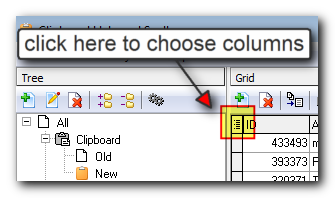
Screenshot - 10_8_2016 , 8_33_26 PM.png

Once you have the Ordering column turned on, you can fill it with values.  By default, and somewhat unintuitively I admit, it's going to sort with highest values at top.  So give the items in that group higher values in the Ordering column to make them show at the top of the menu.  New clips always have blank Ordering values (equivalent to a value of 0) -- that column is there just for you to specify custom values when you manually control sort order.  You can use negative values.

You can also change how the group is sorted in popup menus, and instead of sorting on the Ordering column, have it sort on something else.  If you check out the "Quick Paste" group you'll see it has it's sorting option set to "Ordering,ModificationDateTime" so that any explicit Ordering comes first, and then sorts on ModificationDateTime which is a pretty good way to go.  I believe this is actually the sorting option used if you leave the "Sorting" option of a group blank -- so that is probably the ordering you are seeing now in your popup menus.

Does that help?
4339
Clipboard Help+Spell / Re: what is it the order in a 'popup hotkey'?
« Last post by mouser on October 08, 2016, 08:23 PM »
Hi Herchi.

Ok let me make sure I understand what you are interested in.

Are you saying you have a hotkey set to show the contents of one of your clip groups?  So you right-clicked on a group in the lefthand group panel and set a hotkey for that group.

Now you trigger the hotkey and you see a list of clips in that group in a pop-up menu.

And what you want is to be able to control the order of the clips that show up in that pop-up menu, is that right?
4340
LaunchBar Commander / Re: How to selectively execute programs as Administrator?
« Last post by mouser on October 08, 2016, 12:37 AM »
Can you clarify what you'd like to be able to do?
4341
I did a bad job of explaining it, but here's someone asking for same basic thing: http://stackoverflow...ith-dropbox-sync-api
4342
Android Apps / Re: Other app ideas based on WhenLast code
« Last post by mouser on October 07, 2016, 08:55 PM »
So one idea that could be incorporated into my framework is the idea of a central website file that was automatically downloaded by the app.
So that for example someone who had a website could update a database and it would be promulgated to all people who had the app installed..
4343
LaunchBar Commander / Re: How to selectively execute programs as Administrator?
« Last post by mouser on October 07, 2016, 07:52 PM »
Hmm.. interesting question.. you could always use a commandline tool or shortcut, but I will add an option in LBC to let you specify that a command should be run as administrator.
4344
The license key starts with *r1 and is several lines long.
4345
N.A.N.Y. 2017 / Re: NANY 2017: MemoList DC (Android Memo app)
« Last post by mouser on October 07, 2016, 12:37 AM »
Updated fri 10/7/16
4346
N.A.N.Y. 2017 / Re: NANY 2017: MemoList DC (Android Memo app)
« Last post by mouser on October 06, 2016, 03:34 PM »
sorry my mistake, should be fixed now.
4347
N.A.N.Y. 2017 / NANY 2017: MemoList DC (Android Memo app)
« Last post by mouser on October 06, 2016, 02:33 AM »
This is a simple memo app, with the ability to organize your memos into sections by tag.
Built using my CodyBones skeleton code that I've used in some other apps.

Supports synchronization over dropbox and widget support.


Screenshot1024.png

Widget:
Screenshot - 10_6_2016 , 2_28_23 AM_ver001.png
4348
The RockPaperShotgun blog has a nice blog post up today heralding the unveiling of the entries in the 2016 Interactive Fiction Competition (classic text adventure games, etc.).

This year, IF Comp 2016 opened with 58 entries, the largest selection of new games in its history. The presence of all these great new games is only part of what makes IF Comp exciting. It’s also a time when the IF community comes together to comment, review, and give feedback... And now you’re invited, at whatever level of involvement you like. You can play any of the games for free.

4349
I've been using dropbox to allow synchronization of app data for my android apps, and I'm quite happy with the API and the process in general.

But there is one substantial problem with it.

There is no way to say that you'd like to allow a group of people (via a shared password for example) to have write access to a folder (and only that folder).

If that could be done, it would be possible to do something like install an android app and tell your 5 friends that they can sync their data with you, for that app only.

As it currently stands, my android apps can only synchronize with someone who also has write-access to your same dropbox account.  Essentially this means you can only sync and share with your own multiple devices, not with other people.

It would be great if dropbox could add a feature that allowed you to designate a folder as writeable by different people, as long as they all had some access key/password.
4350
Very cool, and welcome to the site   :Thmbsup:
Pages: prev1 ... 169 170 171 172 173 [174] 175 176 177 178 179 ... 1514next