Hi Dale,
*** UPDATE: ***
I just went back to look at things again...the pdf , jpg , and png files captured.
If I open the pdf file on Adobe reader, it fills about 2.5 screens (vertically) on my laptop,
yet, when I look at the top Adobe menu bar, near where it shows the % magnification,
it shows that it is viewing Page 1/1 : so there is only 1 page ... but it is long.
If I try to print it without using shrink-to-fit (fit-to-page), it crops a smaller area, vertically and horizontally to print.
If I drag & drop the pdf file into a Word document, it gets truncated vertically (along it length), and it is offset to the horizontally
to the right based on the doc's margins. I must resize the file (grabbing its resize tabs at its corners) to make it fit within the Word document.
If I drag & drop the jpg file into a Word document, the file automatically gets resized (fit-to-page) basd on its length.
Similalry, for a png file.
-DaleB
okay, that answers my questions about 'page 1' etc.
It's important to understand that SC creates a single image from your manual scroll.
You probably have an A4 printer - if the image is bigger than A4, it cannot print at full size on your printer - so it offers to print at fit-to-page, or it offers to print a selection/detail. When printing a detail, it will select the centre part of the image (that's why it picks page 2 of 3 pages) unfortunately this cannot by changed in Adobe Reader.
I'm on a Windows 8 machine, with Adobe Reader X1 (11)
Here's the print dialogue I see:
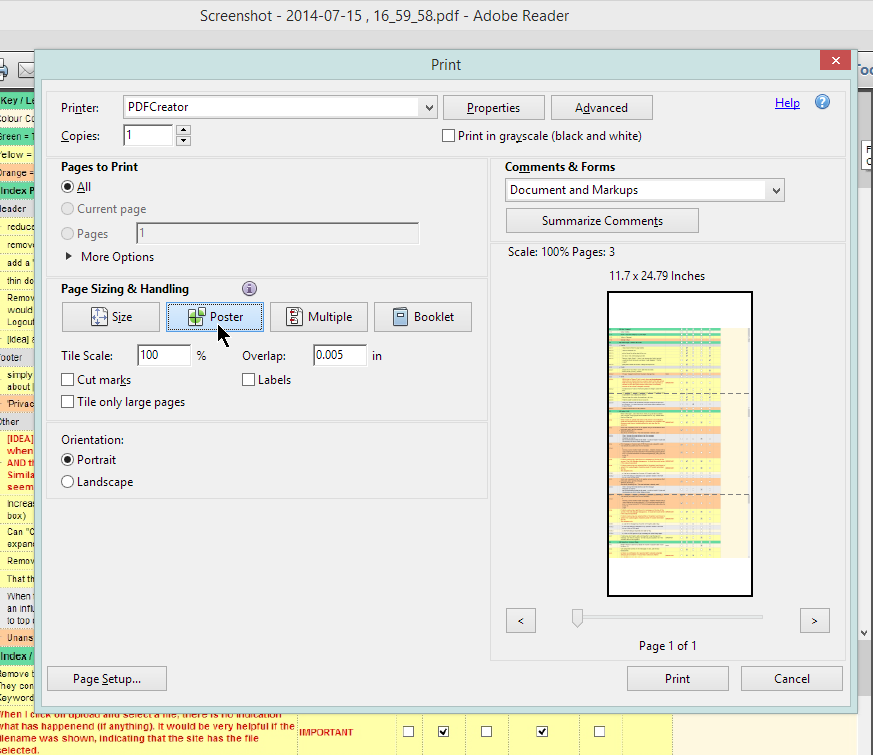
in this version, there is an option to print 'Poster' - this will print the image at 100% and break it up in as many pages as necessary. Do you have that on your version?
----------------------------------------
Re the Word problems - if you want a screenshot to go over multiple pages, you have to take multiple screenshots. (See also next post)


 Recent Posts


 )
)

