


 Recent Posts
3026
Screenshot Captor / Re: extract pics from MOV.video
« Last post by tomos on January 29, 2015, 04:01 AM »hi janvg
there is an autocapture option - I dont see any way of making a hotkey for it though - only seems accessible via the tray context menu (?)
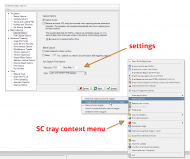
Edit // I dont use it myself - it looks like you toggle it on/off and it will then work automatically when you press any of the capture hotkeys.
Try it out :-)
there is an autocapture option - I dont see any way of making a hotkey for it though - only seems accessible via the tray context menu (?)
Edit // I dont use it myself - it looks like you toggle it on/off and it will then work automatically when you press any of the capture hotkeys.
Try it out :-)


