topbanner_forum
  *

avatar image

Welcome, Guest. Please login or register.
Did you miss your activation email?

Login with username, password and session length
  • Sunday September 20, 2026, 1:15 am
  • Proudly celebrating 15+ years online.
  • Donate now to become a lifetime supporting member of the site and get a non-expiring license key for all of our programs.
  • donate

Recent Posts

Pages: prev1 ... 1157 1158 1159 1160 1161 [1162] 1163 1164 1165 1166 1167 ... 1515next
29026
TapTap / TapTap - LATEST VERSION INFO THREAD - v1.03.01 - Nov 21, 2006
« Last post by mouser on October 29, 2006, 08:34 AM »
DOWNLOAD FROM Program Web Page

LATEST RELEASE:
v1.03.01 - 11/21/06
  • Now you can use capslock, pause as actions of keymaps


OLDER RELEASES:
v1.02.01 - 10/29/06
  • Reloading after changes could sometimes leave hotkeys and options unchanged
  • Fixed bug where it was ignoring doubletaps in some rare cases.

v1.01.01 - 10/29/06
  • First public release


What is TapTap?

TapTap Hotkey Extender is a tiny super-efficient tray-based utility (under <100k) for keyboard fanatics.

It monitors for certain unusual hotkey combinations not supported by most programs (like doubletap right shift key). When such hotkey combinations are detected, TapTap will simulate a normal hotkey that the user has configured.

In this way, you can configure any of your programs to respond to these extended hotkey events as if they supported it natively.

Example:
  • You might have a program which normally triggers on Alt+Ctrl+F5, but you want to configure it to trigger with a double tap of the right control key. You can use TapTap to detect Right Control Doubletap events, and send a Ctrl+Alt+F5 when it does. In this way, you can control your programs the way you want to, and they never know the difference.

Written in lean and mean C++ and highly optimized for insignificant cpu/memory access.
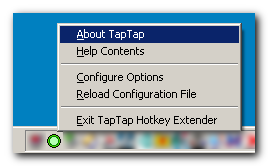
TapTap.png
29027
Find And Run Robot / Re: Chosen item number appearing in next search bug
« Last post by mouser on October 29, 2006, 07:51 AM »
thanks for reminding me about this - i think i reintroduced this at my last round of optimizations; ill try to fix this in the next couple of days since i know it's a showstopper.
29028
LaunchBar Commander / Re: How to add shortcuts?
« Last post by mouser on October 29, 2006, 05:25 AM »
ah!
maybe!
try it, try choosing the special AllStartMenu folder contents, and see if it displays.

another advantage of using the special folders choices, is that Launchbar Commander is designed to work on a USB stick, and will auto grab the proper directories in this case.
29029
LaunchBar Commander / Re: How to add shortcuts?
« Last post by mouser on October 29, 2006, 05:13 AM »
let me pre-empt the reply by someone on the forum and offer this caveat:
one week usually means two weeks
one month usually means five months
one year usually means when the sun burns out

 :-[

but i do try my best!!
29030
LaunchBar Commander / Re: How to add shortcuts?
« Last post by mouser on October 29, 2006, 04:56 AM »
i know the problem - it has to do with windows keeping multiple start menu folders, one for the user, and one for all users.

ok so, here is what you should do:
first, as a temporary measure, create a new folder contents menu in the tree and select "StartMenu" from the drop down folder contents list, instead of "AllStartMenu".

now you will have 2 start menu buttons, which combine to show you what you see on your normal start menu.

then in the coming week or so i will correct the behavior to show all from BOTH the all start menu and user start menu, which i thought i already did.


29031
General Software Discussion / Re: text
« Last post by mouser on October 29, 2006, 03:39 AM »
i don't know if there is a program to do all of what you ask, but you might check out "as-u-type": http://www.asutype.com/
29032
Post New Requests Here / Re: IDEA: Super Efficient Extended Hotkey Mapper
« Last post by mouser on October 28, 2006, 10:09 PM »
taptap is done and fully working.
but i'm too tired to post it now and it probably needs a little bit of a help file, so i'll post it tomorrow.
but it does seem to work well, and you can map the following things to other hotkeys

doubletap LeftControl
doubletap RightControl
doubletap LeftShift
doubletap RightShift
doubletap LeftAlt
doubletap RightAlt
doubletap Insert
doubletap capslock
doubletap numlock
doubletap scrolllock

pause key

winkey+Key combinations


so all you crazy people who like double tapping to do stuff, now you should be in heaven..
and as promised, it is super super lightweight on cpu and memory.
29033
Find And Run Robot / Re: Not FARR; show Start>Programs
« Last post by mouser on October 28, 2006, 09:29 PM »
ah sorry i see what you mean now.

actually most of my programs dont start with windows by default when they really should, but you can usually find an option in them to tell them to.

so i suggest you remove the shortcut you created,  and instead go to the LaunchBar Commander preferences, and select the node at the very very top of the tree, it will give you general options including "start with windows" :)
29034
Find And Run Robot / Re: Not FARR; show Start>Programs
« Last post by mouser on October 28, 2006, 09:06 PM »
the 1 value is what tells the launch bar to delve into the submenus of the start menu and show them at the root - though i suspect this isnt really ideal.. creating your own custom menus is probably more useful.
29035
Find And Run Robot / Re: Not FARR; show Start>Programs
« Last post by mouser on October 28, 2006, 09:05 PM »
now sure what you mean by having to place it in start, but:
1) you can put a button on the launch bar which will display the contents of your start menu (and in fact you can configure it to recurse into the submenus and show them at root as you seem to have said you wanted originally),
2) other than that, yes you have to create your own menus and buttons on the bar, using drag and drop or the tree configuration.

here's a screenshot of how you might try setting up your start menu emulation button on the launch bar:
Screenshot - 10_28_2006 , 9_04_33 PM.png
29036
Living Room / Re: Smilies With Speech Bubbles
« Last post by mouser on October 28, 2006, 08:40 PM »
Love it!   :up: :up: :up:

Great find, lots of other fun smiley's on that page too.
29037
Living Room / Re: Smilies On Strike For Skrommel (SOSFS)
« Last post by mouser on October 28, 2006, 03:58 PM »
skrommel's smilies have been freed due to a post (https://www.donation...64.msg42129#msg42129).  just in the nick of time too, i think someone of them were not going to survive through the winter.

29038
Post New Requests Here / Re: IDEA: View full file system at once (all folders)
« Last post by mouser on October 28, 2006, 03:55 PM »
skrommel posted!!!!!!!!!!!!!!!!!!!

29039
Post New Requests Here / Re: IDEA: Super Efficient Extended Hotkey Mapper
« Last post by mouser on October 28, 2006, 02:30 PM »
im nearly done with taptap, should have a version out tonight.
29040
Find And Run Robot / Re: Not FARR; show Start>Programs
« Last post by mouser on October 28, 2006, 02:25 PM »
can you explain a bit more? it sounds like you might benefit from a launch bar tool like...

LaunchBar Commander :)
https://www.donation...Commander/index.html

or something similar like TrueLaunchBar or FreeLaunchBar.
29041
virtual machines like vmware are ideal for testing stuff, but i wouldn't want to have a live website running on one on a personal pc, for performance reasons.
29042
Best Text Editor / Re: Please correct EmEditor review
« Last post by mouser on October 28, 2006, 05:57 AM »
every day i prove more and more that i need a professional typo corrector by my side at all times  :P

thank you for the correction - it's fixed now.
29043
PopUp Wisdom / Re: Poor uninstall
« Last post by mouser on October 27, 2006, 06:48 PM »
curt you are right, it is confusing to have them be the same name, i really should do as you say.
29044
Screenshot Captor / Re: Problems capturing objects
« Last post by mouser on October 27, 2006, 05:18 PM »
that is impressive - im not entirely sure how they are able to detect such sub-object, i will try to investigate but to be honest i've got some other things ahead of this in the queue so don't expect a fix any time in the next month or two.
29045
Screenshot Captor / Re: Problems capturing objects
« Last post by mouser on October 27, 2006, 04:53 PM »
do you mean that snagit properly jumps to the objects like the buttons when you move over them, or do you mean you can manually move a small box and position it exactly where you want it?  is it clear what im asking?
29046
Screenshot Captor / Re: I just want to say...
« Last post by mouser on October 27, 2006, 04:51 PM »
thank you very much - i can't tell you how nice it is to hear that today  :-*
29047
For your halloween pleasure, here's a kid friendly, professional quality flash click adventure.  Fun, clever, and fairly easy. Perfect to play with the kids.

29048
General Software Discussion / Re: Best Auto-complete Intelli-sense type utility ?
« Last post by mouser on October 26, 2006, 06:22 PM »
Welcome to the site Andrea, we always love to have authors participate in the discussions and talk with users here.  :up:
29049
Mini-Reviews by Members / Re: DM2 - Your Windows Mate
« Last post by mouser on October 26, 2006, 03:51 PM »
By the way, DM2 is also mentioned in our review of Dialog Extenders:
https://www.donation...Extenders/index.html
29050
ouch you are right, editing to make it smaller thx.
Pages: prev1 ... 1157 1158 1159 1160 1161 [1162] 1163 1164 1165 1166 1167 ... 1515next