I forgot to give this thread
closure :p
With the OS now working, I restored the most recent image. I had to get the Windows rescue disc/flash-drive to repair the MBR again.
System started fine after (didnt need to update any files).
I then started messing with partitions using the free Aomei Partition Assistant - deleting the Recovery partition, creating two new partitions - one for data, and one for a couple of backup images. Everything went fine there (so I didnt have to test restoring to a different size partition).
Of interest:
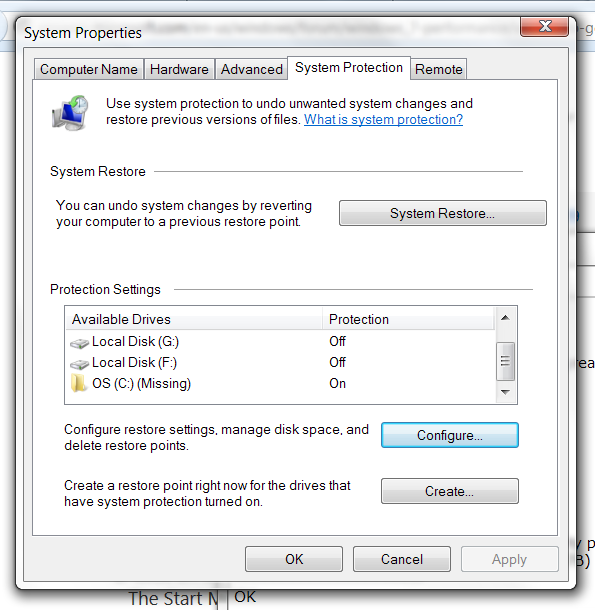
A while later, I noticed System Restore no longer worked.
I was trying to enable it for C but it refused to work:
---------------------------
Could not apply the settings for the following reason: The filename, directory name, or volume label syntax is incorrect. (0x8007007B)
---------------------------
followed by:
---------------------------
There was an unexpected error in the property page: The filename, directory name, or volume label syntax is incorrect. (0x8007007B) Please close the property page and try again.
---------------------------
Turned out there was a second phantom 'C' partition (hidden down the bottom of the list) with System Restore turned on. Once this is turned off, it turned on automatically for the 'real' 'C'.
(I found out how to do that via
MS forums - seems to be common after restoring an image or a reinstall on laptops with funny [peculiar] OEM business on them.)


 Recent Posts

 and no, that's not a feature of CintaNotes.
 - just checked & other videos play, but that keeps stuttering.

