topbanner_forum
  *

avatar image

Welcome, Guest. Please login or register.
Did you miss your activation email?

Login with username, password and session length
  • Friday April 3, 2026, 12:11 pm
  • Proudly celebrating 15+ years online.
  • Donate now to become a lifetime supporting member of the site and get a non-expiring license key for all of our programs.
  • donate

Recent Posts

Pages: prev1 ... 969 970 971 972 973 [974] 975 976 977 978 979 ... 1515next
24326
General Software Discussion / Reminder: Huge January Giveaway Drawing Ends Soon!
« Last post by mouser on January 22, 2008, 12:50 AM »
Attention all supporting members:

If you haven't entered to win something in January's HUGE shareware giveaway, you only have a few days left!!

Deadline is January 25th!


Quick Links:
24327
Seedling's Software / Re: Mixtape Maker: Updates and Latest Beta Versions Here
« Last post by mouser on January 22, 2008, 12:37 AM »
I think mixtape maker needs update checking  :Thmbsup:
24328
Seedling's Software / Re: Mixtape Maker: Updates and Latest Beta Versions Here
« Last post by mouser on January 21, 2008, 09:25 PM »
would it be good to have a display option that showed album, artist, song title, since thats what the keyword searching is looking at.
24329
Seedling's Software / Re: Mixtape Maker: Updates and Latest Beta Versions Here
« Last post by mouser on January 21, 2008, 09:24 PM »
what about being able to filter by song ratings?
i know that many music players let you rate how good a song is.. seems like it would be nice to make a playlist out of only songs with high ratings..
24330
General Software Discussion / Re: KDE 4 out, and my, it looks gorgeous!
« Last post by mouser on January 21, 2008, 08:10 PM »
Sounds like good news.. but.. hate to be the rotten egg in the box.. but.. those screenshots look ugly to me.. maybe i just like my displays packed tight and full of details.. all that whitespace looks yuck.
24331
Living Room / Re: Even V.I.S.T.A. can look beautiful...
« Last post by mouser on January 21, 2008, 11:55 AM »
yeah i have a feeling that the algorithms that generate these things would look just as nice if you fed them random bits, which kind of kills some of the cool factor.. but it's still nice to look at.
24332
well im very happy to hear ideas on what we could do..
i recently added an rss syndication for the blog, complete with images:
https://www.donation...0;sa=blogs;type=rss2

And i'm very open to the idea of providing something like that in a more appropriate form, etc.
24333
My general feeling is that it's not a big deal at all.. I think it's fine to leave all cookies alone forever and don't worry about it.  But on the other hand i get a small sense of happiness when i wipe out all these annoying cookies that i don't want :)  Sort of like the feeling out of having a clean house :)
24334
Drag&Drop Robot / Re: couple quick questions
« Last post by mouser on January 21, 2008, 04:46 AM »
excellent -- glad those file replacement fields were helpful, and i should have mentioned those.
good work getting it solved and thanks for posting the solution as well, i'm sure others will find it useful  :up:
24335
General Software Discussion / Dailyfreeware.net - freeware mini blog
« Last post by mouser on January 21, 2008, 04:38 AM »
Here's a nice little mini-site which seems to post about a couple of select freeware utilities every day.
Not exactly clear to me how they choose programs, and it would be nice to see some subjective commentary on the programs, but i appreciate the concise descriptions and images.

24336
Drag&Drop Robot / Re: couple quick questions
« Last post by mouser on January 21, 2008, 04:25 AM »
so by default it is supposed to add the type of file your zipping to the filename?


this has nothing to do with drag and drop robot --
if you want to change the name of the files created from running winzip, you have to figure out the commandline parameters for winzip and configure that in the Commandline field so that it's named the way you want.

Remember that the winzip ddr file you are using is just a sample file.. you should customize the settings to set the winzip options you want to use.
24337
Drag&Drop Robot / Re: couple quick questions
« Last post by mouser on January 21, 2008, 04:03 AM »
here's one thing you can try for advanced operation when you don't like the names being generated for example in your winzip commandline:

drag all your files to the queue, and configure everything as you want.
in the "Shell Window" radio box, choose: "Don't Run"

Then click "start" button.

What will happen in this case is the program will create code for a batch file in the output window.  Select and copy that text and put it in a .bat text file and you will be able to run the .bat file to perform the operations.

This technique will then let you edit that .bat file in your text editor to do things like search and replace and remove text from filenames, etc.
24338
Ah I understand, you are suggesting that DC find some mechanism and incentive for websites to put a little dc box or page on their site somewhere that would send people to us.  interesting idea if could think of something that would work and fit in with our approach.

A natural idea would be for US to give a commission from donations to sites that refer people to us.. But I think again this goes against our basic ethical approach where we don't want people to think they are being recommended to donationcoder based on some kickback a site is getting.  I'd rather have half the donations but people know that when someone recommends us it's an honest recommendation not motivated by some affiliate fee.
24339
The reviews are definitely part of the issue.. If we write a positive review of a program which we also got affiliate payments from, people would start saying that we gave it a positive review in order to increase sales and thus our own profits.  People need to know that our reviews are not biased, and the best way to insure that is to not get into situations where we profit when people buy a program that is recommended on DC.
24340
Living Room / Re: 64 Bit CPU - Is it worth it?
« Last post by mouser on January 20, 2008, 10:55 AM »
in addition to driver incompatibilities (if you have older hardware you might be in trouble), one of the other things that is not compatible is many of the context menu extensions of programs.  So you may find that your favorite context menu extension tools wont run right on Windows 64.
24341
I tried to make clear but in case i left the wrong impression -- I had nothing but good feelings about Nico, and he was very nice and understanding about the issues i raised.  BDS gets mentioned quite a bit on DC and i have no problem at all with it, or with the affiliate system in general.  I think people here on DC appreciate the ability to buy software at discounted prices and i say more power to BDS  :up:

The only issue i was commenting on was the fact that affiliate sales is something DC has always declined to participate in, for the reasons i cited above and for reasons we've discussed before -- we will still keep looking for ways in which we can pass along savings to members instead of taking affiliate fees.  I'm not sure how much of an ethical difference there is, but it feels like a reasonable line to draw in the sand.

I don't really understand this part:
One of the things I was thinking of was for you to have some kind of syndicateable (is that a word?) thing for DC.
24342
Find And Run Robot / Re: [Bug report] Bad core-aliases
« Last post by mouser on January 20, 2008, 09:58 AM »
Great.. maybe someone can put together new .alias files from these posts and make it available for downloading easily.. then i'll add it to the next update.
24343
Find And Run Robot / Re: [Bug report] Bad core-aliases
« Last post by mouser on January 20, 2008, 09:52 AM »
a Farr update should be able to rectify the problem with the new links. isn't that so, mouser?
yep, just needs an update of the core alias files.
24344
I had a really nice conversation with Bits Du Jour a couple of weeks ago.  Nico seemed like a really nice guy.

They even showed me a nice mockup of set of pages showing how Bits Du Jour could look integrated with DonationCoder pages and it looked really really nice.

I tried to get them to let us pass along the affiliate/commission fees to our members purchasing the programs instead of paying them to us, but that didn't really work for them, i guess mainly because it would make other affiliate customers seem like less of a good deal, which may make some sense.  If we could have arranged that, then i think it's something we would have been inclined to do.

Because it is our policy not to engage in arrangements where we make money off people purchasing certain programs, I decided to decline on behalf of DC to participate in the Bits Du Jour affiliate system.

It's nothing against BDS or any other sites who participate, but it's our policy here that it could be at least an appearance of a conflict of interest if we get money when people buy programs listed on our site.

(It's been suggested that we could take the affiliate payments and do something special with the money, but i don't think that really solves the ethical problem -- i just don't think we should be making money based on users buying certain programs instead of others..)
24345
Find And Run Robot / Re: [Bug report] Bad core-aliases
« Last post by mouser on January 20, 2008, 07:06 AM »
Thanks for the report -- and keep 'em coming.. i'm guessing that a few of the web-based aliases need updating.
24346
General Software Discussion / Mini-HowTo: Handling Cookie Privacy the Right Way
« Last post by mouser on January 20, 2008, 07:01 AM »
This is a tiny little how-to guide that will show you how to handle cookies in a way that preserves your privacy, but lets you browse the web conveniently, and requires minimal effort on your part.

Cookies are tiny files created on your computer when you visit certain websites.  Most often they are used to enable websites remember who you are.  They are also occasionally used by advertising services to track your behavior across multiple sites [Read more].

For people who are very concerned with their privacy, their are tools that act as watchdogs over all cookies (e.g. CookieCop), and you can configure browsers to block all cookies except those you approve, and get an alert any time a new website tries to add a cookie (firefox extensions).

The main problem with these utilities and addons is simply that they can require too much trouble on your part, approving and rejecting cookies every time you visit a site.  And it may seem like a waste to run one of these tools constantly.

Plus, it's increasingly the case that a site simply requires cookies be enabled in order for you to navigate around the site, so blocking cookies completely while you are on a site is just not going to be an option sometimes.

I've found that the most sensible approach is to use a cleaning utility which allows you to keep a whitelist of cookies you want preserved, and then simply delete all non-whitelisted cookies occasionally.

One simple free tool that can do this well is CCleaner.

CCleaner is actually a very good general purpose cleaning utility.  Here i'll just show you how to use it to eliminate unwanted cookies and preserve your privacy.


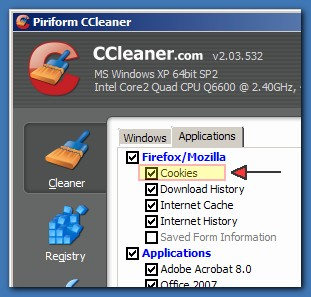
First, install CCleaner, and then open it up.  You'll see a page like this:

cookieclean1a.png cookieclean1b.png

Make sure the options to clean cookies is checked both for Internet Explorer (on main page), and Firefox (on application page).


Then, click on the Options at bottom left, and press the Cookies button.  You should see a display like this:
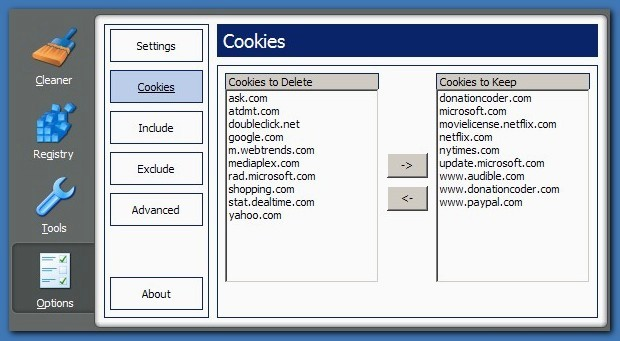
cookieclean2.png

If it's the first time you've configured it, you'll see a bunch of sites listed on the left, and none on the right.  Select the sites on the left which you trust or visit regularly and want to remember you.  Move them to the right hand side and they will be forever preserved.

For those you don't recognize, I'd say just go ahead and leave them to be deleted -- worst case scenario you'll have to log in to those sites again since they won't remember you until you do.  Remember that deleting a cookie is never going to remove your login info from a site, it'll just make it so the site won't recognize you until you log in.


The cookies you configure to "Keep" will forever more be left alone -- all those you leave in the left hand pane will be deleted whenever CCleaner runs its cleaning pass.

Using this method of cookie cleaning means that all cookies are allowed on your pc at the time you are browsing without you ever being annoyed with a pop-up or getting some error because the site couldn't save a cookie it needs for you to navigate on the site.  But then at your convenience you can easily wipe out all the cookies from sites other than those you trust.
24347
Mini-Reviews by Members / Re: Quick Web Creations - Professional 2.0 Images
« Last post by mouser on January 19, 2008, 09:28 PM »
nice minireview  :Thmbsup:

EDIT: Why are there those blue lines around the thumbnails? Am I not using the thumbs-thing right? Or am I the only one who sees them?

as jgp says, that happens when your displayed image is a reduced thumbnail that users can click to expand.
having enlargeable thumbnails is often the best thing, but if you are sure you want the full image only, you can use "attach=" instead of "attachthumb="
24348
The Form Letter Machine / Re: Impossible to file new configuration tree
« Last post by mouser on January 19, 2008, 08:43 PM »
Can you elaborate?
24349
General Software Discussion / Re: What's your music player of choice?
« Last post by mouser on January 19, 2008, 09:52 AM »
The minimalist simplicity of VUplayer (recommended by Allen) won me over.
24350
DC Member Programs and Projects / Re: Deductoid Discussion
« Last post by mouser on January 19, 2008, 07:14 AM »
This damn game snuck into my brain.. I warn you if you are a puzzle person, don't play it unless you can afford to get addicted.
Pages: prev1 ... 969 970 971 972 973 [974] 975 976 977 978 979 ... 1515next