topbanner_forum
  *

avatar image

Welcome, Guest. Please login or register.
Did you miss your activation email?

Login with username, password and session length
  • Wednesday March 18, 2026, 7:29 pm
  • Proudly celebrating 15+ years online.
  • Donate now to become a lifetime supporting member of the site and get a non-expiring license key for all of our programs.
  • donate

Recent Posts

Pages: prev1 ... 75 76 77 78 79 [80] 81 82 83 84 85 ... 386next
1976
Can be replaced easily enough if you're competent with a soldering iron but there are some lethal voltages lurking in the PSU, especially the discharge from the main capacitor.

I'm usually glad to take things apart and tinker with them. But I decided I'd better not ever mess inside of monitors when I learned about those lethal voltages.
1977
Did you ever manage to find out what was the reason or did it come good in a later update, Deo?

I had stopped putting my PC to sleep and instead either left it running or shut it down completely to avoid the issue.

Eventually I forgot that I ever had this problem and probably around the new year I began putting my PC to sleep at night again and the problem hasn't happened yet.


But as of about mid-December, my other monitor has started having issues when I turn on my PC, though I'm fairly confident it's unrelated. My screen is a pale grey, then looks like "clouds" form on it, then there are either some bright or dark lines of pixels that show up at the top, soon replaced by several lines of glitchy pixels at the top of the screen which gradually expand down toward the bottom until finally the picture comes back, but the colors are messed up. Once it reaches that point, I can shut the monitor off and turn it on again and the colors are all good. But if I try to restart the monitor earlier in the process, it continues about from where it left off. It's like it needs to "warm up" a bit first. It has happened both when resuming from sleep and also when powering on from an off state.

I took a video of it using my tablet. It seems to be worse and last longer since I took this video:

1978
Non-Windows Software / Re: Android book reader (thinking Moon+)
« Last post by Deozaan on January 30, 2017, 03:56 PM »
This is kind of off topic, but if you're concerned about the few dollars to buy an app, you may want to know this:

If you use Google Opinion Rewards they will occasionally give you paid surveys that will earn you somewhere between $0.10 - $1.00 each time (but be aware that sometimes they don't pay anything). These few cents here and there add up over time, and I've used those funds to purchase apps or even movies/albums every so often for "free."

It shouldn't be too difficult to save up the $4.99 needed for Moon+ Pro.

Here's most of my reward history for 2016, (note the Total Earned goes back to 2013). Looks like I made about $7.50 in Play Store credits from those surveys. :)

Google Opinion Reward History.png
1979
General Software Discussion / Re: Windows 10 Announced
« Last post by Deozaan on January 30, 2017, 03:19 PM »
We should probably mark informational posts about Fast Ring/Insider builds as "beta" or "preview" releases so people who aren't part of the Fast Ring/Insider program don't worry they'll be affected by these issues. Otherwise it just seems a bit like fearmongering, IMO.


Related: I came across a site that somewhat nicely lists all the recent changes to Windows 10 builds, and even makes it clear who will be affected by the changes (Fast Ring, Release, Business, Xbox, Mobile, etc.)

https://changewindows.org/

With this you can see what actually changed, rather than the standard boilerplate of "This update improves functionality and security of Windows." or whatever it usually says. For example, here's what it says changed in 15019:

Click here to expand the changelog
Start

  •     The animation when moving tiles in and out of a folder has been polished further
  •     The default tile lay-out has been updated

Microsoft Edge
Edge 40.15019

  •     You can now let Edge read books aloud to you
  •     If you click on an image, you can now use Ctrl + Mouse wheel to zoom in the e-book viewer

EdgeHTML 15.15019

  •     When using emoji’s, Edge will now render them in full color by default
  •     WebRTC 1.0 is now enabled by default
  •     Re-deferral support
  •     Chakra JIT is not out-of-process by default
  •     Support for SharedArrayBuffer behind the Experimental JavaScript Features flag
  •     Support for WebAssembly behind the Experimental JavaScript Features flag

about:flags

  •     "Enable WebRTC 1.0" has been removed

Settings
System

  •     "Blue light" has been renamed "Night light"
  •     Night light has an updated range for color temperatures
  •     Custom scaling has been added as a subpage

Personalization

  •     The Wheel settings now list customizable apps alphabetically
  •     The "Get more themes from the Store" button has been moved to the top of the Installed themes section

Gaming

  •     Gaming has been added as a new category in the Settings app
  •     "Game bar" has been added and allows you to manage the Game bar and hotkeys
  •     "Game DVR" has been added with settings like storage location, FPS and more
  •     "Broadcasting" has been added with settings to manage your broadcasts like audio quality and more
  •     "Game Mode" has been added and allows you to enable Game Mode which will improve overall performance while playing a game

Privacy

  •     You're now either in the "Basic" or "Full" group for feedback and diagnostics, with "Enhanced" removed
  •     You can now disable Microsoft from using diagnostic data to provide a tailored experience

Update & recovery

  •     Troubleshoot has been added as a new page and allows you to easily start troubleshooting a number of features in Windows
  •     Under "Restart settings" you can now require Windows Update to show more notifications before restarting
  •     The option to prevent Windows Update from installing drivers has been removed

Mixed Reality

  •     "Holographic" has been renamed "Mixed Reality"
  •     Settings on "Audio and speech" are now functional
  •     "Environment" has been added and allows you to clear information about your environmnet
  •     "Headset display" has been added and allows you to change display quality
  •     "Spaces" has been added and allows you to remove holograms in your environment
  •     "Uninstall" has been added and allows you to uninstall Mixed Reality

Ink Workspace

  •     Improved copy reliability in Screen Sketch

System

  •     The OOBE experience now includes a number of new privacy settings like Location, Speech recognition and Diagnostics
  •     The OOBE now supports captive portal Wi-Fi connections
  •     The OOBE has an updated design for signing into or signing up for a Microsoft Account
  •     The OOBE now has pagination to indicate your progress
  •     The OOBE now uses the new Windows Hello implementation to enroll
  •     The OOBE now uses a recorded voice instead of a synthetic voice
  •     The OOBE now supports subtitles
  •     While you're account is being prepared after an upgrade or after installation, new strings will appear

Language

  •     Latin-based languages now have an ellipsis child key when holding the period key on the touch keyboard

Apps
Mixed Reality Portal

  •     "Windows Holographic" has been renamed "Mixed Reality Portal"
  •     When clicking on "Get started", you'll now see a setup instead of the compatibility results

Windows Defender Security Center

  •     Browser and app management has been added to the home page but is broken

Other features

  •     You can now record with Beam
  •     You can now resize Hyper-V windows in Enhanced session mode
  •     17 games have been added to the list of full-screen supported with the Game bar
  •     Paint now has a "Open Paint 3D" button in the ribbon
  •     The on-screen touchpad has a new design to make to left and right button better visible

And further

  •     The System (Enhanced) setting is now available in the Windows ADK for IT Professionals
  •     Improved Settings reliability

Fixed issues

  •     Unknown fixes and enhancements to the OOBE
  •     Fixes an issue where right-clicking the night light quick action and clicking on Settings would open the main Settings screen instead of the night light settings
  •     Fixes an issue where waking your device from sleep or connecting a new monitor would make Windows ignore the night light setting
  •     Fixes an issue that would cause Explorer to hang if night light was enabled
  •     Fixes an issue where connecting an Xbox 360 or One Controller to your PC would crash the DWM
  •     Fixes an issue where in some games using Alt + Tab would cause both the game and the newly focused window to flicker
  •     Fixes an issue where Narrator might not speak or say "No item in view" in Edge while tabbing or using other navigation commands
  •     Fixes an issue where pasting on top of selected text in a Web Note would cause Edge to crash
  •     Fixes an issue that kept users from viewing Twitch.tv streams in Edge
  •     Fixes an issue where sharing a PDF in Edge would cause the browser to crash
  •     Fixes an issue where typing [ in the F12 Developer Tools window would not work on the Hungarian keyboard
  •     Fixes an issue where Taskbar preview icons would be small on high-DPI devices
  •     Fixes an issue where tapping outside a textbox with focus in an UWP app would not dismiss the on-screen keyboard
  •     Fixes a typo in the compatibility option to override high-DPI scaling
  •     Fixes an issue where newly pinned secondary tiles would appear in the Recently Added list
  •     Fixes an issue that prevented you from dragging the final tile from a folder onto the same row as the folder tile
  •     Fixes an issue where using Hey Cortana could cause SpeechRuntime.exe to use a high amount of CPU
  •     Fixes an issue where Notepad when maximized with enough text to require a scrollbar would result in the scrollbar's right-most edge not responding when trying to drag it
  •     Fixes an issue where pressing Alt to set focus to the menu bar in some apps would cause that app to become unresponsive if pressing Ctrl or clicking inside the app's child window
  •     Fixes an issue where Cortana could crash when typing out a UNC path to slow when that path has been used in Cortana before
  •     Fixes an issue where Default apps would crash when you clicked on an app under "Choose default app" and selected the option to look for an app in the Store
  •     Fixes an issue that could cause some apps to crash after using the Open dialog to rename or open a folder
  •     Fixes an issue where Win + Shift + S would not work in the Snipping Tool if it was set to something other than Rectangle
  •     Fixes an issue where Windows would open multiple Snipping Tool processes when using Win + Shift + S and hitting Esc to stop
  •     Fixes an issue where some file attributes, like +s, would get lost when copying or moving a folder to another partition
  •     Fixes an issue where using the Command Prompt with some fonts would cause conhost.exe to use a lot of CPU
  •     Fixes an issue with Windows Ink where undoing and redoing a point erase would cause the ink to reappear in the wrong order
  •     Fixes an issue where the mouse and keyboard would become unresponsive for a few seconds at a time
  •     Fixes an issue where some apps would crash when switched to Tablet Mode
  •     Fixes an issue where calendar appointments that are marked Tentative or Out of Office would show up as Free in the Taskbar clock and calendar flyout
  •     Fixes an issue where slideshows would not work when selecting multiple folders in the Background Settings
  •     Fixes an issue where pages would flash when navigating from and back to the Theme settings
  •     Fixes an issue on the Bluetooth & other devices settings page where it would show "Systemsettings.Viewmodel.settingentry" at the bottom
  •     Fixes an issue that could cause the Netflix app to crash on launch
  •     Fixes an issue where the Netflix app would crash when starting a movie on certain hardware types
  •     Fixes an issue where DOTA2 would not launch correctly

Known issues

  •     The download indicator when downloading a new build is broken
  •     Nonstop exceptions in the Spectrum.exe service may occur resulting in audio not working and disk I/O becoming very high
  •     Some Google sites will not load due to an implementation of a new security model
  •     Microsoft Edge extensions do not work in this build
  •     The F12 Developer Tools may crash, hang or fail to accept input
  •     "Inspect Element" and "View Source" options don't work correctly in Edge
  •     Windows Insiders will see a "Mixed Reality" entry in the Settings app
  •     Some captive portal Wi-Fi networks will fail to connect in the OOBE
  •     Yes and No commands in the OOBE will fail
  •     Quicken will fail to run with an error stating .NET 4.6.1 is not installed
  •     Dragging apps from All apps to pin them on the Start screen won't work
  •     Some Tencent apps and games may crash or work incorrectly in this build
  •     Windows Update might claim that "Some Settings are managed by your organization" despite not being managed
  •     Audio could stop working with a "Device in use"-error
  •     The Action Center could appear blank and transparent
  •     Clicking some elements in desktop games might cause the game to minimize without being able to restore it
  •     The Game Mode setting will initially be displayed incorrectly
  •     Some games may experience crashes or black screens when loading
  •     Broadcasting to Beam from the Game bar will require some Privacy settings to be changed
  •     The broadcast live review window in the Game bar may flash green when broadcasting


All that said, I'm not exactly sure how to see what the current standard release is. According to "winver" I'm on 14393.693 and Windows Update says there are no new updates for me. But that website says the latest "Current" is 14393.726. However, it says the latest "Current" for Mobile is 14393.693, which is the version I'm currently running even though I'm on PC. And I don't have "Defer Updates" enabled in my update settings. :-\

Maybe the discrepancy is a result of Microsoft doing "rolling updates" and I just haven't been selected yet to receive the latest "Current" version.
1980
Living Room / Re: Happy 2017, respect to DC friends.
« Last post by Deozaan on January 29, 2017, 12:15 AM »
I was recently listening to the DonationCoder Podcast theme song (Cody's Theme). I really like that song. :)
1981
What's the license on the code?

Think about that question after reading the title again.

So you're hosting code in your repository that you don't have the legal right to? And deceptively calling it "OpenOpera" as if it was FOSS?
1982
What's the license on the code?
1983
The possibilities that spring to my mind are:

  • Are both HDDs formatted using the same filesystem? (Does that filesystem support large files?)
  • Do you have "Compress this drive to save disk space" enabled on one or both drives?

I recently-ish discovered that enabling drive compression kept causing my source code repositories to become corrupted. The problem plagued me for over a year and I had to keep pulling a fresh copy of my repo from BitBucket because my local copy kept getting corrupted. I even bought a new HDD because I thought the corruption was a sign that my old one was failing. So now, with multi-terabyte drives becoming ubiquitous and relatively inexpensive, I would recommend to keep this option disabled to avoid rare problems like what I experienced.
1984
You may also be able to use some tool like WinDirStat to see what's taking up space on your drives.
1985
Living Room / Re: Interesting "stuff"
« Last post by Deozaan on January 23, 2017, 08:06 PM »
^ reply #368 -- wrong thread I think :-)

Your post and the one it refers to have been moved to this thread, which is a better fit than where they first appeared.
1986
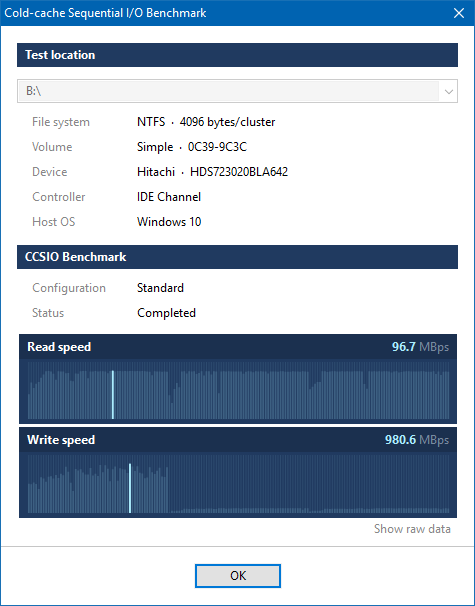
Screenshots don't seem to work very well on my Windows 10 system:


Here's what the window actually looks like for me:

CCSIO Bench.png
1987
Living Room / Re: how to learn finance
« Last post by Deozaan on January 19, 2017, 06:52 PM »
I read the Dave Ramsey book (Total Money Makeover).  I would classify it as more of a motivational book than an information book..  It's basically written to wake you up to the urgent need to get absolutely dead serious and focused on eliminating all debt, and shake some sense into you about getting deadly serious about making a major life-changing commitment to budgeting your money.

It's short on facts and details, but if you can benefit from the motivation I'd say it's worth a read.

Well I wouldn't say there are no concrete steps -- it's just you could write all the facts and steps and procedure out on an index card.  And you could sum them up basically by saying that you should:
1) create an emergency fund for emergencies.
2) get super focused on paying off all your debt as soon as humanly possible -- change your lifestyle dramatically to do so if need be; pay off smaller debts first for the psychological benefit.
3) after 1+2 are done, start saving 15% per year for retirement.

Again, don't get me wrong, if you need this motivation, i think it's well worth it to read the book even if those are the only concrete steps you get out of it.

I'm not knocking the book -- it is what it is -- it's not an investment strategy book, it's mostly a motivational book (imho).

But the financial problem for many of us is really a mental habit behavior issue you are trying to fix, so whatever you need to do to get yourself motivated is worth it.

I think this is a fair assessment. I felt like for the first chapter or two he was spending all his time telling the reader how awesome his book is and how it will change your life. It was very self-promotional and it made me suspicious that it was just going to be a bunch of BS. I kept wondering when he was going to get to the actual content.

But then once I got to the content, I was happy with it, and it definitely helped me see some concrete steps to take. And yes, those concrete steps could be put on an index card (I summarized them in my previous post). But I felt the book was useful in driving home the point of the importance of doing these things as well as how big of a difference these things can make over the long term.

If you want a book about facts, read The Millionaire Next Door. :) It's also not an investment strategy book. But it does talk about the many little ways--and some of the big ways--you can improve your finances through your every day behaviors.
1988
Living Room / Re: Happy 2017, respect to DC friends.
« Last post by Deozaan on January 19, 2017, 06:44 PM »
beni bidi beechee.

OK, I'll bite.

What's this mean? Some sort of play on veni vidi vici?

Happy 2017!
1989
Living Room / Re: how to learn finance
« Last post by Deozaan on January 17, 2017, 01:39 PM »
I've been budgeting using YNAB and the YNAB method, combined with the ideas/goals/concepts explained in Dave Ramsey's The Total Money Makeover as well as The Millionaire Next Door by Drs. Thomas Stanley and William Danko.

Same here. Thought not the second one.  I'll have to check it.

It has been several years since I read either book, so the details in my memory are certainly not fresh. But as I recall, I found The Total Money Makeover to be a practical guide on actual steps to take and financial goals to have (save $1,000, debt-snowball, save $10,000, pay off mortgage, save/invest like crazy!) whereas The Millionaire Next Door is "just" an explanation of the results of their study of how the average affluent person lives. That is to say, generally we think of millionaires as driving expensive cars, wearing expensive clothes, living in expensive houses, and otherwise displaying their wealth as a status symbol. But generally speaking, most millionaires are just normal people living in middle-class homes/neighborhoods with middle-class jobs, driving used cars, who just managed their money more frugally than everyone else who is living paycheck to paycheck. Hence the title, The Millionaire Next Door, because those of us who aren't millionaires could very well be living next to one and not know it.

From the back cover: "The implication of The Millionaire Next Door...is that nearly anybody with a steady job can amass a tidy fortune." -- Forbes

It's more of a study about the behavior ("millionaires don't buy $500+ watches") and attitudes (avoid instant-gratification, are frugal, financially organized (budgeting)) of the rich. It's good and interesting information to know, but it's more abstract and not quite as easy to just put into practice like the information found in the Money Makeover.


I'm planning to re-read The Total Money Makeover soon. Maybe having those details fresh in my mind will help re-motivate me and get me more on track to reach my financial goals.
1990
Living Room / Re: how to learn finance
« Last post by Deozaan on January 16, 2017, 08:27 PM »
I said it before I'll say it again, this is the year I get financially organized and literate -- who's joining me?

I'd say I'm joining you, but it's something I've already been doing for the past several years. I've been budgeting using YNAB and the YNAB method, combined with the ideas/goals/concepts explained in Dave Ramsey's The Total Money Makeover as well as The Millionaire Next Door by Drs. Thomas Stanley and William Danko.
1991
DC Gamer Club / Re: DiRT Showdown Free on Humble Bundle
« Last post by Deozaan on January 12, 2017, 03:45 PM »
For the next ~2 days.

https://www.humblebu...t-showdown-free-game

The key must be redeemed on Steam by Jan 28 10AM PST.
1992
N.A.N.Y. 2017 / Re: NANY 2017: Feast Day / Fast Day (Android)
« Last post by Deozaan on January 08, 2017, 11:12 PM »
I wish I understood these Android compatibility things better.

What version of the API did you target when you made the APK? Android 5.0 is API 21. So if you targeted anything >21 it would say it wasn't compatible with Android 5.0 or below.

Nope..just the play store.  Excuse my ignorance, but how do I go about installing the apk directly?

Download the APK from the original post onto your device and then install it from your device. You may have to enable installing from "Unknown Sources" in your device's Security settings before it will let you install the APK.
1993
N.A.N.Y. 2017 / Re: NANY 2017 Release: Drive Letters Tool
« Last post by Deozaan on January 08, 2017, 11:06 PM »
I like it! Thanks! :Thmbsup:
1994
Found Deals and Discounts / Significant Discounts on AWS Courses/Certifications
« Last post by Deozaan on January 05, 2017, 03:12 PM »
A bunch of courses and certifications are discounted until January 19th, here:

https://acloud.guru/courses
1995
DC Gamer Club / Re: Factorio - Automate All the Things!
« Last post by Deozaan on January 04, 2017, 03:49 AM »
Since my initial "cheater" victory, I have completed a challenge on a new map to win legitimately in less than 8 hours. I barely made it, finishing in 7:49:29.

Factorio - There is No Spoon.jpg
1996
General Software Discussion / Re: YNAB moving to a subscription model
« Last post by Deozaan on January 02, 2017, 06:53 PM »
A year on since this was announced, has anyone moved on from YNAB to something else? Or did anyone bite the bullet and update to the subscription model?

I'm still happily using YNAB 4, but am having a hard time figuring out what to recommend to people who ask about budgeting software. Especially since, AFAICT, you can't purchase licenses to YNAB 4 anymore. It has even been delisted from Steam.
1997
DC Gamer Club / Re: Factorio - Automate All the Things!
« Last post by Deozaan on December 26, 2016, 04:23 PM »
A few days ago I finally "won" the game on a map.

But it was a "cheater" map that I used some console commands to spawn a bunch of ores in one location just to see how it would work out, so it doesn't really count.

Factorio - Finished.jpg
1998
Living Room / Re: Show us the View Outside Your Window
« Last post by Deozaan on December 24, 2016, 03:36 PM »
Merry Christmas everyone!

2016-12-24 14.34.48 Small.jpg
1999
DC Gamer Club / Re: Humble Store giveaway for next couple days: Grid
« Last post by Deozaan on December 22, 2016, 07:30 PM »
Note that unlike most other offers on Humble, it seems the keys you claim must be redeemed to a Steam account before the end of the year, at which point it seems they will expire if they haven't been redeemed.
2000
Living Room / Re: Movies you've seen lately
« Last post by Deozaan on December 22, 2016, 01:39 AM »
I thought that was a reference to Man of Steel, not BvS.  Especially since the other aliens that were there were just as powerful- but Superman was the one that survived.  Never put together that they could be referring to BvS.

Well, I just had Batman vs. Superman (at least partially) spoiled when I went looking up information on June Moone. This is what Wikipedia says about the plot of Suicide Squadw:

Potential Batman vs. Superman spoiler
In the aftermath of Superman's death, intelligence officer Amanda Waller assembles Task Force X, a team of dangerous criminals [...]

So I feel I can safely say it definitely assumed I had seen Batman vs. Superman.

It might be because you haven't read the comics?  Admittedly, with a cast that was this large, it was inevitable that some people would get the short end of the stick... I knew slipknot's position because of this.  And I do think that your complaint has merit beyond what you say- it's bad writing.  More than the BvS link, I thought this was the point where they relied on you already knowing the characters, though I'm not sure offhand of a better way to execute it in the time given.  They are doing a better job with Justice League, but I still give the credit to Marvel, as they were willing to give the major characters in the Avengers their own movies (for the most part), and not rush the project to market as DC is.  I'll go down your list interjecting what makes each special- at least the ones I know.  I also linked the names up to the wikipedia entries.

I definitely haven't read the comics. Even so, most of the superheroes in the Marvel movies are characters I've heard of before, either from Saturday Morning Cartoons from my youth, or video games, or something. Besides that, I feel they did a poor job of introducing us to them in this movie. And I wondered why they introduced us to them multiple times. The opening scenes introduce us to a few of them. Then Waller is proposing her plan, wherein she introduces them to us again. Then they go check them out in person, where we are introduced a third time. Then bad things happen and the squad is finally organized. I didn't really care for it, but that's not to say I have any better ideas for how it could have been done.

Enchantress was a super powerful being whose actions largely make no sense.

I think her actions made sense, but they just didn't do a good job of conveying them.  Sort of like in the comics; they never really knew what to do with her.

Her actions make sense as far as her wanting to destroy humanity, but they don't make sense in the same way that Apocalypse's (from X-Men Apocalypse) actions don't make sense. These people have immense power and can kill in an instant or move/teleport to safety in an instant, but they leave themselves vulnerable and engage in hand-to-hand combat.

June Moon

I didn't even mention her because my first reaction to her part in the story was, "What kind of archaeologist discovers an ancient ruin and immediately breaks something?"

Incubus was a super powerful being whose actions largely make no sense, and whose name I only know after having looked it up on IMDB.
Incubus was the entity that was inside of June's brother, and more powerful than she.  They did an OK job of explaining this, I thought, if less than they should have.

I thought Incubus was her brother, and she gave him a new host. But aside from that, I still don't understand why--if he is an actual god, and she is only god-like--why does he do everything she says. And again, he can kill in an instant, and everything he touches--except the Suicide Squad--is immediately destroyed. I honestly can't remember if it ever came down to kicks and punches with the Suicide Squad (not counting the one obvious exception), but it still seems to me like he could have annihilated them instantly.

Flag was OK, I guess, but I couldn't figure out what made him any more special than any of the other military folks.

They needed a handler.  He was it.  Nothing really special about him.

That's how I felt, but the way Waller introduced him made it seem like there was something special about him, which I didn't understand.

Waller was OK, I guess, but I couldn't figure out why Deadshot, or anyone else, for that matter, didn't just smash/break/shoot/steal her phone/tablet and then kill her and Flag.

Again, her position was that she did have the killswitch and was the power behind the throne, and that was the reason that they were just after her tablet with her alive, rather than dead.  If she wasn't in range of the tablet, their bombs go boom.  Not in range also means dead.  She's supposed to be very much a ruthless power behind the scenes type of person, that thinks several steps ahead of the opposition.

Maybe I missed that part. I didn't remember them ever explaining that if she was dead or too far from it, they'd die. In fact, I'm pretty sure that wasn't an explicit part of the plot, because wasn't there a few minutes after her helicopter crashed that they weren't sure she survived? They certainly wouldn't need to wonder whether or not she was still living if they were rigged to explode upon her death.

This video is amusing, and makes good points (and has some spoilers):

Pages: prev1 ... 75 76 77 78 79 [80] 81 82 83 84 85 ... 386next