topbanner_forum
  *

avatar image

Welcome, Guest. Please login or register.
Did you miss your activation email?

Login with username, password and session length
  • Wednesday December 3, 2025, 11:19 am
  • Proudly celebrating 15+ years online.
  • Donate now to become a lifetime supporting member of the site and get a non-expiring license key for all of our programs.
  • donate

Recent Posts

Pages: prev1 ... 60 61 62 63 64 [65] 66 67 68 69 70 ... 1514next
1601
Find And Run Robot / Re: Use of Variables inside Aliases
« Last post by mouser on April 26, 2019, 06:18 PM »
There are also alternative ways to do what you want, that might be less advanced but easier to maintain.
For example, FARR is very happy to let you make lists of items, either in an alias or even in a separate file, and then filter based on them.

So if you make an alias called "users" that just had a list of your users and their associated web urls like:
Code: Text [Select]
  1. alice | http://www.mypage.com/user/1
  2. bob | http://www.mypage.com/user/2
  3. etc.

The advantage of doing it that "simpler" way is that you could type "users" and see a list of all your user urls, and then type "users b" to have it start filtering only users starting with b, or just type "users bob" and hit enter without thinking.  This also has the advantage of being less sensitive to spelling errors and helping you remember user names, etc.

There may be cases where using complex variables and regular expressions make sense, but it may be that sometimes just using a simple list of labeled results is cleaner.  You could also put that list in a text file and tell farr alias to grab the list from the text file so you could more easily update it outside of farr..
1602
Find And Run Robot / Re: Use of Variables inside Aliases
« Last post by mouser on April 26, 2019, 06:13 PM »
Hi Xavi_8m, and welcome to the site  :Thmbsup:

I'm glad you are liking FARR -- you sure jumped right into the advanced stuff :)
I think I should be able to fix your problem -- sounds like it's just a matter of the order that FARR replaces variables and regex values, and that regex $$n values should be resolved first.
1603
I see, let me, does the slide show have transitions that move the images during transitions, or is is just a solid image appears and then eventually switches to another one without any transition (fade, slide, etc.).
If this is the case, you should be able to find some mp4 or other video codec that compresses it well.
But if you have transitions between the images, then any video format you use is likely to result in a significantly bigger file.

In that case (or if you just want a more flexible and efficient and less burdensome for the users approach) your solution would be to find an html/javascript script designed to run the slideshow that you can upload with your images.
In this case, the html/javascript will be serving the same function as irfanview does on your local pc.
1604
LaunchBar Commander / Re: Visual Corruption
« Last post by mouser on April 24, 2019, 04:57 PM »
I wonder if it could be an issue with the driver for your graphics card, which might need an update..  Normally the chance of this is pretty slim, but it can happen.. It's worth checking if there is an updated driver for your graphics card, or if you have any other advanced software that could be messing with the screen (e.g. remote desktop software, etc.).
1605
LaunchBar Commander / Re: Visual Corruption
« Last post by mouser on April 24, 2019, 12:42 PM »
The version update is not important -- it just means you have the latest and I haven't bothered updating the web page version listed yet.

The corruption issue is strange.  Does it doesn't matter which skin you are using?
1606
Developer's Corner / Red Dead Redemption 2 - Long Article on What Went Wrong
« Last post by mouser on April 24, 2019, 09:56 AM »
Really long interesting article on Read Dead Redemption 2, a much awaited video game (I thought the original was one of the top 10 video games I had ever played).

The most brain-shattering example happens when you play dominoes. You can see neither the board nor your hand from the main default screen while playing dominoes. And I have a big TV, so please, it’s not the TV. But the game is designed so you can zoom in on the board, then zoom out, and then zoom back in on your hand. It’s designed to mimic what it would actually feel like to be realistically playing dominoes.

Not only is this a really obstinate decision, but the board view is actually worthless because the view of your hand is even better and closer than the view that shows you the board. That means you have to hold the left trigger basically the entire time you play to properly see the board. This is a ridiculous choice to me, on every level, because it so readily creates an exhausting experience.


from osnews.com
1607
Screenshot Captor / Re: Settings on Unavailable Network Drive
« Last post by mouser on April 23, 2019, 03:51 PM »
 :up:
1608
Screenshot Captor / Re: Settings on Unavailable Network Drive
« Last post by mouser on April 23, 2019, 01:23 PM »
I don't mind using a different (local) directory for storing my settings, but how can I change the default location for the ScreenshotCaptor.ini file?

Edit the ConfigDir.ini file in the installation location of Screenshot Captor -- there you can specify the location where you want your Screenshot Captor settings file (ScreenshotCaptor.ini) and related files to be stored.

Let me know if that helps!
1609
Developer's Corner / Re: Node.js Learning Resources?
« Last post by mouser on April 22, 2019, 01:46 PM »
I'm going to start work on a node.js game idea soon :)
1610
scr is just an exe file with a different extension.
and exe files are executable, there is no universal way to convert them.
however, it is very unlikely that the exe itself has video or image files embedded in it. there is probably a directory of images or video somewhere else on your disk the the program installs and loads.
(this is assuming of course that the screensaver/exe is showing video or images and not dynamic graphics).
1611
Living Room / Re: What books are you reading?
« Last post by mouser on April 19, 2019, 10:23 PM »
Principles of Economics by Mankiw
https://www.amazon.c...Mankiw/dp/128516587X
Screenshot - 4_19_2019 , 10_22_18 PM.png

Each page makes sense, but when I close the book and look around I still find it hard to understand how anyone is making any money.
1612
DC Member Programs and Projects / Re: Unping all the links!
« Last post by mouser on April 19, 2019, 10:03 AM »
oh nice!
1613
Screenshot Captor / Re: Grab windows object misfit
« Last post by mouser on April 19, 2019, 01:27 AM »
 :up:
1614
Screenshot Captor / Re: Grab windows object misfit
« Last post by mouser on April 18, 2019, 03:12 PM »
1615
Screenshot Captor / Re: Grab windows object misfit
« Last post by mouser on April 18, 2019, 12:32 PM »
Yes, I was hoping that would be the case.  Should make it fairly easy for me to do a fix for the red box object capture of window forms.
Thanks for your help tracking down the problem -- I should have an update in the next few days.  :up:
1616
Screenshot Captor / Re: Grab windows object misfit
« Last post by mouser on April 17, 2019, 03:38 PM »
Ok that's helpful -- I'll see if I can't fix this. I seem to remember windows api providing information about window border size based on the theme -- I think that might be the solution.

I thought of another question.  If you select that window and use the ACTIVE WINDOW CAPTURE mode instead of the red box object mode, what does the capture look like in that case?
1617
Screenshot Captor / Re: Grab windows object misfit
« Last post by mouser on April 17, 2019, 12:30 PM »
Ok, sounds like I might need to look into whether on Windows 10 I need to adjust for the border size of windows..
If you capture a smaller object than a window, like a button or a text box, the size seems correct?
1618
Living Room / Nice long hacker article on jailbreaking a car head unit
« Last post by mouser on April 17, 2019, 07:02 AM »
Some of us enjoy reading a good man versus machine detective story.
This is a long description of the process of getting access to the software running the head unit (audio, navigation, etc.) in his car.

Back in June, I purchased a new car: the 2018 Subaru Crosstrek. This vehicle has an interesting head unit that's locked down and running a proprietary, non-Android operating system. Let's root it. If this was Android, we could most likely find plenty of pre-existing PoCs and gain root rather trivially as most vehicle manufacturers never seem to update Android. Because this isn't an old Android version, we'll have to put a little more work in than usual.


from https://hackaday.com...eaking-a-subaru-qnx/
1619
Screenshot Captor / Re: Grab windows object misfit
« Last post by mouser on April 17, 2019, 05:50 AM »
Can you make sure you are using the latest version of SC and then give me some more details about how the resulting capture is too big?
1620
free tool: WinMerge, compare the folders show only differences.
http://winmerge.org

(For those who do regular comparisons of files and folders, I'm a big fan of the commercial app Beyond Compare)
1621
Living Room / The Bayrob malware gang's rise and fall
« Last post by mouser on April 15, 2019, 12:15 PM »
Longish interesting article on zdnet about a malware gang that was recently convicted of fraud and scamming people out of money.

The Bayrob malware gang's rise and fall: The story of how a talented computer science student and his friends created and ran a multi-million dollar botnet...
A graduate of one of Bucharest's top mathematics and computer sciences college, Danet won several international computer science contests, even ranking third in an ACM (Association for Computing Machinery) edition, and ranking high in many others.
According to Romanian TV station Kanal D, in 2008, Danet was elected the coach of Romania's National Computer Science Team, even though he was still a university student.
"He could have worked anywhere he wanted for the same money he made as a hacker," our source said over the phone when describing Danet's programming skills. "I still can't believe it after all these years."

1622
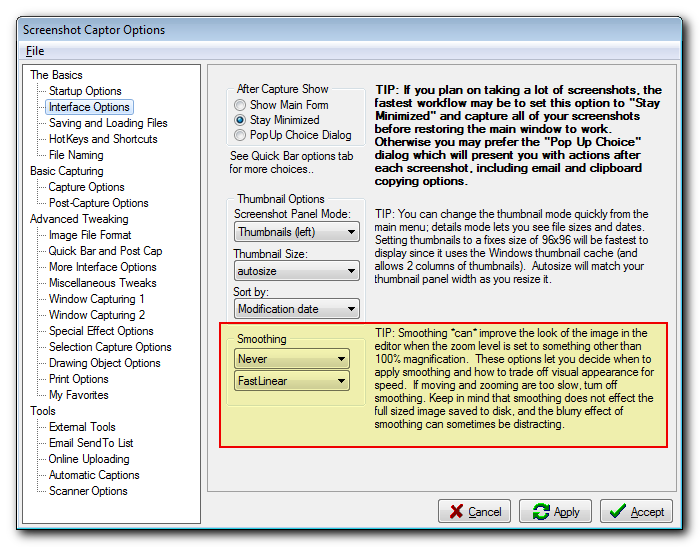
You can very easily tell SC to always save the screenshot to file, and always copy the image (or filename if you prefer) to the clipboard after every capture.
And indeed to otherwise stay out of the way minimized in the tray so you are not bothered by the pop-up post capture dialog.

Screenshot - 4_15_2019 , 11_49_22 AM.png
Screenshot - 4_15_2019 , 11_49_27 AM.png

With these settings, every time you make a capture it will be auto saved and the image copied to the clipboard, without being bothered by the program.
You can later open up the main SC window and delete files you don't want (or use the automatic archiving feature in SC to auto file them by date).

Does that answer your question?
1623
Living Room / Re: I'm getting married, wish me luck!
« Last post by mouser on April 14, 2019, 11:53 PM »
Thanks to everyone for the warm wishes  :-* :Thmbsup:
1624
Find And Run Robot / Re: Aliases don't appear in History
« Last post by mouser on April 14, 2019, 12:41 PM »
Yeah, it's something people have asked for.. Let me reconsider it..

Until then, what you CAN do is type: historys
which will show all your past searches which *WILL* include alias executions
(you can also make a FARR hotkey for that)

OR hit Ctrl+UP arrow to scroll through previous searches.
1625
Small update, I tiled the backsplash behind my sink with photo tiles that my father took of the old neighborhood in new york city where I grew up:
backsplashtiles2.jpg
Pages: prev1 ... 60 61 62 63 64 [65] 66 67 68 69 70 ... 1514next