topbanner_forum
  *

avatar image

Welcome, Guest. Please login or register.
Did you miss your activation email?

Login with username, password and session length
  • Friday April 3, 2026, 12:58 pm
  • Proudly celebrating 15+ years online.
  • Donate now to become a lifetime supporting member of the site and get a non-expiring license key for all of our programs.
  • donate

Recent Posts

Pages: prev1 ... 414 415 416 417 418 [419] 420 421 422 423 424 ... 1515next
10451
General Software Discussion / Re: Separating features into Basic and Advanced
« Last post by mouser on November 29, 2012, 11:32 AM »
One system that I think is a great tradeoff for balancing the needs of tweakers, developers, and casual users, is the system where some really advanced options are hidden away in an area that doesn't even have a nice option user interface.  Think of the firefox about config area, etc.

This is a good system because these advanced tweak options are hidden from normal user, available to tweakers, and don't require careful user interface design by the coder and make it very easy to expose new settings.
10452
Point Motivator / Re: I cannot delete or modify entries??
« Last post by mouser on November 29, 2012, 10:17 AM »
I think one issue is that Point Motivator is somewhat overly complex.

What might make it more usable is if someone was willing to create some xml definition files with some purpose in mind -- with enough entries that would satisfy users so they could use those definition files without ever feeling the need to customize them.

That would keep most users from ever having to go into the options at all.  If I could find someone willing to create some of those, it might breathe some new life into the program..
10453
Point Motivator / Re: I cannot delete or modify entries??
« Last post by mouser on November 29, 2012, 10:11 AM »
Hi Dan,

Thank you for your comments -- I think you probably hit the nail correctly on all of those -- and as you've surmised, Point Motivator could really use an update to smooth out these rough edges.

The real reason it hasn't gotten attention from me is that there doesn't appear to be much interest in the concept, and it feels like perhaps there are no real users; so it just goes to the bottom of the todo list..

However, I will try to get a minor update out at least that takes care of these worst offender bugs.  I definitely appreciate any help you or anyone else gives in identifying the issues to fix -- makes it all that much easier for me to release a quick update.
10454
General Software Discussion / Re: Separating features into Basic and Advanced
« Last post by mouser on November 29, 2012, 09:58 AM »
I tried this once, with my Find and Run Robot application.

In that case I had the options dialog toggle between an Advanced mode, which shows all options, and a Simple mode, which hid most.

First let me say, I am a complete believer in the concept that too many options can be overwhelming, scary, and make it harder to find the options to do what you want.

Having said that, most people who have seen my software know that I simply cannot help myself when it comes to adding options, and they tend to proliferate in my software.  I think that has to do partly with the audience.  I tend to respond most to people who are tinkerers and like to customize things, and the DC forums tend to attract such people.  And I don't spend too much time thinking about "How can we make this easier for new casual users."

Now back to the story of two modes in FARR:  Eventually I dropped the idea of having the Advanced and Simple modes, simply because it did not seem like something that felt unsustainable for me -- hiding options in the dialog just never looked right.

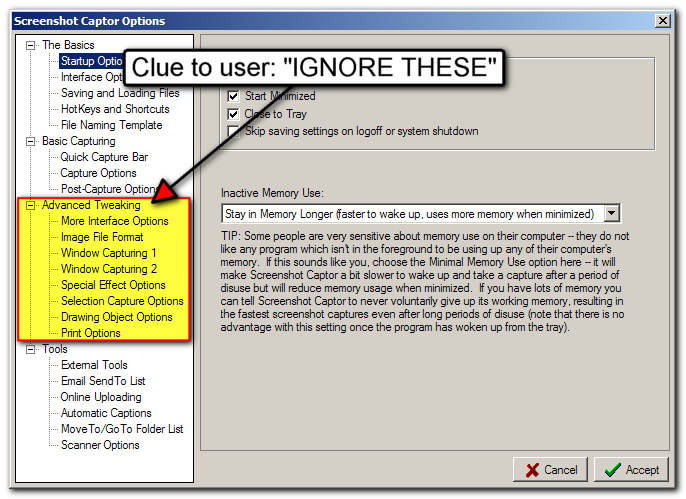
However, that was before I moved to my more standard TABBED options dialog which I have taken to using on most of my applications these days.  I think the TABBED options offers a fairly natural way to move Advanced options to a separate section of tabs, and keep the more basic stuff in other tabs.

It's still not a perfect separation, but I think it can serve an important role in helping people see which options are more likely to be useful to them.  A sample from the new Screenshot Captor options dialog:
Screenshot - 11_29_2012 , 9_56_47 AM - cap 00091.png

This Advanced group is something I will probably add to my other programs as well.  The only disadvantage is that it means some options that would otherwise logically be grouped together may get separated (some in basic options and some in advanced), but I think that's a price worth paying.
10455
N.A.N.Y. 2013 / Re: NANY 2013: wordpress-basetheme
« Last post by mouser on November 29, 2012, 08:51 AM »
The idea of making a good base theme that is clear and easy to understand and customize, that people can use as a starting point, sounds terrific.
10456
Living Room / Re: Animal Friends thread
« Last post by mouser on November 29, 2012, 12:04 AM »
Boy and Kitten play a friendly game of ping pong:

10457
Screenshot Captor / Re: Automatic resize before save
« Last post by mouser on November 28, 2012, 11:05 PM »
ps. for those who don't resize quite so often, SC has a "Create Thumbnail" action inside the File menu, which can be quickly triggered from the toolbar to use previous settings, which can be used to perform fairly quick resizing-like actions (it doesn't actually resize the current image, it saves a copy of the current image at the designated size).
10458
Screenshot Captor / Re: Automatic resize before save
« Last post by mouser on November 28, 2012, 11:02 PM »
great :)  :up:
10459
Google has decided to file our newsletters into spam folder, so if you have a gmail address and haven't received our newsletter that's probably why. Official google policy seems to be that they do what they want and don't have to explain themselves to anyone so not really anything we can do about it.  Thank you google!
10460
Screenshot Captor / Re: Automatic resize before save
« Last post by mouser on November 28, 2012, 09:34 PM »
you have the right idea
try putting the %file% parts in double quotes, and a full path to the icovert exe.

like c:\imagemagick\icovert.exe "%file%" -resize 120 "%file%"
10461
Thanks to DC member ewemoa as usual for his help with preparing the newsletter.
10462
DonationCoder.com Newsletters / Newsletter for November 28, 2012 - Countdown to NANY
« Last post by mouser on November 28, 2012, 04:58 PM »
Newsletter for November 28, 2012
"Countdown to NANY"


1. Newsletter Editorial

Hello dear readers.  It's been nearly five months since the last DonationCoder.com newsletter, so this is no doubt the first newsletter that many of you will have received from me.  If so, welcome.

What you'll find here is a collection of some of the more interesting discussion topics that have taken place on our forum in the last few months, as well as a list of new software updates from us, and a personal invitation from me to participate in our yearly "New Apps for the New Year (N.A.N.Y.)" event, which starts now and ends on January 1st, 2013.

Let's get the boring stuff out of the way first:  For those of you who are users of my software (Screenshot Captor, Launchbar Commander, Find and Run Robot, etc.) there have been some substantial updates recently, including a new beta release of Screenshot Captor with a few very big new features (and more coming over in the following months).

Now to the main point of today's newsletter, to announce and invite you to participate in the DonationCoder.com "New Apps for the New Year (N.A.N.Y.) 2013" event.  This is our yearly celebration of programming, where we invite coders of all skills to help ring in the new year by releasing some new piece of free software to the public by New Year's Day.  It's not a competition -- there are no winners or losers.  Everyone is welcome to take part and all the participants get a DonationCoder mug commemorating the event.  

NANY is one of the funnest things we do, and the last few years have produced some great new programs.  If you're a programmer (hobbyist or pro), we want your participation!  If you're not a coder, we still want your participation -- drop by the NANY 2013 section, and help test new releases and suggest ideas for the programmers.

Do you know a friend who might be interested? Or do you write a blog or newsletter?  If so, please help us spread the word!  Whether you are a long time DonationCoder member or someone who has never visited the site before, everyone is welcome.  30 days is plenty of time to come up a fun little project to work on -- a game, a utility, whatever, and share it with our readers.   What can you create in 30 days?

Visit the NANY 2013 section of our forum to read more and ask questions: https://www.donation...ndex.php?board=313.0


2. User-to-User: Your Input Requested

We love nothing more than having interesting discussions on our forum -- and we love when new people participate in the discussions.  In each newsletter we try to highlight a few topics that we think might interest casual readers and that are good candidates for making your first post.


3. N.A.N.Y. (New Apps for the New Year) 2013 Updates

Last year we started NANY very early, at a slow and steady pace.. this year we're going back to our old chaotic model of a frenzied 30 day sprint..  Check out some of the early pledges and progress reports below.  And if you are a programmer or know someone who is, please tell them to stop by and pledge to release a new piece of freeware by New Year's Day.


4. Mouser Software Updates

Since the last newsletter I've updated several of my larger programs.  The Screenshot Captor release is an early beta, which is half way through a giant update that will bring a bunch of new major features, and which will be out before the end of the year.


5. Other Coding Snacks and Member Projects

The Coding Snacks section is one of the things that people appreciate the most on the DonationCoder.com forum -- it's where anyone can post a request for a custom piece of software -- and often find the requests granted overnight by one of the coders who inhabit the forum.  It's also a great place to get help learning to do a little quick coding.


6. Mini-Reviews

In the past few years we've drifted from larger reviews to user-written mini-reviews, and we've had quite a few posted since the last newsletter.


7. Fun, Humor, and Amusements on the Web

You've made it half way through the newsletter, so let's have a break.  Go make yourself a hot chocolate, and check out these fun websites and videos!


8. General Software Discussion

Almost half the posts on the DC forum take the form of general software discussions, questions, recommendations, etc. These posts wind up in the General Software Discussion section and make it one of the most active sections of the DC forum.


9. Specific Software Discussion and Software Services

This section of the newsletter draws attention to some of the standout discussions about specific programs that have been started since the last newsletter.  I've also put some small member software announcements here.


10. Special Windows 8 Section

Since the last newsletter we've had a bunch of threads on the Microsoft's new Windows 8 Operating System:


11. Website Discoveries, Debates, and Discussions

What's new in cyberspace? What exciting new sites have been discovered by forum members?  What's the current hot topic and debate? Read on to find out...


12. Developer's Corner

Some people mistakenly think that the DonationCoder forum is only for coders -- which couldn't be farther from the truth!  Everyone is welcome and we discuss all manner of things, the overwhelming majority have nothing to do with coding.  This section highlights some discussions that might be relevant for developers or the self-employed.


13. Hardware Hideout

Although most of our forum discussions are about software, there are always some interesting hardware and gadget threads popping up.

10463
Actually.. perhaps we could commission a NANY drawing..
A drawing of of all NANY participants (using their avatars for inspiration), arranged as if they were all in a group photo :)
10464
Cody drawing please.
10465
Hi Cornan and welcome to the site.

BrowserTraySwitch doesn't get much attention from me these days just because so few people use it.

I happen to use FireFox and haven't used BTS in a long time, but it isn't exhibiting that behavior for me.

Have you tried deleting all the browser configuration files for BTS and recreating them?

Perhaps the phenomena has something to do with interaction with another browser -- perhaps you could do a little more testing and tell me whether your problem happens on reboot even if you dont ever switch browsers, or does it only happen when you change to a particular browser and then back again to Firefox?
10466
Screenshot Captor / Re: Automatic resize before save
« Last post by mouser on November 28, 2012, 01:41 PM »
such as with a post capture command line?
yep, you have the right idea.  you just need to find a command-line resizer (or general purpose tool) that will do what you want.

ImageMagick is free and can certainly do the job.

You would then configure it here:
Screenshot - 11_28_2012 , 1_40_35 PM - cap 00086.png

Do share your solution with us when you get it working  :up:
10467
Screenshot Captor / Re: Capture based on system time not milliseconds
« Last post by mouser on November 28, 2012, 01:31 PM »
Hi Robert.

This would actually be a perfect job for my MiniCap tool, which is the commandline-based little brother of Screenshot Captor, combined with a tool that can be used to run commandline tools at specific schedules.

That would be a lighter weight solution too.

This has come up occasionally, i think it would be helpful if someone could find a good free and flexible scheduling tool for this and maybe make a walkthrough showing how to configure MiniCap for us with it.

Anyone willing?
10468
General Software Discussion / Re: Loads of Distraction for the SC Users!
« Last post by mouser on November 28, 2012, 01:10 PM »
Iam trying hard to search for a method to hide the 'Navigation Ruler' that appears within the Editor screen of the SC.

I'm not sure what you are talking about -- can you elaborate?

Lastly, One certainly expects to see a 'Copy to Clipboard' based icon in the toolbar pane, but there is none...!?

Not a bad idea; there is a copy PATH to clipboard to the right of the filename on the bottom of the screen.

Note you can also DRAG images from the left thumbnail panel into outlook, etc.
10469
Living Room / Re: Animal Friends thread
« Last post by mouser on November 28, 2012, 12:56 AM »
Peter the Elephant plays a Green Piano:


From http://www.neatorama.com/
10470
Living Room / Re: What about Skrommel?
« Last post by mouser on November 27, 2012, 11:34 PM »
Skrommel is a very unique and mysterious individual.. if you'll remember he rarely socialized here -- he was a coding machine and a very impressive fellow.  The last we heard from him he had embarked on a large project building a house.

I think for someone like skrommel, the proper thing is to always keep an extra tea cup in the cupboard and be ready to pour him a cup for when he decides to stop in again, and not ask for much more than that.
10471
Living Room / Re: The Free Videos Thread
« Last post by mouser on November 27, 2012, 11:25 PM »
verrrry cool.
10472
Screenshot Captor / Screenshot Captor v3.13 Beta Test
« Last post by mouser on November 27, 2012, 11:06 PM »
There's a new beta of Screenshot Captor available for brave beta testers, with some early versions of a couple of big features that I will be developing further in the coming weeks.

Download:

And you'll also need to grab and install the new version of my new Easy Screencast Recorder tool which is not yet official:

Once you install both, you will see the Easy Screencast Recorder entry in the Tools menu; recording videos with it will put them in your screenshot folder where you can select them, etc.

And you will see in the View Menu an option to show the Quick Capture Toolbar, which can be docked out of the way at the top or bottom of your monitor.


Full change list:

v3.13.01 - Nov 28, 2012
  • [MajorFeature] Preliminary support for playing video files and extracting frames from them; and integration with Easy Screencast Recorder.
  • [MajorFeature] First draft of new (optional) onscreen quick capture bar.  The look+feel of this will change dramatically in future versions.
  • [MinorFeature] Will now autodetect and work with SharexMod in addition to ShareX (they are based on same codebase and the differences are not super clear).
  • [InterfaceChange] New hierarchical organization of options dialog.
  • [BugFix] When capturing the active window and main form was visible, SC sometimes failed to properly grab it; SC now does a better job of grabbing last active window, with less delay in reactivating it.
  • [BugFix] Scrolling capture dialog could hide behind main window.
  • [MinorImprovement] Scrolling capture dialog now has help button that links to online scrolling capture tutorial video.
  • [Improvement] Small performance improvement in dragging selection (can still be slow to update tweaking selection size when zoomed out and resize filter is enabled).
  • [BugFix] Scrolling the clipart (or frame) thumbnail panel very quickly could result in error about "List Index Out of Bounds".
  • [Feature] Added new %numinc% field with a resetable persistent counter in options (see File Naming Template tab).
  • [BugFix] Zoom and Navigation panel could be inadvertently scaled by mouse wheel.
  • [BugFix] Minor spelling errors on tooltip hints corrected.
  • [MinorChange] Ctrl+A now should work in comment memo to select all text.


The two main features are that SC can now load video files and easily let you extract frames and mark up from them, and the new optional Quick Capture toolbar.

The Quick Capture Toolbar is going to be completely revised and changed so this is just a preview of the idea.

I have a few more big major changes that are coming soon too, so this is just an early teaser.
10473
N.A.N.Y. 2013 / Re: NANY 2013 PLEDGE - BU2M (Back Up 2 Mate)
« Last post by mouser on November 27, 2012, 11:49 AM »
I hate to be a party pooper, but what you are describing is a giant project.. I can't help but think that it's not an idea to take on unless you are absolutely driven to spend a good chunk of your life devoted to the project and are prepared to really research how to do it well.
10474
Living Room / Re: Help me get my back back!!!
« Last post by mouser on November 26, 2012, 10:02 PM »
spineadventures.com, lol  :P
10475
Living Room / Re: Help me get my back back!!!
« Last post by mouser on November 26, 2012, 09:44 PM »
Sent my donation.  Good luck Michelle  :up:
Pages: prev1 ... 414 415 416 417 418 [419] 420 421 422 423 424 ... 1515next