topbanner_forum
  *

avatar image

Welcome, Guest. Please login or register.
Did you miss your activation email?

Login with username, password and session length
  • Monday September 21, 2026, 4:53 am
  • Proudly celebrating 15+ years online.
  • Donate now to become a lifetime supporting member of the site and get a non-expiring license key for all of our programs.
  • donate

Recent Posts

Pages: prev1 ... 404 405 406 407 408 [409] 410 411 412 413 414 ... 1515next
10201
Clipboard Help+Spell / Re: Update Check
« Last post by mouser on January 17, 2013, 04:16 PM »
Not in registry.
It will be in your User's Documents folder, under DonationCoder\ClipboardHelpAndSpell.

(unless you are running it portably).
10202
i don't remember ever seeing such a post..
10203
Do yourself a favor,
download ImageGrid, a free utility coded by DC member vlastimill:

it is designed to make it easy to combine images like this.
10204
Thanks so much RG, I appreciate it!  :Thmbsup:

I think it probably needs another round of features before it's truly useful for anyone but the hardcore.
10205
Screenshot Captor / Re: Screenshot Captor v3.13 Beta Test
« Last post by mouser on January 15, 2013, 06:54 PM »
ill look into it.
10206
Living Room / Re: Reddit co-founder Aaron Swartz dies at 26
« Last post by mouser on January 15, 2013, 03:39 PM »
Long good post from a friend about Schwartz and his politics and how the system is corrupt and is betraying us:

http://www.nakedcapi...wartzs-politics.html

Aaron Swartz was my friend, and I will always miss him. I think it’s important that, as we remember him, we remember that Aaron had a much broader agenda than the information freedom fights for which he had become known. Most people have focused on Aaron’s work as an advocate for more open information systems, because that’s what the Feds went after him for, and because he’s well-understood as a technologist who founded Reddit and invented RSS. But I knew a different side of him. I knew Aaron as a political activist interested in health care, financial corruption, and the drug war (we were working on a project on that just before he died). He was a great technologist, for sure, but when we were working together that was not all I saw...
10207
hmm... yes ok that makes some sense.

and i guess you have it set to save on changes without asking -- otherwise it should have asked you if you wanted to save changes before switching images i guess.

the default folder for save as.. let me ponder this..

you might try using the SAVE+ button on the right hand toolbar -- it was specifically made for quickly saving a new version of the file and switching to it, leaving the original alone.
10208
both files are changed.
"save copy as" and "save new version" should NOT change the original.
can you give me steps to reproduce?
10209
Finished Programs / Re: DONE: Random (real random) file from folder and subfolders
« Last post by mouser on January 14, 2013, 11:04 PM »
Always fun to see someone reporting that they find a program from a donationcoder member useful. :up:
10210
The Form Letter Machine / Re: Paste ability needed.
« Last post by mouser on January 14, 2013, 11:54 AM »
I understand from personal communication that this request was just about their not being a right-click menu with paste option when in the text editing dialog of the options -- but this is just an oversight, you can still paste into this dialog with Ctrl+V.
10211
The one thing I wish for is the ability to pin it to my desktop.

can you explain what you mean?  If you drag it to an edge it will dock there (with an additional option to auto-slide out of the way).
10212
Living Room / Re: Foxit Reader security flaw
« Last post by mouser on January 13, 2013, 09:20 PM »
Just want to say thank you for posting the security tips, they are appreciated  :up:
10213
Screenshot Captor / Re: Feature Request::'My Favorites' Panel for ClipArt Objects.
« Last post by mouser on January 13, 2013, 01:06 PM »
good point, i will move it to the top.. and i will have it REMEMBER the last selected folder, so no matter what you select it will be there the next time.
10214
LaunchBar Commander / Re: Excel files don't open
« Last post by mouser on January 13, 2013, 11:20 AM »
Great.
10215
Living Room / Re: Gadget WEEKENDS
« Last post by mouser on January 12, 2013, 07:22 PM »
Tinman, why are you trying to ruin a perfectly good, high-tech, possibly toxic, $20 gadget with an 8 cent just-as-good solution?  Are you trying to make me look foolish?
10216
Thanks rg, i've updated it to remove that line  :up:
10217
LaunchBar Commander / Re: Excel files don't open
« Last post by mouser on January 12, 2013, 04:02 PM »
Can you try this beta version:
https://www.donation...arCommanderSetup.exe
10218
LaunchBar Commander / Re: Excel files don't open
« Last post by mouser on January 12, 2013, 03:44 PM »
Thank you for the gentle reminder.. let me try to upload a test build today that tries to solve the problem.
10219
Living Room / Re: Gadget WEEKENDS
« Last post by mouser on January 12, 2013, 03:37 PM »
Today's gadget, an oven liner:

Screenshot - 1_12_2013 , 3_36_19 PM.png
http://www.amazon.co...-Liner/dp/B000GLNV8Q

What it does:
Sits at the bottom of your oven and anything that would normally drip onto the bottom of your oven drips onto it.  Can be easily removed and cleaned and reused.
10220
Clipboard Help+Spell / Re: [Bug] Menu displaying
« Last post by mouser on January 12, 2013, 03:28 PM »
Strange.. anyone else notice this?
10221
Clipboard Help+Spell / Re: using CHS
« Last post by mouser on January 12, 2013, 03:16 PM »
Also keep in mind that most of the time you probably want to use the quick paste popup menu (ctrl+alt+q by default) when in another program to paste in a clip, rather than doing so from main window.

Also another way to copy the currently selected clip to the last active window (in addition to double clicking it) is to use the Orange clipboard button with a green arrow on it, to copy the currently selected clip to the last active window:

Screenshot - 1_12_2013 , 3_15_45 PM.png
10222
Clipboard Help+Spell / Re: Copy files and paste later [CH&S]
« Last post by mouser on January 12, 2013, 03:12 PM »
Is this a feature people actually use?  I can't think of a time when i would use it..
10223
Screenshot Captor / Re: Feature Request::'My Favorites' Panel for ClipArt Objects.
« Last post by mouser on January 12, 2013, 03:10 PM »
Let's see..

Ctrl+C should copy screenshot to clipboard, as long as you are in the main window and not in object mode.. perhaps i could add a button too toolbar for it..

As far as clipart favorites.. clipart objects are just png images, and you can add your own clipart folder from the "External Tools" directory -- could you try that and just maintain any of your favorite clipart in your own custom folder there.

What else did i miss?
10224
N.A.N.Y. 2013 / Re: NANY Submission - Paste Button
« Last post by mouser on January 12, 2013, 01:01 PM »
Same problem -- I don't see download.
10225
Clipboard Help+Spell / Re: Quick Paste Confusion
« Last post by mouser on January 12, 2013, 12:59 PM »
This is a good question, though a bit tricky and advanced.

The "Quick Paste" group is a "virtual" group, which is created dynamically based on the date of clips.  So it will always show recent clips, even if those clips are in other groups.'

You can't physically remove clips from the "Quick Paste" groups, and if you delete a post shown in "Quick Paste" group it will be deleted from its real/home group.

However, what you can do is CHANGE the rules for the Quick Paste group to tell it to never show clips that are in your Favorites.

Here's how you do that:
  • Show the main window of CHS.
  • Right click on the "Quick Paste" group and select "Edit this Group"
  • In rules, add this to the end:  AND (IsFavorite=false)


Your final "Quick Paste" group should look like:
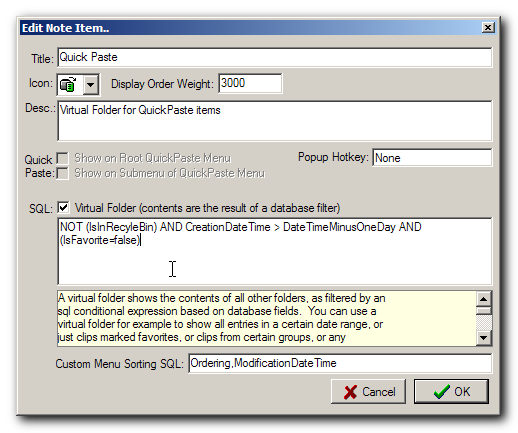
Screenshot - 1_12_2013 , 12_58_06 PM.png

Now you should find that favorites are never listed in the Quick Paste group/popup.
Pages: prev1 ... 404 405 406 407 408 [409] 410 411 412 413 414 ... 1515next