topbanner_forum
  *

avatar image

Welcome, Guest. Please login or register.
Did you miss your activation email?

Login with username, password and session length
  • Friday December 19, 2025, 6:30 am
  • Proudly celebrating 15+ years online.
  • Donate now to become a lifetime supporting member of the site and get a non-expiring license key for all of our programs.
  • donate

Recent Posts

Pages: prev1 ... 401 402 403 404 405 [406] 407 408 409 410 411 ... 470next
10126
General Software Discussion / Re: fully free software utilities for biz use
« Last post by 40hz on June 23, 2009, 06:29 PM »
1. There is no need to search for hidden files just go to:
Configuration -> Display -> File display -> Show hidden/system files (for experts only).
-fenixproductions (June 23, 2009, 04:53 PM)

w00t!!! fenixproductions is 100% correct.

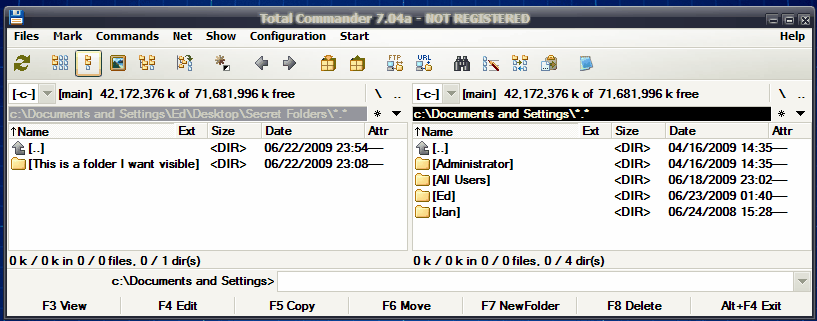
The above setting and a restart did the trick. The FHF hidden folder is now clearly visible in Total Commander.

tc3.gif

So I'll have to temper my suggestion/recommendation with the caveat that folders hidden using Free Hide File are not necessarily hidden from everything that's out there.

Also worth noting is the point that was made about the risk of using undocumented OS features. Definitely worth thinking about before you use FHF on a business machine.


10127
The only recent change I've made to my security setup is to incorporate an Untangle Open Source Network Gateway into the mix. Untangle provides boundary protection for my SOHO network. Most of its features are available for free under GPL.

Untangle is a big product. I've mentioned it in some previous posts, so I won't repeat it here. Here's the original post in case anybody's interested: https://www.donation....msg158003#msg158003

You can read all about Untangle on their website ( www.untangle.com ). Linux and Windows versions are available on the downloads page.

Disclaimer: 40hz is not affiliated in any way with the folks that publish Untangle.

----------------

On my desktop I'm still using paid versions of Avira Antivirus and ThreatFire.

I'm also running Comodo's Firewall - less for security, and more for keeping an eye on what my apps are getting up to behind my back. ;D

All three desktop apps play nicely together, so I'm not overly motivated to switch. So far (knock wood) I haven't been hit with anything this combo didn't catch in time.

Note: I'm sure a lot of it depends on how you use your PC, but from what I've seen, staying on top of MS Windows and Office updates does the most to prevent malware from actually killing your machine. Internet security suites have their place in an overall protection strategy, but keeping current with Microsoft's updates will always be your first line of defense.

Just my 2¢  8)
10128
General Software Discussion / Re: fully free software utilities for biz use
« Last post by 40hz on June 23, 2009, 03:50 PM »
240hz
This application is a joke IMHO.
-fenixproductions (June 22, 2009, 11:26 PM)

I...umm...think that characterization might be just a little bit over the top. :)

Hiding folders is done by using Windows environment mechanisms: folders are renamed to RECYCLER˙˙ and have attributes set to system and hidden. This way they are not visible in explorer (and cmd.exe) but their content can be easily seen in Total Commander.


I can't confirm that statement with Total Commander 7.04a

Folders not hidden yields this:
tc1.gif

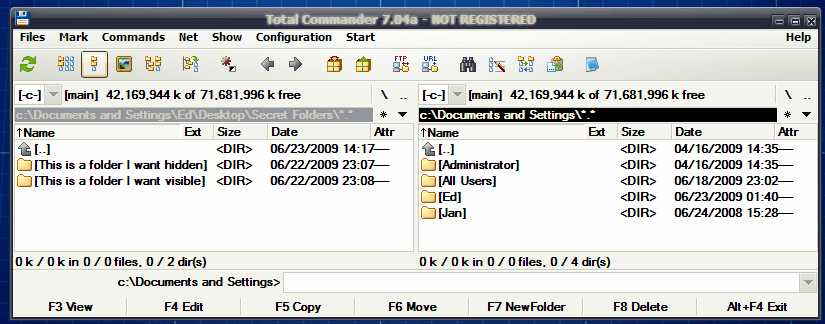
One folder hidden yields this:

tc2.gif

I also tried searching all drives with all attributes selected for inclusion (including system and hidden), and TC came up with nothing.

Of course, there's always a chance I did something wrong. So if you're more familiar with TC than I am, maybe you could recheck my findings when you get a chance and post back here if I screwed up?

What is even worse: files are not even encrypted!

I think you might be guilty of faulting it for missing a feature it never claimed it had. Encryption is not part of FHF's function. Its authors do not make any claims that it does perform encrytion. And if you look at the product's webpage, you won't find mention of file encryption anywhere.

Of course, this application needs password but only for making it possible to uninstall.

Actually the primary reason for the password is to prevent unauthorized use of the program. It's only requested during an uninstall in order to allow you to unhide your hidden folders prior to removing FHF from your system. If you don't, FHF's uninstall script will also delete any folders that you left hidden.

It's so called "security through obscurity".

Yes it is. The more common term for that is: stealth.

And while stealth is not as intrinsically secure as encryption, it still has its place in securing information. A stealthed file is moderately secure. An encrypted file is very secure. But an encrypted file that is also stealthed becomes extremely secure.

Note: there's nothing preventing you from parking encrypted files in a folder hidden by FHS. Doing so would give you a much higher level of protection. Many heavyweight crypto apps (like TrueCrypt) provide encryption and stealthing. But they can be a bit much for the average business.

One good use is to hide all your password protected application data folders. We keep all our accounting and payroll data in hidden folders. When we're ready to run our accounting software, we just unhide them as needed. A casual snooper would first have to find them before they could even think about making a copy to take offsite and crack. It's not foolproof. But the combination of stealthing the folders, and password protecting the files within, is much more secure than doing either one alone.

No security system is completely impenetrable. That's why you need to think in terms of layers and synergies.

This would be a nice tool if it could encrypt data but default installation doesn't do that.

Again, it wouldn't matter how you installed it because it doesn't do file encryption.

I assume that other tools rely on explorer functionality too much and get blinded. Try TC then :)

I Did. But again, I'm not up on all the ins-and-outs and tricks you can probably do with TC. So if you're a TC Guru, and you get different results than mine, please let me know how you did it? I'm always happy to learn something.  :Thmbsup:

-----------

I still think an app like FHF has a place in a business setting. There are a lot of pieces of data that many business owners would prefer not to leave out in the open. And while some would merit full scale encryption, many others would not. A plain textfile with bank account numbers would definitely be worth encrypting. You'd be foolish to create such a textfile, but that still wouldn't make it not worth encrypting.

However: contracts, drafts, bid proposals, and client correspondence very likely wouldn't merit full encryption treatment for most businesses. But that still doesn't mean you'd be comfortable leaving them out in the open in some file directory. For situations like that, FHF would work out very nicely.

My office uses a layered security approach. Things I don't want people messing with go into one of my desk drawers which I can also lock if I need to. It's not very secure. A person with a screwdriver could get in fairly easily. But that's still more secure than leaving something out in the open.  For things that do need to be secured, we have an office safe. And for things that really need protecting, we'll either use a bank safety deposit box, or our attorney's escrow service.

I think of  FHF as falling into the locked desk drawer layer of security. No joke about it! ;D


10129
General Software Discussion / Re: The Dude! - free network monitor
« Last post by 40hz on June 22, 2009, 11:24 PM »
Not gonna happen anytime soon... Nicole Evangeline Lilly is "overbooked". How about dating her photo instead?

Wouldn't work for me. I already know what she looks like.  ;)

Besides, my GF has a bunch of questions concerning the Kate Austin character and Lost, that she would love to discuss with her over dinner and drinks.

So it looks like only the woman herself will do. 8)

(C'mon Sham-Wow! people. Give me a call. Don't keep us waiting... )

10130
General Software Discussion / Re: fully free software utilities for biz use
« Last post by 40hz on June 22, 2009, 10:46 PM »
There are times when you need to hide a folder (or folders) on a PC.

Interestingly enough, it's a lot harder to do than you'd think under Windows.

Obvious uses for  hidden folders may come to mind immediately. But once you get past tucking your collection of Curious JPEGs for the Discriminating Connoisseur safely out of sight, you might want to consider some other good uses for a hidden folder. You could store your financial or other personal information in a hidden folder. Or your password list. Or you accounting backups. Possibly even your supplemental collections of Curious JPEGs for the Discriminating Connoisseur since you're a subscriber!

There are several commercial apps that will do this. Most of them are bundled into a suite with other security applications you may not need. There are also various hacks you can do to make something disappear from WinExplorer. But they all involve registry tweaking or other ill-advised maneuvers.

A company called Cleanersoft (www.cleanersoft.com ) makes a nice little free utility called (appropriately enough) Free Hide Folder that does exactly that. This is a true hide utility. Once hidden, folders cannot be found by Windows Explorer, nor are they visible from the command prompt. This is an important distinction, since many freeware file hiders only keep things invisible on the GUI level.

Free Hide Folder can optionally be set up to require a password in order to use it.

I created a folder (cleverly called) Secret Folders containing two subfolders. One I want to be visible, and the other I want to be invisible.

Here they are in Explorer and under the command prompt:

1.gif

2.gif

Now I add them to Free Hide Folder's control panel and click the button to hide the first file:

3.gif

And voila! Now you see it - now you don't. It's securely hidden until I run Free Hide File and make it visible again:

4.gif

5.gif

I'm not sure if folders protected by this utility would remain hidden from every other file utility or tool. But I tried locating the hidden folder with Everything, the Windows search function, NexusFile, and a few other file managers. I'm happy to report it didn't show up in any of them.

The EULA states (rather charmingly IMHO) that Free Hide Folder is a 'FREEWARE product, for commercial and not commercial use."

6.gif

Registration and donations are requested, but not obligatory, as explained by the above screen which appears when you first open the app.

Sweet! :)


10131
General Software Discussion / Re: fully free software utilities for biz use
« Last post by 40hz on June 22, 2009, 07:06 PM »
40hz - yep on the Enterprise stuff.  I have been playing with Spiceworks and other programs, considering Untangle,
-Steven Avery (June 21, 2009, 06:24 PM)

Just wanted to +1 on Untangle. I use the dedicated server version as opposed to the reRouter Windows version. I did that more because I had a spare PC floating around when I decided to set it up than for any solid technical reasons. I did do up the Windows version for my sister, however, and so far (knock wood!), it's been running exactly as advertised.

Looks cool up on screen too! Always a plus since I'm a firm believer in The Shiny Principle.

The Shiny Principle:

"Looks aren't everything. But where the choice falls between two or more competing products, which are virtually identical in form and function, the vast majority of consumers will invariably buy the product that comes packed in the shiniest box."

"Everything's shiny, Captain!"

10132
Hmmm....

Be nice if they could extend the rule to also cover some of the paid "astroturfing" and "evangelism" going on out there.

If we're gonna tolerate corruption, it behooves us to keep it within the bounds of officially sanctioned corrupt practices - such as political campaign financing and 'pork barrel' legislation.

Because if we don't, it just might be the end of the United States as we know it. :tellme:

wink wink ;)

Another article here: http://arstechnica.c...onsored-blogging.ars
10133
Living Room / Re: XP Reinstall - some thoughts - be prepared
« Last post by 40hz on June 22, 2009, 03:55 PM »
How much time is spent on an install compared to an early image? (e.g. one you did the day after the last install.)  Very little, if  you are doing other things at the same time.  Maybe an hour.  And the earlier the image, the cleaner you are and the more you can rethink what you want to install and how to lighten the system.
-Steven Avery (June 21, 2009, 06:08 PM)

IMHO early images are pretty much the only images worth doing. To do a full XP reinstall I've adopted a hybrid approach:

Images-

I run two early images for each machine I set up.

The first image file contains nothing but the OS, MS Service Packs, and KB updates, along with the most recent "known good" hardware drivers. This is essentially the same thing as creating a slipstreamed OEM restoration disk. You could use various utilities (nLite, etc.) to do the same thing. But unless you know what you're doing, you run the risk of screwing something up. And sometimes these very same utilities can screw something up entirely on their own if Microsoft made a change they're not aware of.

Sticking to plain-vanilla Microsoft update tools and software avoids potential problems. It's not as elegant as flexing your technical craftsmanship with nLite or RVM Integrator - but it always works, no matter which version of Windows you're running. It's also the officially sanctioned way of doing things, which is something to keep in mind should you ever need to call Microsoft. Especially now that they charge for XP phone support.

Caveat: If you you need to contact Microsoft for support, DO NOT let them know you used nLite or any similar 3rd party utility to create your install image. If you do, they will tell you that:

1) use of 3rd party modified images is not a supported installation method

2) you need to reinstall Windows using the original product CD in order to
    fix your problem (or to get additional technical assistance from Microsoft) ---and---

3) your credit card will be charged for the support call you just made to find that out!


Onward...

Once created, I this minimal first image is referred to as my Microsoft Only image. This is primarily created as a fallback image. If I screw up after that creating my working image (which comes next) then at least I know the basic OS installation and updates are already taken care of - and can be easily returned to.


The working image is the same as the first, except it also contains an office suite, a web browser, and a half dozen or so extra utilities I consider essential. I'll also take care of basic interface changes, customizations, and optimizations before this image gets created. (This is the image I'll actually use should I need to do a reinstall. So to save future effort, I'll try to take care of as many details as I can before I commit to a final image.)


Drivers-

Drivers get archived using a freeware driver backup utility. These get burned onto their own CDRW each time any one of them changes.

Security Software-

Neither disk image includes ANY security software. I prefer to create a separate Security Apps CD since most of them get updated too frequently to belong on a drive image.

About once a week, I'll run Lunarsoft's AntiMalware Toolkit ( www.lunarsoft.net ) to download copies of that type of software which I'll later burn to disk. That way, if I need to reinstall from an image (or buy a new machine), I don't need to get too involved with downloading security apps. I'll just install fresh copies from the CD, secure in the knowledge that they're never more than one week out from their current release. Doing it this way also eliminates the Catch-22 exposure risk of using the web to download an antivirus app before you actually have one installed. Small risk, but worth avoiding just the same.

User Data-

All personal data, such as bookmarks, e-mail, and documents are handled by normal backup/restore procedures.

User Applications-


Periodically, I'll run out a list of apps that are installed on my system. Since I keep a database of all the apps I use, I always have a copy of my purchase information, product keys, and registration for each item should I ever need to reinstall. It's also a good idea to maintain (and backup) a folder that contains the installers for every app you use that didn't come on disk. These should get burned to their own app archive DVD.

Reimaging & reinstallation:

Now, when I need to do an XP reinstall, I follow these steps:

  • Gather up the Working Image, Driver, Security, and App Archive CD/DVDs - along with my personal data backups which reside on external hard drives.
  • Gather up any lists of information I'm going to need for the reinstallaition
  • Grab some coffee and throw the dogs out
  • Unplug the network cable
  • Partition and format the hard drive
  • Reinstall the OS, Drivers, main apps and essential extras off the Working Image DVD
  • Reinstall any updated hardware drivers backed up on the archived drivers CD
  • Reinstall antimalware apps from the Security Apps CD
  • Plug the network cable back in
  • Run web updates for all security apps
  • Go to the Windows and MS Office update pages and grab whatever updates I'm still missing (also see note below)
  • If you're using Firefox and/or Thunderbird, launch them. They should automatically discover and offer to install their own updates as soon as they connect to the web.
  • Restore all user data and other backups (bookmarks, email, Mozilla extensions, docs, etc.).
  • Look at my list of apps and decide which ones I want to put back on my machine. (Application 'creep' is a real problem for me since I do a app lot testing on my main work machine. Most of the time I reinstall less than half of what was on it prior to reimaging. Install and update (or optionally redownload) whatever else needs to be installed.
  • Let the dogs back in and grab another cup of coffee.
  • Promise myself I'm not going to do that again anytime soon.

It may seem like a lot to do. But after you've done it a few times it almost becomes second nature.


--------

* Note: I also keep full offline Windows/Office update repositories on DVD using a terrific utility called Offline Update 6.0 (link: http://www.h-online....-Linux--/news/113359 ). This app lets you collect all of Microsoft's updates on disk, thereby minimizing security exposure while saving time. And it can also be used when setting up multiple machines. I usually install Windows and Office updates from the disks this app generates. I'll do this right after I finish loading the hardware drivers. Saves a huge amount of time and bandwidth. Especially if a full service pack is needed.

Offline Update is an excellent tech tool that deserves to be much better known than it is. If I can get some free time, I'll do a write-up on it for Donation Coder.


10134
Living Room / ExtremeTech website closing
« Last post by 40hz on June 22, 2009, 11:07 AM »
           t179889273_48436_3.gif
et_logo.gif

Sad news for many of us.

Ziff Davis will be closing the ExtremeTech website this Friday, June 26th.

http://www.extremete...,2845,2349080,00.asp

The Last Column

ExtremeTech will be folding up its tent this Friday, June 26th. The current staff: writers Jason Cross and Joel Durham, producers Jeremy Atkinson and Mike Nguyen, our enthusiastic forum moderator, Jim Lynch, plus your truly, will be leaving Ziff-Davis.

So far, no specific reason has been given, although Ziff Davis has been doing various other closings and consolidations as part of an overall corporate reorganization for the last two years.

Related Link:

http://www.reuters.c...US284011642920090622


10135
General Software Discussion / Re: The Dude! - free network monitor
« Last post by 40hz on June 21, 2009, 12:21 PM »
@apk982 - Hey! Welcome to Donation Coder! As you might have noticed, the folks here don't miss much. We're also a bit touchy when it comes to 'product pimps' and spammers. So please don't be too put off by the crew asking for clarification regarding your relationship with a product. We sometimes question bona fides until we get to know a person a little better. It's just our way of trying to maintain a little quality control. :)

---------

+1 on Spiceworks. Another excellent application similar in functionality to The Dude, without being a duplicate of it.

Both are nice. Both are free. Why not try both and see which you like best.?


Disclaimer: 40hz is not associated with the makers of Spiceworks, The Dude - or anything else come to think of it. However, if somebody would like to slip him a cool few million, a Jaguar S1 E-Type, or a date with Evangeline Lilly to shill their product, he'd at least be willing to talk about it...


 ;D
10136
General Software Discussion / Re: fully free software utilities for biz use
« Last post by 40hz on June 21, 2009, 11:37 AM »
Did we want to include "enterprise" type software in this list? I'm thinking in terms of: servers, application appliances, gateway/portal software, NAS, etc.? Things many businesses could benefit from, but also a bit "outside the box" for many SB owners. (Which is a shame IMHO.) Or should we primarily stick to discussing desktop apps just to keep things under control.

Also - enter the big issue of platform. Do we (should we) keep it restricted to Windows apps, or should we open it up?

I'm guessing that the desktop apps probably should be confined to software running under Windows, since that's what most businesses are currently using. However, if we open the list up to include the free enterprise category, most of the best stuff (actually more like all of it) is going to run under some version of NIX.

Your thoughts?  :)

10137
Living Room / Re: What annoys you to no end?
« Last post by 40hz on June 21, 2009, 11:18 AM »
Awww, couldn't you at least have kept the link to the snapping-turtle-duck-eating video? I found it pretty amazing - didn't know turtles could do this. In the "wow, wtf" not "LULZ!" way, though.

Nope. Mouser didn't like it. For me, that was sufficient reason to just 86 the whole thing.

It's easy enough to find on YouTube if anyone's that interested.

(BTW: I also didn't think of it as LoL. More like ZOMG! I probably shouldn't have included the smiley. I meant it to imply "just kidding" rather than "ha-ha". I probably should have said icbiwoop!!! instead. Oh well.  "So it goes..." )


10138
Living Room / Re: What annoys you to no end?
« Last post by 40hz on June 20, 2009, 11:44 AM »
:( i know this is probably going to seem over sensitive, and it is a remarkable video in terms of animal behavior, but it's also pretty cruel to watch and something i'd rather not see embedded as an animation playing inside a post.. linking to it would be fine.

I tend to agree mouser!

I think it's more a difference in individual perception rather than excessive sensitivity on your part.

My GF and I are quite active in various wildlife and animal rescue organizations. Both of us saw the video as interesting, from an educational viewpoint, since it demonstrates an aspect of turtle behavior that many people would not expect. (Snapping turtles claim a fair number of waterfowl each year where we live.) Most people think of turtles as lumbering dull-witted creatures. Nothing could be further from the truth. In their native environment, most turtle species are fast, intelligent and fierce predators.

Despite the fact that hunting behaviors may see "cruel" (a term which isn't ever appropriate when commenting on animal behaviors since the practice of cruelty is an exclusively human phenomenon) they are also part of the the natural order found in our ecosystem. And much as I personally hate to see ducklings occasionally 'disappear' while they out swimming on the river not too far from our house, I must also acknowledge that hunting turtles help balance the duck population. And despite the fact that turtles are neither cuddly nor cute, I must also acknowledge they have an equal claim to survival and the right to exist.

Either way, the clip has apparently upset some people at DoCo. And although it was not my intent to offend anyone, apparently I have. For that, I apologize.

Clip and link have both been removed. My feeling was that if the subject matter was inappropriate because it could upset someone, it didn't really matter whether it was immediately visible or not. Including the link wouldn't have removed that possibility - so I thought it best to make both go away.

---

(Note: the clip in question showed a medium-sized turtle unexpectedly grab a pidgeon-sized bird and haul it into the water. There was no blood or gore such as you'll find on NatGeo or Animal Planet. The bird disappears with the turtle underwater, and that's the end of it.)

10139
Living Room / Re: I can haz LOLMouser plz?
« Last post by 40hz on June 20, 2009, 10:59 AM »
Is that HitlerCat to the right, 40hz? No wonder none of them are amused.

Wow! I never noticed that. Good catch! ;D

10140
Living Room / Re: I can haz LOLMouser plz?
« Last post by 40hz on June 20, 2009, 12:37 AM »
LOLCat.jpg

10141
Living Room / Re: What annoys you to no end?
« Last post by 40hz on June 19, 2009, 11:59 PM »
That little ant (bug? tick? insect?) that Josh calls an avatar. I've tried to kill it three times.

You're not alone.

I don't know if it would be fair to say it annoys everybody. (Josh does have his admirers. ;D) But quite a few of us have tried to kill that wretched little thing!

I'd like to introduce that bug to this turtle: ;D

<Edit: Image removed by 40hz. See Mouser's post and my reply below.>

<Edit2: At the suggestion of two people who e-mailed me: I've put back the original text line above the image since the brief discussion that followed won't make complete sense without it.>


10142
Living Room / Re: What annoys you to no end?
« Last post by 40hz on June 19, 2009, 11:37 PM »
40hz:  ;D ;D ;D ;D ;D ;D ;D ;D ;D ;D that t-shirt is great

Ain't it? Friend e-mailed the jpeg. Wish it were my design.  ;D
10143
General Software Discussion / Re: fully free software utilities for biz use
« Last post by 40hz on June 19, 2009, 11:25 PM »
Thanks hamradio and 40hz for explaining my point...  :)

No hay de qué! :Thmbsup:

10144
General Software Discussion / Re: fully free software utilities for biz use
« Last post by 40hz on June 19, 2009, 10:52 PM »
In other words, if you are a larger company that wants to install the software on many pcs, you should get a commercial license.  Otherwise, no worries.

@Mouser!

Here's something I've been meaning to ask, and maybe now is a good time to do it.

What about situations where you have someone like me who provides site support for a number of small to medium-sized clients. Many of these clients aren't too gung-ho on getting involved with licensing plans and variable pricing points. But all of them are quite comfortable buying individual copies of a product as needed.

I have arrangements with the authors of certain products whereby I can invoice my clients for a specific number of copies. Once I get paid by my client, I forward their remittance to the author (via credit card or PayPal), and receive PDF licenses and/or activation keys back by e-mail.

After I have the licenses and/or keys in hand, I can then go ahead and install the product on my client's machines.

This arrangement works best for all parties IMHO because it works just like a boxed SKU code product - except there's no box or SKU code.

Pros:

  • My organization knows exactly how much each license will cost (before we include it in quotes or proposals) without needing to wait for the software publisher to get back to us with their own quote.
  • Our client knows exactly how much it's going to cost before they're asked to commit.
  • The software author(s) are guaranteed to get paid
  • The client has a reliable record of the number of copies they have licensed
  • It's fast. No waiting around a week for the Fedex guy to show up with a stack of boxes. Hand us a check and we can be installing the software (in most cases) within minutes. Talk about instant gratification! :up: :up: -and-
  • There's no risk of pirated copies being installed because no media is ever given to (or left with) the client (This no-media provision is agreed to by the client up front. If they don't agree, we request they purchase directly from the publisher.) Note: as part of this no-media provision, my company agrees to handle product registrations, and provide product reinstallation, should it ever become necessary (i.e. drive crashes, machine replacements, etc.)


Cons:

None I can think of.


So...have you ever considered setting up a DonationCoder software store?

Just a thought! :) :Thmbsup:

---

P.S. Maybe this should be moved to a separate topic if you think it's worth discussing or brainstorming over?

10145
General Software Discussion / Re: fully free software utilities for biz use
« Last post by 40hz on June 19, 2009, 04:03 PM »
Re: JKDefrag

Excellent and reliable product. But it needs a new hairdo and better clothes.

Enter JKDefragGUI. ( www.emro.nl/freeware/ )

JkDefragGUI is an Graphical User Interface which allows you to easily select all the features JkDefrag, a freeware defragmentation tool made by Jeroen Kessels has to offer.

But is can do a lot more.

JkDefragGUI can schedule a defragmentation, install JkDefrag or it's screensaver but can also do some small maintenance to you computer. It can be used to schedule a defragmentation of your systemfiles like pagefile and registry files. JkDefragGUI also supports CCleaner which can be used instead of the internal cleaning function.

JkDefragGUI was created for people who don't have the skills of an advanced user but still want to use the powerful features JkDefrag has to offer or for those people who like a GUI instead of a the command line.

Further JkDefragGUI is compatible with U3 memory pens and with BartPE pre-installed environment.

JKDefragGUI.gif

10146
General Software Discussion / Re: fully free software utilities for biz use
« Last post by 40hz on June 19, 2009, 03:42 PM »
For a small footprint & completely portable file search check out X-Find from Xteq.

Writes settings to the registry at:
HKEY_CURRENT_USER\Software\Xteq Systems\X-Find\1.0
HKEY_CURRENT_USER\Software\Xteq Systems\X-Find

Which makes your point what exactly?


He may mean if it writes to the registry then it is not a completely portable application cause it leaves its footprints behind in the registry.

No problem. Download a copy of CleanAfterMe from Nirsoft and run it when you're done. This utility is a "must have" if you run portable apps on anybody's machine other than your own.

You don't want to be somebody who "left their watch on the nightstand," as the saying goes. ;D 8)

Link: www.nirsoft.net/utils/clean_after_me.html

CleanAfterMe allows you to easily clean files and Registry entries that are automatically created by the Windows operating system during your regular computer work.

With CleanAfterMe, you can clean the cookies/history/cache/passwords of Internet Explorer, the 'Recent' folder, the Registry entries that record the last opened files, the temporary folder of Windows, the event logs, the Recycle Bin, and more.

CleanAfterMe is a portable application. This means that you can run it without any installation and without leaving any trace in the Registry.
You can also run this program from a USB flash drive: In order to do that, simply copy the executable file of CleanAfterMe (CleanAfterMe.exe) into the USB flash drive, and run it from there.

Check out some of the other Nirsoft utilities while you're over there. They have something for everyone - and each is a gem!  :Thmbsup::Thmbsup:

<Edit: @Steve - Let's add Nirsoft's utilities to the list. ( www.nirsoft.net/utils/index.html ) Sorry, I missed seeing your update on post 1. :-[ >

10147
Living Room / Re: Looking for P2p file sharing for personal use
« Last post by 40hz on June 19, 2009, 02:52 PM »
Hey! You got it running! Cool...

File sharing with Frost works much like sharing does in newsgroups - except you don't actually need to upload the files first - although you can if you want to.

You advertise shares, which then can be requested by anybody on your private net. Frost takes care of the details of getting the file (either from cache or from the advertising machine) and delivering it to the requester. It's not like a classic filesharing system.

How do I share files?

Filesharing works different in Frost than in other apps. You don't upload files to other users, but put them in Freenet.
When you select which files or directories to share on the "Shared files" tab, Frost advertises them to other users. Then when someone asks for a specific file, Frost uploads it to Freenet and the other user gets it from there.

(Note: substitute the phrase "Your Network" for "Freenet" since you'll be running a private net and not using public nodes.)

Take a look at the Frost Wiki.  ( http://jtcfrost.wiki.sourceforge.net/ ) It will explain how it works and also how to use it.

To add additional computers to your net, you need to install Freenet on each of those machines.

See the section How To Add Known Friends on this page for directions:

http://wiki.freenetp.../FirstTimersHandBook

or here for a more detailed explanation:

http://wiki.freenetp...g/FreenetConnections


Keep in mind that this is a P2P application. Think torrent. A lot of people forget that because Frost sometimes makes it feel like you're on a centralized server. One of the people in our net once described it as BitTorrent wedded to a news server. It's not really an accurate analogy, but it gets the idea across.

 :)

10148
Living Room / Re: What annoys you to no end?
« Last post by 40hz on June 19, 2009, 08:52 AM »
iPhone Evangelists. Especially since they've announced the 3GS!

(Yes it's cool, OK? Now will you shut up about it already!) ;D

idontcare-shirt.jpg

"Darling, could we please not talk about your iPhone tonight?"
10149
Living Room / Re: Upgrading Video and Power Supply on an Dell XPS 400
« Last post by 40hz on June 18, 2009, 10:13 PM »
If you have an old or even a new standard ATX PSU laying around, you could plug it in

As has been noted above... :)

Do not do that until you check the pinout on the wiring harness plug. Dell does not use standard pinouts on their power supplies. You'll either need a plug adapter or a Dell compatible PS. Otherwise you run the risk of frying your mobo.


10150
General Software Discussion / Re: fully free software utilities for biz use
« Last post by 40hz on June 18, 2009, 05:17 PM »
If you need a free accounting package, look no further than to the folks over at Microsoft.
(Yes, I know. Try not to faint!  ;D)

Microsoft has a very capable small business accounting package called Microsoft® Office Accounting Express which is offered as a free download. ( www.ideawins.com/Default.aspx )

I was a little skeptical when I heard about this. I was wondering if it was extremely crippled like Intuit's Simple Start Free Edition of Quickbooks is. Much to my surprise, it wasn't. The Professional edition of Office Accounting does pack many additional features. But they're nothing that most small businesses would need.

Product version comparison link: www.ideawins.com/Compare.aspx

For once, I'm amazed at just how much $0 can get you from Microsoft.

Ballmer.jpg

 8)
Pages: prev1 ... 401 402 403 404 405 [406] 407 408 409 410 411 ... 470next