topbanner_forum
  *

avatar image

Welcome, Guest. Please login or register.
Did you miss your activation email?

Login with username, password and session length
  • Friday April 3, 2026, 6:51 am
  • Proudly celebrating 15+ years online.
  • Donate now to become a lifetime supporting member of the site and get a non-expiring license key for all of our programs.
  • donate

Recent Posts

Pages: prev1 ... 397 398 399 400 401 [402] 403 404 405 406 407 ... 1515next
10026
Multi Photo Quotes / Re: Latest Multi Photo Quotes Release v1.38.01 - Feb 18, 2013
« Last post by mouser on February 18, 2013, 08:26 AM »
Latest update adds some nice features you will want if you use it:

v2.00.01 - Mar 25, 2013
  • [MajorFeature] MPQ will now avoid repeating images as long as possible -- both within a single display and between display cycles.
  • [MajorFeature] MPQ now understands video files (avi,mpg) and will display random frames from them if they are found in image directories.
  • [Feature] You can now backup and restore settings to different files, to allow you to switch between sets of settings.
  • [MinorFeature] Added option to disable normal default image directories (useful for quick testing custom additional directories).
  • [MinorFeature] Click to browse+add new folders to default image directory list.
  • [Improvement] Detects and adapts to changes in attached monitors and resolution.
10027
Screenshot Captor / Re: Screenshot Captor DirectX Capture Addon - EARLY BUGGY BETA
« Last post by mouser on February 17, 2013, 06:04 PM »
Does anyone want to try a new version of the directx capture addon?
10028
It sounds to me like maybe something else has taken over shift+prtscreen hotkey.

try setting a different unusual hotkey in screenshot captor options and see if it works -- if so then at least we know that's what the problem is.
10029
Screenshot Captor / Re: Suggestion: Renaming file before coping to clipboard
« Last post by mouser on February 17, 2013, 12:56 PM »
Look at the File Naming Template tab in options.
10030
Multi Photo Quotes / Re: Pictures shown twice or more at the same time
« Last post by mouser on February 17, 2013, 08:02 AM »
Is there another file to be replaced??

yes!

During install, TWO copies of the exe are placed on your computer.
One is C:\Program Files (x86)\MultiPhotoQuotes\MultiPhotoQuotes.exe
And for the screensaver, a copy is placed in your Windows directory as ssMultiPhotoQuotes.scr

The files are IDENTICAL, just a change of name and location.

This is done solely so that the screensaver is found by windows.

This explains why my testings yesterday worked


Mystery solved!

Thanks for reminding me about this -- I forgot all about it.
10031
Multi Photo Quotes / Re: Pictures shown twice or more at the same time
« Last post by mouser on February 17, 2013, 07:42 AM »
Are you sure? Is it possible an older version is running?  I couldn't find any duplicates when running my last test.. Can you test the latest to be sure you are still seeing duplicates (make sure its not showing duplicates only if there are more panels than images).

I've uploaded a new version to: https://www.donation...iPhotoQuotes1373.zip

The only change here i think is that now you can save and restore configuration sets, so that should make it easier to test things.

I'd really like to release a new version today so testing is appreciated.
10032
Find And Run Robot / Re: Setting "Large Icon Slides" won't display icons
« Last post by mouser on February 17, 2013, 04:39 AM »
Could I have a screenshot of the display of some results with the Desktop Large setting?
10033
Find And Run Robot / Re: Setting "Large Icon Slides" won't display icons
« Last post by mouser on February 17, 2013, 04:16 AM »
Can you try looking in the Display Options tab, at the bottom under "Tweaks", and see if those Max Size for Large Icon display options have any effect? You may have to restart FARR for each change.

This sounds like something I should fix asap.
10034
Screenshot Captor / Re: Capturing new image over an older image?
« Last post by mouser on February 16, 2013, 10:19 PM »
This is an interesting request.. There is no better way to do it currently but I could actually add a function like "Import objects from other screenshot" fairly easily..
10035
Thanks for the post, Josh  :up:
10036
Multi Photo Quotes / Re: Pictures shown twice or more at the same time
« Last post by mouser on February 16, 2013, 08:02 AM »
Great! Thanks for the help testing.
10037
Multi Photo Quotes / Re: Pictures shown twice or more at the same time
« Last post by mouser on February 16, 2013, 07:34 AM »
Ok I reuploaded and changed name of zip file to make sure it wasnt some glitch.
Try: https://www.donation...iPhotoQuotes1372.zip
10038
Living Room / Re: Gadget WEEKENDS
« Last post by mouser on February 15, 2013, 02:46 PM »
Ok my gadget for today is a cordless vacuum cleaner with beater brush.

I've posted before about the Swiffer Sweeper Vac, which is great for pet hair and dust on hardwood.

This gadget is more for carpet and rugs -- especially if you have pet hair.

There are a few of these models out there, and I've owned two.

The one I have now is a Hoover Linx cordless, which retails for about $150 but which I got for $50 on ebay because it was half-broken.
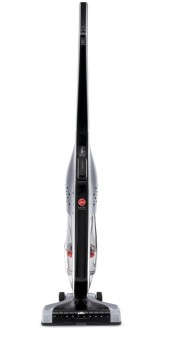
vac_41Rbg5XK7RL._SL1032_small.jpg

Previously I had a black+decker one that was almost as good.

The key feature of this device is that it is cordless, which for me means I'm actually likely to use it -- as I hate dealing with cords.  And that it has a motorized beater brush, which is essential for rugs/carpets.

You should know that in terms of suction, a cordless vacuum does not even come close to the power of a corded model -- in fact I would go so far as to say that the cordless models are virtually useless as a replacement vacuum for hard flooring work (i'd prefer the swiffer sweeper), BUT if you have carpet/rug and want something to regularly pick up pet hair, the motorized beater brushes work well and these are very useful devices.  So again, this is a narrow use gadget in my opinion, but one that does it's particular job well and with extreme convenience.
10039
Living Room / Re: silly humor - post 'em here! [warning some NSFW and adult content]
« Last post by mouser on February 15, 2013, 01:20 PM »
 ;D
10040
Multi Photo Quotes / Re: Pictures shown twice or more at the same time
« Last post by mouser on February 15, 2013, 01:09 PM »
Ok let's see if I got it right this time:

Cany you try new download (same url): https://www.donation...MultiPhotoQuotes.zip
10041
Multi Photo Quotes / Re: Pictures shown twice or more at the same time
« Last post by mouser on February 15, 2013, 11:32 AM »
You're right.  Thanks for the test images, working on it now.
10042
Multi Photo Quotes / Re: Pictures shown twice or more at the same time
« Last post by mouser on February 15, 2013, 06:10 AM »
Hmm.. well it should never be happening now.. unless MPQ has no choice because there aren't enough images to fill the screen without repeating.
10043
Multi Photo Quotes / Re: Add video panels to MultiPhotoQuotes?
« Last post by mouser on February 14, 2013, 07:43 PM »
Random sample screenshots of screensaver with a movie from Homeland tv show season 1, and the srt subtitle file from it
(Note I have 4 monitors so normally these are giant and spread out across multiple monitors):

home1.jpg
home4.jpg
home2.jpg
home3.jpg
10044
General Software Discussion / Re: Directory Opus 10
« Last post by mouser on February 14, 2013, 01:34 PM »
Come on folks, take it down a notch.. there's no reason this thread has to get out of hand like this.
10045
Multi Photo Quotes / Re: Add video panels to MultiPhotoQuotes?
« Last post by mouser on February 14, 2013, 12:24 PM »
One feature that is missing is a smarter way to avoid showing frames from the credits at the very end or opening logos at the very start.  The credits are worse since they can go on for so long.

The dumb way to solve this would be to avoid showing frames from say the first 60 second and the last 10 minutes.  The drawback being that it's inexact and you might never see frames from the very end of the movie.

An alternative would be to let user specify a start and end offset for a movie with an extra moviename.info file.. but i wonder if anyone really wants to go through the hassle of doing that.
10046
Multi Photo Quotes / Re: Add video panels to MultiPhotoQuotes?
« Last post by mouser on February 14, 2013, 12:17 PM »
MPQ now will read .srt subtitle files, perfect for combining with a movie file.

The best way to do this is as follows.

  • Let's assume you have a movie "StarWars.avi" and a subtitle file ("subsforswars.srt").
  • Create a new directory called something like C:\Program Files\MultiPhotoQuotesMpsMedia\Books\StarWars\ and also C:\Program Files\MultiPhotoQuotesMpsMedia\Books\StarWars\Images
  • Put in that first directory the srt file and the avi in the Images subdirectory.

Now in MPQ options, in the quote books tab you will be able to enable StarWars.

The benefit of creating a new quote "book" subdirectory is that MPQ will know to associate the srt file with the movie file, and only show subtitle lines from the movie when showing images from the movie, and it will enable you to enable and disable that folder from the options.

Note that you could also use a simple file of quotes from the movie instead of the srt file -- placing them in the same directory as the movie above will have same effect.
10047
Multi Photo Quotes / Re: Add video panels to MultiPhotoQuotes?
« Last post by mouser on February 14, 2013, 11:27 AM »
This would be a perfect feature to combine with a book of quotes from a movie..
Maybe I should add support for subtitle files to show random subtitle lines from a movie. DONE.
10048
Multi Photo Quotes / Re: Add video panels to MultiPhotoQuotes?
« Last post by mouser on February 14, 2013, 09:31 AM »
I'd love to hear if anyone actually uses it..
10049
Multi Photo Quotes / Re: Add video panels to MultiPhotoQuotes?
« Last post by mouser on February 14, 2013, 01:22 AM »
Pretty darn cool, I think :)
10050
Multi Photo Quotes / Re: Pictures shown twice or more at the same time
« Last post by mouser on February 14, 2013, 01:16 AM »
ps. this beta also supports extracting random frames from video files.  :Thmbsup:
Pages: prev1 ... 397 398 399 400 401 [402] 403 404 405 406 407 ... 1515next