topbanner_forum
  *

avatar image

Welcome, Guest. Please login or register.
Did you miss your activation email?

Login with username, password and session length
  • Friday April 3, 2026, 6:51 am
  • Proudly celebrating 15+ years online.
  • Donate now to become a lifetime supporting member of the site and get a non-expiring license key for all of our programs.
  • donate

Recent Posts

Pages: prev1 ... 396 397 398 399 400 [401] 402 403 404 405 406 ... 1515next
10001
Screenshot Captor / Screenshot Captor - Post your SC Clipart Requests Here
« Last post by mouser on February 21, 2013, 08:05 AM »
If you don't know already, Screenshot Captor has a special Clipart panel that you can open up to browse clipart for adding into your screenshots via drag+drop:
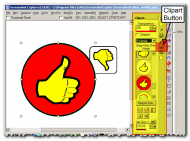
Screenshot - 004.png

You can add your own clipart -- these are just standard png files (which support transparency).


Anyway, I was talking to dc member app about including some of her custom clipart creations with Screenshot Captor.

And she said she might be willing to create some new custom clipart for use with Screenshot Captor, if people had specific requests.

So I thought it might be useful to start a new thread where people could post request for custom clipart that could be bundled with Screenshot Captor.

If you have requests for clipart images that you think would be useful to you when annotating screenshots, post them here on this thread.  Or use this thread to share clipart graphics you have created yourself and are contributing to the collection (must be able to be freely distributed).

So, post your requests!
10002
Screenshot Captor / Re: Screenshot Captor caption feature
« Last post by mouser on February 21, 2013, 07:40 AM »
I split off the caption discussion to a new thread.

Yeah that extra space is actually by design, though I cant remember exactly what my thinking was.. Maybe ill make it an option later and take it out for now.
10003
Updated new beta version and updated the list of changes (i'm on a roll!).
10004
Screenshot Captor / Re: Screenshot Captor caption feature
« Last post by mouser on February 20, 2013, 03:52 PM »
Tip:
Creating captions don't (currently) undo very well..
There are two good tricks to remember when experimenting with stuff like this:

  • The Save+ button is your best friend; it will quickly save the current file to a new file with a new name and let you keep working, preserving the previous version of the file.
  • If you save before you do some experimenting, you can always quickly go back to the last saved version of a file, discarding all experimental mistakes by choosing from the File menu "discard all changes to file since last save".
10005
Screenshot Captor / Re: Screenshot Captor caption feature
« Last post by mouser on February 20, 2013, 03:38 PM »
I just tried the captions and they look good so far bot how do you control the background colour and font colour?

You can set the caption colors and fonts from the "Automatic Captions" options tab, but this is likely to change and i'll probably put most of those controls in the Caption Dialog itself.

However, note that a caption is an EDITABLE text box object, so once it's created you can select it, and change the text,colors, font, and transparency.

My plan is to add a feature where you can save and then choose presets of option combos for these text boxes and captions.. so you could easily choose "Large white text on semi transparent background at the bottom" vs "Small Red text overlaid on image at top with no background" etc., and same for text boxes.
10006
Mouser's Zone / Re: Problem with Grab Selected Region
« Last post by mouser on February 20, 2013, 12:15 PM »
It sounds like maybe we have been giving you the opposite result and you prefer redbox capture mode.
In which case in the new version choose to use Red Box Capture Mode option "Objects *AND* Regions"

However, to answer your question about how to perform a selected region capture in the new mode, you dont hit enter, you click and hold left mouse and drag it to select the region to capture.
10007
Screenshot Captor / Re: What about the "Horizontal" Capture!?
« Last post by mouser on February 20, 2013, 12:06 PM »
Screenshot Captor is quite happy to do horizontal and combination horizontal+vertical scrolling captures.  :up:
10008
General Software Discussion / Re: MagicRAR Drive Press - worth anything?
« Last post by mouser on February 20, 2013, 10:08 AM »
Simon, we have a kind of informal rule here about frequency of commercial authors posting update announcements.. This site is not really the best place to post such announcements.
10009
Screenshot Captor / Re: "Incorrect" filename for "Grab selected region"
« Last post by mouser on February 20, 2013, 04:59 AM »
if some part of the active foreground window is within the captured region, that is used.

if not, it tries to guess which window should be treated as the "active"/foreground window within the capture -- first by looking at cursor location, then at center of capture.

when it finds one, it uses that info for the caption and memo, but then also tries to find the largest contained subwindow to actively select -- which can be useful for performing blur effects, etc.
10010
Screenshot Captor / Screenshot Captor caption feature
« Last post by mouser on February 20, 2013, 01:35 AM »
Caption Test:
sccaps_ver001.png

Captions are starting to look quite nice.
10011
oops i posted non-beta download url  >:(

please redownload now from fixed urls above.
10012
Screenshot Captor / Re: "Incorrect" filename for "Grab selected region"
« Last post by mouser on February 20, 2013, 12:37 AM »
arg! i forget to use the beta urls.. fixed!  try again please.
10013
I have uploaded a new beta to:

It's quite possible I broke something so I would appreciate feedback!


v3.28.01 - March 17, 2013 A.K.A v4.0RC
  • [MajorFeature] Freehand painting/annotations; Like objects, can be edited after save.
  • [MajorFeature] New (dockable) QuickCapture bar.
  • [MajorFeature] Undo available for most object manipulation actions.
  • [MajorFeature] You can now specify custom comment in post-capture pop-up dialog; option to add caption for this comment and/or store it in image comments.
  • [MajorFeature] You can now capture shots from webcams (see Capture menu).
  • [MajorFeature] New super-easy-to-use built-in image host uploader (currently using imm.io, more to come); you can still configure the use of ShareX or others if you prefer; warning given on first upload.
  • [Feature] You can now save and load your entire configuration settings to/from different files, to make it easy to switch between groups of settings [see new menubar on options dialog]
  • [Feature] You can now save all selected images to an animated GIF file.
  • [Feature] Added Quick Expand Canvas item in Edit menu for quickly expanding the canvas around the image, which can be useful for adding annotations, etc.
  • [Feature] You can now define your own custom list of preset sizes that will be available in all resizing/regionsizeselection dialogs and menus (thumbnailer, resizer, etc.).
  • [Feature] Resizing and selection options can now work by percentages; you can also include percentage based resizing presets.
  • [Feature] The last directory and file format used in the SaveAs dialog are now remembered; defaults to PNG format.
  • [Feature] When moving old files into the archive directory, ScreenshotCaptor now shows a summary balloon tray message.
  • [Feature] Active window selection and information capture is now smarter about choosing a window or sub-window within the capture region if capturing an area that does not include a foreground active window, or especially if performing an arbitrary region capture.  New option (See Window Capturing 1 options tab) to control this.
  • [Feature] Added more color options for captions (see Automatic Captions tab in options to set defaults); better captions during printing.
  • [Feature] You can now nudge objects in the same variety of ways you can use to adjust selection (use ctrl,shift,alt and arrow keys to move, grow, shrink); faster object nudging.
  • [Feature] Selecting and adjusting objects now shows their position and size in status bar -- makes it easier to do fine adjustments.
  • [Feature] Now provides tip on how to speed up saving with many objects and semi-transparency when GDI+ option is off.
  • [Feature] New option to flatten transparency during normal saving (PNG images will not exhibit transparency but will preserve it internally for editing).
  • [Feature] Added Edit menu item to copy current (or selected) image files to clipboard as shell file objects (useful for pasting in email programs, etc.).
  • [Feature] You can now drop files onto the main window and you will be prompted to make some choices (copy or move files into Screenshot directory, add image files as objects onto current image, or switch to the dropped file and path).
  • [Feature] Added option to check for updates at startup.
  • [Feature] In addition to creating animated gifs, you can now display them in SC and easily extract frames (works same as for video files).
  • [Feature] Added complete selection mode button to toolbar (lasso, freehand, magic wand, etc.)
  • [Feature] Added new options for handling large captions (enlarge size of caption box to accomodate wrapped text, auto-reduce font size).
  • [Feature] New option in interface tab to use chessboard pattern for background -- useful for working with transparent images (especially with transparent borders).
  • [Feature] Added new specialfx operation to remove text/noise inside selection region.
  • [Feature] You can now right-click on any clipart object and have it applied as a (tiled) background watermark; you can right-click clipart or frames and choose to view a preview in external viewer.
  • [Feature] Added blendmode property to bitmap objects.
  • [Feature] New option to tell SC not to save active window internal meta data to file comment meta data; useful if you are using images with an application that extracts and uses file comment meta data.
  • [Feature] New buttons added to toolbar (copy to clipboard, select/resize preset sizes, etc.)
  • [Feature] You can now configure what toolbar buttons to show.
  • [Improvement] Major revamping of icons throughout the application by DC member Carroll D. (hamradio); Improvements to organization of menus.
  • [Improvement] Improved alpha transparency rendering when saving images or printing; especially useful when objects are over transparent or semitransparent areas.
  • [Improvement] Objects are now in front of paint layer.
  • [Improvement] Added new option to use GDI+ libraries for alternate implementation of alpha blending and transparency (may be significantly faster when using many objects).
  • [Improvement] Creating new blank image was not clearing transparency info; now uses transparency setting from resize dialog to decide whether to make new image pure opaque or pure transparent.
  • [Improvement] Faster saving when image does not have transparency.
  • [Improvement] Arrow text can now be edited in memo mode, which is more convenient for editing larger multi-line text.
  • [Improvement] Launching of second copy now highlights the tray icon.
  • [Improvement] User clipart directory is now shown at TOP of clipart list.
  • [Improvement] Added more caption options, both in auto captions and in interactive caption dialog.
  • [Improvement] Text boxes can now specify custom border line widths;
  • [Improvement] Post-capture pop-up dialog now prints print-captions.
  • [Improvement] Better print captions for small images.
  • [Improvement] Post-capture pop-up dialog button improvements; remembers position better.
  • [Improvement] Re-organized option dialogs for better readability.
  • [Improvement] New options for post-capture dialog including options on where to show form, whether to show print previews, etc.
  • [Improvement] Added new post-cap option to copy file shell object to clipboard.
  • [Improvement] Repeat region capture will now repeat a caption of the region of the screen selected by a previous *object* capture.
  • [Improvement] Some operations that changed directories was not forcing save of dirty file first.
  • [Improvement] You can drag a folder onto the main window to instruct Screenshot Captor to switch to that directory.
  • [Improvement] Improved application startup time.
  • [Improvement] Added some tooltip hints to some controls.
  • [Improvement] SaveAs folder and format now remembered and used in all places where SaveAs dialog is shown.
  • [Improvement] SaveAs will now use default filename template, and default to a uniquified safe filename.
  • [Improvement] Added option to enable/disable the retrieval of URLs from browsers, and a note about possible slowdowns when doing so; disabled Firefox URL retrieval option by default since it can cause serious capture slowdowns.
  • [Improvement] The Moveto/Goto folder list is now kept in canonical state, handles blank lines, and has a new option to automatically add new folders to it, like a Most-recently-used list.
  • [Improvement] Setup program will now offer to launch Screenshot Captor after installation, even on Windows vista/7/8.
  • [Improvement] Better thumbnail panel sizing; no more horizontal scrollbar.
  • [Improvement] Faster saving of partially transparent images with objects.
  • [Improvement] When switching out of object mode, if an object was selected, it's bounding region becomes selected in normal mode; especially useful for applying effects.
  • [Improvement] If user tries to select a region in Object selection mode containing no objects, SC automatically switches to region selection mode and selects region.
  • [Improvement] Double-clicking an object in region-select mode will now switch to object mode and select the object under cursor; double-clicking in object mode toggles you back to normal region-select mode.
  • [Improvement] The Watermarking submenu of the SpecialFx menu now shows all files in the clipart directory with watermark in their path or name, plus all files in user watermark directory; this makes it easier for addon clipart to include watermarks; see also feature for quickly applying any clipart object as watermark.
  • [Improvement] Improved external tool configuration dialog.
  • [Improvement] Removed old clipart directory; packaged now with DC member App103's nice clipart; moved old clipart into a separate addon download; removed separted Masks directory and rearranged Frames directory.
  • [Improvement] Clicking on a clipart item shows it's full path in statubar.
  • [Improvement] SC now creates a MyClipart and MyFrames directories in the user-writable SC folder where configuration settings are stored, and adds this to the clipart (and watermark) and frame folder list.
  • [Improvement] SC no longer switches out of object mode when saving.
  • [Improvement] Ctrl+A in thumbnail file panel now only selects files (not folders).
  • [Improvement] SaveAs dialogs now have more advanced options that can be chosen for some image file formats.
  • [Improvement] Better tracking of object manipulation for undo actions; better reporting of undo actions and indications of where in undo stack you are (shown on statusbar); larger undo buffer (from 10 to 100).
  • [Change] Improved menu item names.
  • [Change] Confirmation request when flattening objects to background.
  • [Change] SaveAs dialog now tries to do a faster preview in images with many objects.
  • [Change] Changed ordering of top toolbar buttons.
  • [Change] SC no longer tries to delete objects that are cropped out.
  • [Change] When you change screenshot directories, the "Autocreate JUNK folder" option is disabled, as is the "Auto move old files" option.
  • [Change] Options dialog now has an "Apply" button to test apply any pending options changes.
  • [Change] The internal file comment that specifies last active window region is now written at END of file comment meta data, and is only written if its non-empty.
  • [BugFix] Updated ScDx ScreenshotCaptor DirectX capture addon (separate download).
  • [BugFix] Last non-public beta release was not using unique %num% counters.
  • [BugFix] Capturing windows file explorer was not seeing window title (path).
  • [BugFix] Captions were not sometimes leaving a pixel wide gap at bottom and right of image.
  • [BugFix] Improved flattening of objects and saving of standard file formats with objects+paint.
  • [BugFix] Nudging objects was not marking image as changed; nudging objects is now much faster.
  • [BugFix] Object arrows could reverse direction when image was resized or cropped or objects nudged; changing canvas size could sometimes lose arrow objects.
  • [BugFix] Save selected region as new file was not working right.
  • [BugFix] Functions to select region around objects and expand canvas around objects were not working right.
  • [BugFix] Copy image to clipboard was not properly handling object layering.
  • [BugFix] Fixing bug where application would forget it's non-maximized size+position on screen between runs.
  • [BugFix] When antialiasing enabled, highlight boxes and text memos had a thin colored border even if border option for the object was disabled.
  • [BugFix] Sometimes when changing zoom it would not reapply antialias settings.
  • [BugFix] Sometimes font setting was being reset to default.
  • [BugFix] Finally found and fixed bug that was occasionally causing some preferences (like object defaults) to be reset to defaults between runs.
  • [BugFix] Improved border width around memos; effect of changing memo properties is now immediately visible.
  • [BugFix] MoveTo folder list was corrupting long file paths.
  • [BugFix] Hitting 'c' in region capture mode to set cursor position was sometimes leaving corruption overlayed on capture.
  • [BugFix] When loading low-depth PNG files (or perhaps other non-png files), any alpha transparency added to background would not be saved.
  • [BugFix] Some operations involving selection of files behaved erratically if thumbnail panel was configured to be hidden.
  • [BugFix] Rotating bitmaps now respects aspect ratios.
  • [BugFix] Top labels for zoom percentages were overlapping on large-text setups.
  • [BugFix] Program was never saving changes on exit, regardless of the option to do so.
  • [BugFix] Arrow objects could sometimes be created where the lines would be invisible.
  • [BugFix] Fixed floating point exception that could occur if bitmap object was resized to 0 height or width.
  • [BugFix] SC was not releasing hotkeys when you are on hotkeys configuration page, making it hard to reassign hotkeys; they are now disabled when on this tab.
  • [BugFix] When scanning, scan DPI information was not always being saved in the resulting PNG file, which could cause printable page size to be wrong if image files were manipulated or combined at a later time.
  • [BugFix] Some of the MoveALL and DeleteALL menu items were not always affecting all files if some were selected and some were not.
  • [BugFix] Print margins, alignment, gamma, were not being saved between runs.
  • [BugFix] When moving/copying/renaming files between folders entirely within the thumbnail browser panel (not using SC menus), the .object files associated with images were not accompanying image files.

Previous Beta (features still not in official stable release):
v3.13.01 - Nov 28, 2012
  • [MajorFeature] Preliminary support for playing video files and extracting frames from them; and integration with Easy Screencast Recorder.
  • [MajorFeature] First draft of new (optional) onscreen quick capture bar.  The look+feel of this will change dramatically in future versions.
  • [MinorFeature] Will now autodetect and work with SharexMod in addition to ShareX (they are based on same codebase and the differences are not super clear).
  • [InterfaceChange] New hierarchical organization of options dialog.
  • [BugFix] When capturing the active window and main form was visible, SC sometimes failed to properly grab it; SC now does a better job of grabbing last active window, with less delay in reactivating it.
  • [BugFix] Scrolling capture dialog could hide behind main window.
  • [MinorImprovement] Scrolling capture dialog now has help button that links to online scrolling capture tutorial video.
  • [Improvement] Small performance improvement in dragging selection (can still be slow to update tweaking selection size when zoomed out and resize filter is enabled).
  • [BugFix] Scrolling the clipart (or frame) thumbnail panel very quickly could result in error about "List Index Out of Bounds".
  • [Feature] Added new %numinc% field with a resetable persistent counter in options (see File Naming Template tab).
  • [BugFix] Zoom and Navigation panel could be inadvertently scaled by mouse wheel.
  • [BugFix] Minor spelling errors on tooltip hints corrected.
  • [MinorChange] Ctrl+A now should work in comment memo to select all text.
10014
Mouser's Zone / Re: Problem with Grab Selected Region
« Last post by mouser on February 19, 2013, 02:43 PM »
Hi andrew, welcome to the site.

It sounds like you have enabled the old redbox capture mode for capturing regions.

May I suggest you download the latest beta that I just posted here,
and then go to preferences and find the "Advanced Tweaking -> Selection Capture Options" tab, and at the bottom where it says "When to use Red Box" choose "Objects not Regions".

ps.
I will be moving this post to the Screenshot Captor section of the forum.
10015
Screenshot Captor / Re: "Incorrect" filename for "Grab selected region"
« Last post by mouser on February 19, 2013, 02:27 PM »
sba,

I have uploaded a new beta to:

There are quite a few changes in the new version, including some major revamping of active window selection code responsible for the behavior you've identified.  I'm hoping the new version will fix your problem and also do a better job of highlighting the active window when doing things like region captures, etc.  But i've changed enough that it's possible I broke something so I hope to get some good beta tester reports.

Can you let me know how it works for you?
10016
DcUpdater / Re: DcUpdater reports incorrect version of installed app
« Last post by mouser on February 19, 2013, 09:31 AM »
you have 2 copies of screenshot captor installed.
you can see the second one is:
C:\Program Files (x86)\ScreenshotCaptor\ScreenshotCaptor\

that shouldnt be there, it should be in C:\Program Files (x86)\ScreenshotCaptor\
10017
Screenshot Captor / Re: "Incorrect" filename for "Grab selected region"
« Last post by mouser on February 19, 2013, 07:10 AM »
Ok let me see If maybe i can't improve that.
10018
Screenshot Captor / Re: "Incorrect" filename for "Grab selected region"
« Last post by mouser on February 19, 2013, 06:57 AM »
This is good timing because I'm about to release a new beta for testing and maybe I can fix this..

I suspect that Grab Selected Region is getting the info of the active foreground window, regardless of what are of the screen you select.  Can you verify that?

-jesse
10019
I guess the kind of thing i was interested in is more internal structural decisions like:
  • How is the plugin/extension system designed?
  • How is the installation system designed?
  • How are users, and more importantly GROUPS of users represented in the database?
  • How is the permission system handled?
  • How is upgrading handled?
  • How are hooks and events handled?
  • How is translation handled?
  • How is logging handled?
  • How is security handled and what kinds of options exist for monitoring and dealing with problems?
  • What kind of support for versioning exists?
  • What kind of choices were made about what to build into core vs. what to write as extensions?
10020
T-Clock / Re: T-Clock 2010 (download)
« Last post by mouser on February 18, 2013, 09:23 PM »
Not a bad idea.
10021
Screenshot Captor / Re: More Autonaming tokens
« Last post by mouser on February 18, 2013, 09:19 PM »
Do you think you could give me a list of characters that need to be cleaned up?
10022
Screenshot Captor / Re: [Beta 3-14-01] %num% is always overwriting 001.png
« Last post by mouser on February 18, 2013, 03:35 PM »
Fixed internally; will be in next beta release.
10023
It makes my eyes burn but I appreciate your ingenuity  :D
10024
Rover,

I can't disagree with any of your comments -- but in this case I was really just thinking that it would be useful to try to survey the different kinds of INTERNAL structural choices that different CMS/socialnetwork software systems chose, and why.  How do they represent users and groups, etc.  It's not so much in an effort to solve a problem as much as it is a desire to understand the different strategies chosen to see if one approach stands out as better than the rest.
10025
Living Room / Re: 3000 Days Online: 30th May 2013
« Last post by mouser on February 18, 2013, 08:54 AM »
I sincerely hope and believe that by then we will have the new DC2 cms in place and replacing all of the static web pages on the site and have some new interesting things to celebrate.
Pages: prev1 ... 396 397 398 399 400 [401] 402 403 404 405 406 ... 1515next