Welcome Guest.   Make a donation to an author on the site November 20, 2009, 05:44:26 PM  *

Please login or register.
Or did you miss your validation email?


Login with username and password (forgot your password?)
Why not become a lifetime supporting member of the site with a one-time donation of any amount? Your donation entitles you to a ton of additional benefits, including access to exclusive discounts and downloads, the ability to enter monthly free software drawings, and a single non-expiring license key for all of our programs.


You must sign up here before you can post and access some areas of the site. Registration is totally free and confidential.
 
Your Support Funds this Site: View the Supporter Yearbook.
   
   Forum Home   Thread Marks Chat! Downloads Search Login Register  
Pages: [1] 2   Go Down
  Print  
Author Topic: CCCCtrlC - simple multiple clipboard utility  (Read 4580 times)
TPReal
Honorary Member
**
Posts: 108


see users location on a map View Profile WWW Give some DonationCredits to this forum member
« on: July 14, 2009, 06:42:59 AM »

As a part of not-working on my MSc I decided to finally learn AHK and programme myself a little multiple clipboard tool, using an idea which came to my head a long time ago. Now that it works like I want it to work, I thought why not share with you, maybe someone is waiting for this kind of software smiley

Here comes some description of the program:

CCCCtrlC

Simple multiple clipboard utility. Creates any number of additional clipboards
(called cccclipboards) and allows accessing them using normal keyboard shortcuts.

To put it simply
  • Hold Ctrl+C to select a cccclipboard, and release to copy to it.
  • Hold Ctrl+V to select a cccclipboard, and release paste from it.

Some more description
If you press Ctrl+C or any other clipboard shortcut (see below) and release it normally (without delay), then the regular clipboard is used for the operation. But if you hold the shortcut for a moment, in the bottom right corner of the screen you will see a clipboard selection info scrolling over cccclipboards. Release the keys and the action will be executed on the currently selected cccclipboard.

Supported clipboard manipulation shortcuts
  • Ctrl+X, Ctrl+C, Ctrl+V
  • Shift+Del, Ctrl+Ins, Shift+Ins

Special functions
  • Ctrl+C+V - display this help
  • Ctrl+X+C - display cccclipboards list; symbols on the list:
    • C - data in cccclipboard
    • _ - cccclipboard empty
  • Ctrl+Ins+X - erase all cccclipboards (does not erase the primary clipboard)
  • Ctrl+Ins+V - show / hide tray icon (right-click the icon for options)

Cccclipboard selection speed can be customised using command line parameter:
CCCCtrlC.exe initial_interval
where initial_interval is the cccclipboard switch time (the lower the faster, default value is 10 which is pretty fast).

Screenshot
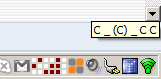
Here I'm holding Ctrl+V. There is some data in cccclipboards number 1, 2, 4 and 6, and the selection is currently at cccclipboard 4. If I release Ctrl+V at this very moment, I'll paste from cccclipboard 4.

Download: CCCCtrlC
« Last Edit: July 14, 2009, 09:43:20 AM by TPReal » Logged

brotherS
Master of Good Ideas
Honorary Member
**
Posts: 1,927


To make a difference, be different.

View Profile WWW Read user's biography. Give some DonationCredits to this forum member
« Reply #1 on: July 14, 2009, 06:54:50 AM »

Wow, sounds interesting! :-) Are you planning to add a search function?

I'm currently using ClipX, but since it sometimes stops adding clipped text to its history I'm more or less searching for an alternative. But I need a search function.
Logged

"I learned long ago, never to wrestle with a pig. You get dirty, and besides, the pig likes it." -- George Bernard Shaw

"The cost of education is nothing, compared to the price of ignorance." -- Dan Pena
yksyks
Supporting Member
**
Posts: 354


see users location on a map View Profile Give some DonationCredits to this forum member
« Reply #2 on: July 14, 2009, 07:04:49 AM »

... But I need a search function.

Good search-as-you-type function has Ditto. The latest beta seems to be quite stable, too.
Logged
TPReal
Honorary Member
**
Posts: 108


see users location on a map View Profile WWW Give some DonationCredits to this forum member
« Reply #3 on: July 14, 2009, 09:45:00 AM »

I'm not planning to add a search option because this program is intended to be as easy to use as possible, and I'm not going to add any GUI to it, save for the tooltip smiley So probably it's not the tool you're looking for.
Logged

brotherS
Master of Good Ideas
Honorary Member
**
Posts: 1,927


To make a difference, be different.

View Profile WWW Read user's biography. Give some DonationCredits to this forum member
« Reply #4 on: July 14, 2009, 10:13:00 AM »

Ok, I'll test Ditto - thanks! smiley
Logged

"I learned long ago, never to wrestle with a pig. You get dirty, and besides, the pig likes it." -- George Bernard Shaw

"The cost of education is nothing, compared to the price of ignorance." -- Dan Pena
cranioscopical
Friend of the Site
Supporting Member
**
Posts: 1,941


see users location on a map View Profile Give some DonationCredits to this forum member
« Reply #5 on: July 14, 2009, 10:43:50 AM »

Thanks for sharing, TPReal!
Logged

Chris
rjbull
Charter Member
***
Posts: 1,317

View Profile Give some DonationCredits to this forum member
« Reply #6 on: July 15, 2009, 03:43:11 AM »

I'm currently using ClipX, but since it sometimes stops adding clipped text to its history I'm more or less searching for an alternative. But I need a search function.

brotherS, if you want a search function, try out ArsClip as well.  And, of course, mouser's Clipboard Help+Spell.
Logged
mouser
First Author
Administrator
*****
Posts: 21,829


plarker mouser see users location on a map View Profile WWW Read user's biography. Give some DonationCredits to this forum member
« Reply #7 on: August 04, 2009, 11:16:10 AM »

mentioned on ghacks today  thumbs up
http://www.ghacks.net/200...ncer-cccctrlc/#more-15028
Logged
TPReal
Honorary Member
**
Posts: 108


see users location on a map View Profile WWW Give some DonationCredits to this forum member
« Reply #8 on: August 04, 2009, 11:47:23 AM »

Cool
I think it was noticed because of this post on FreewareWire, and it didn't get there by itself too - I had spoken with Jon, the site's owner. Do you see? I had to find another blog for the program because you didn't put it on DC blog smiley
Logged

mouser
First Author
Administrator
*****
Posts: 21,829


plarker mouser see users location on a map View Profile WWW Read user's biography. Give some DonationCredits to this forum member
« Reply #9 on: August 04, 2009, 11:56:17 AM »

Quote
because you didn't put it on DC blog

i apologize -- i missed it.. it's on their now.

no one should hesitate to send me a message if there is something they think should be added to the dc blog that i overlook.  thumbs up
Logged
TPReal
Honorary Member
**
Posts: 108


see users location on a map View Profile WWW Give some DonationCredits to this forum member
« Reply #10 on: August 04, 2009, 12:12:31 PM »

Thanks. Probably I was just too shy smiley
Logged

Nod5
Supporting Member
**
Posts: 543


View Profile Give some DonationCredits to this forum member
« Reply #11 on: August 05, 2009, 02:29:59 PM »

This is really cool TPReal! Minimalistic and useful. Good work!

I would very rarely have need for more than 4 clipboard items at a single time but for those that do then this hold-wait-release solution might pose a problem: either you speed it up and risk pasting to/copying from the wrong slot or you slow it down but then get annoyed by the wait time. So for 4+ clipboard items I'm thinking that a clickable gui solution, or multiple hotkey solution, could be better.

Do you yourself use it with the default speed? How often do you hit the wrong clipboard slot?
Logged
TPReal
Honorary Member
**
Posts: 108


see users location on a map View Profile WWW Give some DonationCredits to this forum member
« Reply #12 on: August 05, 2009, 02:49:40 PM »

Thanks smiley

The main purpose why I wrote this program was because I didn't like those where you have to click something on the GUI or press multiple keys or a complicated chords to access additional clipboards. So there are surely people who think just the opposite, and then this program is probably not the best choice for them. Also, the number of additional clipboards is not limited by the program but I guess using more than 5 would be a pain. So everything just depends on how you use your clipboard.

I myself use the default timing parameter and successfully hit first and second cccclipboard without looking at the tooltip (well, OK, from time to time I happen to miss, too smiley but it's not as often as to be annoying). And as I only occasionally use more than those two (plus the regular one), it is just perfect for me.
Logged

Nod5
Supporting Member
**
Posts: 543


View Profile Give some DonationCredits to this forum member
« Reply #13 on: August 05, 2009, 03:13:46 PM »

Ok I'll try to use it a bit and see if my responses are quick enough :-)

Two more ideas that come to mind:
- For 4 or fewer clipboard use then CCCCtrlC could be more minimalistic to use if the number of clipboards weren't autoextended.
- ctrl+c-holding could be made to loop over those four clipboards until the user presses any other key (like space).

edit: One more thing, not CCCCtrlC specific but relating to clipboards in general: almost every time I need more than two clipboards it is because I am doing paste repetitions of some sort. Like pasting recipient, subject and contents for emails in a webmail interface multiple times. The perfect clipboard tool would have a learn mode in which the user pastes into the three types of input boxes from three different clipboards. Thereafter the user just needs to select each input box and ctrl+v. The script would then know what clipboard to paste from to that box.
« Last Edit: August 05, 2009, 03:21:00 PM by Nod5 » Logged
TPReal
Honorary Member
**
Posts: 108


see users location on a map View Profile WWW Give some DonationCredits to this forum member
« Reply #14 on: August 05, 2009, 03:38:55 PM »

I thought about both the things that you mention, and I decided to make it as it is smiley But I think that during regular usage it really does not make any difference.

As for your general remark, well, that would have to be quite a complicated mechanism I think. But I guess this could be done. Not in CCCCtrlC, though smiley
Logged

rjbull
Charter Member
***
Posts: 1,317

View Profile Give some DonationCredits to this forum member
« Reply #15 on: August 06, 2009, 03:27:32 AM »

... pasting recipient, subject and contents for emails in a webmail interface multiple times.
You might need a much heavier-duty program for that.  You could do it with KeePass, where you tab between fields and enter text, or the similar functionality (which I haven't tried) in mouser's ClipboardHelp+Spell.  Look for Advanced SendKeys Method in CHS' Help.  If you need to change recipient each time, though, that's more of a problem.
Logged
Nod5
Supporting Member
**
Posts: 543


View Profile Give some DonationCredits to this forum member
« Reply #16 on: August 06, 2009, 11:41:09 AM »

I'm not sure that it would have to be so very heavy-duty. AHK can check the active window and control class and for most purposes that would be fine. I'll try to put together some code for that when I have more time.
Logged
solaia
Participant
*
Posts: 1

View Profile Give some DonationCredits to this forum member
« Reply #17 on: November 09, 2009, 07:12:40 AM »

Such a tool - if w/o bugs - would be exactly what I am looking for since years. But...

- With every start of computer the exe-file of this programm has to be initilized. Why programm cannot start with computer?
- The cursor running much too fast for beginners. Speed cannot be changed. Given on -start -execute the recommended CCCCtrlC.exe [Intervall] say CCCCtrlC.exe [20] just pop the shabby grey windows-mistake-information-window. Bumm! Reply: "'CCCCtrlC.exe doesn't exist" !
- Copied with normal (short-time) Shift+C the copy has doubled i.e. 'CCCCtrlC.exe [Intervall]CCCCtrlC.exe [Intervall]' - unbelievable but it's true.
- There is no uninstall

Fazit: Just to test your nerves and to confirm that it is better to use commercial programms

Shows problem we meet since ever: Incapability of most software-programmers to explain programms, understandable for public use. Not even capable to explain installation properly. Incompability of software-programmers to didactical psychology (teaching).
Little hint: If the cake should taste good follow a cook book and read to the instructions:
1.....
2.....
3...... an so on

What can you learn from a cook book that your programm tastes good (= successful installation & runs well on everybodies computer) ?

Logged
scancode
Honorary Member
**
Posts: 478


I will eat Cody someday.

see users location on a map View Profile Read user's biography. Give some DonationCredits to this forum member
« Reply #18 on: November 09, 2009, 07:30:11 AM »

Piece of shit Re:

What a nice way to treat someone who's releasing an application FOR FREE. Don't like it, don't use it.
I'd like to see your reaction if somebody else called your work a POS.


- With every start of computer the exe-file of this programm has to be initilized. Why programm cannot start with computer?

Add to startup folder, stop bitching. Some of us don't like having a lot of programs running at startup.

- The cursor running much too fast for beginners. Speed cannot be changed. Given on -start -execute the recommended CCCCtrlC.exe [Intervall] say CCCCtrlC.exe [20] just pop the shabby grey windows-mistake-information-window. Bumm! Reply: "'CCCCtrlC.exe doesn't exist" !

Use the full path, ie

"C:\Documents and Settings\You\Desktop\Downloads\CCCCtrlC.exe" 20

- Copied with normal (short-time) Shift+C the copy has doubled i.e. 'CCCCtrlC.exe [Intervall]CCCCtrlC.exe [Intervall]' - unbelievable but it's true.
undecided

- There is no uninstall

Not needed, just delete the EXE :/

Fazit: Just to test your nerves and to confirm that it is better to use commercial programms

 undecided

Shows problem we meet since ever: Incapability of most software-programmers to explain programms, understandable for public use. Not even capable to explain installation properly. Incompability of software-programmers to didactical psychology (teaching).
Software programmers teach stuff to computers. Teachers teach stuff to people.

Little hint: If the cake should taste good follow a cook book and read to the instructions:
1.....
2.....
3...... an so on

What can you learn from a cook book that your programm tastes good (= successful installation & runs well on everybodies computer) ?

Programmers != bakers
Also, a little common courtesy goes a long way.
Since it seems you know so much about programming and end-user experience, why don't you code your own tool and share it with the rest of us?

</nastygram>
« Last Edit: November 09, 2009, 07:34:17 AM by scancode » Logged

TPReal
Honorary Member
**
Posts: 108


see users location on a map View Profile WWW Give some DonationCredits to this forum member
« Reply #19 on: November 09, 2009, 07:36:33 AM »

- With every start of computer the exe-file of this programm has to be initilized. Why programm cannot start with computer?
Add it to Windows autostart. It's a simple program, you just need to do it manually, that's all.

- The cursor running much too fast for beginners. Speed cannot be changed. Given on -start -execute the recommended CCCCtrlC.exe [Intervall] say CCCCtrlC.exe [20] just pop the shabby grey windows-mistake-information-window. Bumm! Reply: "'CCCCtrlC.exe doesn't exist" !
Not CCCCtrlC.exe [20] but CCCCtrlC.exe 20, the square bracket is a standard notation for optional parameters. Also in the help that is displayed when you hold Ctrl+C+V there is no square bracket at all. And the option works like it should.

- Copied with normal (short-time) Shift+C the copy has doubled i.e. 'CCCCtrlC.exe [Intervall]CCCCtrlC.exe [Intervall]' - unbelievable but it's true.
I can't understand what you mean. First, probably you mean Ctrl+C and not Shift+C, second, I don't have any problem with anything double copying and can't reproduce your problem.

- There is no uninstall
There's no install so there's no uninstall. Just remove the program from the autostart. To stop the running program, press Ctrl+Ins+V and select Close from the tray icons that appears.

Fazit: Just to test your nerves and to confirm that it is better to use commercial programms
I've been using this program frequently since I posted it here, that is four months, and if I had any complaints about anything, I'd simply correct it.

So, in general, I don't agree with what you say. Of course this program is a simple tool provided "AS IS", so it shouldn't be compared with commercial products, but on the other hand I haven't found any similar program, even commercial, that I liked more than this one.

TPR.
Logged

yksyks
Supporting Member
**
Posts: 354


see users location on a map View Profile Give some DonationCredits to this forum member
« Reply #20 on: November 11, 2009, 04:49:04 AM »

Some time ago I recommended Ditto here, but recently got disappointed with reliability of the latest version. At the same time I realized that I'm seldom using older clips, and that I can live without graphic clips as well. So I tried CCCCtrlC and I'd like to thank you.

But it wouldn't be me if I miss to make some suggestions (hope you don't mind):

1. Fixed number of cccclipboards, possibly as a second command-line parameter

2. Use some kind of highlight (possibly just inverted colors) on the selected cccclipboard, not the parenthesis, which make the whole tooltip changing positions

In my opinion this would improve the usability, especially #2. But thanks again!
Logged
TPReal
Honorary Member
**
Posts: 108


see users location on a map View Profile WWW Give some DonationCredits to this forum member
« Reply #21 on: November 11, 2009, 10:16:17 AM »

Some time ago I recommended Ditto here, but recently got disappointed with reliability of the latest version. At the same time I realized that I'm seldom using older clips, and that I can live without graphic clips as well. So I tried CCCCtrlC and I'd like to thank you.

I'm glad you like it smiley Thanks for letting me know.

As for your suggestions:

2. The thing that is displayed on the screen is not a form, but simply a tooltip, similar to those that are shown when you hold your mouse pointer over various elements of GUI in most programs. That's why I can't do anything more than just display text. The only thing that could be done is try to align the Cs by putting more spaces between them, but I've checked that it doesn't look better. So I'm afraid there's no way to correct it without breaking the almost no GUI principle.

1. Currently the selection doesn't cycle over the cccclipboards anyway, so I decided to extend the capacity dynamically so that you can pretend that it's fixed at any number you wish smiley And using more than 5 of them is not very convenient anyway. I thought about this but finally decided to leave it as it is. Again, the almost no configuration principle would suffer if I tried to change this smiley and I think it wouldn't be worth it.
Logged

yksyks
Supporting Member
**
Posts: 354


see users location on a map View Profile Give some DonationCredits to this forum member
« Reply #22 on: November 11, 2009, 12:02:13 PM »

OK, I understand. I agree with #1. Regarding #2, how about displaying something like:

  • underline "_" for empty clips
  • lowercase "c" for non-empty clip
  • en-dash "–" for selected empty clip
  • uppercase "C" for selected non-empty clip

Or something similar, I'll be thinking about this. The cycling through the tooltip would just "raise" the appropriate symbol visually and it would keep the tooltip compact. What do you think?
Logged
TPReal
Honorary Member
**
Posts: 108


see users location on a map View Profile WWW Give some DonationCredits to this forum member
« Reply #23 on: November 11, 2009, 12:11:12 PM »

  • underline "_" for empty clips
  • lowercase "c" for non-empty clip
  • en-dash "–" for selected empty clip
  • uppercase "C" for selected non-empty clip

I experimented with various similar combinations (especially the lowercase 'c' seemed a good idea) but those letters vary in width and the result seems even more jerky.
Logged

yksyks
Supporting Member
**
Posts: 354


see users location on a map View Profile Give some DonationCredits to this forum member
« Reply #24 on: November 11, 2009, 12:58:36 PM »

You're right, I forgot you can't change the font. So, here's another idea: use characters that should have same proportions in all fonts, which are unfortunately only numbers and underline. I could imagine replacing the selected cell with an appropriate number, which might even add to lucidity of the thing, but how to emphasize whether the cell is full or empty? Even the space character has different width... Can you at least use bold or underline attribute?
Logged
Pages: [1] 2   Go Up
  Print  
 
Jump to:  
   Forum Home   Thread Marks Chat! Downloads Search Login Register  

DonationCoder.com | About Us
DonationCoder.com Forum | Powered by SMF
SMF © 2006-2009, Simple Machines LLC

social bookmark this page