| Application Name | PESplash |
| Version | v1.7.0.11 |
| Short Description | this tool will attempt to embed text information into a CODE section of
any PE file. it does so by finding valid opcode strings and replaces
them with "like-minded" opcodes therefore not changing the size or
operability of the file. |
| Supported OSes | Windows 32-bit |
| Web Page | http://seedling.dcmembers.com |
| Download Link | http://seedling.dcme...m/other/PESplash.zip |
| not much, just Win32 OS | |
| v1.7.0.11 | - v1.7.10
-------
fixed a bug that would randomly corrupt text in both embedding and
retrieving process
improved the retrieving routine and can now get watermark text
much faster!
v1.7
----
inserts a default 'save as' filename once the 'open' file is
selected.
--------------------------------------------------------------
this could possibly cause problems since the routine
uses the '.' as a deliminator and renames the file. an example
of a problem would be in a path with '.' used in the name:
C:\stuff.i.like.a.lot\file.exe
would result in:
C:\stuffw.i
since, by default, it simply adds a 'w' after the filename and
then re-adds the extension
--------------------------------------------------------------
added drag & drop support
v1.6 RTM
--------
added a group box around the progress bar with changing caption
text explaining basically what the bar is keeping track of
v1.5 beta
---------
fixed 'ops.dat' reading code to allow for commented lines starting
with '//'. this allows for easier management of this file.
buttons are now disabled when performing a task
Hidden Text edit box is now read only
ProgressBar is half-way decent (could still use some better
progression tho)
inclusion of ProcessMessages to help the window stay focused on more
than the ProgressBar when performing a task! (thanks guys  ) )
LOTS of code cleanup!
this build is practically a FINAL version and may be converted to
FINAL once further testing proves its reliability
v1.1 beta
---------
now uses an external file 'ops.dat' which contains mask pairs for
checking!
created an icon
v1.0 beta
---------
first gui build and name changed to PESplash
v0.1 beta
---------
all 3 switches are operable(-e | -r | -c)
embeds data and saves to "newfile.exe"
can now retreive embedded data from watermarked file
returns space available for watermarking
do NOT try to use this with a packed file, it'll crash
or at best, it'll make the packed file useless!
v0.3 alpha
----------
now takes text input for embedding
converts text to a binary string and saves changes to "testbin.bin"
v0.2 alpha
----------
got rid of the temp file (now stores text bytes into memory
directly)
saves changed CODE section as a binary file "testbin.bin"
v0.1 alpha
----------
initial build
uses one set of masks only, no table yet
creates temp text representation of valid opcodes from CODE section
of a PE file
creates temp text representation of changed CODE section with ALL
bytes found by mask0 or mask1
|
| Seedling | http://seedling.dcmembers.com/ |
DescriptionExecutable code steganography
FeaturesI have submitted a rather unusual app that takes a different approach in steganography. I (with the help of friends and Oleh Yuschuk's disassembly engine ) developed this application way back in 2003-2004. The app is called PESplash. It embeds text into windows exe files using interchangeable assembly opcodes.
With this app you can create your own 'keys' (ops.dat file) that will be able to embed/read hidden text via a binary stream based on the interchangeable codes you have in your ops.dat file. So, it embeds this data into the CODE section of your executable file and will run just as originally compiled without error and yet contains hidden data. Now, be warned, if you decide on interchangeable opcodes and you are wrong, then your application will most likely not run correctly. the default ops.dat file contains most zero flag, interchangeable codes that should not be a problem to swap (but it's not perfect).
So to summarize, it embeds text into your executable files. This could be used in nefarious ways (and is the reason i never released it to the public). Use with restraint, but it's a pretty cool way of tracking who is downloading your files (if released in the wild), send messages, etc.
Anyway, that's my submission, enjoy.
Also, please note that this is free and without protection, however, if you plan on using this in a corporate/commercial product, then you must contact me for proper compensation.
Screenshots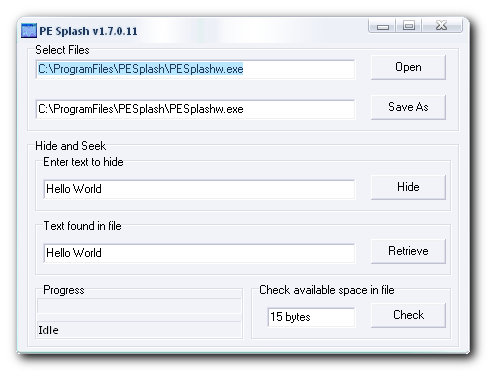 UsageInstallation
unzip this to a dir of your choice and run it
Using the ApplicationSelect an unpacked app, have it scan for the amount of bytes available (per your ops.dat file keyfile) then write the text to the file, done. to retrieve the embedded text, just open the file and select retrieve, done.
Uninstallationjust delete the files that you unzipped, done
Known Issuesthis will not work with already packed (compressed) executable files. that is, it will seem to work, but the file will not work.


