DonationCoder.com forum
 
Read-only archive. This is a static copy of the DonationCoder.com forum. Reading and searching work as before; logging in, posting and private messages do not.
Archive of 2026-10-21 · About this archive · Main site

Last post Author Topic: DONE: Change (sub) folder(s) date based on newest/oldest file in the folder  (Read 187,587 times)

4wd

  • Pedantic Old Bastard
  • Supporting Member
  • Joined in 2006
  • **
  • Posts: 5,652
    • Coding Snacks
Am using this sooo many times.  :Thmbsup:

Perhaps I should of included that per use royalty routine ...


Glad you're getting some use out of it.  ;)
"I will not follow where the path may lead, but I will go where there is no path, and I will leave a trail." - Muriel Strode, 1903

dcwul62

  • Supporting Member
  • Joined in 2013
  • **
  • Posts: 336
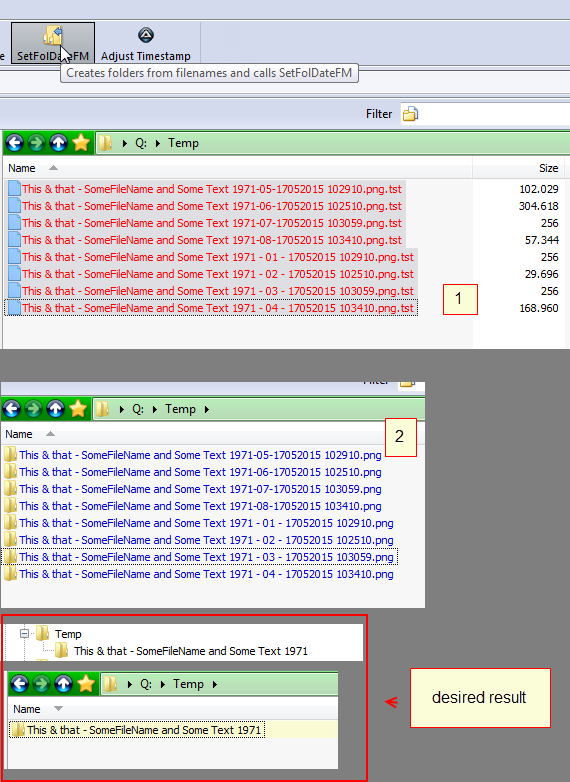
I have been puzzling about the below quite regularly. Sofar I renamed/copied files to folders 'manually', i.e. naming folders myself, not using setfoldatefm.

I wonder if it can be included in setfoldate though, as it is something regularly occuring with many files.

example

This & that - SomeFileName and Some Text 1971 - 01 - 17052015 102910.png
This & that - SomeFileName and Some Text 1971 - 02 - 17052015 102510.png
This & that - SomeFileName and Some Text 1971 - 03 - 17052015 103059.png
This & that - SomeFileName and Some Text 1971 - 04 - 17052015 103410.png
This & that - SomeFileName and Some Text 1971-05-17052015 102910.png
This & that - SomeFileName and Some Text 1971-06-17052015 102510.png
This & that - SomeFileName and Some Text 1971-07-17052015 103059.png
This & that - SomeFileName and Some Text 1971-08-17052015 103410.png

to a folder
This & that - SomeFileName and Some Text 1971

I vainly tried to figure this out myself.

Hope there is an easy solution for this, but if it is too complex, please leave it as t is.
I will continue the 'manual way'.

thanks
-

4wd

  • Pedantic Old Bastard
  • Supporting Member
  • Joined in 2006
  • **
  • Posts: 5,652
    • Coding Snacks
I'm not sure what you're trying to get at here since SetFolDate only affects the dates of folders, it has no effect on any other attribute nor does it have any effect on files.

Didn't this get answered in another thread?

I suggested using DOpus to rename them into new folders.

http://www.donationcoder.com/forum/index.php?topic=39651.msg369918#msg369918
"I will not follow where the path may lead, but I will go where there is no path, and I will leave a trail." - Muriel Strode, 1903

dcwul62

  • Supporting Member
  • Joined in 2013
  • **
  • Posts: 336
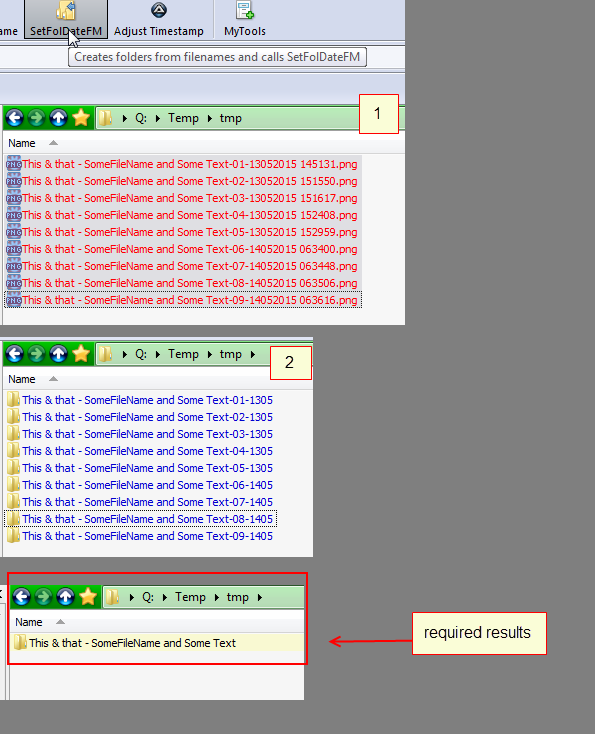
There are two methods...

1)
-
SnagIt-19052015 122021.png

-

and

2)

-
SnagIt-19052015 122051.png
-

I meant the method under nbr 2

4wd

  • Pedantic Old Bastard
  • Supporting Member
  • Joined in 2006
  • **
  • Posts: 5,652
    • Coding Snacks
You're not talking about SetFolDate, you're talking about a script that incidentally calls it.

Still works fine here, what does the output log show?
"I will not follow where the path may lead, but I will go where there is no path, and I will leave a trail." - Muriel Strode, 1903
« Last Edit: May 20, 2015, 03:53 AM by 4wd »

dcwul62

  • Supporting Member
  • Joined in 2013
  • **
  • Posts: 336

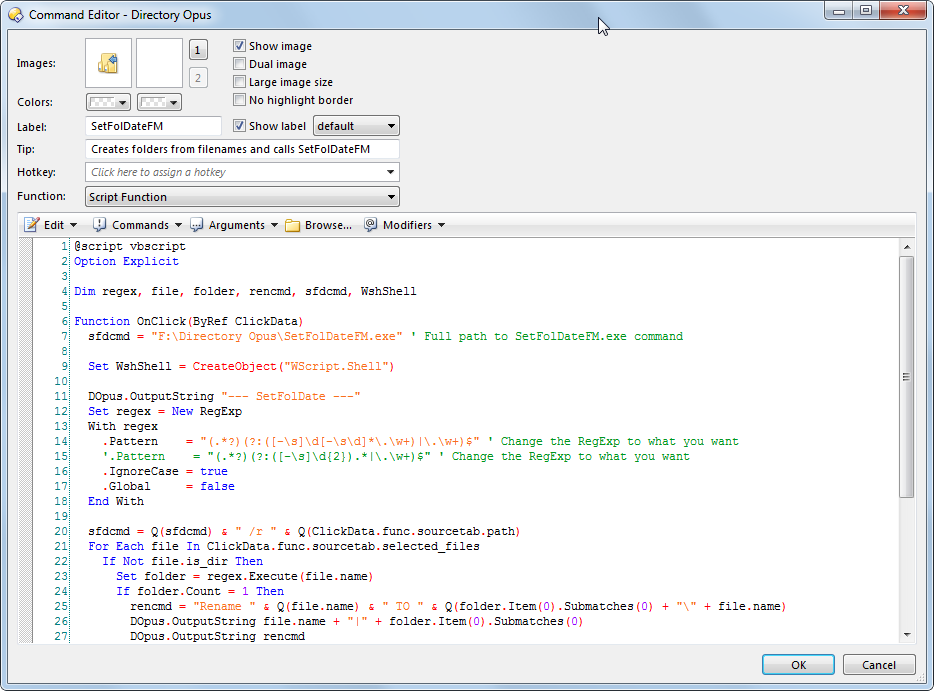
Often a screenshot explains things better.


===
[attachthumb=#]
====

The script used for the Opus button is as follows

==


Code: (vb)
@script vbscript
Option Explicit

Dim regex, file, folder, rencmd, sfdcmd, WshShell

Function OnClick(ByRef ClickData)
  sfdcmd = "F:\Directory Opus\SetFolDateFM.exe" ' Full path to SetFolDateFM.exe command

  Set WshShell = CreateObject("WScript.Shell")
  
  DOpus.OutputString "--- SetFolDate ---"
  Set regex = New RegExp
  With regex
    .Pattern    = "(.*?)(?:([-\s]\d[-\s\d]*\.\w+)|\.\w+)$" ' Change the RegExp to what you want
    '.Pattern    = "(.*?)(?:([-\s]\d{2}).*|\.\w+)$" ' Change the RegExp to what you want
    .IgnoreCase = true
    .Global     = false
  End With

  sfdcmd = Q(sfdcmd) & " /r " & Q(ClickData.func.sourcetab.path)
  For Each file In ClickData.func.sourcetab.selected_files
    If Not file.is_dir Then
      Set folder = regex.Execute(file.name)
      If folder.Count = 1 Then
        rencmd = "Rename " & Q(file.name) & " TO " & Q(folder.Item(0).Submatches(0) + "\" + file.name)
        DOpus.OutputString file.name + "|" + folder.Item(0).Submatches(0)
        DOpus.OutputString rencmd
        DOpus.OutputString "--------"
        ClickData.func.command.RunCommand rencmd
	sfdcmd = sfdcmd & " " & Q(folder.Item(0).Submatches(0))
      End If
    End If
  Next
  DOpus.OutputString sfdcmd
  WshShell.Run(sfdcmd)
End Function

Function Q(s)
  Q = """" & s & """"
End Function


I tried to mess around with the regex (line 14) but didn't how to solve this.
On and on I tried with Opus rename
fm:  bla bla
to: \1\\\2 
(that you suggested in earlier threads)
but a. I didn't know exactly what I was doing and b. it did not work out, so gave up on that one.

However, maybe.. what I am asking is simply impossible.

brgds
=

==

4wd

  • Pedantic Old Bastard
  • Supporting Member
  • Joined in 2006
  • **
  • Posts: 5,652
    • Coding Snacks
^(.*?\d{4})(?:.*)
"I will not follow where the path may lead, but I will go where there is no path, and I will leave a trail." - Muriel Strode, 1903

dcwul62

  • Supporting Member
  • Joined in 2013
  • **
  • Posts: 336
Will the current regex still work then?


later...
I check, regretfully it doesn't.
will re-instate the previous regex
Code: (vb)
"(.*?)(?:([-\s]\d[-\s\d]*\.\w+)|\.\w+)$"

=
[attachthumb=#]
=
« Last Edit: May 20, 2015, 05:59 AM by dcwul62 »

4wd

  • Pedantic Old Bastard
  • Supporting Member
  • Joined in 2006
  • **
  • Posts: 5,652
    • Coding Snacks
Have you thought of having more than one button since your file naming conventions are so diverse?
"I will not follow where the path may lead, but I will go where there is no path, and I will leave a trail." - Muriel Strode, 1903

dcwul62

  • Supporting Member
  • Joined in 2013
  • **
  • Posts: 336
Nope, right now, all the renames (except this 'new' one) cud be covered with the existing regex.

4wd

  • Pedantic Old Bastard
  • Supporting Member
  • Joined in 2006
  • **
  • Posts: 5,652
    • Coding Snacks
Code: (text)
(.*?\d{4})(?:.*)|(.*?)(?:([-\s]\d[-\s\d]*\.\w+)|\.\w+)$

You'll have to modify the first part to make sure it doesn't match names that would fall under the second RegEx alternative.
"I will not follow where the path may lead, but I will go where there is no path, and I will leave a trail." - Muriel Strode, 1903

dcwul62

  • Supporting Member
  • Joined in 2013
  • **
  • Posts: 336
Hello 4wd
a complicated one, I guess.
Today I restore a -lot- of subfolders. They got today's date of course.
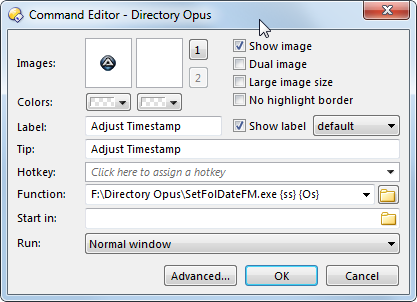
No problem: I have this 'adjust timestamp' button
Opus: d:\Directory Opus\SetFolDateFM.exe {ss} {Os}

A lof of folders (maybe 80% of the 180) went fine and got the folderdates based on newest date in file.
My workaround is to go down the folders and then run the adjust timestamp on sub folders (or sub-sub folders).
SOmetimes it also works to run it a number of times, 3-4-5x
Each time I have to
select folder
click button
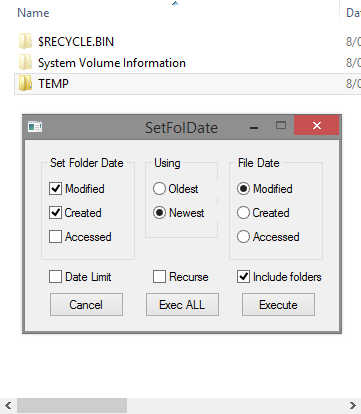
exec all
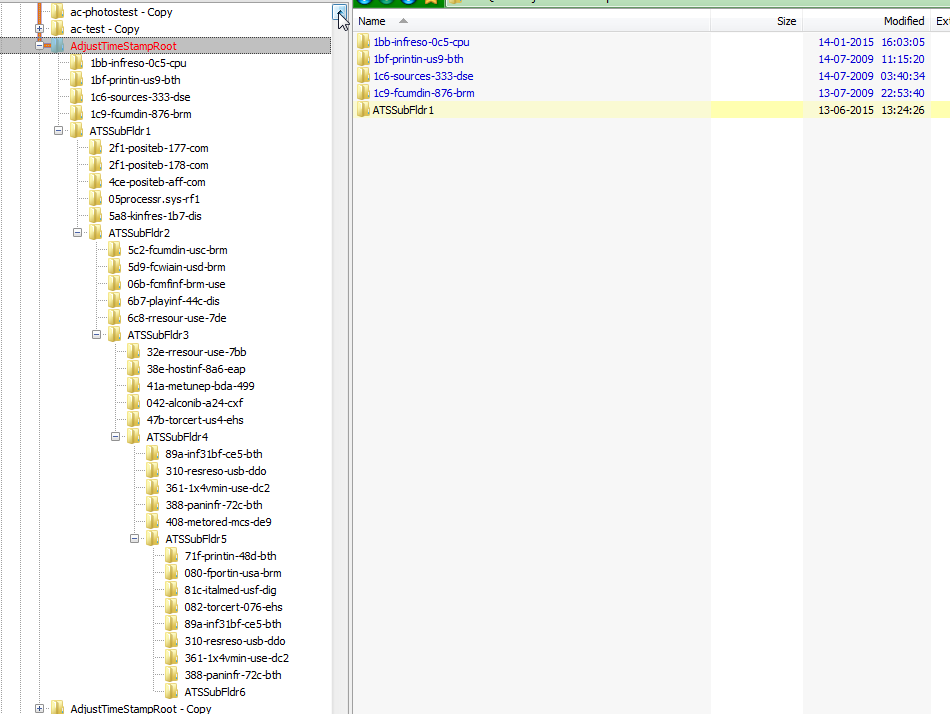
I don't know how this could be solved.
Fact is, in the end it is okay

Just checked on a folder containing some utility software, after the 6x time, everything was okay.

For me it is 99,9% on newest date.

Q:
1) maybe it is possible to have this as a parameter? i.e. I would then have a button that will perform redating on newest date by default (no need to click on Exec all)
2) Maybe there is a way to have this run multiple times? (e.g. 3 times)


I would then only need to click on a hotkey to have it run 3 times on a number of selected folders.

What do you think?

Best regards
-


4wd

  • Pedantic Old Bastard
  • Supporting Member
  • Joined in 2006
  • **
  • Posts: 5,652
    • Coding Snacks
A lof of folders (maybe 80% of the 180) went fine and got the folderdates based on newest date in file.
My workaround is to go down the folders and then run the adjust timestamp on sub folders (or sub-sub folders).
SOmetimes it also works to run it a number of times, 3-4-5x
Each time I have to
select folder
click button
exec all

So, what I think you're trying to say is that the reason the folders didn't get adjusted was because they had no files within them?

Why don't you turn Recurse on?

You're going to have to zip up your folder/file structure and send it to me since I can't look at it without something to work on.  Use skwire's Zero Zipper or since you have DOpus you can use my method.
"I will not follow where the path may lead, but I will go where there is no path, and I will leave a trail." - Muriel Strode, 1903

dcwul62

  • Supporting Member
  • Joined in 2013
  • **
  • Posts: 336
Recurse is on, of course, by default.

Imagine following scenario:

X:\Folder

Select folder, click on Adjust time stamp, newest date, recurse tagged.
exec all

Nothing happens, do it again, and again and maybe again.
After 2-3 times, in worst case after the 6the time, folder is adjusted correctly.

So, what I am telling is that sometimes, on individual folders, I need to run the same adjust timestamp routine a couple of times.
In the end it is successful, for sure.

I would like to avoid doing the same routine multiple times.

So...
Q: is it possible to have additional parameters that does
a) the redate based on newest file
b) basis recursive=on
c) no deselecting the folder (until I manually deselect it, e.g. moving down to another folder)
d) does the job 3x

for example something like:

d:\Directory Opus\SetFolDateFM.exe {ss} {Os} {N} {R} {3}
{N} newest
{R} Recursive
{3} 3 times

to be honest, i have no idea where the {ss}{Os}  parameters come from...

I would then use a hotkey to simply execute the job, without any additional clicks.

Hope you understand, then again. I don't know if it is complicated.

Best regards
==

4wd

  • Pedantic Old Bastard
  • Supporting Member
  • Joined in 2006
  • **
  • Posts: 5,652
    • Coding Snacks
Imagination doesn't help me fix what may or may not be a problem, all that may be the problem is you have something running that is locking the folder while SetFolDate is running.

If you want it to run multiple times, change the DOpus button by adding the command multiple times with the @nodeselect modifier.

{ss} - need source path (short)
{Os} - need all selected (short)

They are DOpus External control codes used to pass arguments to programs.
"I will not follow where the path may lead, but I will go where there is no path, and I will leave a trail." - Muriel Strode, 1903

dcwul62

  • Supporting Member
  • Joined in 2013
  • **
  • Posts: 336


I mean this...

=
SnagIt-13062015 133457.png
=

=
AdjustTimeStamp-13-06-2015 13-37-46.mp4 (1.9 MB)
=

Wonder whether the button should read like this now

d:\Directory Opus\SetFolDateFM.exe {ss} {Os}
@nodeselect
d:\Directory Opus\SetFolDateFM.exe {ss} {Os}
@nodeselect
d:\Directory Opus\SetFolDateFM.exe {ss} {Os}
@nodeselect
d:\Directory Opus\SetFolDateFM.exe {ss} {Os}
@nodeselect

=

4wd

  • Pedantic Old Bastard
  • Supporting Member
  • Joined in 2006
  • **
  • Posts: 5,652
    • Coding Snacks
You're going to have to zip up your folder/file structure and send it to me since I can't look at it without something to work on.  Use skwire's Zero Zipper or since you have DOpus you can use my method.
"I will not follow where the path may lead, but I will go where there is no path, and I will leave a trail." - Muriel Strode, 1903

dcwul62

  • Supporting Member
  • Joined in 2013
  • **
  • Posts: 336

Hello again, pls find attached  zip file.
I have just created a sub sub sub folder structure with some test files.
I needed to click on the new 'multi timeadjust' button twice to get the date of the rootfolder corresponds with the news file in the folder (12-06-2015)

Hope you will see what I mean.
==

4wd

  • Pedantic Old Bastard
  • Supporting Member
  • Joined in 2006
  • **
  • Posts: 5,652
    • Coding Snacks
Thanks but I didn't really need the contents of the files, just the file/folder tree structure.

I can see what's happening, the change isn't fully propagating up the tree when Include Folders is set.

I suspect this is due because I haven't taken into account the new date of the recently changed (sub)folder, ie. it's using the date it obtained when the tree was first read.

It's easier to see what's happening if you use a dual pane lister with a flat view of the folder structure on one side.

I'll have a play around with it.
"I will not follow where the path may lead, but I will go where there is no path, and I will leave a trail." - Muriel Strode, 1903

dcwul62

  • Supporting Member
  • Joined in 2013
  • **
  • Posts: 336
Most probably you won't be able to read the files anyway. They are just for testing purposes.


Did you try it yourself? The redating, I mean.
If you are at the topfolder, likely you need to click on adjust timestamp about 5-6x
Maybe if the tree is less 'deep', say just 1 subfolder or 2 at best, then the adjust timestamp runs fine.

For me it is no problem to have separate 'multi-adjust timestamp' button.
However, I think what I suggested below (multiple rows and @nodeselect in between) is not the right way..??
Get a number of pop-ups and need to click "exec all' each time.

Anyway, let's wait and see.

If it is too complicated, if there is no solution, then forget it.

Thanks for all yr help sofar!

=

4wd

  • Pedantic Old Bastard
  • Supporting Member
  • Joined in 2006
  • **
  • Posts: 5,652
    • Coding Snacks
Did you try it yourself? The redating, I mean.

Yes, this is how I could see what was happening  ;)

You could probably modify your post and remove the archive now, saves people downloading a lot of renamed executables.  :)
"I will not follow where the path may lead, but I will go where there is no path, and I will leave a trail." - Muriel Strode, 1903

4wd

  • Pedantic Old Bastard
  • Supporting Member
  • Joined in 2006
  • **
  • Posts: 5,652
    • Coding Snacks
UPDATE: v0.3.1.5
Fixed: Wasn't properly migrating date when recursion was active.
"I will not follow where the path may lead, but I will go where there is no path, and I will leave a trail." - Muriel Strode, 1903

zaaphod

  • Participant
  • Joined in 2015
  • *
  • Posts: 2
I'm very confused.  I can't get this to do anything at all..  I can't get the context menus to work, so I tried just using setfoldatefm from a command line with my target directory as an argument like this:

l:
setfoldatefm l:\test
or
setfoldatefm test

and it does pop up the window with options, but after selecting my options and pushing execute or execute all,  the window just goes away and the dates do not change in my folders.  I feel I must be missing something very basic, but I just can't figure out what it is.  I am using windows 7 professional 64bit.  Is there some other package or program I need to install to get this to work?  I came across this by doing an internet search, so if there is some prerequisite package needed to make this functions, I did not find out about it..  I looked through a lot of posts and can't figure it out.  I see some people talking about things like DOpus but that goes right over my head, don't have a clue what that is... maybe I need it? 

Please help!  this is exactly what I want to do and I don't want to re-invent something that seems to be perfected.

4wd

  • Pedantic Old Bastard
  • Supporting Member
  • Joined in 2006
  • **
  • Posts: 5,652
    • Coding Snacks
I'm very confused.  I can't get this to do anything at all..  I can't get the context menus to work, ...
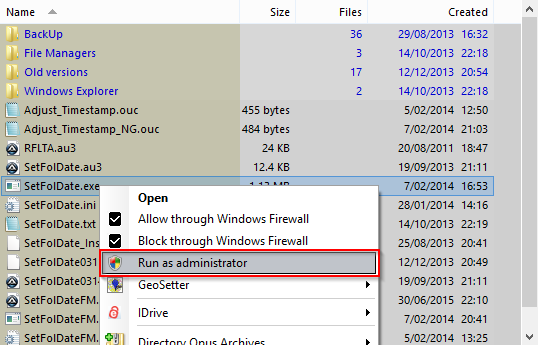
If you're only using Windows Explorer, you only need the SetFolDate.exe executable from the archive.

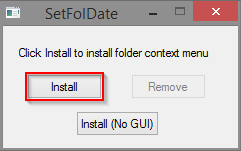
Copy it to a folder somewhere, (eg. D:\SetFolDate\SetFolDate.exe), and run it using Run as Administrator, (required to add the context menu to the system).

2015-09-08 11_29_16.png

When the window opens select Install.  Install (No GUI) adds an extra context menu item that runs it using the last used options so no GUI opens.  The window will close after the installation.

2015-09-08 11_23_13.png

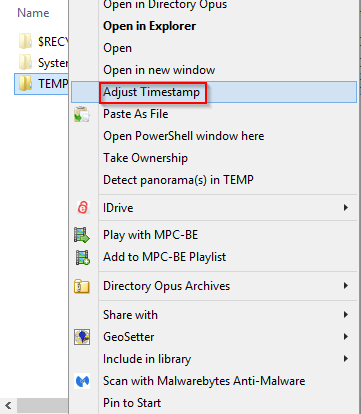
Right-click on a folder and the new menu item(s) should appear.

2015-09-08 11_33_48.png

Selecting it will open the GUI.

2015-09-08 11_34_47.png


The SetFolDateFM version is really only for alternative file managers, (in my case Directory Opus because that's all I normally use), and uses command line args for the parameters, whereas the Windows Explorer version grabs the selected folders from the explorer window.
"I will not follow where the path may lead, but I will go where there is no path, and I will leave a trail." - Muriel Strode, 1903
« Last Edit: September 08, 2015, 01:42 AM by 4wd »

zaaphod

  • Participant
  • Joined in 2015
  • *
  • Posts: 2
Thank you very much for explain this to me.  I did get it to work I neglected to run it as administrator and, along with my misunderstanding to the intent of setfoldatefm.exe led to my confusion.

Original address: https://www.donationcoder.com/forum/index.php?topic=35881.0