DonationCoder.com forum
 
Read-only archive. This is a static copy of the DonationCoder.com forum. Reading and searching work as before; logging in, posting and private messages do not.
Archive of 2026-10-21 · About this archive · Main site

Last post Author Topic: DONE: Change (sub) folder(s) date based on newest/oldest file in the folder  (Read 187,587 times)

Skrell

  • Supporting Member
  • Joined in 2008
  • **
  • Posts: 14
cool man can't wait! :)

skwire

  • I eat Coding Snacks for breakfast...
  • Global Moderator
  • Joined in 2005
  • *****
  • Posts: 5,297
    • Participated in NANY Challenge Seventeen Times
    • Coding Snacks
    • Superboy Coder
    • Cody Award
    • Volunteers/Staff
    • Gathering Badge
This thread probably should be in Coding Snacks, one of the mods like to move it there?

Done.  Thank you for your work on this.  =]

4wd

  • Pedantic Old Bastard
  • Supporting Member
  • Joined in 2006
  • **
  • Posts: 5,652
    • Coding Snacks
Done.  Thank you for your work on this.  =]

Thanks skwire - I was thinking more of the request area but wth :)

Looks like I'm going to end up with two slightly different programs, one for Explorer and one for filemanagers, (DOpus, possibly TC, etc), since the proper way to do this with one program would be to make it a COM object - which is currently beyond my knowledge.
"I will not follow where the path may lead, but I will go where there is no path, and I will leave a trail." - Muriel Strode, 1903

dcwul62

  • Supporting Member
  • Joined in 2013
  • **
  • Posts: 336
@4wd - thanks sofar. I guess, once it is completed, there will be a separate post/download link or so?
keep up the good work!
=

4wd

  • Pedantic Old Bastard
  • Supporting Member
  • Joined in 2006
  • **
  • Posts: 5,652
    • Coding Snacks
I guess, once it is completed, there will be a separate post/download link or so?

Yes, I'll post and replace the original attachment.
"I will not follow where the path may lead, but I will go where there is no path, and I will leave a trail." - Muriel Strode, 1903

dcwul62

  • Supporting Member
  • Joined in 2013
  • **
  • Posts: 336
Okay 4wd  :Thmbsup:
We look forward to your new release one of these days.
=
« Last Edit: August 30, 2013, 02:13 PM by dcwul62 »

skwire

  • I eat Coding Snacks for breakfast...
  • Global Moderator
  • Joined in 2005
  • *****
  • Posts: 5,297
    • Participated in NANY Challenge Seventeen Times
    • Coding Snacks
    • Superboy Coder
    • Cody Award
    • Volunteers/Staff
    • Gathering Badge
Thanks skwire - I was thinking more of the request area but wth

It's well beyond a request now.   ;D

4wd

  • Pedantic Old Bastard
  • Supporting Member
  • Joined in 2006
  • **
  • Posts: 5,652
    • Coding Snacks
- See above -
"I will not follow where the path may lead, but I will go where there is no path, and I will leave a trail." - Muriel Strode, 1903
« Last Edit: September 04, 2013, 07:20 AM by 4wd »

dcwul62

  • Supporting Member
  • Joined in 2013
  • **
  • Posts: 336

Thank you!

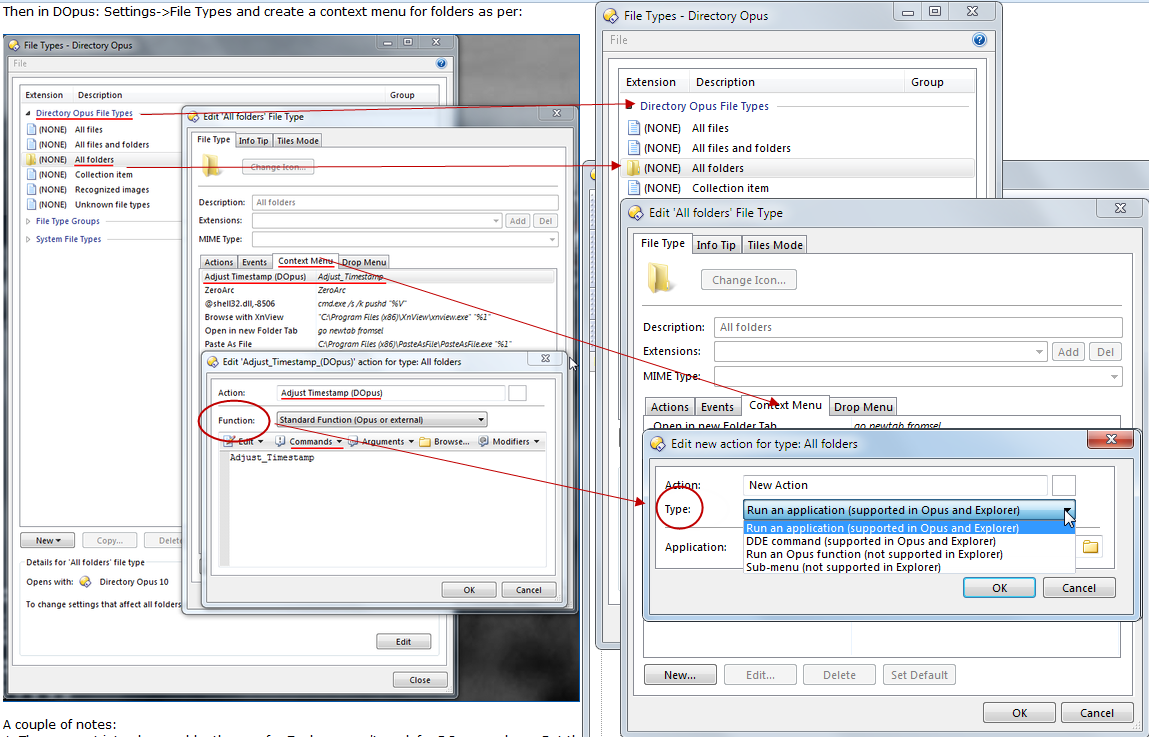
I'd like to try it out, but have at some point I fail to get 'Function' when creating a context menu item.

Pls see attachment.
Where you have 'Function'  - I have 'type'

Am doing the same steps.
Cud you give me a hint?
(Opus 10.5)

=
[attachthumb=#]
=

4wd

  • Pedantic Old Bastard
  • Supporting Member
  • Joined in 2006
  • **
  • Posts: 5,652
    • Coding Snacks
er yeah, my fault - that's a picture of the Editing dialog rather than New... dialog.

Choose Run an Opus function, then select Adjust_Timestamp from the Command list, (which will only show up if you imported the command file Adjust_Timestamp.ouc).
"I will not follow where the path may lead, but I will go where there is no path, and I will leave a trail." - Muriel Strode, 1903

dcwul62

  • Supporting Member
  • Joined in 2013
  • **
  • Posts: 336
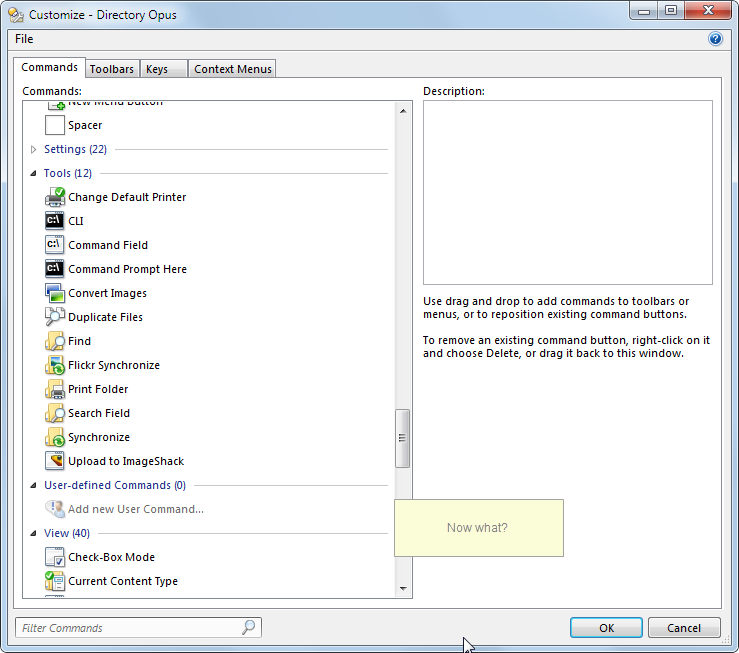
Sorry 4wd, is it possible to create an .exe of this? Like the old one?
Think it is rather complicated this way. These are Opus 'areas' I never go into actually.
I have double clicked the .exe and have both .exe and .ouc files in my F:\Directory Opus-folder
Think I should use settings->toolbars, but then what?

=
[attachthumb=#]
=

Double clicking an .exe (old one) was nice...  :)

Thanks.

4wd

  • Pedantic Old Bastard
  • Supporting Member
  • Joined in 2006
  • **
  • Posts: 5,652
    • Coding Snacks
Use the file menu in the Customise window: File->Import
"I will not follow where the path may lead, but I will go where there is no path, and I will leave a trail." - Muriel Strode, 1903

dcwul62

  • Supporting Member
  • Joined in 2013
  • **
  • Posts: 336
4wd, thanks a lot!

As a kind of recap for myself and possible other users who, like me, may not be familiar with 'User Defined Commands'


After double-clicking SetFolDateFM.exe, personally, I drag the Adjust_Timestamp.ouc from desktop to my Directory Opus program folder

Contextmenu
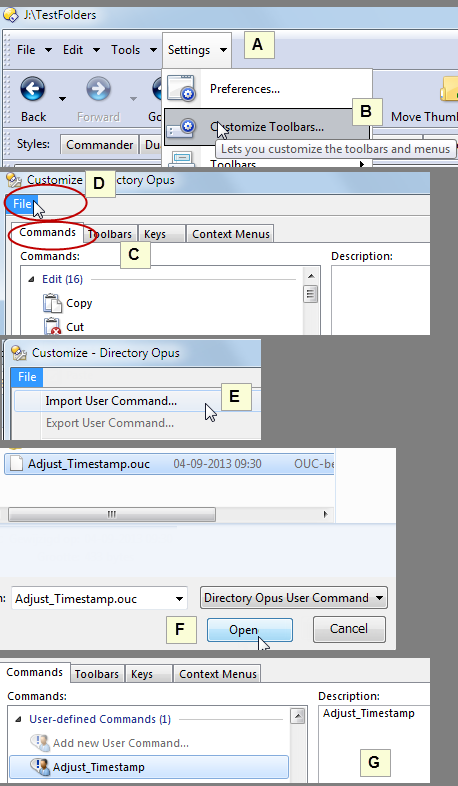
1. Click on: Settings (A) select Customize Toolbars (B)  select tab Commands (C)

2. Click on: File (D) select: Import User Command (E)

3. Go to and Open Adjust_Timestamp.ouc – click Open (F)

4. Note under User-defined Commands "Adjust_Timestamp" has been added (G)

=
SetFolDate-STEP1-4-06092013 090819.png
=

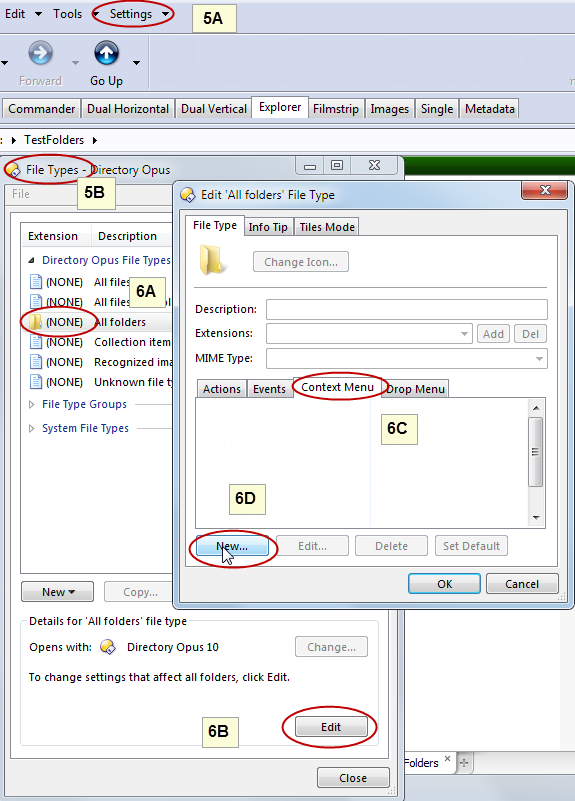
5. Click on: Settings, (5A)  select: File Types (5B)

6. Click on:
(NONE) All folders (6A),
click on Edit (6B)
select tab Context Menu (6C)
click on "New…" (6D)  

SetFolDate-STEP5-6-06092013 094207.png


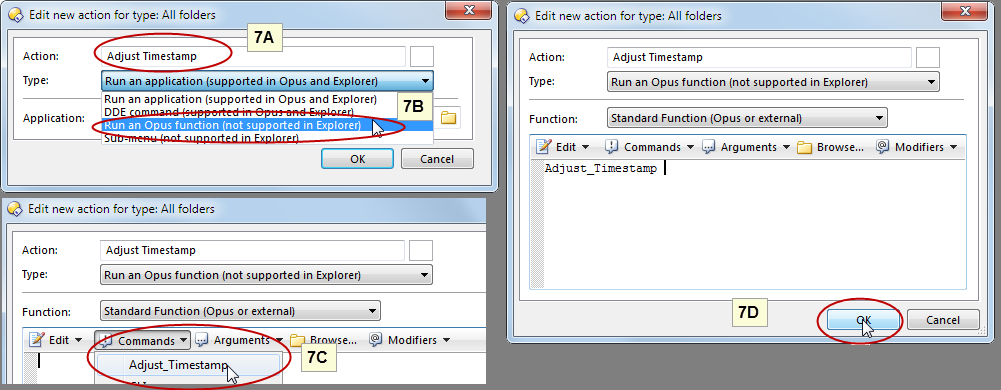
7. Enter title: Adjust Timestamp (A),
click on Drop down menu & select "Run an Opus function (not supported in Explorer), (B)
click on Commands and select Adjust Timestamp (C)
click on "OK" (D)
=
SetFolDate-STEP7-06092013 090819.png
=


8. Click "OK"

=

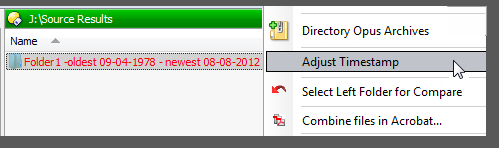
9. Note a new context menu has been added, click on "OK"  - next window click on "Close"

10. Note the new Adjust Timestamp entry.

=
SetFolDate-STEP9-01092013 082129 - Copy.png
=

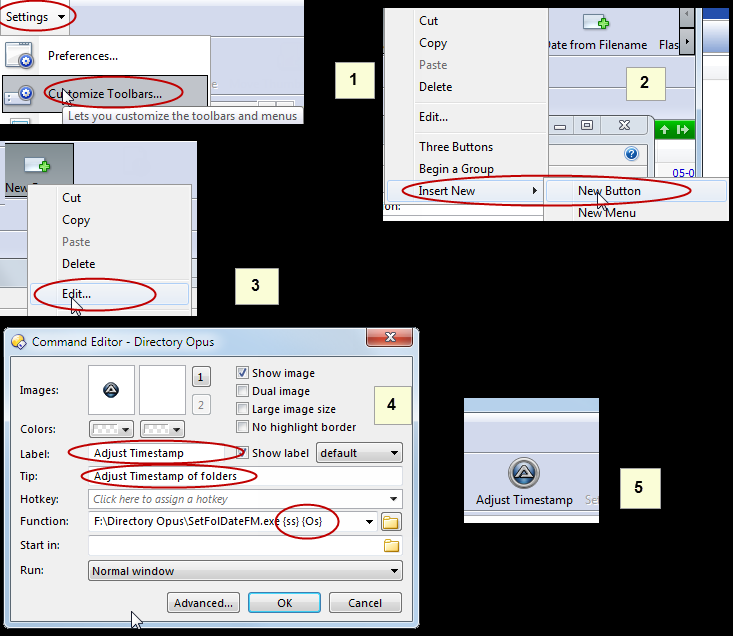
2) Adding a toolbarbutton to Directory Opus

1. Click on "Settings" , select "Customize Toolbars"
2. "Rightclick" anywhere on the "toolbar", select "Insert New" and "New Button"
3. "Rightclick" on the "button", select "Edit..."
4. Enter Label-text, e.g. Adjust Timestamp, and (Optional) Tip-text,
   Browse to "SetFolDateFM.exe"-file and add {ss} {Os} as parameters
    x:\path\SetFolDateFM.exe {ss} {Os}  (x = driveletter and path=path to Setfoldatefm.exe)
  click "OK"
5. Note the button.
=
SetFolDate-Button-06092013 102413.png
=
« Last Edit: September 06, 2013, 09:49 AM by dcwul62 »

dcwul62

  • Supporting Member
  • Joined in 2013
  • **
  • Posts: 336
hi 4wd - question: I am not sure how recursive works. Cud you give me a hint?
when is not greyed out?

dcwul62

  • Supporting Member
  • Joined in 2013
  • **
  • Posts: 336
hi 4wd,

sorry, me again .. :-[

I also installed it into Windows Explorer.

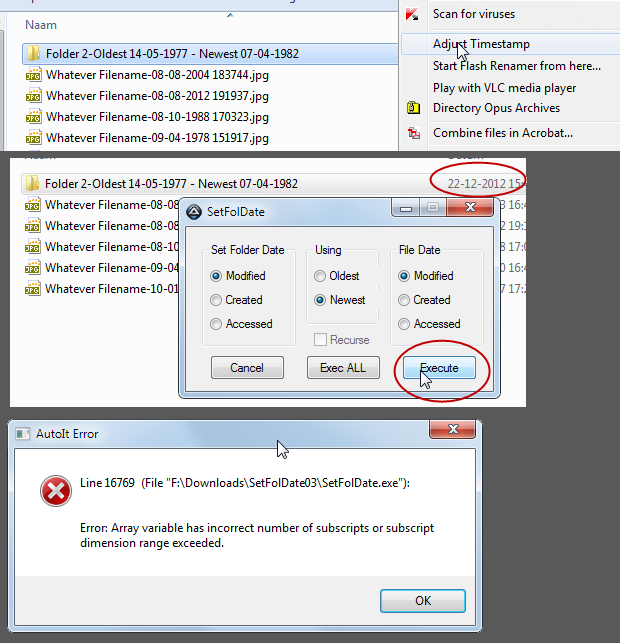
The context menu is there alright, but I got an error.
=
[attach=#]
=

4wd

  • Pedantic Old Bastard
  • Supporting Member
  • Joined in 2006
  • **
  • Posts: 5,652
    • Coding Snacks
hi 4wd - question: I am not sure how recursive works. Cud you give me a hint?
when is not greyed out?

2. Yes, there is a Recurse checkbox there but it's disabled for a reason, ie. it doesn't work yet.

At a guess, I'd say when I actually put it in  ;)

The context menu is there alright, but I got an error.

Oooppss, typo.
"I will not follow where the path may lead, but I will go where there is no path, and I will leave a trail." - Muriel Strode, 1903
« Last Edit: September 04, 2013, 02:09 AM by 4wd »

dcwul62

  • Supporting Member
  • Joined in 2013
  • **
  • Posts: 336
Oh, btw, can de reg-entry be deleted, or should it still remain in place?
4wd

  • Pedantic Old Bastard
  • Supporting Member
  • Joined in 2006
  • **
  • Posts: 5,652
    • Coding Snacks
Oh, btw, can de reg-entry be deleted, or should it still remain in place?

If you don't intend ever using the Explorer based version then you can delete it, (or select Remove if you run SetFolDate.exe).
"I will not follow where the path may lead, but I will go where there is no path, and I will leave a trail." - Muriel Strode, 1903

dcwul62

  • Supporting Member
  • Joined in 2013
  • **
  • Posts: 336
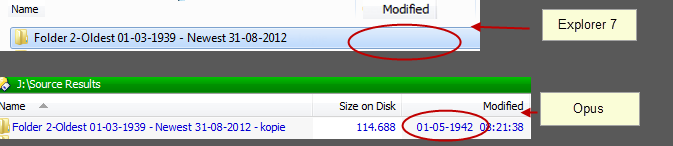
Oh, by the way, a small note:
Windows Explorer does not show any created/modified/last accessed dates of files prior 1980.
Don't ask me why, but is a fact.

So when  folders contain files with dates prior 1980 the folder can not be 're-dated'.
The date field will be blanked.
No problem when using Opus.

I think there is no solution for this.
This just for your info.
=
[attachimg=#]
=

4wd

  • Pedantic Old Bastard
  • Supporting Member
  • Joined in 2006
  • **
  • Posts: 5,652
    • Coding Snacks
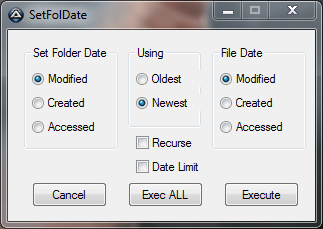
SetFolDate v0.3.0.6

I'll update the previous posts later, but for now.

2013-09-04 12_06_33-SetFolDate.png

Added: Recursion
Added: Date Limit - select to not allow date changes older than 01-Jan-1980
Change: Main dialog now opens somewhere near the mouse instead of the screen centre
"I will not follow where the path may lead, but I will go where there is no path, and I will leave a trail." - Muriel Strode, 1903
« Last Edit: September 04, 2013, 07:21 AM by 4wd »

dcwul62

  • Supporting Member
  • Joined in 2013
  • **
  • Posts: 336
Many many thanks!

(Sorry for the delay)

Looks fine to me

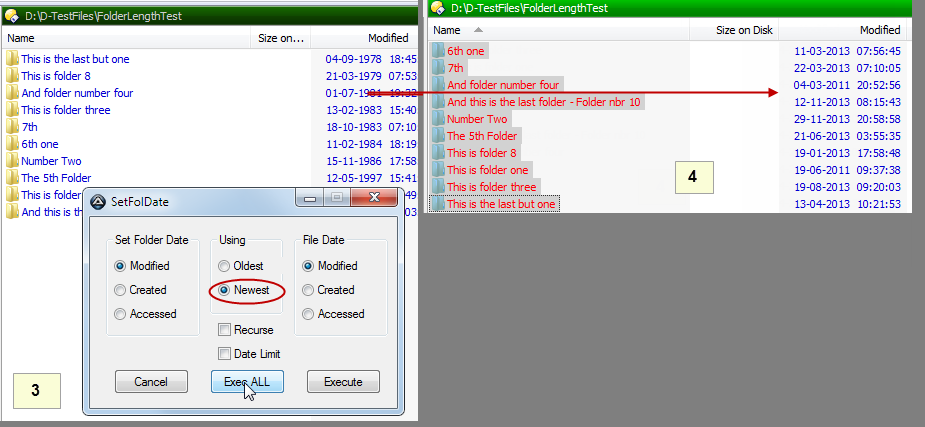
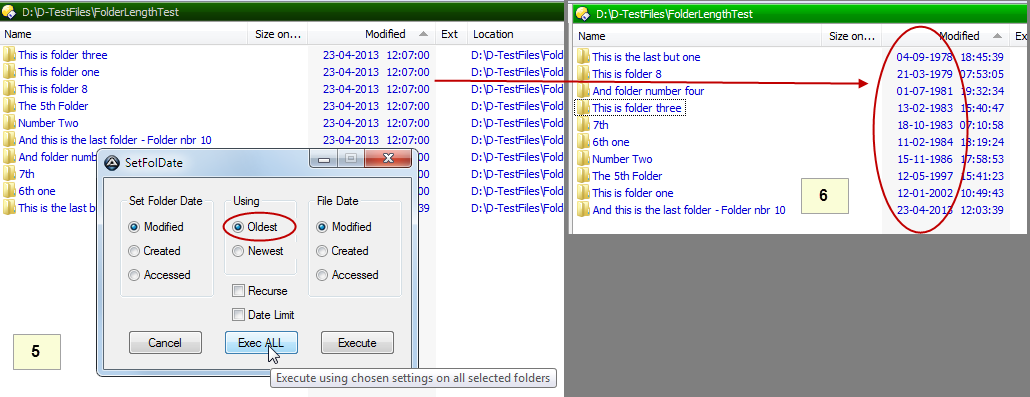
Below screenshots are of the actions in Directory Opus.

1) In the right window panel: Select (multiple) folders
=
SetFolDate-01-02-04092013 095546.png
=

2) from the context menu - Select Adjust Timestamp
=
SetFolDate-03-04-04092013 095552.png
=

3) click on "Execüte" or "Exec (ALL)"
=
SetFolDate-05-06-04092013 095600.png
=
« Last Edit: September 06, 2013, 06:36 AM by dcwul62 »

tomos

  • Charter Member
  • Joined in 2006
  • ***
  • Posts: 11,970
    • Gathering Badge
    • Participated in NANY Challenge Once
completely off-topic -
I've gotta say it dcwul62 - you make the classiest screenshots on dc!


Going to try this out, hopefully later, with dopus.
Thanks 4wd (and dcwul62)  :up:
Tom

tomos

  • Charter Member
  • Joined in 2006
  • ***
  • Posts: 11,970
    • Gathering Badge
    • Participated in NANY Challenge Once
dcwul62 - your instructions for incorporating with dopus were a great help!
... but I did get stuck on a couple of occasions (note: if something can be done wrong, I usually seem to manage it :-[ )

#2. make sure Commands tab is selected :-[

#6C. double-click :-[
#7. comes before 6G (i.e. 6G should be left out - otherwise one is trying to figure out how to get back to the "Edit new Action etc" dialogue)

I figured it all out in the end anyways :-[ (how often can someone be embarrassed in a single post ;D )
and
it's working nicely :Thumbsup: all round
Tom

4wd

  • Pedantic Old Bastard
  • Supporting Member
  • Joined in 2006
  • **
  • Posts: 5,652
    • Coding Snacks
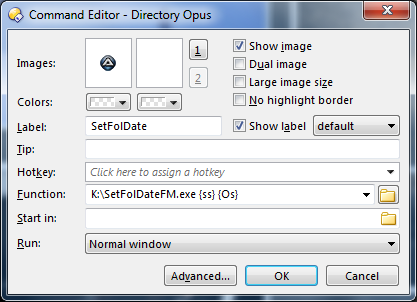
Just in case you're wondering, the seemingly convoluted DOpus setup is really only so you get the particular context menu in DOpus and not Explorer or any other file manager.

You could just as easily have a button in DOpus:

2013-09-06 13_35_33-.png

I've gotta say it dcwul62 - you make the classiest screenshots on dc!

+1  ;D

PS: Source added to archive
"I will not follow where the path may lead, but I will go where there is no path, and I will leave a trail." - Muriel Strode, 1903
« Last Edit: September 06, 2013, 03:57 AM by 4wd »

dcwul62

  • Supporting Member
  • Joined in 2013
  • **
  • Posts: 336
@tomos,thanks for tips!

i have updated the 'instructions'.
guess this is by now detailed enough to get things going.

@4wd
thanks.
frankly . . . I did not know about this...
this is, or course, much easier!  :Thmbsup:

added this to 'instructions' as well  :)
« Last Edit: September 06, 2013, 08:49 AM by dcwul62 »

Original address: https://www.donationcoder.com/forum/index.php?topic=35881.0