|
IconBoy
|
 |
« on: July 31, 2007, 10:25:05 PM » |
|
Sometimes I need to send an email which comes to my phone as an SMS. It would be handy to know when I have reached the 160 character limit as I type in real-time or even if I paste. Does anyone have an idea how this can be done and only show when I use Outlook Express (or Outlook) or when I use IE or FF for example. I don't need it when I am typing in Notepad. Thanks
|
|
|
|
|
Logged
|
|
|
|
|
|
|
Nod5
|
 |
« Reply #2 on: August 01, 2007, 04:59:59 PM » |
|
IconBoy: since you talked about OutlookExpress I assume that's what you'd like to se a character count for in this thread also. I tried making a small AHK script that grabs the text from the new message window but I didn't get the preferred method to work (that is, this did not work: ControlGetText, some_output_variable_name, Internet Explorer_Server1, ahk_class ATH_Note ). I think it has to do with the type of control that the new message window is. Without finding a way to work on that control directly I can only think of quite messy ways to count the characters through AHK. For example: send ctrl+A (select all) and ctrl+C (copy) to the text, count the number of copied characters and tell you the result. Like this, assuming that the email input box in the new message window has focus: [ copy or print] F7:: xvar2= TrayTip sendinput ^a sleep 100 sendinput ^c StringLen, xvar2, clipboard TrayTip,, string length = %xvar2%,2 sendinput {end} return Drawbacks with that: 1. requires manual input (pressing F7 above, or some other hotkey) since letting the script autorun repeatedly would prevent the user from adding text due to the select all step (ctrl+a), 2. the text selection is noticeable and so visually disturbing and 3. the current input prompt position is lost due to the select all step. Still, that kind of character counting on hotkey press might be enough in some situations perhaps?
|
|
|
|
« Last Edit: August 01, 2007, 05:06:52 PM by Nod5 »
|
Logged
|
|
|
|
|
|
IconBoy
|
 |
« Reply #3 on: August 01, 2007, 11:35:35 PM » |
|
Thanks for your input. I was really hoping for real-time counting as I type. Perhaps someone who is way more clued up on programming/scripting could get a bright idea! 
|
|
|
|
|
Logged
|
|
|
|
|
app103
|
 |
« Reply #4 on: August 01, 2007, 11:49:02 PM » |
|
In my signature is a blue banner for the Donation Coder Whatpulse team. They have a key counter application (not a key logger!) that you can send a pulse to clear it before you begin your email, keep the 'geek dialog' window open, and observe the key count it displays. It will not count characters you paste, and it will count backspaces as key strokes. Not a perfect solution, but it is an option. Plus you'd be contributing to the team's scores.  kc = key count mc = mouse clicks tkc = total key count tmc = total mouse clicks rank = my position rank on the whatpulse site klp = keys last pulse (when i cleared it by sending my totals in to the site) miles moved = miles I have moved my mouse 
|
|
|
|
|
Logged
|
|
|
|
|
IconBoy
|
 |
« Reply #5 on: August 02, 2007, 12:23:42 AM » |
|
So do I need to create a profile to use it or can I use it without "logging in"? Thanks
|
|
|
|
|
Logged
|
|
|
|
|
app103
|
 |
« Reply #6 on: August 02, 2007, 12:24:44 AM » |
|
you need to create a profile & log in...and by that I mean set up an account, and create an alias on the site for each pc you will be running it on.
|
|
|
|
|
Logged
|
|
|
|
|
steeladept
|
 |
« Reply #7 on: August 03, 2007, 12:11:25 PM » |
|
I can't seem to find it now, but I thought Firefox had an SMS plugin that would do this, if Firefox is, indeed, and option.
|
|
|
|
|
Logged
|
|
|
|
|
lanux128
|
 |
« Reply #8 on: August 04, 2007, 11:17:09 PM » |
|
IconBoy: do you want this character counting feature to be available all the time or only when you're typing inside OE? i can make an AHK gui in which you can type your message & later paste into an editor of your choice..  what do you think?
|
|
|
|
|
Logged
|
|
|
|
|
|
|
lanux128
|
 |
« Reply #10 on: August 04, 2007, 11:47:35 PM » |
|
...but I thought Firefox had an SMS plugin that would do this... steeladept, i think this is what you had in mind: Teleflip Send instant messages to cell phones via Firefox. It uses the free service Teleflip and the freeware SMTP mailer Blat. Currently only compatible with Windows and service areas of North America. • http://roachfiend.com/arc...ives/2005/03/06/teleflip/
|
|
|
|
|
Logged
|
|
|
|
|
lanux128
|
 |
« Reply #11 on: August 05, 2007, 03:39:13 AM » |
|
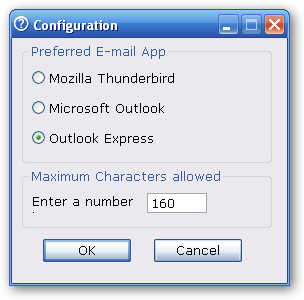
NOTE: Get the latest version of Count-as-you-type hereDue to virus false alarm on compiled Autohotkey scripts. i'm going to recompile the script and will post them later. in the meantime, i'm going to remove the download links temporarily. i seem to have too much time on hand so i came up with this AHK script.. there is a list of changes below. Count-as-you-type v1.36 • display number of characters typed. • needs Autohotkey for the AHK script. there is a compiled EXE as well. Changes:• name change.  • added tray-balloon notification when exceeding max character. • auto-appear when OE compose window is active. • launch GUI by double-clicking tray-icon. • 'Close to Tray' button closes with text kept in memory (no re-typing).• Added gui for configuration. • Changed window detection from AHK Class to WinTitle (see note below). • Added Nod's code for GUI changes. (Thanks, dude!) • GUI closes when existing compose window is closed. • Escape key now works the same as 'Send to Tray'. • Minor fix: Settings for email app wasn't being saved. Note: After recognizing the difficulties in supporting more than the three pre-defined email apps, i've added the 'Quick-Send' feature where you can use this script as a stand-alone tool. Basically, type your message then click on the 'Send' button and your default email app will be opened with the message in its compose window. To use this, check the 'Quick-Send' and your 'Copy' button will morph into 'Send' button. Main Config Count-as-you-type-v136.ahk (7.93 KB - downloaded 711 times.) Count-as-you-type-v136.exe (237.26 KB - downloaded 562 times.)
|
|
|
|
« Last Edit: April 16, 2008, 10:38:20 AM by lanux128 »
|
Logged
|
|
|
|
|
IconBoy
|
 |
« Reply #12 on: August 05, 2007, 09:31:44 PM » |
|
Count characters as you type
Thanks - this is a great script! Is there any chance that if you over 160 characters, it could DING a sound or flash in the taskbar or some other type of of notification? It would be great if the app autostarted if you started typing a specific email address 
|
|
|
|
|
Logged
|
|
|
|
|
lanux128
|
 |
« Reply #13 on: August 05, 2007, 10:20:09 PM » |
|
sure i can add notification whenever maximum character is exceeded. but imo, autostart based on email address will be too resource-consuming, how about if the program appears whenever you have your email compose window open? in that case, i need to know your email program.. 
|
|
|
|
|
Logged
|
|
|
|
|
IconBoy
|
 |
« Reply #14 on: August 06, 2007, 11:31:52 AM » |
|
Thanks very much. I am using Outlook Express 6.00.2900.2180. Perhaps if you had a Prefs option, you could browse to your Email program of choice? Looking forward to trying it out. 
|
|
|
|
|
Logged
|
|
|
|
|
lanux128
|
 |
« Reply #15 on: August 06, 2007, 08:37:31 PM » |
|
ok IconBoy, i've modified the script to auto-appear whenever OE's compose window is active and added a tooltip when exceeding the max chars..  check the above post for the update..
|
|
|
|
|
Logged
|
|
|
|
|
IconBoy
|
 |
« Reply #16 on: August 06, 2007, 09:46:46 PM » |
|
Wow! Wow! Wow! This is so great! Nice how it pops up when you Compose a new message. Thanks very much! 
|
|
|
|
|
Logged
|
|
|
|
|
kiwi2b
|
 |
« Reply #17 on: August 06, 2007, 10:18:30 PM » |
|
lanux: just found the thread, can you make this work (exe and ahk) for outlook 2003? I have to write to a limit so it would be so handy... 
|
|
|
|
|
Logged
|
|
|
|
|
lanux128
|
 |
« Reply #18 on: August 07, 2007, 01:20:36 AM » |
|
IconBoy: you're welcome.. glad to be of help. kiwi2b: sure, i can do that but since i don't have outlook 2003, first i have to find out what is the compose window's title.. don't worry, i'll post an update in a day or two.. 
|
|
|
|
|
Logged
|
|
|
|
|
Nod5
|
 |
« Reply #19 on: August 07, 2007, 06:24:09 AM » |
|
great script lanux128! one idea: maybe add a button to automatically open a new email message window with the entered text as message body? It could use the same mailto: solution that FARR uses perhaps.
|
|
|
|
|
Logged
|
|
|
|
|
IconBoy
|
 |
« Reply #20 on: August 07, 2007, 05:16:12 PM » |
|
If I open a message, the SMS AHK window pops up as well  I am guessing you only wanted it to pop up when you Composed a new message and not anytime else? Just a little "bug" work on to help this along 
|
|
|
|
|
Logged
|
|
|
|
|
lanux128
|
 |
« Reply #21 on: August 07, 2007, 07:18:51 PM » |
|
|
|
|
|
|
Logged
|
|
|
|
|
lanux128
|
 |
« Reply #22 on: August 08, 2007, 11:12:43 PM » |
|
thanks for the feedbacks, guys.. i am posting an update that will be address some of the problems. as usual, i can't test on all email apps, so let me know if there is any hitches..  • get your v1.35 update here..
|
|
|
|
|
Logged
|
|
|
|
|
kiwi2b
|
 |
« Reply #23 on: August 09, 2007, 06:09:19 AM » |
|
Hi lanux128 Okay, v1.3 works well with Outlook Express (start a new message and your prog starts etc), but the options dialogue doesn't seem to make the change to Outlook 'stick'. So after changing the option to Outlook, whenever I reopen the options box it is back to Express again. Of course when I start Outlook and make a new message, nothing happens. Tried v1.35, same problem. Also, Express doen't work either: start a new message, nothing happens.  Also, is it possible to count words as well as characters? 
|
|
|
|
|
Logged
|
|
|
|
|
lanux128
|
 |
« Reply #24 on: August 09, 2007, 07:25:56 AM » |
|
talk of sloppy coding - it's fixed now, kiwi2b..  do try again & let me know..
|
|
|
|
|
Logged
|
|
|
|
|