|
Gothi[c]
|
 |
« on: March 18, 2007, 07:43:03 AM » |
|
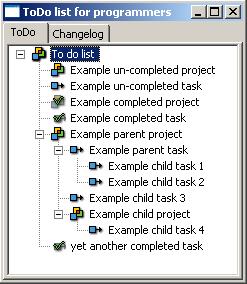
Just a quick little todo app I wanted for myself. I wanted a todo application that would generate todo.txt/changelog.txt files for my projects automagically, and keep track of a relation between changelog and finished todo items, starting from a plain hierarchical todo gui which i could use to just organise my thoughts. I know that there is a thousand and one todo applications out there already, which is why I was a bit hesitant to start this project, I searched around and tried various todo applications out there, but none did what I wanted them to do, or they did too much. The vast majority seemed to be suffering from heavy feature bloat. I just wanted something very simple and minimal that did what I want it to do. So I eventually broke down and made this, I thought I would share. I wouldn't call it a finished product just yet, but it's usable. Known issues: - When adding a new project or task, or when marking one as completed, the treeview will refresh and expand all nodes (instead of remembering which ones you had open or closed.) - On linux: when moving the main window to a different workspace/desktop new dialogs do not appear on the correct workspace. - When the changelog text field is left emtpy they do not show up in the changelog treeview when marked as completed. (they are however written to the txt files using the summary text) I'll get around to fixing these some day  obligatory screenshot:  I made a silly little web page for it, which is where you can go download it: http://www.linkerror.com/tolipo.cgi
|
|
|
|
|
Logged
|
|
|
|
|
mouser
|
 |
« Reply #1 on: March 18, 2007, 08:01:24 AM » |
|
You might consider a bulletted list of some important aspects: - Open Source
- Multiplatform (coded with wxwidgets)
(ps. you should submit this to wxwidgets repository)
|
|
|
|
|
Logged
|
|
|
|
|
urlwolf
|
 |
« Reply #2 on: March 18, 2007, 08:32:13 AM » |
|
the auto TODO and changelog generation are very good ideas. I think it'd be sensible to add those features to a larger, more complex tool such as toDoList. Many programmers use this. Of course, your implementation has the advantage of being multiplatform! What do you think? Do you want to post this request for toDoList? Or do you mind if I do? Thanks!
|
|
|
|
|
Logged
|
|
|
|
|
|
Gothi[c]
|
 |
« Reply #3 on: March 18, 2007, 06:10:07 PM » |
|
Go ahead and do it, I'm not really interested since I need mine to be cross platform.
|
|
|
|
|
Logged
|
|
|
|
|
mouser
|
 |
« Reply #4 on: March 18, 2007, 06:19:47 PM » |
|
I think we could benefit from an explanation of how the changelog thing works (what it does).
|
|
|
|
|
Logged
|
|
|
|
|
Gothi[c]
|
 |
« Reply #5 on: March 19, 2007, 08:40:14 AM » |
|
Thanks for the suggestions, mouser. I updated the front page to include a 'key features' bullet list, and an explanation of how exactly the changelog/todo generation works. I hope that helps!
|
|
|
|
|
Logged
|
|
|
|
|
mouser
|
 |
« Reply #6 on: March 19, 2007, 08:45:29 AM » |
|
put a screenshot at the top of that page somewhere while you are at it -- everyone needs to see a screenshot.
|
|
|
|
|
Logged
|
|
|
|
|
Gothi[c]
|
 |
« Reply #7 on: March 19, 2007, 09:24:30 AM » |
|
Ok,... i guess they wouldn't notice the screenshot section in the menu 
|
|
|
|
|
Logged
|
|
|
|
|
Gothi[c]
|
 |
« Reply #8 on: May 16, 2007, 10:17:26 AM » |
|
|
|
|
|
|
Logged
|
|
|
|
|
mouser
|
 |
« Reply #9 on: May 16, 2007, 05:59:35 PM » |
|
cool  i like the new design of the website btw.
|
|
|
|
|
Logged
|
|
|
|
|
Gothi[c]
|
 |
« Reply #10 on: May 16, 2007, 06:39:27 PM » |
|
Thanks 
|
|
|
|
|
Logged
|
|
|
|
|
justice
|
 |
« Reply #11 on: May 16, 2007, 06:51:38 PM » |
|
Am going to try this out at work tomorrow. Looks good and a good replacement of my many scribbles-on-notepad-which-weeks-later-i-can't-read method. automatic changes documentation is another step closer towards actually usable development tools. Let's just wait for programming editors that can show documentation in a seperate side column alongside the coding, and it should be a lot easier to properly document code without getting in the way. 
|
|
|
|
« Last Edit: May 16, 2007, 06:54:39 PM by justice »
|
Logged
|
|
|
|
|
justice
|
 |
« Reply #12 on: November 07, 2007, 08:18:06 AM » |
|
Is this still being developed? I'd like to be able to drag and drop tasks between projects in the list, and use the delete key on the keyboard to delete a task, F2 to rename it. I'm using Tolipo at the moment to have a "next 3 tasks" list of my todolist which is held on a FogBugz database. This way when I'm lost i can easy between 3 priority projects and add new ones from the bigger pool. This keeps me productive without drowning in tasks.
|
|
|
|
|
Logged
|
|
|
|
|
Gothi[c]
|
 |
« Reply #13 on: November 07, 2007, 09:59:54 AM » |
|
Great ideas! It shall be done.  (just be patient  ) Is this still being developed? I'd like to be able to drag and drop tasks between projects in the list, and use the delete key on the keyboard to delete a task, F2 to rename it. I'm using Tolipo at the moment to have a "next 3 tasks" list of my todolist which is held on a FogBugz database. This way when I'm lost i can easy between 3 priority projects and add new ones from the bigger pool. This keeps me productive without drowning in tasks.
|
|
|
|
|
Logged
|
|
|
|
|
justice
|
 |
« Reply #14 on: November 07, 2007, 10:10:03 AM » |
|
Cool It would also be good if you were asked for the todo and changelog files on creation of a project instead of having to do this yourself. The resulting files are xml is there an easy way to get a plain text changelog out of it? 
|
|
|
|
|
Logged
|
|
|
|
|
Gothi[c]
|
 |
« Reply #15 on: November 08, 2007, 01:01:29 AM » |
|
I made all changes you requested, new download (version 2.0) available from the website. Cool It would also be good if you were asked for the todo and changelog files on creation of a project instead of having to do this yourself.
When creating a new project, under text file paths, click either of the browse buttons for changelog or todo text files. They no longer have to be existing files, you can now enter a new file. The resulting files are xml is there an easy way to get a plain text changelog out of it?  They should be plain text. If you added the todo/changelog textfile filenames correctly for your project(s), these files should be filled with something along the lines of: [ copy or print] ==== Todo list for test project ==== [ test task -] test task description [ another task -] another todo You are probably looking at the internal todo.xml file, which is used by tolipo internally to store it's hierarchy. This is NOT the actual todo/changelog list output! To generate this, rightclick the todo listbox, and click 'Write todo/changelog files' and any files you defined in the projects changelog/todo textfiles will be written. Also remember that if you create a sub-project, you should select the checkbox to append the changes to the files of it's parent project.
|
|
|
|
|
Logged
|
|
|
|
|
urlwolf
|
 |
« Reply #16 on: December 10, 2007, 01:18:26 PM » |
|
Hey Gothi[c],
I'm using tolipo and it's a great little tool! One question though. After you have a bunch of items completed, it gets a bit tiring to scroll up and down to find the one you need to check out. Could it be possible to hide completed items?
Thanks!
|
|
|
|
|
Logged
|
|
|
|
|
Gothi[c]
|
 |
« Reply #17 on: December 10, 2007, 05:18:55 PM » |
|
Could it be possible to hide completed items?
Yes. Good idea actually.  I'll put it in the next version.
|
|
|
|
|
Logged
|
|
|
|
|
justice
|
 |
« Reply #18 on: March 28, 2008, 06:29:17 AM » |
|
I've started using it again as a breakdown tool / personal todo list alongside the bugtracking tool we use.
|
|
|
|
« Last Edit: March 28, 2008, 06:46:48 AM by justice »
|
Logged
|
|
|
|
|
Gothi[c]
|
 |
« Reply #19 on: March 28, 2008, 08:19:06 PM » |
|
I've started using it again as a breakdown tool / personal todo list alongside the bugtracking tool we use.
Cool! I haven't had too much time lately to do much coding on my projects. But keep me updated on features you'd like me to implement for the future 
|
|
|
|
|
Logged
|
|
|
|
|