Updated March 2015| App Name | MoveIt |
| App URL | http://milesaheadsoftware.org/ (scroll down a bit) - dc thread is here |
| App Version Reviewed | MoveIt 1.2.3.0 updated for version 1.3.3.0 |
| Test System Specs | QuadCore, 8GB RAM, Win7 x64 / also tested with Win.8.1 x64 |
| Supported OSes | XP, Win.7, Win.8.1 |
| Support Methods | dc forum thread above / forum PM, etc. |
| Upgrade Policy | N/A see below |
| Trial Version Available? | N/A see below |
| Pricing Scheme | donationware |
| Author (of the app) Donation Link |  Donate to MilesAhead, the app Author (here on dc); or via directly via paypal: https://www.paypal.c...LG%2egif%3aNonHosted Donate to MilesAhead, the app Author (here on dc); or via directly via paypal: https://www.paypal.c...LG%2egif%3aNonHosted |
| Screencast Video URL | -- |
| Relationship btwn. Reviewer and Product | We're both longtime dc forum members. I've used this app daily for years now, I've asked for features - and gotten them. I'm a fan :p |
NOTE: according to download page, MoveIt is only for use with a single monitor. For a multi-monitor setup, check out
GridMove.
Intro:MoveIt is a windows manager designed to flexibly resize windows, and also to move the active window in various ways. It is not unlike GridMove but it takes a different approach.
It uses a limited number of preset,
but customisable, window sizes.
There are three varying methods to resize a window:
- Hold Middle Mouse Button on Caption Bar and press one of the keys listed below
- Press Winkey and click a window, then press one of the keys listed below
- Use custom hotkey combination (needs to be set by user; no mouse-click needed with this one), then press one of the keys listed below
[to resize]
L = Left
R = Right
T = Top
B = Bottom
C = Center
S = Square[to move]
h = horiz center
v = vert center
keys 1 to 9 will move the active window from bottom left of screen through to top right - without resizing it[other]
u = undo
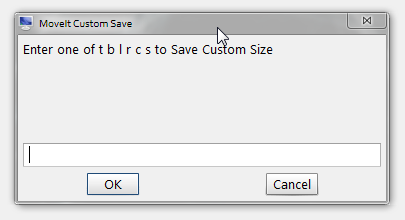
z = Custom Save (more info below)
Screenshots of some window layouts I use
 MoveIt - windows management app - Mini-Review
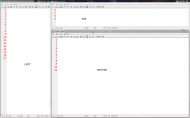 MoveIt - windows management app - Mini-ReviewCustom Save
The beauty of the app is that you can modify all these window sizes very easily on the fly:
resize your window to whatever size you want for e.g. "top", press your default hotkey, then
press "z", you get the dialogue below - press "t" for top -
you can change the current window size to default for any of the above options (Left / Right / etc.)
 Working with Explorer
Press
Control Shift e to Stagger open Explorer Windows
Press
Control Shift x to Close all Explorer Windows
Other very nice features:#
Ctrl+Winkey+ArrowKeys, and
Alt+Winkey+ArrowKeys, will move active window in increments in the direction of the arrow key (again without resizing it).
# An easy way of making four equal sized windows:
Move a window by dragging the title bar - press alt before releasing the mouse and the window will snap to the quadrant in which the mouse was released.
Who is this app designed for:It's a relatively simple window resizer/mover. What with having to hit a hotkey and/or mouse click and then
another key - initially I thought this would be too much key pressing but I'm finding it no problem at all to implement, and easy remember all the keys. So dont be scared away by that aspect of things.
Customisable hotkey:Ctrl+Winkey+ArrowKeys and
Alt+Winkey+ArrowKeys as used to move windows in increments, and the Explorer related hotkeys - these are not customisable.
To setup a hotkey
for changing window size -
right-click on the tray icon:

or,
for advanced users:
 Why I think you should use this product
 &
How does it compare to similar appsIf you want to arrange your windows, I'd recommend both this
and GridMove.
MoveIt is more focused on using keyboard shortcuts - I know GridMove is also mouse friendly, but I've only ever used it via the keyboard so cannot really comment on it's mouse capability.
I have MoveIt and GridMove both running in the tray - I havent had any problems with that.
Initially I liked MoveIt mainly for the ability to move windows without resizing, but now I rarely use GridMove as I find MoveIt (also) intuitive to use, and it has more than enough options for most of my needs.
GridMove
has the advantage of catering to multi-monitor setups and also to more complex window arrangements.
ConclusionsI love it
 Links to other reviews of this application
[none I know of]


