| Originally posted: | 2012-06-18 |
| Last updated | 2018-07-11 |
Basic Info| App Name | ![[Stick A Note] old image - Stick-A-Note MR00 logo gif.png](https://www.donationcoder.com/forum/index.php?PHPSESSID=944decec7f564bd5bb1c6abd70c5b971&action=dlattach;topic=31349.0;attach=105639;image) Stick A Note by Anand K. Gupta, Stick A Note by Anand K. Gupta,
- and used in conjunction with Universal Viewer Free from http://www.uvviewsoft.com/ |
| Thumbs-Up Rating |  |
| App URL | Stick-A-Note from http://sites.google.com/site/stickanote/ and
Universal Viewer Free from http://www.uvviewsoft.com/ |
| App Version Reviewed | Stick-A-Note Freeware v3.0.1 (2017-12-27)
Universal Viewer Free v5.7.2.0 (2012-06) (there is a more recent version) |
| Test System Specs | Installed/run on Win7-64 HP, Win8/8.1-64 Pro, Win10-64 Pro
|
| Supported OSes | Previous versions of Windows up to an including Win10-64 Pro |
| Support Methods | Stick-A-Note: Refer to website Feedback page: http://https//sites....kanote/home/feedback
Universal Viewer: Refer to Support page: http://www.uvviewsoft.com/support.htm
|
| Upgrade Policy | Upgrades also freeware, posted to the websites (which have other tools also available from their respective developers) |
| Trial Version Available? | Stick-A-Note is FREEWARE, and so is Universal Viewer Free, though, confusingly, some of the latter's plugins may be Shareware/Honestyware (and the UV Navigator panel might be such a plugin, I think).
|
| Pricing Scheme | (Not applicable.)
|
1. About: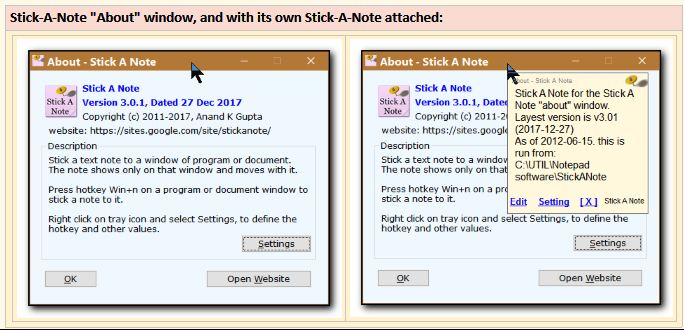 2. Introduction:
In a separate DCF discussion thread:
Re:
Gmail Notes (Sidebar add-on for Firefox only) - Mini Review- I commented:
@TaoPhoenix:
Well, I think you're quite right about Stick A Note, and I was wrong (too hasty).
I had previously just given Stick A Note a very hasty and cursory once-over. It didn't seem to work properly and the notes didn't seem to persist, so I uninstalled it, thinking to come back and recheck it at a later stage. But I hadn't done so yet.
After reading your comment, I installed the latest version of Stick A Note, and it seems to work fine and the notes persist (are sticky), even (and especially) in Gmail. I've not seen that before - a sort of "local" form of Gmail Notes, without the frills or the cloud.
And I like that the notes are stored in one location as .TXT files. Makes them small and easily indexed/searchable.
I think maybe you or I should do a thorough trial and mini-review of Stick A Note now!
-IainB
So, here is a review of
Stick-A-Note being used with something that helps to make Stick-A-Note even more useful from an information management perspective - i.e.
Universal Viewer.
3. Overview:Stick-A-Note arose from a project by
@anandcoral -
NANY 2012 - Pledge & Final Release: Stick A NoteAnand's website describes Stick-A-Note as useful for sticking a text note to
any window of a program or document. The note shows
only on that window and "moves" with it - i.e., can be brought back when that window is opened again (as long as Stick-A-Note is running also).
 4. Who could make use of Stick-A-Note + Universal Viewer:
 (Used in conjunction with each other.)
Anybody who:
- (a) wants to be able to make persistent sticky notes on any window.
- (b) wants to be able to view all their SAN notes in a tree view.
5. The Good:Stick-A-Note is an excellent tool for making
ad hoc persistent notes on any window - as long as it has a unique Window Title.
If the user is OK with only being able to see/review all their notes as .txt files, then that is OK, but if they want a "tree viewer", then they could use, for example, Universal Viewer, Windows Explorer or xplorer².
As an example, here are some Stick-A-Note .txt files (name is prefixed "SAN") in a directory:
***Add image or change?
6. Constraints and "needs improvement" section:Stick-A-Note on its own does exactly what it was designed to do.
There can only be one note allowed per window.
I am not aware of any constraint on the amount of text that is allowed in a note.
From my perspective, it was lacking a "tree viewer" for its .txt Note files, and the Universal Viewer therefore seemed a useful addition, as well as being a powerful multi-purpose viewer in its own right. However, I have tended to prefer use the rather good built-in xplorer² viewer, rather than Universal Viewer.
7. Why I think you should use this software:- Stick-A-Note is a very handy ad hoc sticky note tool!
- A viewing tool such as Universal Viewer or the xplorer² file viewer helps to extend its usefulness in terms of making the notes more readily viewable.
8. How it compares to similar apps:Stick-A-Note: is listed on
alternativeTo as an alternative to several sticky note apps.:
Stick A Note:Anand's website gives an example of two possible alternatives:
I found GumNotes not as intuitive as Stick-A-Note, but it does have a good - though proprietary - notes viewer.
9. Conclusions:- Stick-A-Note is a simple and minimalistic app. which does what it was designed to do, and very well. Very sticky/persistent notes.
- Universal Viewer: If you don't already have a good file viewer, then UV could be well worth considering as an adjunct to Stick-A-Note, especially as it can also view image files and many other formats of document files (not just .txt) that you may have in the same directory as the Stick-A-Note .txt files.
10. More notes/examples:- 1. Here is Stick-A-Note in action on this page in Firefox:
***Add image or change?
- 2. This is using Windows Explorer with Preview Pane enabled, rather than using Universal Viewer:
***Add image or change?
- 3. This is using xplorer² with Quick Review pane enabled, rather than using Universal Viewer:
I have settled on using this for max flexibility and ease of use. It gives a better display, and I can search/filter and then immediately manually edit (just press the F3 key) the SaN*.txt files, if I want - which suits my needs well:
***Add image or change?


