A couple of things that I hope I can get sorted -- when updating the last
TimeZone I ran into these issues:
1. Double Clicking on the dcUpdater file could not install Issues with 1.26.01
Note the missing "Installation To:" even though the following was set in the dcUpdater file:
<InstallDirectory>Plugins</InstallDirectory>
<BaseDirectory>Find and Run Robot</BaseDirectory>
2. Running dcUpdater from Start Menu produces a lot of duplicate files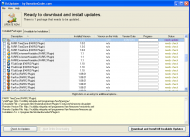 Issues with 1.26.01
I've mentioned this before, but not sure if I'm doing something not entirely right?
3. Signalling FARR<SignalForUpdate>FindAndRunRobot.exe</SignalForUpdate>
I thought the above would signal FARR to reload the plugin? I'm (almost) sure that didn't happen. It's meant to reload and run through the Init isn't it??
Anyway... I was hoping to cure my confusion...


