|
lanux128
|
 |
« on: January 06, 2010, 05:43:26 AM » |
|
currently when using Ctrl+backspace to delete the previous word, Farr starts from the end of the line regardless of the cursor position. can Farr be made aware of the cursor position and delete from that position?
|
|
|
|
|
Logged
|
|
|
|
|
|
|
mouser
|
 |
« Reply #2 on: May 11, 2010, 07:47:01 AM » |
|
can you fellows truly be planning to use such an odd feature?
|
|
|
|
|
Logged
|
|
|
|
|
|
skajfes
|
 |
« Reply #3 on: May 11, 2010, 08:06:07 AM » |
|
can you fellows truly be planning to use such an odd feature?
Why not? It is standard behavior for all text boxes in windows (as far as i can tell) and I use it very often, along with other shortcuts (ctrl + del, ctrl + left, ctrl + right, ctrl + shift + del...), so it is a bit confusing when FARR (launcher for keyboard manics) doesn't work as expected.
|
|
|
|
|
Logged
|
It is impossible to make anything foolproof because fools are so ingenious.
|
|
|
|
ewemoa
|
 |
« Reply #4 on: May 11, 2010, 08:49:25 AM » |
|
|
|
|
|
|
Logged
|
|
|
|
|
lanux128
|
 |
« Reply #5 on: May 11, 2010, 08:04:24 PM » |
|
I would like this too. thanks ewemoa, much appreciated.
|
|
|
|
|
Logged
|
|
|
|
|
ewemoa
|
 |
« Reply #6 on: May 12, 2010, 08:37:09 AM » |
|
Hope it works out ok for you. The code is a modification of one of the AutoHotkey_L examples for its #If directive and should apply to all TEdit controls. I've made a version which also checks that the window is of class TMainForm, so if the first version gives any trouble, there's something else to try 
|
|
|
|
|
Logged
|
|
|
|
|
lanux128
|
 |
« Reply #7 on: May 12, 2010, 10:40:45 AM » |
|
Hope it works out ok for you.
thanks again for this script as it comes in handy when i'm using a live search plugin in Farr (e.g. Google Plus or FarrWebMetaSearch). btw, you dropped a hint when you mentioned AutoHotkey_L since it has the #If command.  but i wonder if this works with multi-line edit control?
|
|
|
|
|
Logged
|
|
|
|
|
ewemoa
|
 |
« Reply #8 on: May 12, 2010, 04:41:46 PM » |
|
As I understand it, the way this works has to do with the class of the control (and now also that of the window the control lives in). If those match, it seems like it may work. For reference: http://www.autohotkey.net/~Lexikos/AutoHotkey_L/docs/commands/_If.htm Formatted for AutoIt with the GeSHI Syntax Highlighter [ copy or print] #If ActiveControlIsOfClassAndWindowIsOfClass("TEdit", "TMainForm") { ^Del:: Send ^+{Right }{Del } } #If ActiveControlIsOfClassAndWindowIsOfClass(CClass, WClass) { ControlGet , FocusedControlHwnd , Hwnd, , % FocusedControl , A WinGetClass, FocusedControlClass, % "ahk_id " . FocusedControlHwnd WinGetClass , FocusedWindowClass , % "ahk_id " . Hwnd Return (FocusedControlClass = CClass ) and (FocusedWindowClass = WClass ) }
You may have noticed that this code may apply for some non-FARR apps too.
|
|
|
|
« Last Edit: May 12, 2010, 05:35:53 PM by ewemoa »
|
Logged
|
|
|
|
|
lanux128
|
 |
« Reply #9 on: May 12, 2010, 07:56:45 PM » |
|
thanks for the source.. i'm already using your "Select All" script, this one is also within that scope. soon we can have an ewemoa's compendium for better text editing. 
|
|
|
|
|
Logged
|
|
|
|
|
|
|
ewemoa
|
 |
« Reply #11 on: May 13, 2010, 09:23:29 AM » |
|
i found a program (mIRC) where this scripts doesn't work..  Well it is not surprising to me  The current code is deliberately made to be a bit focused on where it's supposed to work. FWIW, the code from which this descends only checked controls with class "Edit". FARR doesn't use that for its main edit box IIUC, so I changed what it checks for. I also modified it to check the window class as the original request was for FARR and I didn't want this to affect too many other things. I agree that a more general tool would be interesting, but haven't given it much consideration yet. Formatted for AutoIt with the GeSHI Syntax Highlighter [ copy or print] #If ActiveControlIsOfClassAndWindowIsOfClass("Edit", "mIRC") { ^Del:: Send ^+{Right }{Del } } #If ActiveControlIsOfClassAndWindowIsOfClass(CClass, WClass) { ControlGet , FocusedControlHwnd , Hwnd, , % FocusedControl , A WinGetClass, FocusedControlClass, % "ahk_id " . FocusedControlHwnd WinGetClass , FocusedWindowClass , % "ahk_id " . Hwnd Return (FocusedControlClass = CClass ) and (FocusedWindowClass = WClass ) }
|
|
|
|
« Last Edit: May 13, 2010, 09:30:27 AM by ewemoa »
|
Logged
|
|
|
|
|
|
|
ewemoa
|
 |
« Reply #13 on: May 15, 2010, 11:29:14 PM » |
|
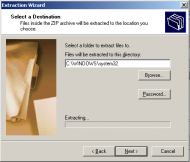
lanux128, I am not finding the hack to work in the following situation.  Without the hack running, Control+LeftArrow at the end of the path field will move the cursor to the beginning of the field. Before: C:\WINDOWS\System32| After: |C:\WINDOWS\System32 where | shows the cursor position. Contrast this with Windows Explorer's address field where the result is that the cursor moves to the right of the last backslash. Before: C:\WINDOWS\System32| After: C:\WINDOWS\|System32 Without the hack running, do you happen to know some general keystrokes that would move the cursor to the right of the last backslash in the Extraction Wizard dialog? More generally, moving the cursor to the first backslash to the left of the current cursor position  I'd rather not do things that involve copying the text, analyzing the content, and sending arrow keys to get this to work...
|
|
|
|
|
Logged
|
|
|
|
|
lanux128
|
 |
« Reply #14 on: May 16, 2010, 04:47:19 AM » |
|
i noticed this too on a installer dialog (can't remember if it was InstallShield or NSIS). they do not seem identify the backslash as a delimiter, unlike the way windows explorer does. i believe this is the default in most text editors and word processors. i'll let you know if i find out anything. 
|
|
|
|
|
Logged
|
|
|
|
|