After more than eighteen weeks of private beta testing and eight months since previous version, Total Commander 7.50 public beta 1 is finally available.
Official announcement:
http://www.ghisler.c...iewtopic.php?t=21820The newest version brings out almost 600 fixes (mostly related to new functionality) and many new features. In this mini-review I will try to focus on the biggest changes only because I want to avoid copy&paste of help file. I recommend to take a look on Help or
HISTORY.TXT files (some additions will be listed at the end of my post though).
I also encourage anyone to write full review about how do you use the newest TC or what do you expect from it 
What is worth to mention is that 7.5pb1 is free for any registered user. Simply run downloaded file and improved installer will update your installation without any data loss.
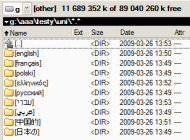
Even having above in mind I recommend anyone to make backup of your TC (&data but it's obvious) before using it. This is first public beta and new bugs will be found. If you find any, please, report them on TC's forum board.1. Unicode supportThe most awaited feature was to have this application Unicode aware. TC previously had been warning users about improper characters in directories names but it changed. All internal tools support Unicode now. Also plugins API has been updated for that reason. I hope its authors will update their files soon to use it to the fullest.
 Total Commander 7.50 public beta 1 - mini-review
Internal "Compare by content" window gained few benefits and allows to compare any combination of ANSI, UTF-8, UTF-16 and UTF-16 little endian (Mac).
2. Files handling64bit systems users will be satisfied now because context menu problems should be gone. TC handles them properly and even allows to define which shell extensions should be shown for them.
Also all time-related functions now use the NTFS time instead of the old FAT file system time (dates before 1980 supported). There are no problems with paths containing names longer than 259 characters too.
Copy dialog gained Pause/Start buttons also in foreground transfers. Copying to multiple targets (folders or LNK files) is supported by selecting them before copy.
3. FTPAll connections are now stored with within tree and can be grouped in folders for easier usage. Because of many complaints about passwords storage security, TC offers master password (AES) for better protection of your data.
Obviously, all encoding related features has been also added like:
- detecting code page reported by some servers,
- encoding support in Shift+F5 (server to server copying),
- allowing the user to choose the encoding of file names.
 Total Commander 7.50 public beta 1 - mini-review4. Breadcrumbs
There were few requests on public board about this functionality and one of them growth large enough to gain author's agreement for implementation. So similar to other file managers (i.e. DirectoryOpus, Vista's Explorer) TC has breadcrumb navigation panel now. The biggest difference from other software is that even if breadcrumbs are mainly mouse oriented, Total offers keyboard shortcuts (Alt+F11, Alt+F12) for them what extends it's usability for each keyboard lover.
By default breadcrumbs seem to be harder to handle because of no automatic menu pop-up but after a little bit of playing with
wincmd.ini file, they are lot easier to use.
 Total Commander 7.50 public beta 1 - mini-review
wincmd.ini
[Configuration]
BreadcrumbDelayButton=-500
Drag'n'drop is fully supported not only for local drives but also for FTP and filesystem (WFX) plugins.
5. Internal associations systemOne of the best features (IMHO better than Unicode) delivered within newest TC is portable files associations system which allow to skip Windows registry hell while dealing with various files. Thanks to that you can assign any application to any kind of file by your own and be sure that your setting will follow you with your pendrive together with favourite applications. All changes made are not messing with operating system and are valid in TC only. By default each assigned program is called by Enter or double click but there is nothing against having more than one application: they will be visible in RMB menu or in separate one (called with cm_ContextMenuInternal command).
Sounds simple and not revealing my excitement yet? Well...
The power of this feature is using similar approach as for files names colouring which are filters based on "Find files" dialog. It is now possible to have rules defined according to various files attributes like date, size, hidden / system /etc. or data provided by content (WDX) plugins. So (i.e.) you can have AIMP opened for John Lennon's songs and Foobar for Paul McCartney ones (to keep 'em separated ;) Of course, if there are no internal associations, Windows ones will be used instead.
 Total Commander 7.50 public beta 1 - mini-review6. Lister
Due to Unicode support it would be inexcusable if there is no support for different characters encoding. Since this version Lister will not only allow you to change displayed text's characters set but will also offer full RTL handling, with easy language direction switch between LTR and RTL (hold Ctrl and press either left or right Shift key).
 Total Commander 7.50 public beta 1 - mini-review7. Quick filter
Quick filter (Ctrl+S, Ctrl+Shift+S), as the name reveals, give the possibility to filter files list according to typed phrase. QF, custom views and file types filter (menu Show -> Custom) - these features altogether make files operations much easier than any other known (at least to me) file manager.
 Total Commander 7.50 public beta 1 - mini-review8. Button bar
Over the years buttons bar seemed to be ignored and few changes made to it, so Christian Ghisler took his time (and users ideas) and extended its functionality. Maximum number of available buttons has been incerased to 500 and they can be placed in multiple rows. No more gymnastics with empty buttons :)
For such purpose button bar edit dialog has been redesigned a little bit:
 Total Commander 7.50 public beta 1 - mini-review
As you can see on the picture above, you can add a "link" to other button bar. You can even treat it as pop-up menu:
 Total Commander 7.50 public beta 1 - mini-review9. More, and more, and more…
All previous paragraphs are only a brief description of new features. Lots of things have been improved (i.e. synchronize tool or new command line parameters) and it's impossible to write them all and keep myself away from overwriting. I recommend (once again) to take a look on history file to get whole fixes / addins coverage.. For simple list of some addins, for which I got bored too soon to make it complete... simply click on button below.
Even more features added…
- Allow to use the Windows key for custom hotkeys
- CRC check: Show lines with errors in red, so they can be found more easily
- Combine files: Show counter of file being combined
- Combine files: Show counter of file being combined
- Command line switch /S=C starts directly "Compare by content" without TC main window, e.g. totalcmd.exe /S=C c:\file1 d:\file2
- Command line switch /S=L starts Lister directly
- Command line switch /S=S starts "Synchronize dirs" directly, accepts two paths as parameters, or alternatively a settings name in the form /S=S:SettingsName
- Ctrl+C or Ctrl+Insert in new style overwrite dialog copies names and details to clipboard (similar to standard Windows MessageBox)
- Custom icon for CRC checksum files (.sfv, .sha, .md5)
- Date/time picker to search dialog (date from/to)
- Drag file system plugin root to button bar -> add button with the icon of this plugin
- Dropdown menu listing all redefined hotkeys
- Exception stack trace code added, inspired by uLkStackTrace. Modified code available under http://www.ghisler.com/strace.zip in accordance with Mozilla General Public License
- Installer: Auto-detect previous installation and allow to auto-update without questions asked. No icons will be created.
- Installer: Let the user retry when overwriting a file fails -> user can close the running program/open file
- Installer: Only close running Total Commander if in same dir where the installation goes to (only works on NT-based systems)
- Internal unpacking of encrypted RAR archive with encrypted file names (Alt+F9 unpack specific only)
- Internal unpacking of multi-part RAR archives: Alt+F9 on first file unpacks all files from it, even if they are on different disks
- Internal unpacking of multi-part RAR archives: ENTER on first part shows content of all parts in same dir and allows to unpack them
- More keys for hotkeys in Configuration - Options - Misc
- New icons for Ctrl+S quick search filter, sync dialog title, ftp connection dialog, and "ftp" item in tree and breadcrumb bar
- New internal cm_SrcHideQuickView (also with Left and Right) to turn quick view panel off
- New internal command with parameters: MULTIRENAME <saved rename parameters> opens the multi-rename dialog box with the specified rename parameters. Giving an invalid name will set all options to the default values
- New start menu parameters %UL and %UF to pass UTF-8 list file (with BOM) to program in button bar or start menu (like %L and %F)
- New start menu parameters %WL and %WF to pass UTF-16 Unicode list file (with BOM) to program in button bar or start menu
- OPENTABS and APPENDTABS internal commands now also work without parameters - showing the file open dialog
- Press Shift+F4 (edit specific file) repeatedly to select only the name part (not the extension) of the name, like in F5 copy dialog
- Search function, plugins page: New operator !regex (NOT regular expression) finds files which do not match the given regular expression
- Show drive icons also in drive dropdown list. Can be turned off via wincmd.ini [Configuration] IconsInDriveList=0
- Show drive icons in drive not found dialog
- Show encoding icon for *.sha files if they aren't associated with any other program
- Speed up loading of Alt+F10 tree by using a virtual listbox (LBS_NODATA) except when an accessibility software is used - LB_GETTEXT doesn't work with LBS_NODATA
- Store line breaks in descript.ion files in the form \n (\ is stored as \\), mark such comments with custom ID 0xC2 received from inventors of descript.ion
- System information: Better detection of CPU
- System information: Show display adapter name
- Themed list header: On XP, draw header of sorted column as pressed if the theme supports it, so it can be found more easily
- Use Combobox in F5 copy dialog (options section) for overwrite options, number them for quick access by keyboard
- When using "Watch directory changes": Detect when user wants to eject USB stick via system tray, and stop watching a dir on the stick so it can be removed
- Windows 2000, XP and newer: Show drive labels in tree, and use RegisterDeviceNotification to be informed when drive label changes
- ZIP packer: Pack files from directories with no read rights (read via tcmadmin) - no single locked files supported
- increased max. comment length in descript.ion to 4096 characters (minus the length of the file name, a space, and final line break)
- wincmd.ini [Configuration] SpeedLimitEnabled=1 enables speed limit when background transfer manager is started
- wincmd.ini [Layout] TabHeaderBoldArrow=0 turns off bold arrow in tab header (default: same as TabHeaderThemed)
- wincmd.ini [Layout] TabHeaderThemed=0 turns off themed tabstop header (Name/Ext/Size/Time/Attr)
- ZIP packer: Pack files from directories with no read rights (read via tcmadmin) - no single locked files supported


