This is a plugin for FARR that utilizes the
Comparer tool written by fenixproductions for the recent NANY 2009 event.
Essentially it adds a right-click context menu item to any result that will give you info on the file; by installing additional wdx total commander plugins you can get even more info for specific kinds of files. See the link above for more info on that.
You can also use +cmpc in your search string to trigger the info display without using the right click.
Download:
https://www.donation...s/FarrCompareCmd.zipScreenshot:
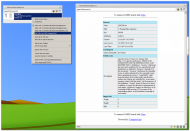 Comparer File Info Plugin for FARR, uses total commander wdx plugs for file info
All credit goes to fenixproductions for his tool which does all the work; thanks to ecaradex, ewemoa and, czb for the javascript plugin scripting for FARR which this uses. This plugin might be useful for people who want to see how to make a farr plugin that shells out to executables and displays the results, and for information on adding a context menu item to results.


