|
taichimaster
|
 |
« on: July 02, 2007, 07:39:36 PM » |
|
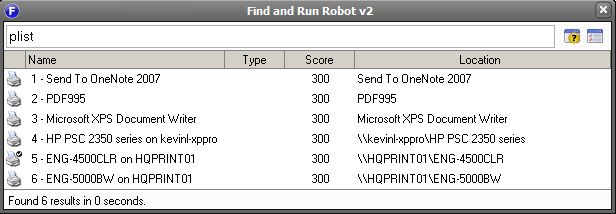
PrinterList 0.0.0.4This plugin allows you to set your default printer based on your selection. There's currently only 1 adv.config option which allows you "Leave FARR window open after launching". Mouser mentioned a trick where you could add multiple instances of the same printer but with different settings. So you could have a list of profiles and easily switch among them. I haven't tried this myself though, maybe mouser can elaborate  HP 2350 - HiRes HP 2350 - LoRes HP 2350 - Color HP 2350 - GreyScale Installation:Extract the zip file to the farr2 plugins directory then reload the plugins from the plugins listing screen. Screenshot: Version Historyv0.0.0.1 (July 2nd, 2007) Initial Release v0.0.0.2 (July 2nd, 2007) [FIX] Restart search and refresh Display regardless of user options v0.0.0.3 (July 3rd, 2007) [NEW] Added Option to change launch action to "Display Printing Queue" v0.0.0.4 (July 4th, 2007) [NEW] Changed name to "PrinterList" and alias to "plist" [FIX] Fixed a bug where the search is always restarted without any argument Comments and constructive criticisms are welcome!
|
|
|
« Last Edit: July 05, 2007, 02:13:41 PM by taichimaster »
|
Logged
|
|
|
|
|
mouser
|
 |
« Reply #1 on: July 02, 2007, 07:45:52 PM » |
|
i LOVE this plugin! i have configured multiple copies of my laster printer, one for duplex, one for hires, one for lores draft mode, and this make its very easy to switch between them. LOVE IT!
ps. taichi, this is your 2nd entry (remember nwconn? can you make a standalone post about it since its hard to find?)
|
|
|
|
|
Logged
|
|
|
|
|
|
|
edbro
|
 |
« Reply #3 on: July 02, 2007, 08:27:34 PM » |
|
Great plugin, thanks. How do you setup multiple copies of a printer driver?
|
|
|
|
|
Logged
|
|
|
|
|
mouser
|
 |
« Reply #4 on: July 02, 2007, 08:33:54 PM » |
|
Great plugin, thanks. How do you setup multiple copies of a printer driver? go to printers in your control panel and click add printer, then make an additional printer item for your existing printer. then right click on this new printer and choose properties, set some different properties for it and give it a new name.
|
|
|
|
|
Logged
|
|
|
|
|
mouser
|
 |
« Reply #5 on: July 03, 2007, 11:35:36 PM » |
|
Here's another FARR tip.
You can of course use the advanced plugin options of taichi's plugin to configure farr to stay open after making a printer default, BUT
you could also use FARR's built in mechanism for staying open when you trigger a result.
normally farr closes after you trigger a result, but by default it's configured to stay open if you CTRL+click or CTRL+#.
in this way when you want to launch something and then launch another, just hold CTRL down while you do.
|
|
|
|
|
Logged
|
|
|
|
|
taichimaster
|
 |
« Reply #6 on: July 04, 2007, 03:37:20 AM » |
|
Uploaded 0.0.0.3. Please see post #1.
|
|
|
|
|
Logged
|
|
|
|
|
edbro
|
 |
« Reply #7 on: July 04, 2007, 07:07:54 AM » |
|
Uploaded 0.0.0.3. Please see post #1.
Great! I made a copy with a different override alias so now I have one that sets the default and another that shows the queue.
|
|
|
|
|
Logged
|
|
|
|
|
nitrix-ud
|
 |
« Reply #8 on: July 04, 2007, 07:38:07 AM » |
|
@ mouser normally farr closes after you trigger a result, but by default it's configured to stay open if you CTRL+click or CTRL+#.
in this way when you want to launch something and then launch another, just hold CTRL down while you do. Could you add CTRL+enter ?? i just love FARR 
|
|
|
|
|
Logged
|
|
|
|
|
Josh
|
 |
« Reply #9 on: July 04, 2007, 08:56:55 AM » |
|
I know this is a bit nit-picky, but can you rename this to PrinterList? When I see "List Printer" I get confused and think it is going to PRINT some kind of list.
|
|
|
|
|
Logged
|
STOP THE MADNESS! Microsoft should not have to advertise it's competitors. Opera is getting far out of hand. 
|
|
|
|
taichimaster
|
 |
« Reply #10 on: July 04, 2007, 09:58:22 AM » |
|
I know this is a bit nit-picky, but can you rename this to PrinterList? When I see "List Printer" I get confused and think it is going to PRINT some kind of list.
Hmmm, yea sounds good. I am not very good at naming things. I originally thought of naming it "Default Printer Plugin", but if mouser later on adds the "multi-launch action" feature to the plugin SDK, then it won't be just setting the default printer but may have other actions as well. What's a good alias for this? What about "plist"? It may sound like "process list" or something though. "prnlst"?
|
|
|
|
« Last Edit: July 04, 2007, 10:00:28 AM by taichimaster »
|
Logged
|
|
|
|
|
Josh
|
 |
« Reply #11 on: July 04, 2007, 10:11:40 AM » |
|
plist is good
|
|
|
|
|
Logged
|
STOP THE MADNESS! Microsoft should not have to advertise it's competitors. Opera is getting far out of hand. 
|
|
|
|
tomos
|
 |
« Reply #12 on: July 04, 2007, 12:37:55 PM » |
|
"prnlist" could be misinterpreted... looking forward to trying this one out 
|
|
|
|
|
Logged
|
Free FreeHand.org
|
|
|
|
edbro
|
 |
« Reply #13 on: July 04, 2007, 12:53:55 PM » |
|
I'm using setprn to set default printer and showprn to show the printer dialog.
|
|
|
|
|
Logged
|
|
|
|
|
mouser
|
 |
« Reply #14 on: July 04, 2007, 12:59:58 PM » |
|
how do you set up the different a different alias to do these two dif things?
|
|
|
|
|
Logged
|
|
|
|
|
edbro
|
 |
« Reply #15 on: July 04, 2007, 02:49:27 PM » |
|
I simply placed another copy of the plugin in another folder renamed to ShowPrinter. Then in the alias override box I gave them unique aliases.  Mouser, How in the heck do you attach images? I'm semi-intelligent but I can't figure it out! I used the "attach" button above and browsed to my image using the browse dialog. But, how do you actually attach it???? I have "Link Inline Image.." selected in the top drop down box, although I tried all the combinations. Previewing each of them showed nothing. edit: never mind. I guess it works after all. The preview didn't show the image though.
|
|
|
|
|
Logged
|
|
|
|
|
taichimaster
|
 |
« Reply #16 on: July 04, 2007, 03:01:04 PM » |
|
I simply placed another copy of the plugin in another folder renamed to ShowPrinter. Then in the alias override box I gave them unique aliases. [ ERROR: SPECIFIED ATTACHMENT MISSING ]
Mouser, How in the heck do you attach images? I'm semi-intelligent but I can't figure it out! I used the "attach" button above and browsed to my image using the browse dialog. But, how do you actually attach it???? I have "Link Inline Image.." selected in the top drop down box, although I tried all the combinations. Previewing each of them showed nothing.
edit: never mind. I guess it works after all. The preview didn't show the image though.
Great idea!!!
|
|
|
|
|
Logged
|
|
|
|
|
taichimaster
|
 |
« Reply #17 on: July 04, 2007, 03:05:09 PM » |
|
I know this is a bit nit-picky, but can you rename this to PrinterList? When I see "List Printer" I get confused and think it is going to PRINT some kind of list.
Ok done! v0.0.0.4 is uploaded. For those who installed "List Printer", you would need to delete the old "ListPrinter" folder since the new one is called "PrinterList" 
|
|
|
|
|
Logged
|
|
|
|
|
mouser
|
 |
« Reply #18 on: July 04, 2007, 05:23:00 PM » |
|
I simply placed another copy of the plugin in another folder renamed to ShowPrinter. Then in the alias override box I gave them unique aliases. you clever hobbit!  there should be an easier way for plugin coder to support this though, without requiring multiple copies. in fact taichi could do it now, by simply making an alias file for this plugin, and creating two aliases that trigger it, and then checking which one is actually used by the user during triggeing.
|
|
|
|
« Last Edit: July 04, 2007, 05:24:38 PM by mouser »
|
Logged
|
|
|
|
|
taichimaster
|
 |
« Reply #19 on: July 05, 2007, 02:29:07 PM » |
|
The new download in the 1st post has been updated to include a .dcupdate file for easy update notification! 
|
|
|
|
|
Logged
|
|
|
|
|
|
|