DonationCoder.com forum
 
Read-only archive. This is a static copy of the DonationCoder.com forum. Reading and searching work as before; logging in, posting and private messages do not.
Archive of 2026-10-21 · About this archive · Main site

Last post Author Topic: Clipboard Help+Spell Extended Clipboard Format Data Discussion Thread  (Read 166,659 times)

tomos

  • Charter Member
  • Joined in 2006
  • ***
  • Posts: 11,970
    • Gathering Badge
    • Participated in NANY Challenge Once
Really?  Because I downloaded and installed from the link on page 1 of this thread after reading your post on March 11, 2020, 03:54 PM (6 posts above this one) and there's been no further update announcement.  Is there a more official thread to get beta release notes and links?
hi djMot
my CHS exe (ClipboardHelpAndSpell.exe) downloaded from that link is dated 2020-03-11 21:45
Version number is 2.48.2
(Looking at my troubleshooting log, there's seems to have been two versions of 2.48.2)

Could be that it was in your browsers cache and you got an older version that way. Apparently that can happen.

Tom

tomos

  • Charter Member
  • Joined in 2006
  • ***
  • Posts: 11,970
    • Gathering Badge
    • Participated in NANY Challenge Once
This is probably known but report in case not:
Russian text is saved properly, and does paste properly, but is not displayed correctly in the quick-paste menu:

Screenshot - 2020-03-13 , 18_31_01.jpg

I'm presuming that's because CHS itself not unicode...
Tom

mouser

  • First Author
  • Administrator
  • Joined in 2005
  • *****
  • Posts: 40,931
    • Gathering Badge
    • Plugin Coding Medal
    • Participated in NANY Challenge Seventeen Times
    • Cody Award
    • Coding Snacks
    • Volunteers/Staff
Yeah that's due to the old code not supporting unicode.  But as you say, the actual paste will be good.

mouser

  • First Author
  • Administrator
  • Joined in 2005
  • *****
  • Posts: 40,931
    • Gathering Badge
    • Plugin Coding Medal
    • Participated in NANY Challenge Seventeen Times
    • Cody Award
    • Coding Snacks
    • Volunteers/Staff
New version uploaded.  I put in some better code for letting me add new (and update old) built-in virtual groups.  You should see a new "Virtual Groups" node in your left hand group tree.

Screenshot - 3_15_2020 , 5_05_33 AM.png
« Last Edit: March 15, 2020, 10:05 AM by mouser »

mouser

  • First Author
  • Administrator
  • Joined in 2005
  • *****
  • Posts: 40,931
    • Gathering Badge
    • Plugin Coding Medal
    • Participated in NANY Challenge Seventeen Times
    • Cody Award
    • Coding Snacks
    • Volunteers/Staff
Major new feature, a custom advanced rule system to control what formats get saved:
Screenshot - 3_17_2020 , 5_24_46 AM_ver001.png


The idea is that advanced users can use this feature to have CHS ignore formats that are unneeded and take up too much space, or keep a mostly text database with only a few exceptions where you want more formats, etc.

You could either set the default action to be to store all clipboard formats, and then just set a rule for blocking certain ones, or do the opposite, set the default action to reject all formats, and just set a rule to capture the rare ones you care about.

Just make sure you enable the formats in the main capture tab too.
« Last Edit: March 18, 2020, 04:07 AM by mouser »

mouser

  • First Author
  • Administrator
  • Joined in 2005
  • *****
  • Posts: 40,931
    • Gathering Badge
    • Plugin Coding Medal
    • Participated in NANY Challenge Seventeen Times
    • Cody Award
    • Coding Snacks
    • Volunteers/Staff
Obviously this new feature needs testing and I understand that it's going to be something only advanced users even know how to deal with -- but let me know if you spot anything funky.

The one confusing part is probably that there are now a bunch of redundant ways to tell CHS what formats to capture..
In addition to these advanced rules, you can specify elsewhere to ignore certain common formats and set size limits on those.  Those will override any advanced rules.
The main motivation here is that I feel the advanced rules are going to be too advanced for most users, and I still want to give them some control.

mouser

  • First Author
  • Administrator
  • Joined in 2005
  • *****
  • Posts: 40,931
    • Gathering Badge
    • Plugin Coding Medal
    • Participated in NANY Challenge Seventeen Times
    • Cody Award
    • Coding Snacks
    • Volunteers/Staff
Minor update: The Advanced Format rule editor now gives you some help in the form of a drop-down list of recently seen and common clipboard formats:
Screenshot - 3_17_2020 , 2_27_48 PM.png

tomos

  • Charter Member
  • Joined in 2006
  • ***
  • Posts: 11,970
    • Gathering Badge
    • Participated in NANY Challenge Once
With a quick test 'Reject the format' working well here.

The drop-down list is great --  A very minor request:
could most recent sort to the top of the list? Would make them easier to access.
Tom

mouser

  • First Author
  • Administrator
  • Joined in 2005
  • *****
  • Posts: 40,931
    • Gathering Badge
    • Plugin Coding Medal
    • Participated in NANY Challenge Seventeen Times
    • Cody Award
    • Coding Snacks
    • Volunteers/Staff
Yeah I can do that no problem -- good idea.

And thanks for all the help testing, tomos!

mouser

  • First Author
  • Administrator
  • Joined in 2005
  • *****
  • Posts: 40,931
    • Gathering Badge
    • Plugin Coding Medal
    • Participated in NANY Challenge Seventeen Times
    • Cody Award
    • Coding Snacks
    • Volunteers/Staff
Updated.  :up:

djMot

  • Supporting Member
  • Joined in 2018
  • **
  • Posts: 40
New version just installed.
Code
:: [ Starting Clipboard Help+Spell v.2.51.0 on Thursday March 19, 2020 at 09:13:07 PM ] :::

I can no longer copy/paste across Remote Desktop.  Yes, the clipboard is enabled in the RD connectoid.  What setting controls this in CHSP?  It's not just the latest version that has been a problem this way.  Not sure when it started.  This is the first chance I've had to sit down and report it.

Thanks.

mouser

  • First Author
  • Administrator
  • Joined in 2005
  • *****
  • Posts: 40,931
    • Gathering Badge
    • Plugin Coding Medal
    • Participated in NANY Challenge Seventeen Times
    • Cody Award
    • Coding Snacks
    • Volunteers/Staff
I don't think there is anything in CHS that effects this.. I wonder if its your remote desktop tool or a security app doing it?

mouser

  • First Author
  • Administrator
  • Joined in 2005
  • *****
  • Posts: 40,931
    • Gathering Badge
    • Plugin Coding Medal
    • Participated in NANY Challenge Seventeen Times
    • Cody Award
    • Coding Snacks
    • Volunteers/Staff
v2.52.1 alpha uploaded:
  • [MajorFeature] Advanced format rule system to let you customize rules for which clipboard formats to save or reject according to format, source app, size, etc.
  • [Feature] New option to create backups on new version upgrade.
  • [Feature] You can now set direction of stack pop operation (forward or backward in history).
  • [Feature] Advance rules can now specify to ignore hash on certain formats.

mouser

  • First Author
  • Administrator
  • Joined in 2005
  • *****
  • Posts: 40,931
    • Gathering Badge
    • Plugin Coding Medal
    • Participated in NANY Challenge Seventeen Times
    • Cody Award
    • Coding Snacks
    • Volunteers/Staff
I'm still getting a very rare bug where it something goes wrong with the display updating, and clicking on a new clip does not show its details, and the most recent clip doesn't show up on the quick pop-up menu.  Only a restart of CHS seems to fix it.
I'm trying hard to track it down..

[EDIT: I'm hopeful that I may have found the problem.]
« Last Edit: April 01, 2020, 02:43 PM by mouser »

tomos

  • Charter Member
  • Joined in 2006
  • ***
  • Posts: 11,970
    • Gathering Badge
    • Participated in NANY Challenge Once
v2.52.1 alpha uploaded:
  • ...
    • [Feature] Advance rules can now specify to ignore hash on certain formats.
this works for the inkscape vector clips :Thmbsup:
I set CHS to ignore the inkscape svg (image/x-inkscape-svg) hash, now duplicates are recognised as such. (If I modify the object slightly it is recognised as a new clip :up:)

Here the description of the problem in an earlier post:
The [format/s] that are different are the svg [formats].

[attachment 1 not found]

[attachment 2 not found]

on the left from folder chs1, right is chs2
Clips look identical when pasted.

This looks to me like Inkscape is titling all 'id numbers' differently. I guess that could be filtered, (please note for me this not so important -- I'm going to save clips occasionally to favourites. Beyond that I wont mind duplicates... Willing to keep checking though if you want: my main machine is down so currently no access to illustrator.
[/list]
Tom

mouser

  • First Author
  • Administrator
  • Joined in 2005
  • *****
  • Posts: 40,931
    • Gathering Badge
    • Plugin Coding Medal
    • Participated in NANY Challenge Seventeen Times
    • Cody Award
    • Coding Snacks
    • Volunteers/Staff
2.54.1 updated
Some minor fixes.

mouser

  • First Author
  • Administrator
  • Joined in 2005
  • *****
  • Posts: 40,931
    • Gathering Badge
    • Plugin Coding Medal
    • Participated in NANY Challenge Seventeen Times
    • Cody Award
    • Coding Snacks
    • Volunteers/Staff
Let me know if you spot any bad behavior in the latest version.

mouser

  • First Author
  • Administrator
  • Joined in 2005
  • *****
  • Posts: 40,931
    • Gathering Badge
    • Plugin Coding Medal
    • Participated in NANY Challenge Seventeen Times
    • Cody Award
    • Coding Snacks
    • Volunteers/Staff
Any reports on the latest version?

oblivion

  • Supporting Member
  • Joined in 2010
  • **
  • Posts: 499
    • Participated in NANY Challenge Once
Any reports on the latest version?
I have nothing useful to offer here except the suggestion that, like Mary Poppins, it must be Practically Perfect In Every Way.

(I shall retreat back under my rock again, now.)
-- bests, Tim

...this space unintentionally left blank.

chashnniel

  • Member
  • Joined in 2018
  • **
  • Posts: 127
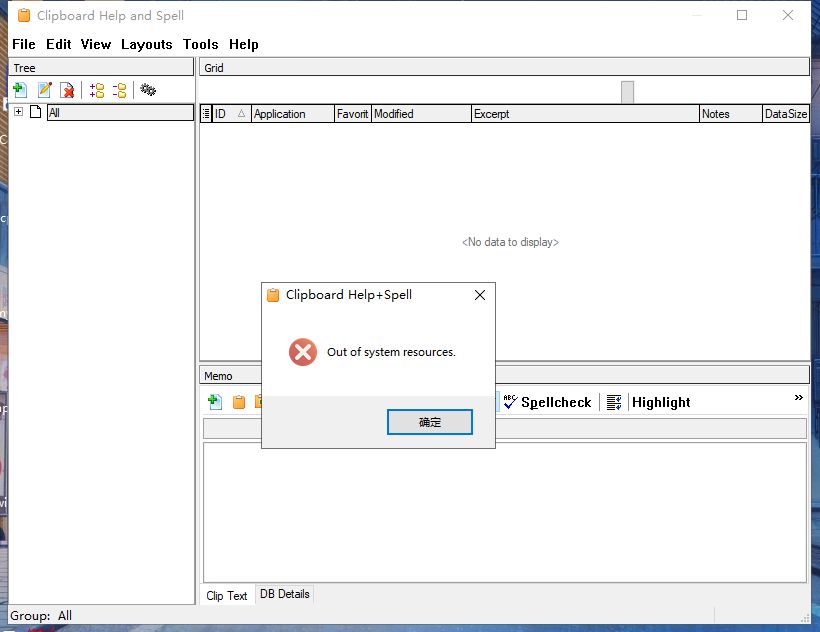
I'm using the latest alpha version.
When I tried to resize the main window, it keeps showing me this error.
0001.jpg

Note:
I used Reso to run another software.
I tried to clean reinstall CHS but it doesn't work.

mouser

  • First Author
  • Administrator
  • Joined in 2005
  • *****
  • Posts: 40,931
    • Gathering Badge
    • Plugin Coding Medal
    • Participated in NANY Challenge Seventeen Times
    • Cody Award
    • Coding Snacks
    • Volunteers/Staff
lis it reproducible? i will try top see if i can reproduce it. if i can reproduce i can fix I'm just not sure whythe new version would introduce this.

markfoley

  • Supporting Member
  • Joined in 2008
  • **
  • Posts: 7
Re: Clipboard Help+Spell Extended Clipboard Format Data Discussion Thread
« Reply #121 on: February 02, 2023, 06:51 AM »
Hi, sorry to necro the thread, but I've been trying to work out why my onenote text has lost all its formatting when pasted with CHS.  Is this formatting preservation feature considered live now?  Or is it just the portable one still that has this?  I did the normal install and can't see anything about formatting.

patrickB

  • Supporting Member
  • Joined in 2008
  • **
  • Posts: 1
Re: Clipboard Help+Spell Extended Clipboard Format Data Discussion Thread
« Reply #122 on: February 22, 2023, 01:40 PM »
Hi,
In order to deploy the software more widely, it would be interesting to have a language txt file.
Some panels are technical and not easy to understand the configurations for non-English speakers.
I just bought it (donation) after testing and comparing various software (clipclip, clipmate, clipcache, arsclip ...), and I find it excellent! :Thmbsup:
Hoping that this project will not be abandoned, as observed, on this category of software (clipboard).

Sorry for my English :-[
Patrick

Original address: https://www.donationcoder.com/forum/index.php?topic=49490.0