
I wrote about it
http://www.rgdot.com/bl/2011/12/31/ethervane-echo-multi-featured-clipboard-manager/
Nice review, rgdot, thank you so much!


 Topic: NANY 2012 Release: Ethervane Echo (Read 568,132 times)


I wrote about it
http://www.rgdot.com/bl/2011/12/31/ethervane-echo-multi-featured-clipboard-manager/

If you change the default installation folder, Echo will not be able to find the dictionaries, and the spell checkoing feature will be disabled.


May I recommend a spellchecker...Magic!


From the Ethervane Spellchecker dictionaries readme.txt:
Aaron died a few years ago...You just had to produce her

hi this is a great clipboard manager ived tried plenty of them before this
but is there a setting i need to change because if you right click tray icon and click clear history you can no longer click on icon to bring it back up only way is to click restore or exit the program and restart it
i do the later as its nice to be able to just click the icon and is there a option to make the close button to minimize it kinda like kee pass does thanks


hi this is a great clipboard manager ived tried plenty of them before this but is there a setting i need to change because if you right click tray icon and click clear history you can no longer click on icon to bring it back up only way is to click restore or exit the program and restart it i do the later as its nice to be able to just click the icon and is there a option to make the close button to minimize it kinda like kee pass does thanks

yes its clear clipboard after clicking it the icon no longer brings it up ive got to close the program and restart it again thanks
 oh 1 more thing clicking clear clipboard doesn't clear anything


hi tranglos everything works perfectly now the only thing i changed is i was coping and pasting from firefox 10 beta 32 bit i switched to firefox nightly 12 32 bit and everything is working perfectly now on nightly 12 could that somehow be responsible for Echo acting like it was
but it reverts to hidden after reboot or logging off or inThat's probably something with your Windows setup, I suspect.

I think I've found a problem under 64-bit: the "Short" tab doesn't display any clips, no matter how short. As an experiment, I changed the filter to use "nrGreaterThanOrEqual" instead of "nrLessThanOrEqual", and then all clips were shown, even the very short ones!
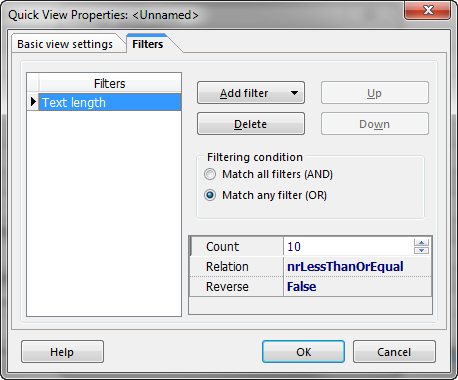
I would like to second Tomos' request for an option to minimize to the tray when I hit the Close box - I know I can just click outside the window or hit the Minimize button, but I just can't get out of the habit of hitting Close when I've finished looking at the clips!
Original address: https://www.donationcoder.com/forum/index.php?topic=27849.0