
tranglos, great support. I appreciate your quick responsiveness to feature requests and bug reports! 


 Topic: NANY 2012 Release: Ethervane Echo (Read 568,132 times)





- have you thought about drag-and-drop or Move to ... ? The possibility of moving a clip from one Quick view to another (and in particular to a custom view, e.g. Archives) either by drag-and-drop or an option in the context menu to Move to ... As things are the Quick views can only contain filtered clips.
- and what about clickable urls ?
BTW the way, unless I missed it somewhere, could you comment on the name : is it Ethervane like weathervane ?
 It's just a word I came up with when looking for a free domain name.
 I strongly feel that the navigation commands should be buttons on the toolbar.
A very cool feature to add to the editor is the ability to highlight search terms. It's already awesome how the non-matches disappear (like evernote), but to make it perfect, the search terms would be highlighted individually.
I can see of one use: trying to copy a portion of a clip already in the program.
In the regular view, you can't highlight a portion of the note without opening the external editor. In fact, if you made the stuff in the regular view selectable, you wouldn't even need an external editor.
But I'd really like to be able to select and copy a portion of a clip without having to double-click on it first, or open up an editor, or any extra steps.
And when I copy that subclip, I'd like the option in the preferences to record or ignore copied subclips. i would set it to record everything including subclips.
Another feature I'd love to have (as in CHS and Arsclip) is a quickpaste menu for pasting stuff. So with CHS and ARSclip, with a hotkey, you can have a quickpaste menu appear right under your mouse pointer which is awesome.
Also, how about an option to show the entire note in the normal view, regardless of the length. I know we can set it to a big value, but how about just a "always show entire note" setting?


@tranglos, first congratulation on "Ethervane Echo" pledge.
Second I pledged "Paste Text Like", which works with clipboard too, so we are both in same boat now :)
Without making "Ethervane Echo" any lesser than "ArsClip", I will like to say that you can open the ArsClip menu at cursor position (set hotkey in Configure) and can increase the number of item (Configure / Show Options). It does has search feature (N - Search, in menu). Permanent clip with script, edit clipboard, exclude program, paste method, form mode etc. are few others which I use occasionally.
Yeah, I only remember testing a version of ArsClip a long time ago. [...] if there is a special menu command to initiate search, it's probably not the kind of "instant search" that I am after.You have to hit a key on the popup to invoke Search. After that, it is what I think people mean by an "instant search" feature. That is, press "d","o","n" and you get everything that includes those, add an "a", and you start to see only those entries with "donation coder" in them. The more letters you add, the more you close in on your target, and removing letters widens it in real time, the list of possibles widens to match.
First of all I must say that this has quickly become my favorite clipboard manager.
Since I was using Ditto before and read your intro I downloaded the program, and replaced Ditto with it the same day.
There seems to be some kind of problem with the search though.
Using this clip for example.
The clip was copied in its entirety, but searching for hello gave no results...


I want to edit clips within the app but keep the original version - sort of like save as is this possible? (I couldnt find a way)
It's easy for me to do this in a text editor, so, just wondering if possible here
thanks tranglos
I ran into a problem with FileHamster (FHm) comment window - I have FHm set to show comment window when making a revision (when I save a file). This comment window is always on top.
If I then call Echo, it is below the comment window, so is not very usable - do you think could it be made more assertively (!) "on top" ?
[1] Is there a pattern to where the window shows on the screen - it always seems to come up directly behind the Filehamster comment window (just right of centre-bottom of screen), but if I escape and call it again, it shows mid left of screen.
[2] How do I change the shortcut - I tried Shift & F12 - typing in F12 but that didnt work (or does it need a restart? - no that no help)
Ctrl+Alt+v doesnt work either.
Win+v works - I'll stick with that**
(BTW what does the MK mean on the qualifier keys in options?)
The hotkey is controlled by two settings: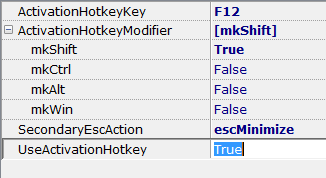
[2] How do I change the shortcut - I tried Shift & F12 - typing in F12 but that didnt work (or does it need a restart? - no that no help)
Ctrl+Alt+v doesnt work either.
Win+v works - I'll stick with that**
(BTW what does the MK mean on the qualifier keys in options?)
Restart is not needed. The modifier is indeed optional, although it's usually not a good idea to use e.g. F12 by itself. The reason it's confusing is the same as why the whole Preferences dialog is confusing
In "ActivationHotkeyKey" type the name of the key itself, without modifiers, e.g. 'Ins', 'a' or 'F12'.
In "ActivationHotkeyModifier" click the + symbol at left to expand the list, and there'll be four separate modifier keys listed. Set to True for the modifiers you want, keep the rest False.
As soon as you click OK or Apply, the new hotkey should be active.

I could try your app to show all shortcuts taken to see if something else is using them (what's it called again?!)
It does look as if some other process could be swallowing some combinations.
I can make give it the regular "on top" flag


One thing I'm unclear about -- no matter how much I increase MaxDispTextSize, the display of each item is limited to 5 lines, even if FixedItemHeight is false. To view more of the item I need to adjust the width of the window. Even then I never seem to see the full item, unless I use the editor. Is there another setting I need to adjust?
Thanks, MaxLinesPerItem was what I was looking for. But I can't set it higher than 10?
Original address: https://www.donationcoder.com/forum/index.php?topic=27849.0