hi folks,
I have an annoyance that you may be able to help me with, there may even be software out there to solve this already.
I work on a laptop with a docking station in work, the docking station has desktop speakers through which i play music if I'm alone in the office, then I have USB headphones which I use to listen to music while people are in the office and for Skype. When i go home I listen to music through the internal laptop speaker or connect to an amplifier through my headphone jack.
My problem is that when switching between these output modes I often have to fiddle around for ages to get sound out of the appropriate device. Plug into the headphone jack means i have to restart itunes. Skype gives me real hassle and I can't seem to work out the correct procedure or sequence to plugging things in and starting programs.....
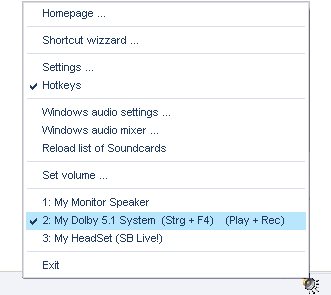
In windows (XP) there does not appear to be a central (or even useful) audio output manager, where the output device (or port) can be readily selected from a list of possibilities. That volume control thingy in the tray is useless...
Can anyone suggest existing software that could help me? or can someone write a wee bit of code that might allow me to keep my hair for another couple of years.
Thanks in advance,
al
I have an annoyance that you may be able to help me with, there may even be software out there to solve this already.
I work on a laptop with a docking station in work, the docking station has desktop speakers through which i play music if I'm alone in the office, then I have USB headphones which I use to listen to music while people are in the office and for Skype. When i go home I listen to music through the internal laptop speaker or connect to an amplifier through my headphone jack.
My problem is that when switching between these output modes I often have to fiddle around for ages to get sound out of the appropriate device. Plug into the headphone jack means i have to restart itunes. Skype gives me real hassle and I can't seem to work out the correct procedure or sequence to plugging things in and starting programs.....
In windows (XP) there does not appear to be a central (or even useful) audio output manager, where the output device (or port) can be readily selected from a list of possibilities. That volume control thingy in the tray is useless...
Can anyone suggest existing software that could help me? or can someone write a wee bit of code that might allow me to keep my hair for another couple of years.
Thanks in advance,
al


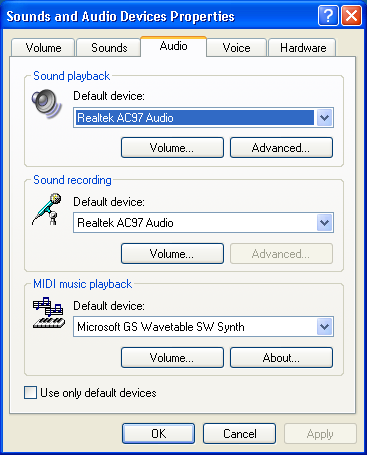


 An advantage with the script above is that no audio device properties window pops up.
 the reason i linked the other thread is just to highlight that this feature is much needed..