DonationCoder.com forum
 
Read-only archive. This is a static copy of the DonationCoder.com forum. Reading and searching work as before; logging in, posting and private messages do not.
Archive of 2026-10-21 · About this archive · Main site

Author Topic: A classic menu software like Direct Access for Dos but for Windows 10  (Read 16,148 times)

tofulover

  • Participant
  • Joined in 2020
  • *
  • Posts: 11
Hi, 2nd post here :)

Back in those days when we are still playing with MS Dos 3.3 to MS Dos 5, there is a menu program that I always use (and love). That is the Direct Access 5.0. Of course these days with the Windows and its start menu, a menu program is not so much relevant any more.

However, sometimes I just wish there is a sort of classic menu system for me to launch my favorite programs. I have searched the net for something like this and actually have tried quite a few too but there is just nothing that looks like the Direct Access for me.

I am wondering if there is such a Windows program out there? If not, given this is DonationCoder.com, how much would it cost to do one such program?

Cheers
tofu

Ath

  • Supporting Member
  • Joined in 2006
  • **
  • Posts: 3,649
    • Participated in NANY Challenge Eleven Times
    • Coding Snacks
    • Linux User
    • Hardware Hacker
It would help if you could describe what specific features of Direct Access appeal the most to you, and what other alternatives you have tried.

As you say, there are many programs that try to solve the display of a menu of applications, so there are probably some features that you dislike, or you would have picked one of the existing offerings already.
F.e., have you tried LaunchBar Commander, as provided in the Software section of this site?
/Ton
Ath's software collection, Quote: "A problem well stated is a problem half-solved." (Charles Kettering)

tofulover

  • Participant
  • Joined in 2020
  • *
  • Posts: 11
It would help if you could describe what specific features of Direct Access appeal the most to you, and what other alternatives you have tried.

As you say, there are many programs that try to solve the display of a menu of applications, so there are probably some features that you dislike, or you would have picked one of the existing offerings already.
F.e., have you tried LaunchBar Commander, as provided in the Software section of this site?

Hi Ath,

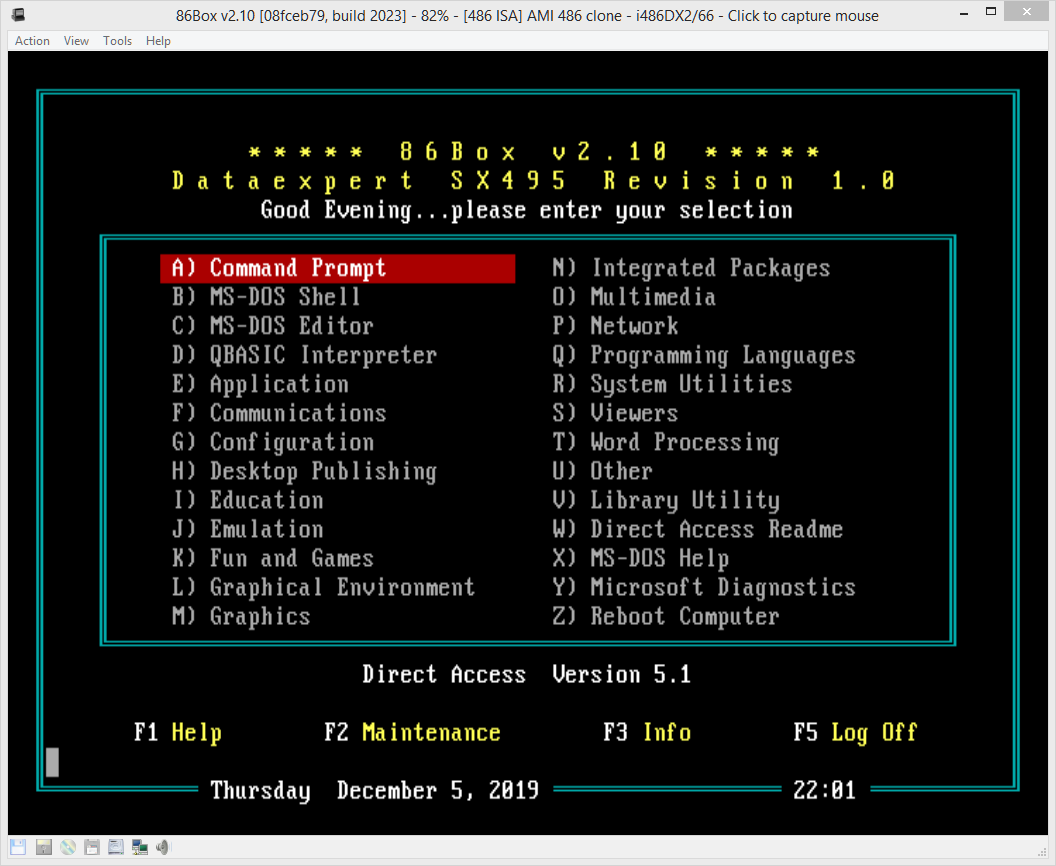
What I would like to have is perhaps a simple program that allows one to define a group category for apps, say: Utils, Productivity, Internet, etc and when you click into this category, you see your favourite apps like say Excel, Word, etc. It is just a simplistic launcher. No need fancy icons and bells and whistle. Can be a console based app too as long as it can launch the normal windows programs.

directaccess.png


p.s. sorry forgot to say yes I had a look at Launchbar commander. It looks very nice but I am after an app that looks like DA5.1 DOS. I have tried other program launchers in the past - rocket dock, object dock, circle dock, etc.
« Last Edit: June 21, 2020, 01:35 PM by tofulover »

Ath

  • Supporting Member
  • Joined in 2006
  • **
  • Posts: 3,649
    • Participated in NANY Challenge Eleven Times
    • Coding Snacks
    • Linux User
    • Hardware Hacker
And what is stopping you from using Direct Access DOS? It can be found here

You'll need 7-zip to extract the floppy images inside the 7z files. I didn't try to install though, too far past it's sell-by date for me (it was re-packaged in 2010, but the installer files are dated 1993 :o)
/Ton
Ath's software collection, Quote: "A problem well stated is a problem half-solved." (Charles Kettering)

Shades

  • Member
  • Joined in 2006
  • **
  • Posts: 2,954
The file Install.exe from the archive 'Direct Access 5.19 (3.5)' (for DOS) doesn't work in Windows 10 64-bit. Likely this installer is 16-bit and/or uses 16-bit components. Still, I don't think the installer will work in 32-bit version of Windows 10 either.

Same thing happens with the archive 'Direct Access 1.0 for Windows (1992) (5.25-1.2mb)'.

Still have Winamp version 1.91 around on one of my drives in storage. Software from 1998 IIRC, but it still worked just fine in Windows 10. Not that it is recommended, but old software can and does run in Windows 10.


The easy path is usually downhill...

x16wda

  • what am I doing in this handbasket?
  • Supporting Member
  • Joined in 2007
  • **
  • Posts: 888
    • Participated in NANY Challenge Once
Not that it is recommended, but old software can and does run in Windows 10
Every time I hear something like this I think of A Fire Upon the Deep by Vernor Vinge. I need to reread, it has been almost 30 years now.  :D
vi vi vi - editor of the beast

tofulover

  • Participant
  • Joined in 2020
  • *
  • Posts: 11
And what is stopping you from using Direct Access DOS? It can be found here

Well it is a 16bit application and Windows 10 no longer runs this. and even if it does, it does not read long file pathnames.

It is okay if there are no such programs around. I am only venturing to ask.

wraith808

  • Supporting Member
  • Joined in 2006
  • **
  • Posts: 11,205
    • Participated in NANY Challenge Fourteen Times
    • Coding Snacks
    • Writer
    • Hardware Hacker
And what is stopping you from using Direct Access DOS? It can be found here

Well it is a 16bit application and Windows 10 no longer runs this. and even if it does, it does not read long file pathnames.

It is okay if there are no such programs around. I am only venturing to ask.


You could run it in an emulator.  You'd still have the problem with long file names, but that could work, depending on how it launches processes.

tofulover

  • Participant
  • Joined in 2020
  • *
  • Posts: 11
You could run it in an emulator.  You'd still have the problem with long file names, but that could work, depending on how it launches processes.

Thanks for that idea.

Lintalist

  • Participant
  • Joined in 2015
  • *
  • Posts: 122
Just saw this, but perhaps popmenu is something to look at? Review here https://www.ghacks.net/2020/06/22/popmenu-is-a-customizable-quick-launcher-for-windows/

Edit: you could try to run in in an emulater, http://takeda-toshiya.my.coocan.jp/msdos/index.html will alllow you to run 16bit dos apps in a 64bit OS

rjbull

  • Charter Member
  • Joined in 2005
  • ***
  • Posts: 3,217
Just saw this, but perhaps popmenu is something to look at? Review here https://www.ghacks.net/2020/06/22/popmenu-is-a-customizable-quick-launcher-for-windows/
That leads to a web site that MBAM says is a Trojan, as I reported here: https://www.donationcoder.com/forum/index.php?topic=48938.msg438953#msg438953

I'm pretty sure it's a false positive, which MBAM has been too keen on lately, but I haven't tried the program.

rjbull

  • Charter Member
  • Joined in 2005
  • ***
  • Posts: 3,217
I just wish there is a sort of classic menu system for me to launch my favorite programs. [...] there is just nothing that looks like the Direct Access for me.

Everything is different in Windows  :(  You might take a look at Qsel
Quote
Qsel is a "launcher" for frequently used programs, documents and web links.

    Create any number of categories with individual launcher window settings
    Easy configuration of launcher windows using drag&drop
    Switch categories: click on category title opens popup menu; back to previous (stacked)
    Access to options and configuration through context menu (right mouse click)
    SystemTray mode with tray menu for quick access to all windows and functions
    Auto-hide mode in docking position at desktop edge (right mouse click to bring window back)
    Windows optionally without title bar (see image)
    Optional at Qsel startup: auto launching items from special "startup" category
    Special launcher items: pop-up file lists to pick from
    Automatic drive letter handling on USB Flash Drives
    Unicode support

It's very different, yet might be a fairly close work-alike.

Lintalist

  • Participant
  • Joined in 2015
  • *
  • Posts: 122
Popmenu.zip: 2 / 79 on virustotal (url scan) at the moment so nothing to worry about me thinks.
Never did like Malwarebytes programs, my opinion is visible in their name :)

Contro

  • Supporting Member
  • Joined in 2007
  • **
  • Posts: 3,947
One good option is with AutoHotkey

I am using a table menu very versatile .:

AsusPortatil - 31_08_2020 , 0_50_33.png

I can easily create submenus .
At the present moment I am trying radial menu, but the classic is the above one.
I can put the files if needed.
Uses a ini file . A launcher.ini file and a menu.ahk file . Both configurables.
:-* :P


Edited : tofulover puts me a private message to get the code of this program.

I put here for everyone
Best Regards
Copia para DC07.11.2020.22.21.rar (2.9 KB)Copia para DC07.11.2020.22.21.rar (2.9 KB)

launcher.ini (4.4 KB)
launcher.ini (4.4 KB)menuak.ahk (2.6 KB)
« Last Edit: November 07, 2020, 10:29 PM by Contro »

Contro

  • Supporting Member
  • Joined in 2007
  • **
  • Posts: 3,947
Re: A classic menu software like Direct Access for Dos but for Windows 10
« Reply #14 on: November 07, 2020, 10:30 PM »
I try to put in seperate post

Copia para DC07.11.2020.22.21.rar (2.9 KB)
menuak.ahk (2.6 KB)
launcher.ini (4.4 KB)
instrucciones.txt (247 B)

Contro

  • Supporting Member
  • Joined in 2007
  • **
  • Posts: 3,947
Re: A classic menu software like Direct Access for Dos but for Windows 10
« Reply #15 on: November 07, 2020, 10:31 PM »
[attachment 2 not found]Copia para DC07.11.2020.22.21.rar (2.9 KB)Copia para DC07.11.2020.22.21.rar (2.9 KB) >:(

I can't see nothing but I am putting the files !!!!!!!
>:(
« Last Edit: November 08, 2020, 08:57 PM by Contro »

Contro

  • Supporting Member
  • Joined in 2007
  • **
  • Posts: 3,947
Re: A classic menu software like Direct Access for Dos but for Windows 10
« Reply #16 on: November 08, 2020, 08:58 PM »
try this link in google drive

https://drive.google.com/drive/folders/1tIHRTrZfVkHxMcqVneNYfxiivSV5Sppb?usp=sharing
:-* :P

Original address: https://www.donationcoder.com/forum/index.php?topic=50042.0