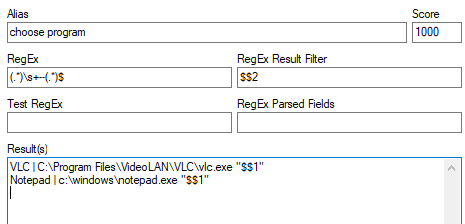
Sometimes you don't want to start the default program for a certain file extension.
With the aliases below, you can pass the file name to start a program which you can select from your user defined menu.
Use it as follows:
First search and find the file using farr's search field or directory traversal.
Then select the file multiple times [Cursor Down] and then [Cursor Right] to display the file name in the farr search box.
Then press <dot>
Then select the program you want to run it with F1..F9, or use the [Cursor] keys.
To shorten the list of menu items you can enter a string after the dot, then only lines matching the string and the file extension.
jump to latest version http://www.donationcoder.com/forum/index.php?topic=41913.msg394054#msg394054
Have fun
With the aliases below, you can pass the file name to start a program which you can select from your user defined menu.
Use it as follows:
First search and find the file using farr's search field or directory traversal.
Then select the file multiple times [Cursor Down] and then [Cursor Right] to display the file name in the farr search box.
Then press <dot>
Then select the program you want to run it with F1..F9, or use the [Cursor] keys.
To shorten the list of menu items you can enter a string after the dot, then only lines matching the string and the file extension.
jump to latest version http://www.donationcoder.com/forum/index.php?topic=41913.msg394054#msg394054
Have fun


 , today I upgraded to v2.226.01 and assumed they were still needed.