


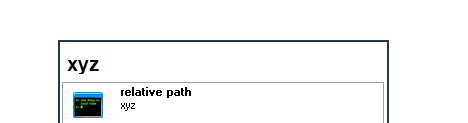
On one Win10 PC FARR aliases with this kind of result line
This happens even though the wmp.ico file exists in the same folder as the .alias file, namely
Instead FARR shows this other icon
Screenshot:
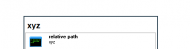
The exact same alias and icon works ok in FARR on another Win10 PC so this is something specific, though I haven't pinned down the cause yet.
edit: Happens on PC number 2 too after updating FARR on it to the latest latest beta , so perhaps this is a general issue with version 2.250?
Note that the wmp.ico is just an example. This issue happens with any icon, but the wmp.ico comes bundled with Win10 so might be useful if mouser or others want to reproduce/troubleshoot this on their PCs.
What does work:
1. Results lines with absolute paths to an icon files, like
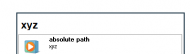
2. If I copy the icon to this location

So FARR on this PC appears to looks for relative path alias icons not next to the .alias file but in C:\Program Files (x86)\FindAndRunRobot\Icons
This is a minor issue - I can just use the absolute path icons as a workaround. But it seems undocumented and I found no setting to change it so worth making a post about.
edit: Relevant FARR help file page that documents the alias icon command
https://www.donationcoder.com/Software/Mouser/findrun/help/alias_tricks.htm
Code
relative path | C:\a.txt /icon=wmp.icoThis happens even though the wmp.ico file exists in the same folder as the .alias file, namely
Code
C:\Users\<username>\Documents\DonationCoder\FindAndRunRobot\AliasGroups\MyCustomInstead FARR shows this other icon
Code
C:\Program Files (x86)\FindAndRunRobot\Icons\console.icoScreenshot:
edit: Happens on PC number 2 too after updating FARR on it to the latest latest beta , so perhaps this is a general issue with version 2.250?
Note that the wmp.ico is just an example. This issue happens with any icon, but the wmp.ico comes bundled with Win10 so might be useful if mouser or others want to reproduce/troubleshoot this on their PCs.
What does work:
1. Results lines with absolute paths to an icon files, like
Code
absolute path | C:\a.txt /icon=C:\test\wmp.icoCode
absolute path | C:\a.txt /icon=C:\Users\<username>\Documents\DonationCoder\FindAndRunRobot\AliasGroups\MyCustom\wmp.ico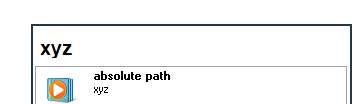
2. If I copy the icon to this location
Code
C:\Program Files (x86)\FindAndRunRobot\Icons\wmp.icoCode
relative path + icon in C:\Program Files (x86)\FindAndRunRobot\Icons | C:\a.txt /icon=wmp.ico 
So FARR on this PC appears to looks for relative path alias icons not next to the .alias file but in C:\Program Files (x86)\FindAndRunRobot\Icons
This is a minor issue - I can just use the absolute path icons as a workaround. But it seems undocumented and I found no setting to change it so worth making a post about.
edit: Relevant FARR help file page that documents the alias icon command
https://www.donationcoder.com/Software/Mouser/findrun/help/alias_tricks.htm
Quote
/icon=localfilename_from_aliasdir.ico (icon file must be in same dir as the source xml file defining the alias)
